
CHEREEKI 8808
CHEREEKI Digital Alarm Clock User Manual
Model: 8808
Inleiding
Dankie vir die aankoopasing the CHEREEKI Digital Alarm Clock. This manual provides detailed instructions on how to set up, operate, and maintain your new alarm clock. Please read this manual carefully before use to ensure optimal performance and longevity of the product.

Beeld: Voorkant view of the CHEREEKI Digital Alarm Clock displaying time and temperature.
Pakketinhoud
Kontroleer asseblief die inhoud van die pakket na uitpak:
- 1 x LED Digital Alarm Clock
- 1 x USB Cable (adapter not included)
- 1 x Gebruikershandleiding
Note: The alarm clock contains a built-in Lithium-polymer battery.
Opstelling
Die krag van die toestel
The CHEREEKI Digital Alarm Clock offers two power modes:
- USB-krag (Aanbeveel vir deurlopende vertoon):
Connect the alarm clock to a USB port or a 5V/1A or 5V/2A adapter using the provided USB cable. In this mode, the LED display will remain continuously on.

Image: Illustrations demonstrating connection to a USB port and a 5V/1A or 5V/2A adapter for continuous power.
- Built-in Battery Power:
When fully charged, the alarm clock can operate on its internal battery. In this mode, the LED display will automatically turn off after 6 seconds to conserve power. The display can be reactivated by sound (above 90 dB) or by pressing any button.

Image: Visual representation of the intelligent voice control function, where the display turns off after 6 seconds in battery mode and can be awakened by sound.
Aanvanklike opstelling
Upon first use or after a reset, you may need to set the time and other preferences.

Beeld: Gedetailleerd view of the alarm clock's top and bottom panels, highlighting buttons for time setting, alarm setting, volume, and switches for alarms.
Bedryfsinstruksies
Stel die tyd in
- In normale tyd vertoonmodus, druk die "TIME SET" button located on the bottom of the clock.
- Gebruik die "UP" en "DOWN" knoppies om die uur aan te pas.
- Druk "TIME SET" again to move to minute adjustment, then use "UP" en "DOWN".
- Druk "TIME SET" one more time to confirm and exit.
- The clock supports both 12-hour (with AM/PM indicator) and 24-hour formats. To switch, press the "UP" knoppie tydens tydinstelling.

Image: Illustration of the alarm clock displaying time in both 12-hour and 24-hour formats.
Setting Alarms (Alarm 1 & Alarm 2)
Die horlosie beskik oor twee onafhanklike alarms.
- To set Alarm 1: Press the "ALARM SET" button once. The Alarm 1 icon will flash.
- Gebruik "UP" en "DOWN" om die uur in te stel, druk dan "ALARM SET" om na minute te beweeg.
- Repeat for minutes, then press "ALARM SET" te bevestig.
- To set Alarm 2: Press the "ALARM SET" button twice. The Alarm 2 icon will flash. Follow the same steps as Alarm 1.
- To activate/deactivate an alarm: In normal time display mode, press the "Alarm 1 Switch" or "Alarm 2 Switch" on the bottom of the clock. The corresponding alarm icon will appear/disappear on the display.

Image: A visual demonstrating the dual alarm functionality with different wake-up times and the snooze feature.
Sluimer funksie
- Wanneer 'n alarm afgaan, druk die groot knoppie "SNOOZE / LIGHT" button on top of the clock to activate the 5-minute snooze function.
- Die alarm sal weer na 5 minute klink.
- To turn off the alarm completely, press any other button on the clock.

Image: A user enjoying extra sleep thanks to the 5-minute snooze feature.
Helderheid aanpassing
The clock offers both automatic and manual brightness control:
- Automatic Brightness (when USB powered): The display brightness adjusts automatically based on the time of day:
- 7:00 AM - 7:00 PM: High brightness
- 7:00 PM - 12:00 AM: Medium brightness
- 12:00 AM - 7:00 AM: Low brightness
- Manual Brightness: In enige modus, druk die "SNOOZE / LIGHT" button on top of the clock to cycle through 4 levels of brightness (25%, 50%, 75%, 100%).
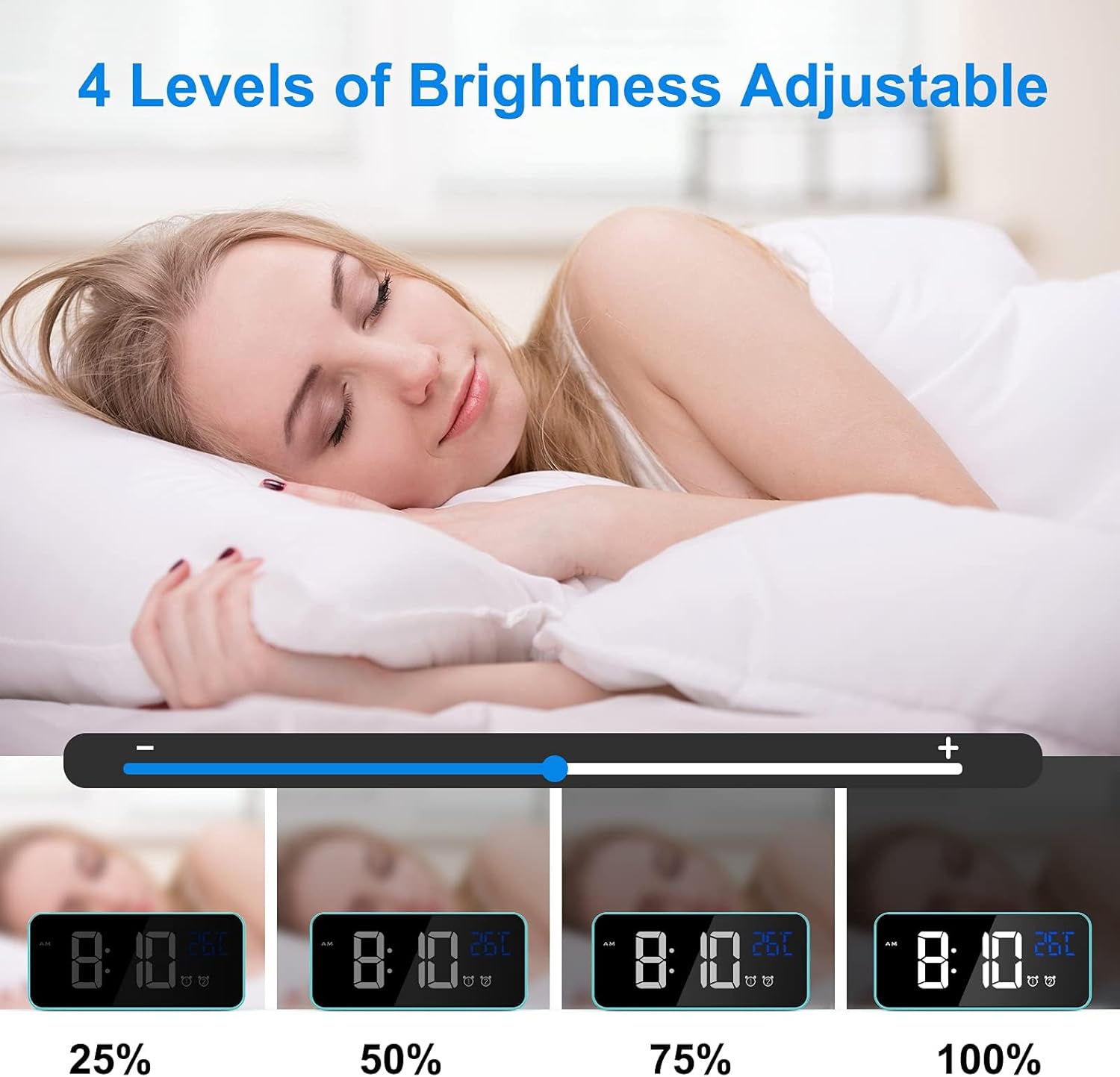
Image: Visual representation of the four adjustable brightness levels of the LED display.
Volume en luitone
The alarm clock features 3 volume levels and 10 different ringtones.
- To adjust volume: During alarm setting, or when an alarm is sounding, press the "Volume" button on the bottom of the clock to cycle through the 3 volume levels.
- To change ringtone: During alarm setting, press the "UP" or "DOWN" buttons when the ringtone selection is active (after setting time and minutes for the alarm).

Image: A user waking up to one of the 10 natural sounds, with an illustration of the four selectable volume levels.
Temperatuur vertoon
- The clock displays the ambient temperature in Celsius (°C) by default.
- Om tussen Celsius (°C) en Fahrenheit (°F) te wissel, druk die "DOWN" knoppie in normale tydvertoningsmodus.

Image: Illustration of the temperature display switching between Celsius and Fahrenheit.
Kenmerke verbyview
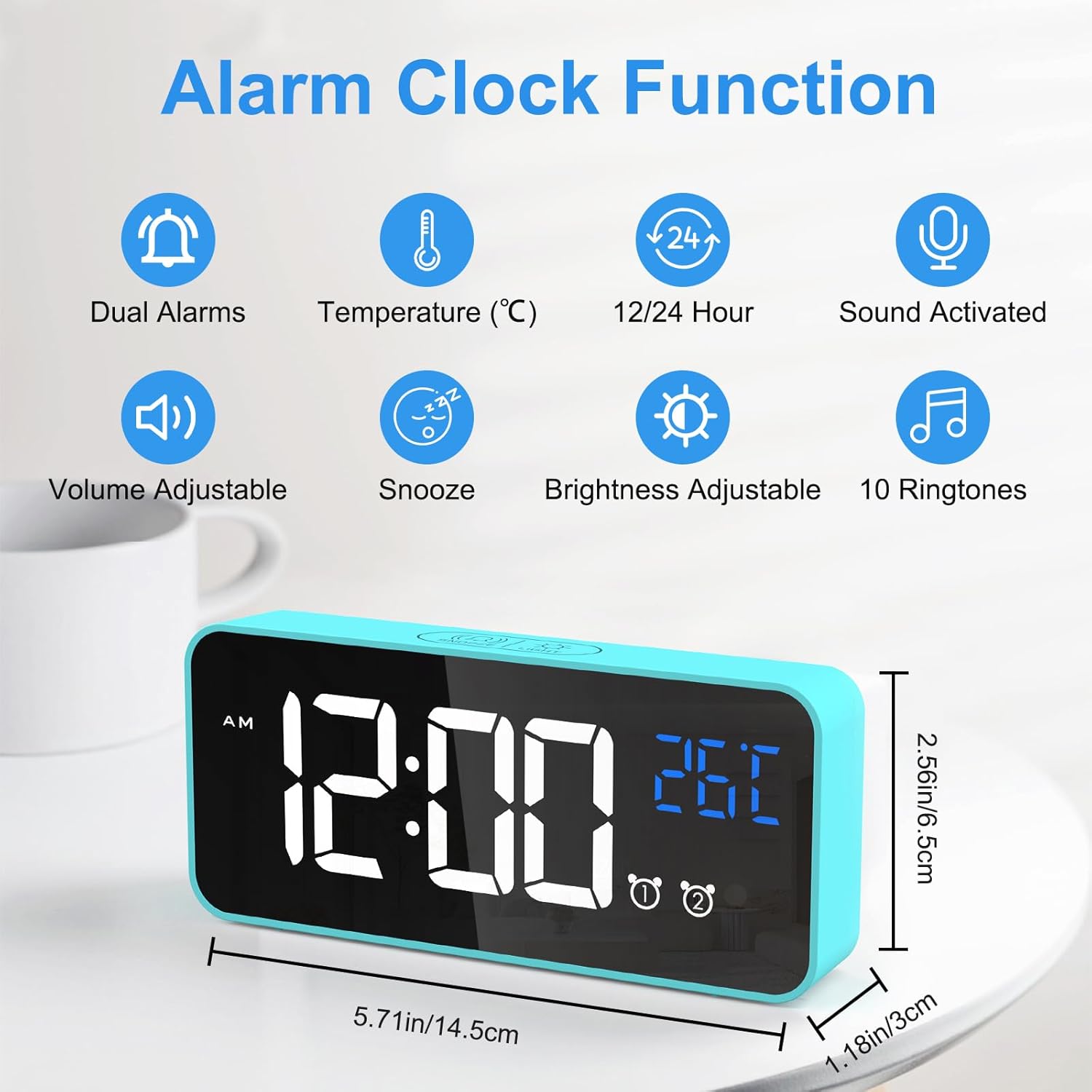
Image: An infographic highlighting the key functions of the alarm clock, including dual alarms, temperature display, 12/24 hour format, sound activation, volume adjustment, snooze, brightness adjustment, and 10 ringtones.
- Dubbele kragmodusse: Operates via USB for continuous display or built-in battery for portable use with voice activation.
- Verstelbare helderheid: 4 manual levels and automatic adjustment when USB powered.
- Dual Alarms with Snooze: Set two independent alarms with a convenient 5-minute snooze function.
- Aanpasbare klank: Choose from 3 volume levels and 10 unique ringtones.
- Stemaktivering: In battery mode, the display activates for 6 seconds when sound exceeds 90 dB.
- Temperatuur vertoon: Shows ambient temperature in Celsius or Fahrenheit.
- Geheue funksie: Settings are retained even if power is lost or the clock is turned off and on again.

Image: A visual explanation of the memory function, showing that settings are retained even after power loss or restart.
Onderhoud
- Skoonmaak: Gebruik 'n sagte, droë lap om die oppervlak van die wekker skoon te maak. Moenie skuurmiddels of oplosmiddels gebruik nie.
- Omgewing: Keep the alarm clock away from heat sources, direct sunlight, and high humidity environments.
- Berging: If the alarm clock will not be used for an extended period, turn off the power switch to preserve battery life.
Probleemoplossing
| Probleem | Moontlike oorsaak | Oplossing |
|---|---|---|
| Display is blank or scrambled. | Low battery, power issue, or internal error. | Connect to USB power. If the issue persists, use a pin to press the "RESET" button on the bottom of the clock. |
| Die skerm skakel na 6 sekondes af. | Clock is operating on battery power. | This is normal behavior to conserve battery. Connect to USB power for a continuously lit display. |
| Die alarm lui nie. | Die alarm is nie geaktiveer nie of die volume is te laag. | Ensure the alarm switch (Alarm 1 or Alarm 2) is in the "ON" position. Check and adjust the alarm volume. |
| Time/settings are lost after power off. | This should not happen due to memory function. | Ensure the internal battery is charged. If the issue persists, perform a reset. |
Spesifikasies
| Kenmerk | Detail |
|---|---|
| Handelsmerk | CHEREKI |
| Modelnommer | 8808 |
| Kleur | Blou |
| Afmetings (L x B x H) | 14.5 x 6.5 x 3 cm (5.71 x 2.56 x 1.18 duim) |
| Gewig | 158 gram (0.35 lbs) |
| Materiaal | Plastiek |
| Tipe vertoon | Digitale LED |
| Kragbron | USB Cable / Built-in Lithium-polymer Battery |
| Spesiale kenmerke | Temperature Display, Snooze Function, Dual Alarms, Voice Activation, Adjustable Brightness, 10 Ringtones |
Waarborg en Ondersteuning
CHEREEKI is committed to providing high-quality products and excellent customer service. If you have any questions or encounter issues with your alarm clock, please do not hesitate to contact our customer support team. We are dedicated to providing attentive after-sales service.
For support, please refer to the contact information provided with your purchase or visit the official CHEREEKI webwebwerf.