
1. Inleiding
The YOSUDA PRO Magnetic Exercise Bike 010C is designed for effective indoor cycling workouts. Featuring a hyper-quiet magnetic system and robust alloy steel construction, it offers a smooth and stable exercise experience. This manual provides essential information for assembly, operation, maintenance, and troubleshooting to ensure safe and optimal use of your exercise bike.
Sleutel kenmerke:
- Hyper Quiet Magnetic System: Operates at less than 20 dB for silent workouts.
- Robuuste kapasiteit: Supports users up to 400 lbs with heavy alloy steel construction.
- Verstelbare weerstand: 50 lbs flywheel with 100 micro-adjustable magnetic resistance levels.
- Slim konneksie: Bluetooth support for sports apps and real-time data tracking.
- Comfort & Customization: 4-way adjustable seat and 2-way adjustable handlebars for personalized fit.
- Geïntegreerde skerm: Large screen monitor displays RPM, time, speed, distance, calories, and odometer. Includes a tablet holder.
2. Opstelling
2.1 Vergadering
The YOSUDA PRO Magnetic Exercise Bike is designed for straightforward assembly, with most major components pre-assembled. Tools and a detailed guide are included to assist you.
- Uitpak: Verwyder alle komponente versigtig uit die verpakking. Maak seker dat alle onderdele wat in die handleiding gelys word, teenwoordig is.
- Heg stabiliseerders aan: Bevestig die voorste en agterste stabilisatorstawe aan die hoofraam met die voorsiene boute en gereedskap.
- Installeer pedale: Attach the pedals to the crank arms. Note that pedals are typically marked 'L' for left and 'R' for right. Ensure they are tightened securely.
- Installeer sitplekpaal: Insert the seat post into the main frame and adjust to an initial comfortable height.
- Installeer stuurstangpaal: Insert the handlebar post into the main frame and adjust to an initial comfortable height.
- Connect Monitor Cables: Connect the monitor cables from the main frame to the display unit.
- Installeer monitor: Secure the monitor onto the handlebar post.
- Installeer waterbottelhouer: Heg die waterbottelhouer aan die aangewese area op die raam vas.

Beeld: Oorview of YOSUDA PRO Magnetic Exercise Bike components during assembly.
2.2 Aanvanklike Aanpassings
Behoorlike aanpassing van die sitplek en handvatsels is noodsaaklik vir gemak en effektiewe oefeninge.
- Sitplekverstelling: The seat can be adjusted 4-ways (up/down and forward/backward). Loosen the adjustment knob, slide the seat to your desired position, and tighten the knob securely. Ensure your knees have a slight bend at the bottom of the pedal stroke.
- Stuurverstelling: The handlebars can be adjusted 2-ways (up/down). Loosen the adjustment knob, raise or lower the handlebars to a comfortable height, and tighten the knob. Your back should be straight and comfortable.
- Pedaalbande: Adjust the toe-caged pedal straps to secure your feet firmly in place. This prevents your feet from slipping during intense workouts.
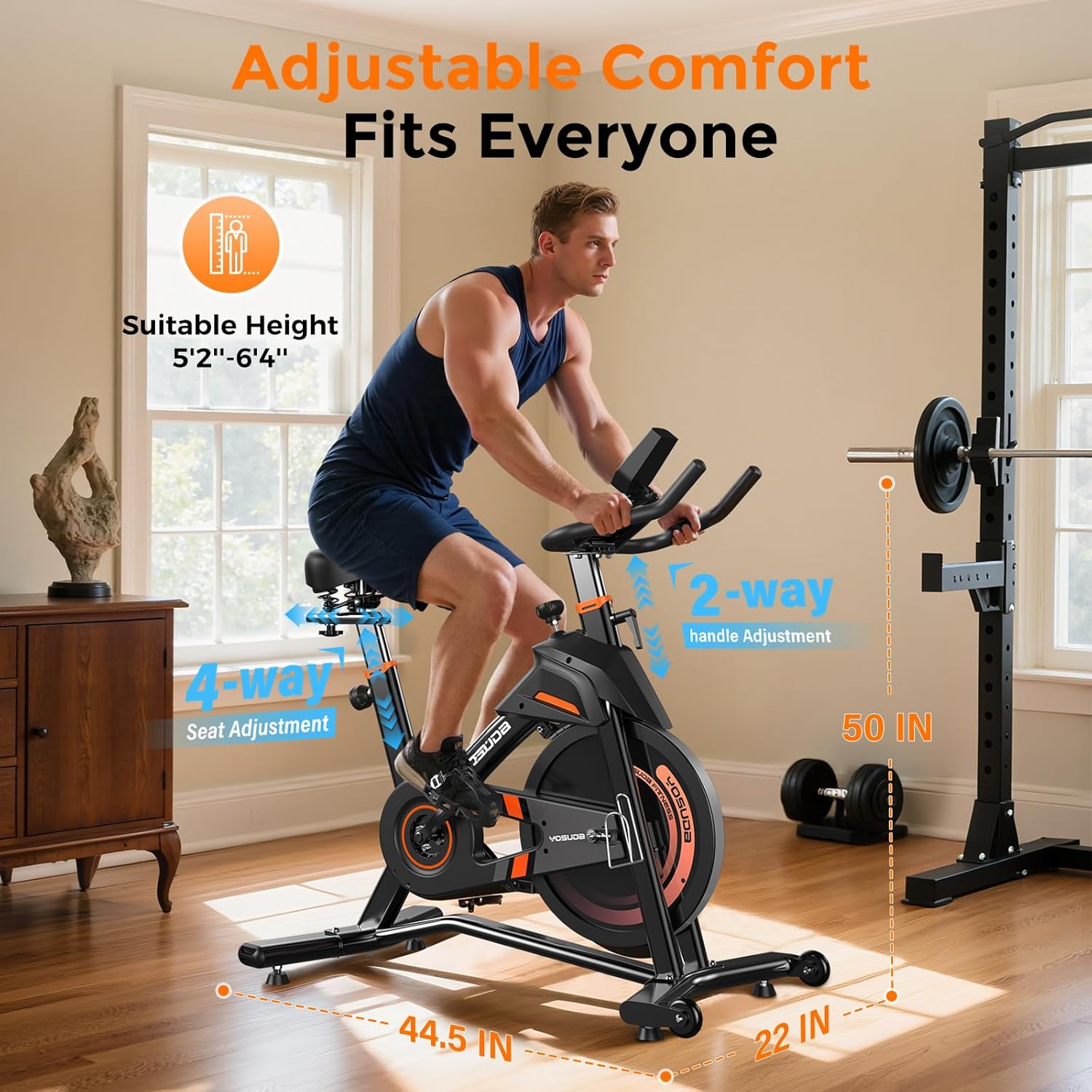
Beeld: Gedetailleerd view of the adjustable seat and handlebars for personalized comfort.
3. Operasie
3.1 Powering On and Monitor Functions
The exercise bike is pedal-powered and does not require an external power source for operation. The monitor is battery-operated.
- Outomatiese aktivering: The monitor automatically turns on when you start pedaling.
- Vertoonmetrieke: The large screen monitor displays:
- RPM: Rotasies per minuut
- TYD: Duur van jou oefensessie
- SPOED: Current speed in miles
- AFSTAND: Total distance covered in miles
- KALORIEË: Geskatte kalorieë verbrand
- Kilometermeter: Total accumulated distance
- Resetting Data: To clear workout data, press and hold the "RESET" button on the monitor.
- Tablethouer: Utilize the integrated tablet holder to place your device for entertainment or to follow workout programs.

Image: Close-up of the exercise bike's monitor and tablet holder.
3.2 Aanpassing van weerstand
The YOSUDA PRO Magnetic Exercise Bike features 100 micro-adjustable magnetic resistance levels, allowing for precise control over your workout intensity.
- Verhoog weerstand: Turn the resistance knob clockwise to increase the magnetic resistance, making pedaling harder.
- Verminder weerstand: Turn the resistance knob counter-clockwise to decrease the magnetic resistance, making pedaling easier.
- Noodstop: Press down firmly on the resistance knob to engage the emergency brake and quickly stop the flywheel.

Image: The resistance knob and flywheel, illustrating the magnetic resistance system.
3.3 Smart Features and App Integration
This exercise bike is equipped with Bluetooth connectivity to enhance your workout experience.
- Connect to Apps: Pair your device via Bluetooth with compatible sports apps to track your exercise data, participate in virtual courses, and monitor your progress.
- Intydse data: Receive real-time recording of exercise data directly to your connected device.

Image: User engaging with virtual rides through top fitness applications.
4. Onderhoud
Regular maintenance ensures the longevity and safe operation of your YOSUDA PRO Magnetic Exercise Bike.
- Skoonmaak: Vee die fiets af met advertensieamp lap na elke gebruik om sweet en stof te verwyder. Vermy skuurmiddels.
- Pedal Inspection: Inspect and re-tighten pedals every 1-2 months to ensure they remain secure for safe use. Loose pedals can cause injury or damage.
- Gordeldrywe: The silent belt drive system requires minimal maintenance. Keep the area around the belt clean and free of debris.
- Stabiliteitstoets: Periodically check all bolts and nuts to ensure they are tight. Re-tighten as necessary to maintain the bike's stability.
5. Probleemoplossing
If you encounter any issues with your exercise bike, refer to the following common solutions:
- Piepende geluide: Check all connection points and ensure they are tightened. Apply a small amount of lubricant to moving parts if necessary, avoiding the flywheel and brake system.
- Unstable Bike: Ensure the bike is placed on a flat, level surface. Adjust the leveling feet on the stabilizer bars until the bike is stable.
- Monitor vertoon nie: Check the batteries in the monitor and replace them if needed. Ensure the sensor cable is securely connected.
- Weerstandskwessies: If resistance feels inconsistent or unresponsive, check the connection of the resistance cable to the knob and the magnetic brake system.
6. Spesifikasies
| Kenmerk | Detail |
|---|---|
| Handelsmerk | YOSUDA |
| Model Naam | L-007C |
| Spesiale kenmerk | Light Commercial, Magnetic, Smart with Bluetooth |
| Kleur | Swart Oranje |
| Kragbron | Trap-aangedrewe (nie-elektries) |
| Aanbevole gebruike | Binneshuise |
| Item gewig | 37.65 kilogram (ongeveer 83 pond) |
| Materiaal | Allooi staal |
| Weerstandmeganisme | Magneties |
| Produk afmetings | 50" D x 22" B x 44.5" H |
| Maksimum gewig aanbeveling | 400 pond |
| Aantal weerstandsvlakke | 100 |
| Ry stelsel | Gordel |
7. Waarborg en ondersteuning
YOSUDA is committed to providing excellent customer service and product support.
- Tegniese Diens: Enjoy 24/7 technical support for any inquiries or assistance you may need with your exercise bike.
- Kontakinligting: For specific warranty details or to reach customer support, please refer to the contact information provided in your product packaging or visit the official YOSUDA webwebwerf.
8. Amptelike produkvideo's
Geen amptelike verkopervideo's is tans beskikbaar vir inbedding nie.