
1. Inleiding
Welcome to the user manual for your new Hisense 55" 4K UHD Roku TV, model 55R6000GM. This television combines stunning 4K Ultra High Definition visuals with the intuitive Roku operating system, offering a seamless entertainment experience. This manual provides essential information for setting up, operating, maintaining, and troubleshooting your TV to ensure optimal performance and enjoyment.
2. Opstelling
2.1 Wat is in die boks
- Hisense 55" 4K UHD Roku TV
- Afstandbeheer
- Gebruikershandleiding
- TV Stands (2) and Screws
- Kragkoord
2.2 Bevestiging van die TV-staanders
Carefully place your TV face-down on a soft, clean surface to prevent damage. Align each stand with the corresponding screw holes on the bottom of the TV. Secure the stands using the provided screws. Ensure the stands are firmly attached before placing the TV upright.

The Hisense 55R6000GM 4K UHD Roku TV, showcasing its display and attached stand feet, ready for placement on a media console.
2.3 Powering On and First-Time Setup
Connect the power cord to the TV and a power outlet. Press the power button on the remote control. Follow the on-screen instructions to complete the initial setup, including language selection, network connection, and Roku account linking.
3. Operating Your Roku TV
3.1 Roku TV Operating System
The Roku TV OS provides a simple, customizable home screen where you can access streaming channels, live TV, and connected devices. Navigate using the remote control's directional pad.
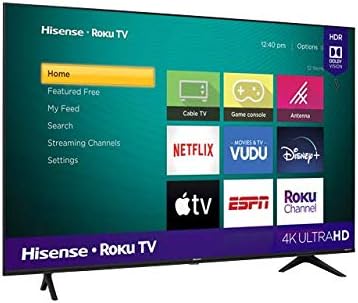
A view of the Hisense Roku TV's home screen, displaying popular streaming applications like Netflix, Prime Video, and Disney+, along with various input options.
3.2 Stembeheer
Utilize the voice control feature on your remote to search for content, launch apps, change inputs, and control playback. Simply press the microphone button on your remote and speak your command clearly.
3.3 Afstandbeheerfunksies
The included remote control offers intuitive navigation and quick access to essential functions and popular streaming services.

The compact remote control for the Hisense Roku TV, featuring dedicated buttons for popular streaming services and essential navigation.
4. Sleutel kenmerke
4.1 4K Ultra HD and Motion Rate 120
Experience stunning clarity with 4K Ultra HD resolution, offering over four times the pixels of Full HD. Motion Rate 120 technology ensures smooth, fluid motion for fast-paced action scenes, sports, and gaming.

The Hisense 55R6000GM TV screen showcasing a vibrant, high-resolution 4K image, demonstrating its visual capabilities.
4.2 HDR Dolby Vision and HDR10
With HDR Dolby Vision and HDR10 support, your TV delivers enhanced contrast, brighter highlights, and a wider range of colors, bringing content to life with incredible realism.
4.3 DTS Studio-klank
DTS Studio Sound creates virtual surround sound for a clear and immersive audio experience, complementing the stunning visuals.
4.4 Bezel-less Design
The television features an elegant, bezel-less design that maximizes screen space, providing a more immersive viewing experience and a sleek aesthetic.

A close-up of the Hisense 55R6000GM TV's display, emphasizing its modern, thin-bezel design for an immersive viewondervinding.
5. Konnektiwiteit
5.1 Beskikbare poorte
Your Hisense Roku TV offers a variety of ports for connecting external devices:
- HDMI-insette (x3): For connecting Blu-ray players, game consoles, soundbars, and other HDMI-enabled devices.
- USB-poort (x1): Vir die koppeling van USB-bergingstoestelle om media te speel files.
- LAN (Ethernet) Poort: Vir 'n bedrade internetverbinding.
- Draadlose konneksie: Built-in Wi-Fi for internet access and screen mirroring (Roku).
- Oudio-invoer/-uitvoer: Various audio options including Bluetooth.
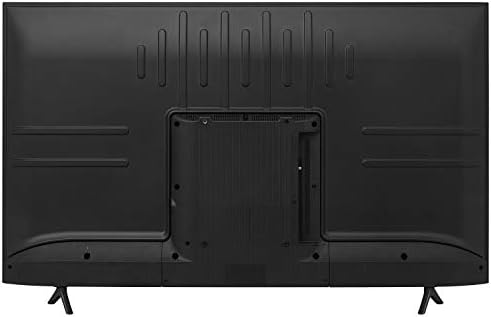
The back panel of the Hisense 55R6000GM TV, illustrating the arrangement of its HDMI, USB, and other connectivity ports for external devices.
5.2 Wi-Fi- en Bluetooth-konnektiwiteit
Connect your TV to your home network wirelessly via Wi-Fi for streaming content. Bluetooth connectivity allows you to pair compatible audio devices.
6. Tegniese spesifikasies
| Kenmerk | Spesifikasie |
|---|---|
| Skerm grootte | 55 duim |
| Resolusie | 4K Ultra HD (3840 2160 x XNUMX XNUMX) |
| Herlaaitempo | 60 Hz (Bewegingstempo 120) |
| Vertoon tegnologie | LED |
| HDR Ondersteuning | HDR Dolby Vision, HDR10 |
| Bedryfstelsel | ROKUTV |
| Oudio Tegnologie | DTS Studio Sound |
| Konnektiwiteit | 3x HDMI, 1x USB, LAN, Wi-Fi, Bluetooth |
| Afmetings (DxBxH) | 22.6 x 123 x 180.9 cm (met staander) |
| Gewig | 12.6 kilogram |
| Modeljaar | 2020 |
Let wel: Afmetings is benaderd en kan effens verskil.
7. Sorg en Onderhoud
To ensure the longevity and optimal performance of your Hisense TV, follow these care guidelines:
- Skoonmaak van die skerm: Vee die skerm liggies af met 'n sagte, droë mikrofiberdoek. Vir hardnekkige merke, liggiesampMaak die lap skoon met water of 'n skermskoonmaakoplossing wat spesifiek vir elektronika ontwerp is. Vermy harde chemikalieë of skuurmiddels.
- Maak die liggaam skoon: Gebruik 'n sagte, droë lap om die TV se raam en agterpaneel skoon te maak.
- Ventilasie: Verseker voldoende lugvloei rondom die TV. Moenie ventilasie-openinge blokkeer nie.
- Krag: Ontkoppel die TV van die kragtoevoer tydens weerligstorms of wanneer dit vir lang tye sonder toesig gelaat sal word.
- Plasing: Avoid placing the TV in direct sunlight, near heat sources, or in areas with high humidity.
8. Probleemoplossing
As jy probleme met jou TV ondervind, raadpleeg die volgende algemene stappe vir probleemoplossing:
- Geen krag: Check if the power cord is securely connected to both the TV and the power outlet. Ensure the outlet is functional.
- Geen Beeld/Klank: Verifieer dat die korrekte invoerbron gekies is. Kontroleer alle kabelverbindings (HDMI, ens.) vir losheid.
- Afstandsbediening werk nie: Vervang die afstandbeheerder se batterye. Maak seker daar is geen obstruksies tussen die afstandbeheerder en die TV se IR-sensor nie.
- Netwerkverbindingsprobleme: Restart your router and modem. Go to the TV's network settings to reconnect to Wi-Fi or check the wired connection.
- Probleme met beeldkwaliteit: Pas beeldinstellings (helderheid, kontras, kleur) in die TV-kieslys aan. Maak seker dat die inhoudbron van hoë gehalte is.
For more detailed troubleshooting or persistent issues, consult the full user manual or contact Hisense customer support.
9. Waarborginligting en ondersteuning
Your Hisense 55" 4K UHD Roku TV 55R6000GM comes with a standard manufacturer's warranty.
- Waarborgtydperk: 12 months directly with the manufacturer.
- Waarborgdekking: Covers defects in materials and workmanship under normal use. Specific terms and conditions apply.
- Kliëntediens: For warranty claims, technical assistance, or service inquiries, please refer to the contact information provided in your product's packaging or visit the official Hisense webwebwerf.
Bewaar asseblief u aankoopbewys vir waarborgdoeleindes.