
1. Inleiding
Thank you for choosing the Xtorm 15W Go Power Bank XG1021. This manual provides essential information for the safe and efficient operation, maintenance, and troubleshooting of your device. Please read this manual thoroughly before using the power bank and retain it for future reference.
2. Produk verbyview
The Xtorm 15W Go Power Bank XG1021 is a compact and portable external battery designed to charge your mobile devices on the go. Featuring a 10,000 mAh capacity and 15W USB-C output, it offers efficient power delivery.

Figure 2.1: The Xtorm 15W Go Power Bank XG1021 in Space Grey, showcasing sy slanke, kompakte ontwerp.
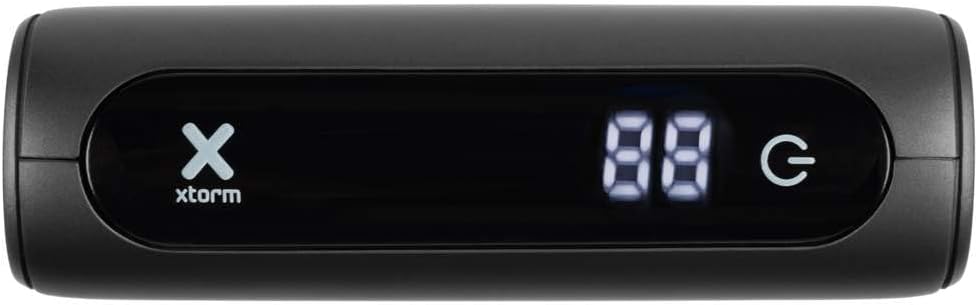
Figure 2.2: Front display of the power bank, indicating battery percentage and power status.
2.1. Universele verenigbaarheid
This power bank is designed for broad compatibility, capable of charging various devices including smartphones, tablets, and portable gaming consoles.

Figure 2.3: Illustration of the power bank's compatibility with different device types.
2.2. Portable Design
The Xtorm Go Power Bank is engineered for portability, making it an ideal travel companion. Its compact dimensions and light weight ensure it can be easily carried.

Figure 2.4: The power bank's compact size, suitable for travel.
3. Opstelling
3.1. Uitpak en aanvanklike inspeksie
Upon opening the package, ensure all components are present and undamaged. The box should contain the Xtorm 15W Go Power Bank, a USB-C cable, and this user manual.

Figure 3.1: Contents included in the Xtorm Power Bank Go package.
3.2. Aanvanklike laai van die kragbank
Before first use, it is recommended to fully charge the Xtorm Go Power Bank. Connect the provided USB-C cable to the power bank's USB-C input port and the other end to a compatible USB wall charger (not included). The digital display will show the charging progress. Once 100% is displayed, the power bank is fully charged and ready for use.
4. Bedryfsinstruksies
4.1. Laai eksterne toestelle
- Koppel jou toestel se laaikabel aan een van die kragbank se uitvoerpoorte (USB-A of USB-C).
- Verbind die ander punt van die kabel met u toestel.
- Die kragbank sal outomaties jou toestel begin laai. Die digitale skerm sal die oorblywende batterypersentasie wys.tage van die kragbank.
- Om die laai te stop, ontkoppel eenvoudig jou toestel.
The 15W USB-C output allows for faster charging of compatible devices.

Figure 4.1: Fast charging an external device using the power bank.
4.2. Kontroleer batteryvlak
The digital display on the front of the power bank indicates the current battery percentage. This display activates automatically when a device is connected or when the power bank is being charged.
5. Onderhoud
- Skoonmaak: Gebruik 'n sagte, droë lap om die kragbank skoon te maak. Vermy die gebruik van harde chemikalieë of skuurmiddels.
- Berging: Bêre die kragbank op 'n koel, droë plek weg van direkte sonlig en uiterste temperature. Vir langtermynberging word dit aanbeveel om die kragbank elke drie maande tot ongeveer 50-70% te laai om die battery se gesondheid te handhaaf.
- Batterysorg: Do not expose the power bank to water or moisture. Avoid dropping or subjecting the device to strong impacts.
6. Probleemoplossing
- Kragbank laai nie: Ensure the USB-C cable is securely connected to both the power bank's input and the wall charger. Try a different cable or wall charger.
- Toestel laai nie vanaf kragbank nie: Ensure the charging cable is securely connected to both the power bank's output and your device. Check if the power bank has sufficient charge. Try a different cable or output port.
- Stadige laai: Ensure you are using a compatible cable and that your device supports fast charging. The power bank's output may be limited by the connected device's input capabilities.
- Kragbank voel warm tydens gebruik: Dit is normaal dat die kragbank effens warm word tydens laai of ontlaai. Indien dit uitermatig warm word, ontkoppel dit onmiddellik en kontak ondersteuning.
7. Spesifikasies
Detailed technical specifications for the Xtorm 15W Go Power Bank XG1021:
| Kenmerk | Spesifikasie |
|---|---|
| Model Naam | XG1021 |
| Handelsmerk | Xtorm |
| Battery kapasiteit | 10,000 mAh (9800mAh / 36.2Wh Li-ion) |
| Connector Tipe | USB Tipe C |
| Invoer (USB-C) | 5V=3A (15W) |
| Uitset (USB-C) | 5V=3A (15W) |
| Uitset (USB-A) | 5V=3A |
| Totale uitset | 15 W |
| Battery samestelling | Litium-ioon |
| Spesiale kenmerk | Kompak |
| Aanbevole gebruik | Slimfoon |
| Kragbron | Kabel Elektries |
| Kleur | Ruimtegrys |

Figure 7.1: Back of the power bank displaying printed specifications and regulatory marks.
8. Veiligheidsinligting
Om veilige werking te verseker en skade aan die toestel of beserings te voorkom, volg asseblief die volgende veiligheidsriglyne:
- Do not expose the power bank to extreme temperatures (above 45°C or below -10°C) or direct sunlight.
- Do not expose the power bank to water, moisture, or high humidity.
- Do not disassemble, modify, or attempt to repair the power bank yourself. This will void the warranty and may cause safety hazards.
- Vermy om die kragbank te laat val of aan sterk impakte te onderwerp.
- Keep the power bank away from flammable materials and explosive environments.
- Gebruik slegs gesertifiseerde laaikabels en adapters.
- Hou buite bereik van kinders.

Figure 8.1: Internal safety mechanisms of the Xtorm Power Bank.
9. Waarborg en Ondersteuning
Xtorm products are manufactured to high quality standards. For information regarding warranty terms and conditions, please refer to the official Xtorm webwebwerf of die waarborgkaart wat by u aankoop ingesluit is.
For technical support, troubleshooting assistance, or general inquiries, please visit the Xtorm Support Helpdesk online or contact their customer service. You can also find more information and updates on Xtorm's official social media channels.
- Xtorm Support Helpdesk: www.xtorm.eu/support
- Sosiale media: Soek vir "Xtorm" on major platforms.


