
1. Inleiding
This manual provides detailed instructions for the setup, programming, operation, and maintenance of your GDR PRO Universal Garage Door Opener Remote. This remote is designed for broad compatibility with various garage door opener brands and systems, offering a convenient solution for controlling up to two garage doors or gates.
2. Veiligheidsinligting
- Always ensure the garage door area is clear of people and obstructions before operating the opener.
- Hou die afstandbeheerder buite bereik van kinders.
- Moenie toelaat dat kinders die motorhuisdeuropener gebruik nie.
- Test the safety reverse system of your garage door opener monthly. Refer to your garage door opener manual for instructions.
- Replace batteries only with the specified type (CR2032 Lithium Cell).
3. Pakketinhoud
Verifieer dat alle items in jou pakket teenwoordig is:
- GDR PRO Universal Garage Door Opener Remote
- Visierklem
- CR2032 Lithium Cell Battery (pre-installed or included)
- Program Guide (this manual)

Image: The package contents include the remote control, a visor clip, a CR2032 battery, and the program guide.
4. Verenigbaarheid
The GDR PRO Universal Garage Door Opener Remote is compatible with most major garage door opener brands manufactured after 1993, including Chamberlain, Genie, LiftMaster (excluding MyQ systems), Craftsman, and Linear. It supports both dip switch and Smart Learn technology systems, operating within 315MHz to 390MHz frequencies.
Let wel: Hierdie afstandbeheerder is nie versoenbaar nie with Allstar, Marantec, Hormann, or LiftMaster MyQ openers.

Image: A detailed chart showing compatible brands, learn/dip switch types, year ranges, and frequencies for programming.
5. Opstelling en Programmering
The remote can be programmed using either a Smart/Learn Button method or a Dip Switch method, depending on your existing garage door opener.
5.1. Programming for Smart/Learn Button Systems (Chart A)
This method applies to systems that use a learn button on the motor unit. Refer to the compatibility chart (Chart A) to determine the number of times to press the program button based on your opener's brand and learn button color.
- Ensure your garage door or gate is GESLUIT.
- Open the remote control by sliding the battery cover down. Press and hold the program button until the LED on the remote illuminates.
- Press and release the Smart/Learn button on your garage door opener's motor unit.
- Select a button on your GDR PRO remote to program. Press this button the corresponding number of times as indicated in Chart A for your compatible brand. The LED on the remote will flash after each press. The code is accepted when one of the following occurs: the garage door opener light flashes, or the garage door moves.
- Press the program button on the remote to exit programming mode. Programming is now complete. Press the selected button on the remote to test.
Let wel: If there are problems programming to button 1, attempt to program to button 2.
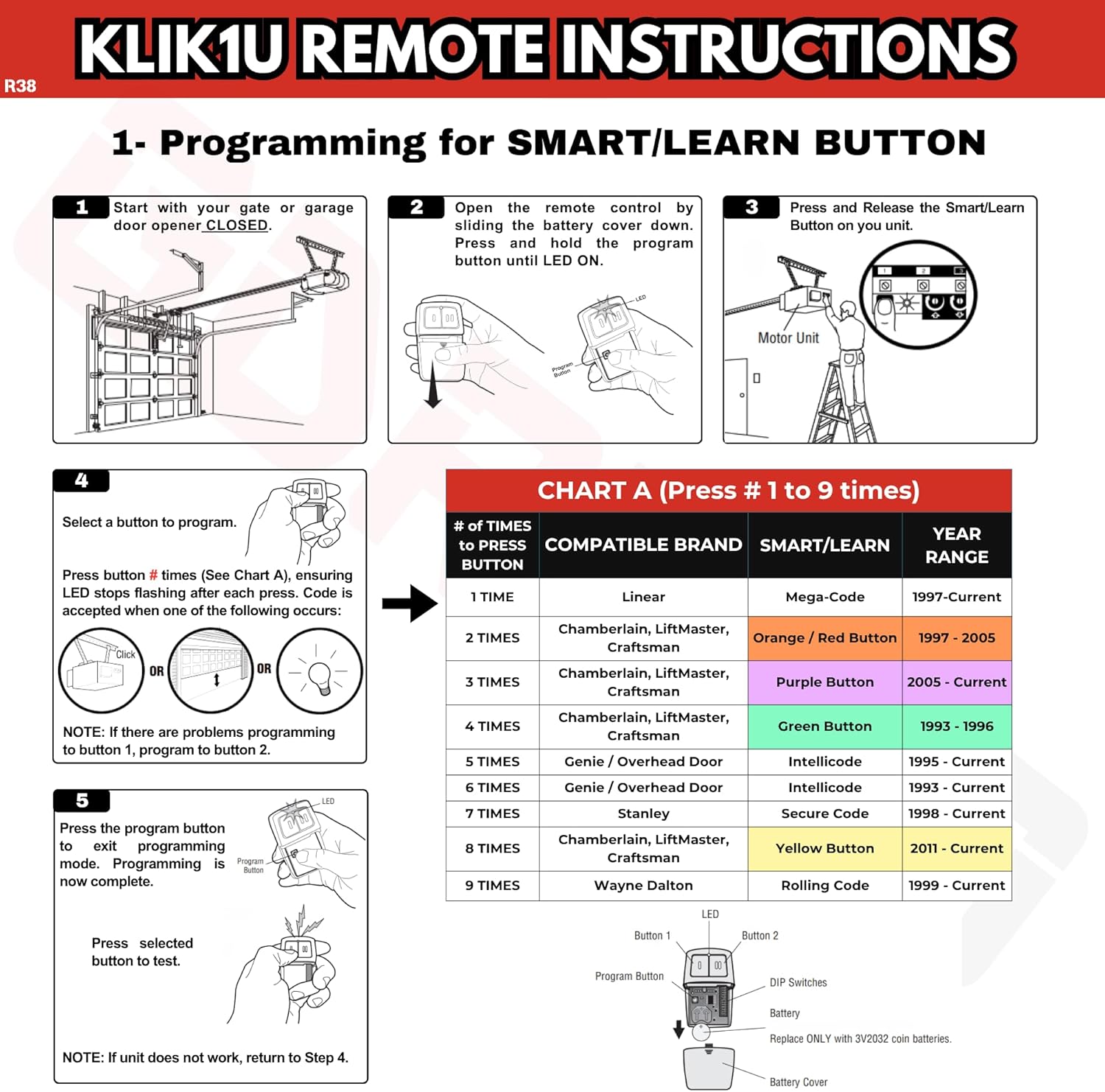
Image: Step-by-step visual guide for programming with a Smart/Learn button, including a chart (Chart A) for button press counts.
5.2. Programming for Dip Switch Systems (Chart B)
This method applies to older systems that use physical dip switches for coding. Refer to the compatibility chart (Chart B) to determine the number of times to press the program button based on your opener's brand and dip switch configuration.
- Ensure your garage door or gate is GESLUIT.
- Open the remote control by sliding the battery cover down. Match the dip switches on your GDR PRO remote to those on your existing remote or motor unit. Turn extra switches OFF if your system has fewer than 12 dip switches.
- Press and hold the program button until the LED on the remote illuminates.
- Select a button on your GDR PRO remote to program. Press this button the corresponding number of times as indicated in Chart B for your compatible brand. The LED on the remote will flash after each press. The code is accepted when one of the following occurs: the garage door opener light flashes, or the garage door moves.
- Press the program button on the remote to exit programming mode. Programming is now complete. Press the selected button on the remote to test.
Note on Dip Switch Position: If programming fails, reverse the dip switch positions (OFF to ON and ON to OFF). For Chamberlain remotes, DO NOT use the "0" position; use "+" or "-". If you already have a button remote, dip switch #1 must be set to "+". If no large remote to open the door, it may be necessary to reprogram original remote controls.

Image: Step-by-step visual guide for programming with dip switches, including a chart (Chart B) for button press counts and dip switch configuration details.
6. Bedryfsinstruksies
Once programmed, operating your GDR PRO Universal Garage Door Opener Remote is straightforward:
- To Open/Close a Garage Door: Press the programmed button corresponding to the desired garage door or gate. The door will begin to move.
- To Stop a Moving Door: Press the programmed button again while the door is in motion.
- Dubbele beheer: If you have programmed two different garage doors or gates, use the respective programmed buttons to control each one independently.
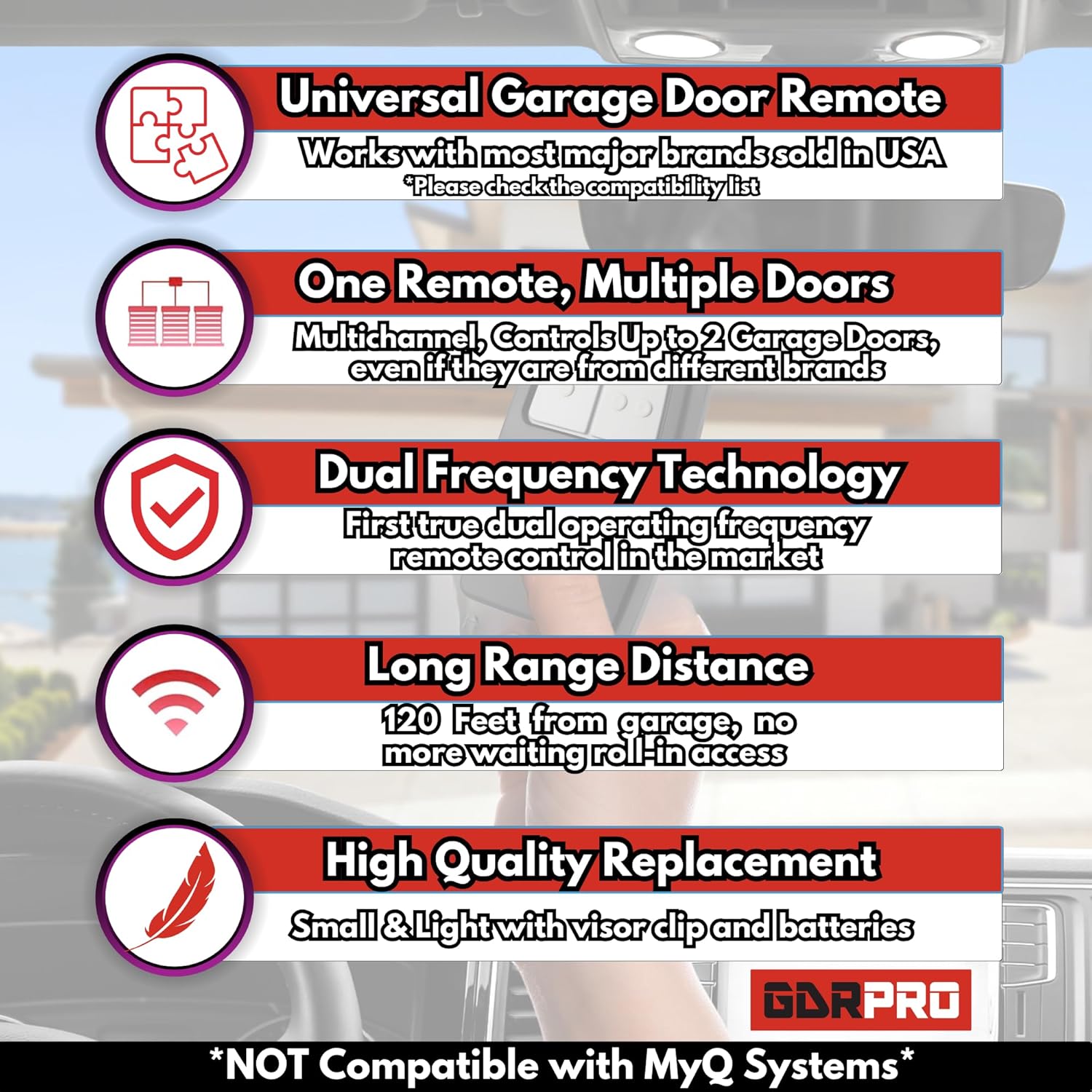
Image: An illustration emphasizing the remote's key features, including its ability to control multiple doors and its long-range capability.
7. Onderhoud
7.1. Battery vervanging
The remote uses one CR2032 Lithium Cell battery. When the remote's range decreases or the LED indicator becomes dim or unresponsive, it's time to replace the battery.
- Slide the battery cover down to open the remote casing.
- Verwyder die ou CR2032-battery versigtig.
- Insert a new CR2032 Lithium Cell battery with the positive (+) side facing up.
- Skuif die batterydeksel terug in plek totdat dit stewig klik.
- Test the remote to ensure proper function.
8. Probleemoplossing
- Remote not programming:
- Ensure the garage door opener is compatible (refer to Section 4).
- Verify you are pressing the program button on the remote and the learn button on the opener for the correct duration.
- Kontroleer die battery in die afstandbeheerder. Vervang indien nodig.
- For dip switch systems, ensure the dip switches on the remote precisely match those on your existing remote or opener. Try reversing the dip switch positions if programming fails.
- Try programming to the other button on the remote (e.g., if button 1 fails, try button 2).
- Remote has short range or is intermittent:
- Vervang die battery in die afstandsbediening.
- Maak seker dat daar geen obstruksies tussen die afstandbeheerder en die motorhuisdeuropener se antenna is nie.
- Check if the antenna on the garage door opener is extended and unobstructed.
- Remote controls the wrong door:
- Reprogram the remote, ensuring you select the correct button for the intended garage door during the programming process.
9. Spesifikasies
| Handelsmerk | DDR PRO |
| Modelnommers | KLIK1U / 375LM (Mfr Part Number: R38-CLK) |
| Verbindingstegnologie | Radio frekwensie |
| Knoppie Hoeveelheid | 2 |
| Maksimum aantal ondersteunde toestelle | 2 |
| Maksimum reeks | 120 Voet |
| Battery Tipe | 1 Lithium Metal CR2032 (included) |
| Item gewig | 1 ons |
10. Waarborginligting
For detailed warranty information regarding your GDR PRO Universal Garage Door Opener Remote, please refer to the manufacturer's official website or contact customer support directly. Warranty terms and conditions may vary.
11. Kliëntediens
If you encounter any issues or have questions not covered in this manual, please contact GDR PRO customer support for assistance. We offer 24/7 customer support to ensure your satisfaction.
Visit the official GDR PRO Store for more information and support: GDR PRO Store

Image: GDR PRO brand message highlighting customer support and product quality.