
Cecotec Conga 1790 Vital
Cecotec Conga 1790 Vital Robot Vacuum Cleaner and Floor Scrubber
Gebruikershandleiding
Inleiding
The Cecotec Conga 1790 Vital is a professional 4-in-1 robot vacuum cleaner designed to sweep, vacuum, mop, and scrub your floors efficiently. Equipped with SmartGyro 3.0 technology, it offers intelligent and orderly navigation, ensuring comprehensive cleaning of your home. This manual provides detailed instructions for setup, operation, maintenance, and troubleshooting to help you get the most out of your robot.

Beeld: Bo view of the Conga 1790 Vital robot vacuum cleaner, highlighting its compact and modern design.
Opstelling
1. Uitpak en Komponente
Carefully remove all components from the packaging. Verify that all parts are present, including the robot, charging base, power adapter, mixed tank, main brush, side brushes, and filters. Keep the original packaging for future storage or transport.
2. Laai die robot
Place the charging base against a wall in an open area, ensuring there are no obstacles within 1 meter to the sides and 2 meters in front. Connect the power adapter to the charging base and a power outlet. Place the robot on the charging base, ensuring the charging contacts align. The robot will indicate when it is charging. Fully charge the robot before its first use.
3. Connecting to Wi-Fi and App Setup
Download the official Cecotec Conga app from your smartphone's app store. Create an account and follow the in-app instructions to connect your robot. Belangrik: The robot requires a 2.4 GHz Wi-Fi network for connection. If you have a dual-band router, ensure your phone is connected to the 2.4 GHz network during the setup process. The app allows you to control cleaning modes, schedule cleaning, adjust suction and scrubbing levels, and view cleaning history and the virtual map of your home.

Image: The robot vacuum cleaner alongside a smartphone showing the Conga app interface with a mapped cleaning area.
Bedryfsinstruksies
1. Skoonmaakmodusse
The Conga 1790 Vital offers four cleaning functions: sweeping, vacuuming, mopping, and scrubbing. These can be used simultaneously or individually. Select your desired mode via the mobile application.
- Sweep & Vacuum: The robot will use its side brushes and main brush to collect dust and debris, which is then suctioned into the dustbin.
- Mop & Scrub: Attach the mixed tank with water and a non-corrosive cleaning solution. The robot will dispense water and use its mop cloth to clean hard floors. You can adjust the water flow level in the app.
2. SmartGyro 3.0 Navigation
The robot utilizes SmartGyro 3.0 technology for systematic and efficient cleaning. It maps your home as it cleans, ensuring it covers all accessible areas. Its gyroscopic, proximity, anti-shock, and anti-fall sensors help it navigate around obstacles and avoid stairs.

Image: The robot cleaning a rug, illustrating its methodical cleaning pattern.
3. App Control and Virtual Map
The Conga app provides a virtual map of your home, allowing you to monitor the robot's cleaning progress in real-time. You can schedule cleaning times, select specific cleaning modes, and adjust suction power (up to 2100 Pa with ForceClean system) and water flow for mopping.

Image: The robot positioned near a smartphone, showcasing the detailed mapping feature within the Conga app.
4. Virtual Voice Technology
Integrate your Conga 1790 Vital with voice assistants like Amazon Alexa and Google Assistant. Use voice commands to start or stop cleaning, send the robot back to its charging base, or locate it.
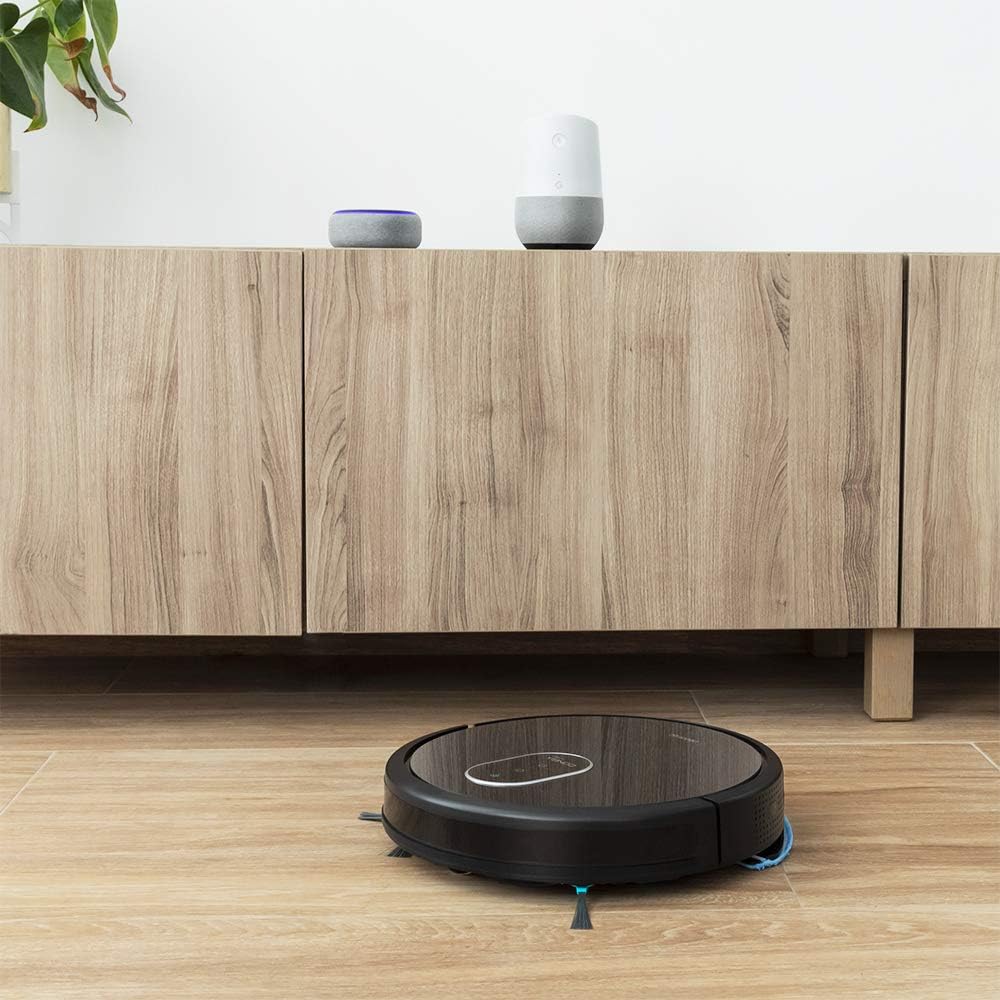
Image: The robot vacuum cleaner in a home setting, demonstrating its compatibility with popular voice assistant devices.
5. Automatic Recharging and Resume
When the battery is low, the robot will automatically return to its charging base via the fastest route. Once recharged, it will resume cleaning from where it left off, thanks to its Total Surface technology.
Onderhoud
Regular maintenance is crucial for optimal performance and longevity of your Conga 1790 Vital.
1. Cleaning Brushes and Wheels
Periodically remove hair and debris that may get tangled around the main brush, side brushes, and wheels. Use the cleaning tool provided to cut and remove tangled hair. This prevents reduced cleaning efficiency and potential damage to the robot's mechanisms.
2. Leegmaak en skoonmaak van die vullisdrom
Empty the dustbin after each cleaning cycle. Open the dustbin, discard collected debris, and rinse the dustbin with water if necessary. Ensure it is completely dry before reinserting it into the robot.
3. Skoonmaak/Vervanging van Filters
The robot uses high-efficiency filters. Tap the filter to remove dust, or gently brush it. Filters should be replaced regularly (e.g., every 1-3 months, depending on usage) to maintain suction power and air quality. Do not wash the HEPA filter with water.
4. Watertenk Onderhoud
After mopping, empty any remaining water from the mixed tank. Clean the tank and the mop cloth. You can use a small amount of non-corrosive floor cleaner in the water tank for enhanced cleaning results.
Probleemoplossing
| Probleem | Moontlike oorsaak | Oplossing |
|---|---|---|
| Robot does not connect to Wi-Fi. | Incorrect Wi-Fi band (not 2.4 GHz), incorrect password, or network interference. | Ensure your router is broadcasting a 2.4 GHz network and your phone is connected to it during setup. Verify Wi-Fi password. Try restarting your router and the robot. |
| Robot returns to charging base prematurely. | Low battery, or perceived low battery due to sensor issue. | Ensure the robot is fully charged. If it still occurs, try manually sending it back to the base and then restarting the cleaning cycle via the app. |
| Swak skoonmaakprestasie. | Full dustbin, clogged filters, tangled brushes. | Empty the dustbin. Clean or replace filters. Remove tangled hair from brushes and wheels. |
| Die robot sit gereeld vas. | Obstacles like cables, small objects, or thick rugs. | Clear the cleaning area of loose cables, small toys, and other potential obstructions. Lift curtains that reach the floor. |
Spesifikasies
| Kenmerk | Detail |
|---|---|
| Handelsmerk | Cecotec |
| Model Naam | Conga 1790 Vital |
| Modelnommer | 5471 |
| Kleur | Swart |
| Afmetings (L x B x H) | 40.5 x 12 x 45 cm |
| Gewig | 4.86 kg |
| Geraasvlak | 64 dB |
| Suigkrag | Up to 2100 Pa (ForceClean System) |
| Batterylewe | 100 minute |
| Filter tipe | Cartridge (High-efficiency) |
| Versoenbare toestelle | Slimfone (via app), Alexa, Google Assistent |
| Spesiale kenmerke | Wireless, 4-in-1 (Sweep, Vacuum, Mop, Scrub), SmartGyro 3.0 Navigation, Virtual Map, Total Surface Technology, BestFriend Care System |
Waarborg en Ondersteuning
Vir waarborginligting en tegniese ondersteuning, verwys asseblief na die amptelike Cecotec-webwerf. webwebwerf of kontak hul kliëntediens direk. Bewaar u bewys van aankoop vir enige waarborgeise.
You can also visit the official Cecotec store on Amazon for product information and accessories: Cecotec Amazon Store.
Belangrike notas
Geen amptelike produkvideo's is in die produkdata verskaf vir inbedding in hierdie handleiding nie.