1. Inleiding
The Epomaker Ajazz i610T is a compact 61-key mechanical keyboard designed for versatility and performance. It supports both Bluetooth wireless and wired (Type-C) dual-mode connectivity, allowing connection to up to three devices simultaneously. Featuring N-key rollover and 17 distinct backlight effects, this keyboard is suitable for various applications, including gaming and professional work environments.
This manual provides detailed instructions for setting up, operating, maintaining, and troubleshooting your Ajazz i610T keyboard.
2. Pakketinhoud
Kontroleer asseblief die pakket vir die volgende items:
- 1 x Ajazz i610T Mechanical Keyboard
- 1 x Tipe C-kabel
- 1 x Gebruikershandleiding
3. Opstelling
3.1 Wired Mode Connection
- Locate the Type-C port on the keyboard, typically on the side or back.
- Koppel die een kant van die meegeleverde Tipe-C-kabel aan die sleutelbord.
- Connect the other end of the Type-C cable to an available USB port on your computer.
- The keyboard will automatically be recognized and function in wired mode. The keyboard will also charge its internal battery while connected via USB.
3.2 Bluetooth Wireless Mode Connection
The Ajazz i610T supports connecting to up to three different Bluetooth devices.
- Ensure the keyboard is powered on. The power switch is usually located on the back or side of the keyboard.
- Druk Fn + Q, Fn + W., of Fn + E to select one of the three Bluetooth device channels. The corresponding key (Q, W, or E) will flash to indicate pairing mode.
- Aktiveer Bluetooth op jou toestel (rekenaar, tablet, slimfoon) en soek vir nuwe toestelle.
- Select "Ajazz i610T" (or similar name) from the list of available devices to pair.
- Once paired, the flashing light on the selected key will become solid, indicating a successful connection.
- Om tussen gepaarde toestelle te wissel, druk eenvoudig Fn + Q, Fn + W., of Fn + E vir die verlangde kanaal.

Beeld: Sykant view of the Epomaker Ajazz i610T keyboard, highlighting the Type-C port for wired connection and charging.
4. Bedryfsinstruksies
4.1 Function Key (Fn) Combinations
Due to its compact 61-key layout, many functions are accessed via the Fn key in combination with other keys. Refer to the keycaps for specific markings indicating secondary functions.
- Fn + [Number Row]: Access F1-F12 functions (e.g., Fn + 1 = F1, Fn + 2 = F2, etc.).
- Fn + P: Print Screen (PrtSc).
- Fn + ;: Scroll Lock (ScrlK).
- Fn + ': Pouse.
- Fn + J: Insert.
- Fn + K: Home.
- Fn + L: Page Up (PgUp).
- fn+m: Delete (Del).
- Fn + ,: End.
- Fn + .: Page Down (PgDn).
- Fn + Arrow Keys: Navigate (Up, Down, Left, Right).
- Fn + Spacebar (hold for 3 seconds): Reset to default mode or exit special modes.
4.2 Agterligbeheer
The keyboard features 17 monochrome backlight effects. Specific key combinations are used to cycle through these effects and adjust brightness.
- Fn + \|: Cycle through different backlight effects.
- Fn + [: Verminder die helderheid van die agterlig.
- Fn + ]Verhoog die helderheid van die agterlig.
4.3 N-Sleutel Rollover (NKRO)
The Ajazz i610T supports N-Key Rollover, meaning all keys pressed simultaneously will be registered accurately. This feature is particularly beneficial for fast typists and gamers, preventing ghosting or missed key presses.
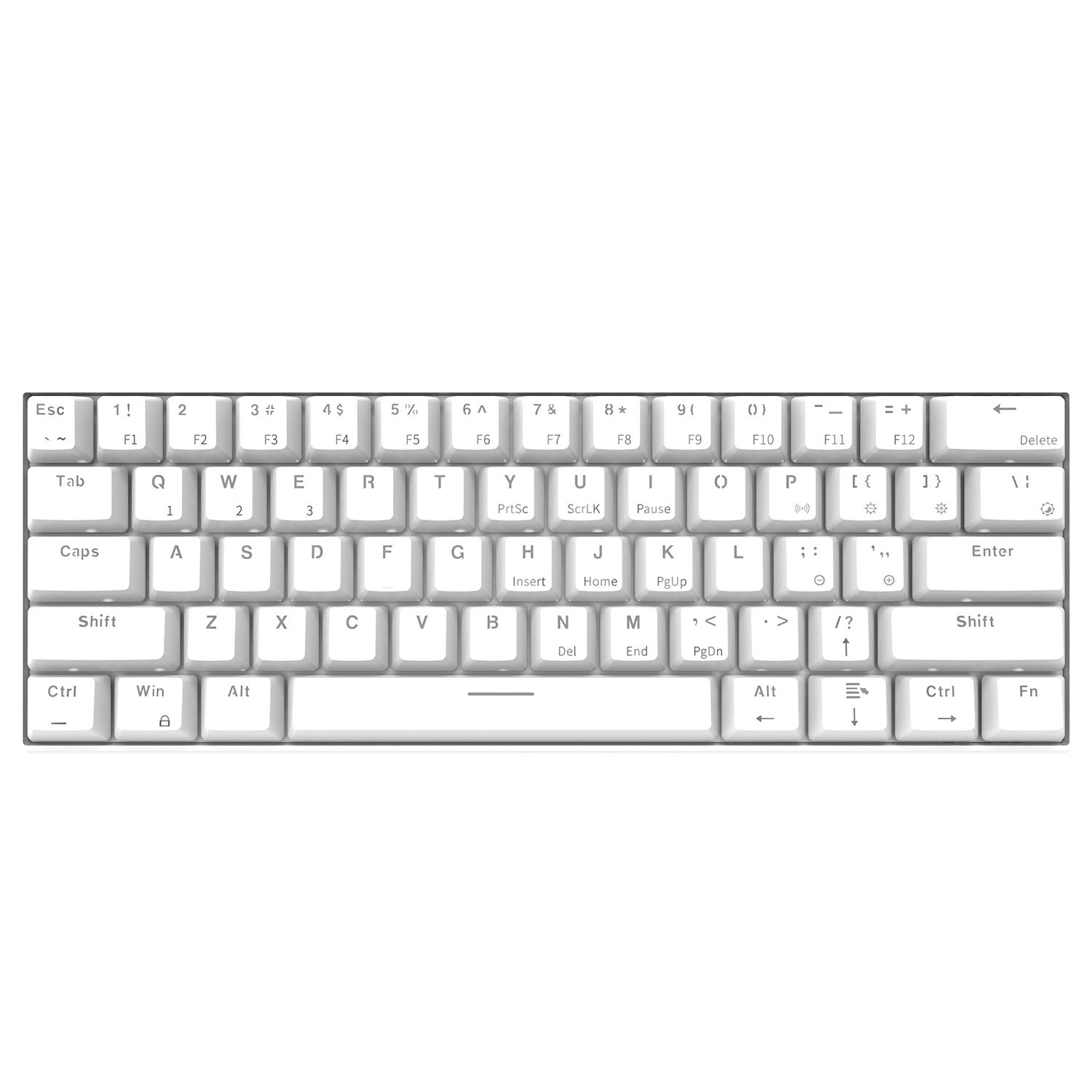
Beeld: Bo-na-onder gehoek view of the Epomaker Ajazz i610T keyboard, showcasing its compact 61-key layout and keycap legends.
5. Onderhoud
Behoorlike onderhoud verseker die lang lewensduur en optimale werkverrigting van jou sleutelbord.
- Skoonmaak: Use a soft, dry cloth to wipe the keyboard surface. For deeper cleaning, use a can of compressed air to remove dust and debris from between the keycaps. For stubborn stains, a slightly damp 'n Lap met sagte seep kan gebruik word om te verseker dat geen vloeistof die sleutelbord binnedring nie.
- Berging: Bêre die sleutelbord op 'n koel, droë plek weg van direkte sonlig en uiterste temperature.
- Vermy mors: Hou vloeistowwe weg van die sleutelbord om skade aan interne komponente te voorkom.
- Kabelversorging: Avoid bending or twisting the Type-C cable excessively to prevent internal wire damage.
6. Probleemoplossing
If you encounter issues with your Ajazz i610T keyboard, refer to the following common solutions:
| Probleem | Moontlike Oplossing |
|---|---|
| Keyboard not responding in wired mode. |
|
| Sleutelbord koppel nie via Bluetooth nie. |
|
| Agterlig werk nie of sit vas. |
|
| Some keys are not responding. |
|
7. Spesifikasies
| Kenmerk | Detail |
|---|---|
| Handelsmerk | EPOMAKER / Ajazz |
| Model | i610T |
| Uitleg | 61 Sleutels (60% Kompak) |
| Konnektiwiteit | Bluetooth 3.0 Wireless / USB Type-C Wired Dual Mode |
| Agterlig | Monochrome Backlight (17 effects) |
| Sleutel omrol | N-Key Rollover (NKRO) |
| Skakel Tipe | Mechanical (Black Switch, White color variant) |
| Materiaal | ABS |
| Battery kapasiteit | 1000mAh litiumioon |
| Kabellengte | Ongeveer 1.5m |
| Ondersteuning van bedryfstelsels | Windows 2000/XP/Vista/7/8/10 |
| Produkafmetings (L*B*H) | 29.1 x 10.1 x 4 cm (11.46 x 3.98 x 1.57 in) |
| Produk Gewig | Ongeveer. 580 g (20.46 oz) |

Beeld: Hoekig view of the Epomaker Ajazz i610T keyboard, demonstrating its compact form factor.
8. Waarborg en Ondersteuning
For warranty information and technical support, please refer to the documentation provided with your purchase or contact the manufacturer directly through their official webwebwerf. Bewaar u bewys van aankoop vir waarborgeise.