
ATuMan LS-P 40m
ATuMan LS-P 40m Laser Distance Meter User Manual
Model: LS-P 40m | Brand: ATuMan
1. Inleiding
The ATuMan LS-P 40m Laser Distance Meter is a high-precision, portable device designed for accurate and reliable measurements. It integrates multiple functions including distance, area, volume, angle, and Pythagorean measurements, making it a versatile tool for various applications.
Key features of this device include:
- High precision for accurate and reliable measuring.
- 11 functions controlled with two intuitive keys.
- Supports up to 3500 measurements on a single charge.
- Capable of volume, angle, area, and distance measurements.

Figuur 1: Voorkant view of the ATuMan LS-P 40m Laser Distance Meter, displaying its screen and single control button.
2. Opstelling
2.1 Laai die toestel
The LS-P 40m is equipped with a built-in Lithium Ion battery. Before first use, or when the battery indicator shows low power, charge the device using the provided USB cable.
- Connect the small end of the USB cable to the charging port on the side of the device.
- Koppel die ander kant van die USB-kabel aan 'n standaard USB-kragadapter (nie ingesluit nie) of 'n rekenaar se USB-poort.
- The charging indicator on the screen will show the charging status. A full charge supports approximately 3500 measurements.
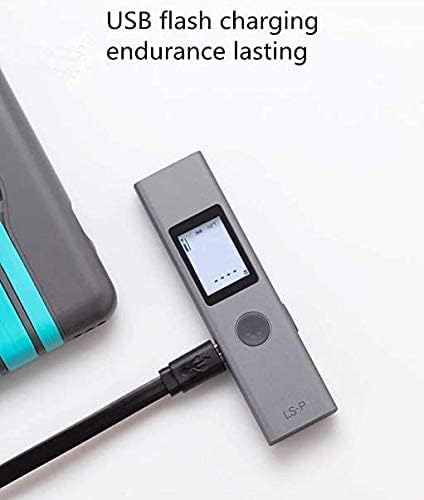
Figure 2: The LS-P 40m device connected to a USB cable for charging, highlighting its USB flash charging capability.
2.2 Aan-/afskakel
- To power on: Press and hold the main button until the screen illuminates.
- To power off: Press and hold the main button until the screen turns off. The device also features an automatic power-off function after a period of inactivity to conserve battery.
3. Bedryfsinstruksies
The LS-P 40m features a simple two-key control system for all its 11 functions. The primary button is used for measurements and mode selection, while the secondary button (if present, or a long press of the primary) is for switching modes or clearing data.
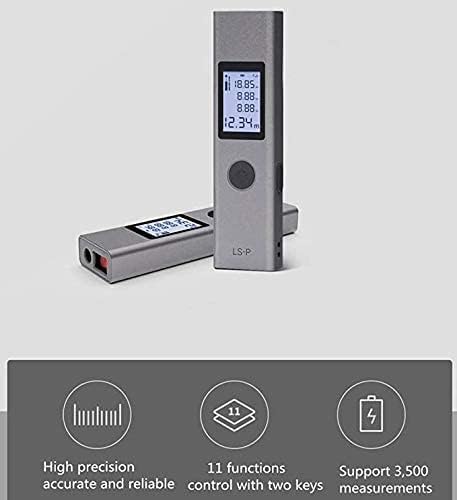
Figuur 3: oorview of the device's capabilities, emphasizing its high precision, 11 functions, and long battery life for up to 3500 measurements.
3.1 Basiese Afstandsmeting
- Ensure the device is powered on and in basic distance measurement mode (usually the default).
- Rig die laserstraal op die teikenoppervlak.
- Press the main button once to activate the laser.
- Press the main button again to take the measurement. The distance will be displayed on the screen.

Figuur 4: Examples of practical applications, including distance measurement for furniture and area measurement for a window.
3.2 Oppervlaktemeting
- Switch to Area Measurement mode. This is typically done by pressing the mode button until the area icon appears on the screen.
- Measure the length of the first side (e.g., width) by pointing the laser and pressing the main button.
- Measure the length of the second side (e.g., height) by pointing the laser and pressing the main button.
- Die toestel sal outomaties die area bereken en vertoon.
3.3 Volumemeting
- Switch to Volume Measurement mode.
- Measure the length, width, and height sequentially as prompted by the device's display.
- Die toestel sal outomaties die volume bereken en vertoon.

Figure 5: Visual representations of volume measurement within a room and angle measurement on a staircase.
3.4 Hoekmeting
- Switch to Angle Measurement mode.
- Follow the on-screen prompts to measure the necessary points to determine the angle.
- The calculated angle will be displayed.
3.5 Pythagorese Meting
The device supports various Pythagorean modes (e.g., single Pythagorean, double Pythagorean) to calculate indirect measurements. Refer to the on-screen icons for specific prompts for each Pythagorean function.
- Kies die verlangde Pythagorese modus.
- Measure the required sides as indicated by the flashing segments on the display.
- Die toestel sal die onbekende kant bereken en vertoon.
4. Onderhoud
4.1 Skoonmaak
- Vee die toestel af met 'n sagte, damp lap. Moenie harde chemikalieë of skuur skoonmaakmiddels gebruik nie.
- Ensure the laser lens and display are clean for optimal performance. Use a lens cleaning cloth if necessary.
4.2 Berging
- Bêre die toestel op 'n koel, droë plek weg van direkte sonlig en uiterste temperature.
- The device features an aluminum-magnesium alloy casing for durability, but it should still be protected from drops and impacts.

Figuur 6: 'n Gedetailleerde view of the device's robust aluminum-magnesium alloy casing, designed for durability.
4.3 Batterysorg
- Laai die battery gereeld, selfs al word die toestel nie gereeld gebruik nie, om die battery se gesondheid te handhaaf.
- Vermy om die battery heeltemal leeg te maak voordat dit herlaai word.
- Indien dit vir 'n lang tydperk gestoor word, laai die battery tot ongeveer 50% voor berging.
5. Probleemoplossing
5.1 Toestel skakel nie aan nie
- Maak seker dat die battery voldoende gelaai is. Koppel die toestel aan 'n USB-laaier en laat dit vir ten minste 30 minute laai voordat jy dit weer probeer aanskakel.
- Press and hold the power button for several seconds to ensure proper power-on attempt.
5.2 Inaccurate Measurements or Laser Not Visible
- Ensure the laser lens is clean and free from dust or smudges.
- Measurements taken in bright sunlight or on highly reflective/absorbent surfaces may be less accurate or difficult to obtain. Try to measure in shaded areas or use a target plate if available.
- Verify that the measurement reference point (front or rear of the device) is correctly set for your application.
5.3 Kort batterylewe
- Maak seker dat die toestel ten volle gelaai is voor gebruik.
- Frequent use of the laser or backlight can consume battery faster.
- Battery performance can degrade over time. If battery life significantly shortens, consider contacting customer support.
6. Spesifikasies
| Kenmerk | Detail |
|---|---|
| Modelnommer | LS-P 40m |
| Handelsmerk | ATuMan (Manufacturer: DUKA) |
| Kleur | Grys |
| Materiaal | Metal (Aluminum-magnesium alloy casing) |
| Battery Tipe | Litiumioon (1 litiumpolimeerbattery ingesluit) |
| Metings per lading | Ongeveer 3500 |
| Funksies | Distance, Area, Volume, Angle, Pythagorean (11 total functions) |
| Pakket afmetings | 13 x 6.9 x 2.1 cm |
| Item gewig | 60 g |

Figure 7: The compact size of the LS-P 40m, demonstrating its portability as it fits into a shirt pocket.
7. Waarborg en Ondersteuning
Specific warranty details are not provided in the product information. For warranty claims, technical support, or service inquiries, please contact the seller or manufacturer directly through their official channels. Keep your purchase receipt as proof of purchase.