
Maxcom MM471
Maxcom MM471 Senior Portable Phone User Manual
1. Inleiding
This manual provides detailed instructions for the safe and efficient use of your Maxcom MM471 Senior Portable Phone. Designed with ease of use in mind, this device features large characters, big buttons, and an ergonomic design, making it ideal for seniors. Please read this manual thoroughly before operating your phone.

Figuur 1: Voorkant view of the Maxcom MM471 Senior Portable Phone.
2. Opstelling
2.1 Pakketinhoud
Maak seker dat alle items in die pakket teenwoordig is:
- Maxcom MM471 Senior Portable Phone
- Battery
- Laai adapter
- Gebruikershandleiding
2.2 Die SIM-kaart en battery insit
The Maxcom MM471 supports dual SIM cards. Follow these steps to install your SIM card(s) and battery:
- Turn off the phone and disconnect it from any power source.
- Verwyder die agterkant van die foon versigtig.
- Insert your SIM card(s) into the designated slot(s) with the gold contacts facing down.
- Plaas die battery in en maak seker dat die kontakte korrek in lyn is.
- Plaas die agterste deksel terug totdat dit stewig in plek klik.

Figuur 2: Terug view with battery and SIM card area.
2.3 Laai die battery
Laai die foon se battery volledig voor die eerste gebruik:
- Connect the charging adapter to the phone's charging port or place the phone in its charging dock.
- Steek die adapter in 'n kragaansluiting.
- Die battery-aanwyser op die skerm sal die laaistatus wys.
- Sodra dit ten volle gelaai is, ontkoppel die laaier.
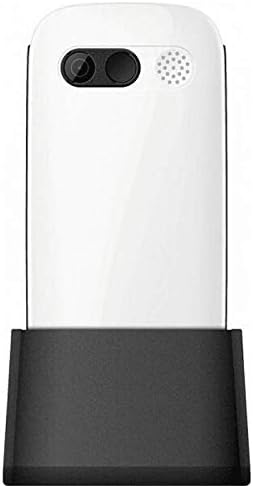
Figure 3: Phone in charging dock.
3. Bedryfsinstruksies
3.1 Aan-/afskakel
- Om aan te skakel: Druk en hou die Skakel/Beëindig Oproep knoppie totdat die skerm verlig.
- Om af te skakel: Druk en hou die Skakel/Beëindig Oproep button until the power-off options appear, then select 'Power Off'.
3.2 Oproepe maak
- Voer die telefoonnommer vanaf die tuisskerm in met behulp van die sleutelbord.
- Druk die Bel button (green button) to initiate the call.
- Om die oproep te beëindig, druk die Skakel/Beëindig Oproep button (red button).
3.3 Ontvang van oproepe
- When a call comes in, the phone will ring and display the caller's number or name.
- Druk die Bel button (green button) to answer.
- Druk op om die oproep te weier Skakel/Beëindig Oproep button (red button).
3.4 Stuur en ontvang van boodskappe
- Navigeer na die 'Boodskappe'-kieslys vanaf die hoofskerm.
- Select 'New Message' to compose a text message.
- Voer die ontvanger se nommer en jou boodskap in.
- Druk 'Stuur'.
- Received messages will appear in your 'Inbox'.
3.5 Kontakte bestuur
The phonebook can store up to 300 names.
- Go to the 'Contacts' or 'Phonebook' menu.
- Select 'Add New Contact' to save a new number.
- Enter the name and phone number, then save.
- To call a contact, select their name from the list and press the Bel knoppie.
3.6 Gebruik Bluetooth
Om aan Bluetooth-toestelle te koppel:
- Gaan na 'Instellings' > 'Bluetooth'.
- Skakel Bluetooth 'Aan'.
- Kies 'Soek vir devices' to find available Bluetooth accessories.
- Select the desired device and pair them.
3.7 Die gebruik van die flitslig
Die foon het 'n ingeboude flitslig vir gerief.
- To turn on the flashlight, locate the dedicated flashlight button (if available) or access it through the 'Tools' menu.
- Press the button or select the option again to turn it off.
4. Onderhoud en versorging
To ensure the longevity and optimal performance of your Maxcom MM471 phone, follow these maintenance guidelines:
- Skoonmaak: Gebruik 'n sagte, droë lap om die foon se oppervlak skoon te maak. Vermy vloeibare skoonmaakmiddels of skuurmiddels.
- Temperatuur: Moenie die foon vir lang tye aan uiterste temperature (warm of koud) of direkte sonlig blootstel nie.
- Vog: Keep the phone dry. Do not immerse it in water or expose it to high humidity.
- Berging: Wanneer dit nie vir 'n lang tyd gebruik word nie, bêre die foon op 'n koel, droë plek met die battery gedeeltelik gelaai.
- Impak: Vermy om die foon te laat val of dit aan harde impakte bloot te stel.
5. Probleemoplossing
If you encounter issues with your phone, refer to the table below for common problems and solutions:
| Probleem | Moontlike oorsaak | Oplossing |
|---|---|---|
| Foon skakel nie aan nie | Die battery is leeg of nie korrek geplaas nie. | Laai die battery. Maak seker dat die battery korrek geplaas is. |
| Kan nie oproepe maak of ontvang nie | No network signal, SIM card not inserted, or SIM card faulty. | Check network coverage. Reinsert SIM card(s). Contact your service provider. |
| Swak oproepkwaliteit | Weak network signal, interference. | Beweeg na 'n area met beter sein. Vermy obstruksies. |
| Battery raak vinnig leeg | Excessive usage, background applications, old battery. | Reduce screen brightness. Close unused applications. Consider replacing the battery if it's old. |
| Sleutelbord reageer nie | Software glitch, physical damage. | Restart the phone. If the problem persists, contact support. |
6. Tegniese spesifikasies
Key technical details of the Maxcom MM471 Senior Portable Phone:
- Model: MM471
- Handelsmerk: Maxcom
- Kleur: Wit
- Verbinding: Bluetooth
- SIM-ondersteuning: Dubbele SIM
- Telefoonboek kapasiteit: 300 names
- Praat Tyd: Tot 14 uur
- Interface: Fisiese knoppies
- Spesiale kenmerke: Large characters, Big buttons, Ergonomic design, Speaker, Flashlight
7. Waarborg- en Ondersteuningsinligting
For detailed warranty information, please refer to the warranty card included with your product or visit the official Maxcom website. For technical support or service inquiries, please contact your retailer or the manufacturer's customer service department.