
Altec Lansing AL-5003
Altec Lansing AL-5003 Multimedia DJ Trolly Speaker User Manual
Model: AL-5003
Inleiding
Dankie vir die aankoopasing the Altec Lansing AL-5003 Multimedia DJ Trolly Speaker. This speaker is designed to deliver powerful audio for various applications, including parties and surround sound systems. Featuring wireless connectivity, a built-in trolley for portability, and multiple input options, the AL-5003 offers a versatile audio experience. Please read this manual carefully to ensure proper setup, operation, and maintenance of your speaker.
Belangrike veiligheidsinstruksies
- Read these instructions thoroughly before operating the speaker.
- Bewaar hierdie handleiding vir toekomstige verwysing.
- Moenie die luidspreker aan reën of vog blootstel nie.
- Moenie enige ventilasie-openinge blokkeer nie.
- Moenie naby enige hittebronne soos verkoelers, hitteregisters, stowe of ander toerusting (insluitend ampversterkers) wat hitte produseer.
- Beskerm die kragkoord teen geloop of vasgeknyp, veral by proppe, geriefshouers en die punt waar dit uit die apparaat kom.
- Gebruik slegs aanhegsels/bykomstighede gespesifiseer deur die vervaardiger.
- Ontkoppel hierdie apparaat tydens weerligstorms of wanneer dit vir lang tye ongebruik word.
- Verwys alle diens na gekwalifiseerde dienspersoneel.
Pakketinhoud
Kontroleer asseblief die pakket vir die volgende items:
- Altec Lansing AL-5003 Multimedia DJ Trolly Speaker
- Kragkoord
- Afstandbeheer
- Gebruikershandleiding
- Auxiliary Cable (may vary by region)
Produk verbyview
The AL-5003 speaker features a robust design with integrated wheels and a handle for easy transport. It includes a powerful 10-inch speaker and a 1-inch tweeter, providing clear and dynamic sound. The control panel is located on the top of the unit, offering easy access to various functions.
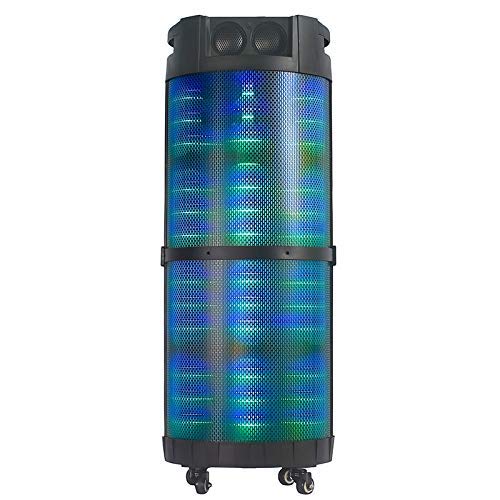
Prent 1: Voorkant view of the Altec Lansing AL-5003 speaker, showcasing its cylindrical design and illuminated grille. The speaker features a sturdy build with integrated wheels at the base for portability.
Beheerpaneel en verbindings
The top panel of the speaker houses the main controls and input/output ports.
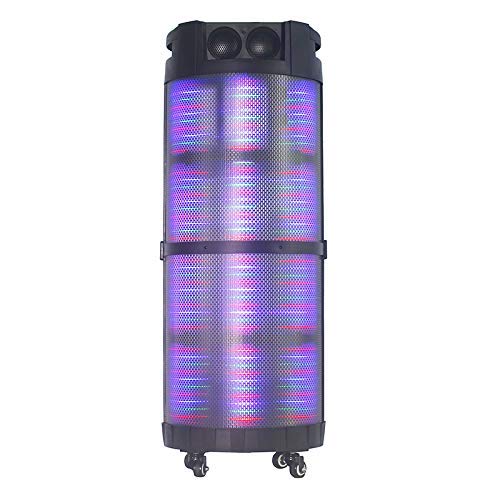
Prent 2: Van onder na onder view of the AL-5003 speaker, highlighting the control panel with various buttons and knobs, along with the top-mounted speakers. This view also shows the integrated handle for easy transport.
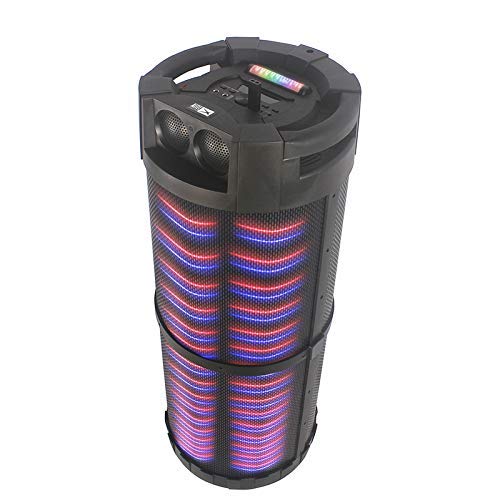
Prent 3: Hoekig view of the AL-5003 speaker, providing a perspective of its overall structure, including the side grille and the top control area. The dynamic lighting effects are visible through the mesh.
Common controls include Power, Volume, Mode selection, Play/Pause, Track Skip, and inputs for USB, Auxiliary, and potentially Microphone (if available on the model).
Opstel instruksies
- Uitpak: Verwyder die luidspreker en alle bykomstighede versigtig uit die verpakking. Bewaar die verpakking vir toekomstige vervoer of berging.
- Plasing: Place the speaker on a stable, flat surface. Ensure there is adequate ventilation around the unit. For optimal sound, position the speaker in a central location within the listening area.
- Kragverbinding: Connect the provided power cord to the AC input on the speaker and then plug it into a standard wall outlet (AC 100-240V, 50/60Hz).
- Aanvanklike koste (indien van toepassing): If the speaker has an internal battery (Lead Acid battery mentioned in specs), it is recommended to fully charge it before first use. The charging indicator light will typically show charging status.
- Krag aan: Press the Power button on the control panel or remote control to turn on the speaker.
Bedryfsinstruksies
1. Bluetooth-modus
- Aktiveer Bluetooth: Turn on the speaker. Press the "Mode" button on the control panel or remote until "Bluetooth" or "BT" is displayed (or indicated by a blue LED). The speaker will enter pairing mode, indicated by a flashing light or audible prompt.
- Bind saam met toestel: Gaan na Bluetooth-instellings op jou mobiele toestel (slimfoon, tablet, skootrekenaar) en aktiveer Bluetooth. Soek vir available devices. You should see "AL-5003" or "Altec Lansing" in the list. Select it to pair.
- Verbinding bevestiging: Once successfully paired, the speaker will emit a confirmation sound, and the Bluetooth indicator light will become solid.
- Terugspeel: Start playing audio on your connected device. Use the speaker's volume controls or your device's volume controls to adjust the sound level. Use the Play/Pause, Next, and Previous buttons on the speaker or remote to control playback.
2. Auxiliary (AUX) Mode
- Koppel AUX-kabel: Insert one end of a 3.5mm auxiliary cable into the AUX input port on the speaker. Connect the other end to the headphone jack or audio output of your external audio device (e.g., MP3 player, laptop).
- Kies AUX-modus: Press the "Mode" button on the speaker or remote until "AUX" is displayed or indicated.
- Terugspeel: Play audio from your connected device. Adjust volume using both the speaker's controls and your device's volume.
3. USB-terugspeelmodus
- Voeg USB-skyf in: Plaas 'n USB-geheuestokkie wat MP3-klank bevat files in die USB-poort op die luidspreker.
- Select USB Mode: The speaker may automatically switch to USB mode. If not, press the "Mode" button until "USB" is displayed or indicated.
- Terugspeel: Die luidspreker sal outomaties klank begin speel files from the USB drive. Use the Play/Pause, Next, and Previous buttons to control playback.
4. Karaoke Function (if applicable)
If your AL-5003 model includes a microphone input, you can use it for karaoke:
- Koppel mikrofoon: Plug a wired microphone into the designated microphone input jack.
- Pas volume aan: Use the dedicated Microphone Volume knob (if present) to adjust the microphone's volume.
- Echo beheer: Some models may have an Echo knob to add an echo effect to the microphone audio.
5. Afstandsbediening
The included remote control provides convenient access to all major functions:
- Krag: Turn the speaker On/Off.
- Modus: Switch between Bluetooth, AUX, USB, and other available modes.
- Volume +/-: Pas die hoofvolume aan.
- Speel/pouse: Begin of onderbreek afspeel.
- Vorige volgende: Slaan oor na die vorige of volgende snit.
- EQ: Select different equalizer presets (if available).
- Demp: Mute or unmute the audio.
Onderhoud
- Skoonmaak: Gebruik 'n sagte, droë lap om die buitekant van die luidspreker skoon te maak. Moenie vloeibare skoonmaakmiddels of skuurmiddels gebruik nie.
- Berging: Wanneer dit nie vir lang tye gebruik word nie, bêre die luidspreker op 'n koel, droë plek, weg van direkte sonlig en uiterste temperature.
- Batterysorg: If the speaker has a built-in rechargeable battery, avoid fully discharging it frequently. For long-term storage, charge the battery to approximately 50-70% every few months to prolong its lifespan.
- Ventilasie: Maak seker dat die ventilasie-openinge nie geblokkeer is nie om oorverhitting te voorkom.
Probleemoplossing
| Probleem | Moontlike oorsaak | Oplossing |
|---|---|---|
| Geen krag nie | Power cord not connected; Power outlet not working; Speaker is off; Battery drained. | Ensure power cord is securely connected. Try a different outlet. Press the Power button. Charge the battery. |
| Geen klank nie | Volume too low; Incorrect mode selected; Device not connected properly; Mute function active. | Increase volume on speaker and source device. Select the correct input mode (Bluetooth, AUX, USB). Reconnect device. Check if mute is active on remote. |
| Bluetooth-samestelling misluk | Speaker not in pairing mode; Device Bluetooth off; Speaker too far from device; Interference. | Ensure speaker is in Bluetooth pairing mode. Turn on Bluetooth on your device. Move device closer to speaker. Turn off other Bluetooth devices nearby. |
| USB-terugspeel werk nie | USB-skyf nie korrek ingevoeg nie; Onversoenbaar file formaat; USB-skyf beskadig. | Plaas die USB-skyf weer in. Maak seker files are in MP3 format. Try a different USB drive. |
| Afstandbeheer werk nie | Batteries drained; Obstruction between remote and speaker; Remote not pointed at sensor. | Replace remote control batteries. Remove any obstructions. Point remote directly at the speaker's IR sensor. |
Spesifikasies
| Kenmerk | Detail |
|---|---|
| Model Naam | Altec Lansing AL-5003 Multimedia DJ Trolly Speaker |
| Tipe luidspreker | Omringklank |
| Spesiale kenmerk | Draadloos |
| Aanbevole gebruike | For Surround Sound Systems, Party |
| Versoenbare toestelle | Gaming Console, Karaoke Machine, Laptop, MP3 Player, Smartphone, Tablet |
| Surround Sound Channel-konfigurasie | 1.0 |
| Beheer metode | Afgeleë |
| Draadlose kommunikasietegnologie | Bluetooth |
| Luidsprekergrootte | 10 duim |
| Kragbron | Elektries met koord |
| Tweeter-deursnee | 1 duim |
| Oudio-invoerversoenbaar | Hulp, USB |
| Luidsprekerverbinding | Wired (for power), Wireless (Bluetooth) |
| Oudio Wattage | 100 Watt |
| Battery sel samestelling | Loodsuur |
| Montage tipe | Vloer staan |
Waarborg en Ondersteuning
Altec Lansing products are manufactured to the highest quality standards. For information regarding warranty coverage, technical support, or service inquiries, please refer to the warranty card included with your product or visit the official Altec Lansing website. Please have your model number (AL-5003) and purchase details ready when contacting support.
Webwebwerf: www.alteclansing.com (This is a generic link, actual link might vary by region)
Ask a question about this manual
Ask about setup, troubleshooting, compatibility, parts, safety, or missing instructions. Manuals+ will review the question and use this page’s manual context to help answer it.