
Petcube CC10US
Petcube Cam User Manual
Model: CC10US | Brand: Petcube
Inleiding
The Petcube Cam is an indoor Wi-Fi pet and security camera designed to help you monitor your pets and home 24/7. It features vivid 1080p HD video, 30-ft night vision, crystal-clear 2-way audio, and AI-powered live motion and sound alerts. This manual provides detailed instructions for setting up, operating, maintaining, and troubleshooting your Petcube Cam.
Wat is in die boks
- Petcube Cam
- 2 m USB-kabel
- Petcube power adapter
- 3M band
- Vinnige begingids
Opstelling
Setting up your Petcube Cam is a quick and straightforward process, typically taking less than 60 seconds. Follow these steps to get your camera up and running:
- Download the Petcube App: Soek vir "Petcube" in your smartphone's app store (iOS or Android) and download the official application.
- Plug in the Camera: Connect the 2m USB cable to your Petcube Cam and the Petcube power adapter. Plug the adapter into a standard power outlet. The camera will power on and indicate its status.
- Koppel aan Wi-Fi: Open the Petcube app and follow the on-screen instructions to connect your camera to your home Wi-Fi network. Ensure you are connecting to a 2.4GHz Wi-Fi network, as the camera does not support 5GHz Wi-Fi.
- Plasing: Position your Petcube Cam in a location that provides the best view of your pet's activity or the area you wish to monitor. The camera offers flexible mounting options, including standing on a flat surface or being mounted to a wall using the included 3M tape.
Bedryfsinstruksies
Once your Petcube Cam is set up, you can begin monitoring and interacting with your pets and home through the Petcube app.
Regstreekse videostroming
Access a live 1080p HD video feed of your home anytime, anywhere. The camera provides a 110° wide-angle view and an 8x digital zoom, allowing you to see a large portion of the room and zoom in on specific details.

2-rigting oudio
Engage with your pets using the built-in microphone and speaker. You can talk to them to soothe separation anxiety or reinforce positive behavior, and also hear their barks or meows in return.

Nagvisie
The Petcube Cam is equipped with 30-ft night vision, providing clear visibility even in low-light or no-light conditions. This ensures you can monitor your pets and home effectively around the clock.

Smart Alerts and Video History
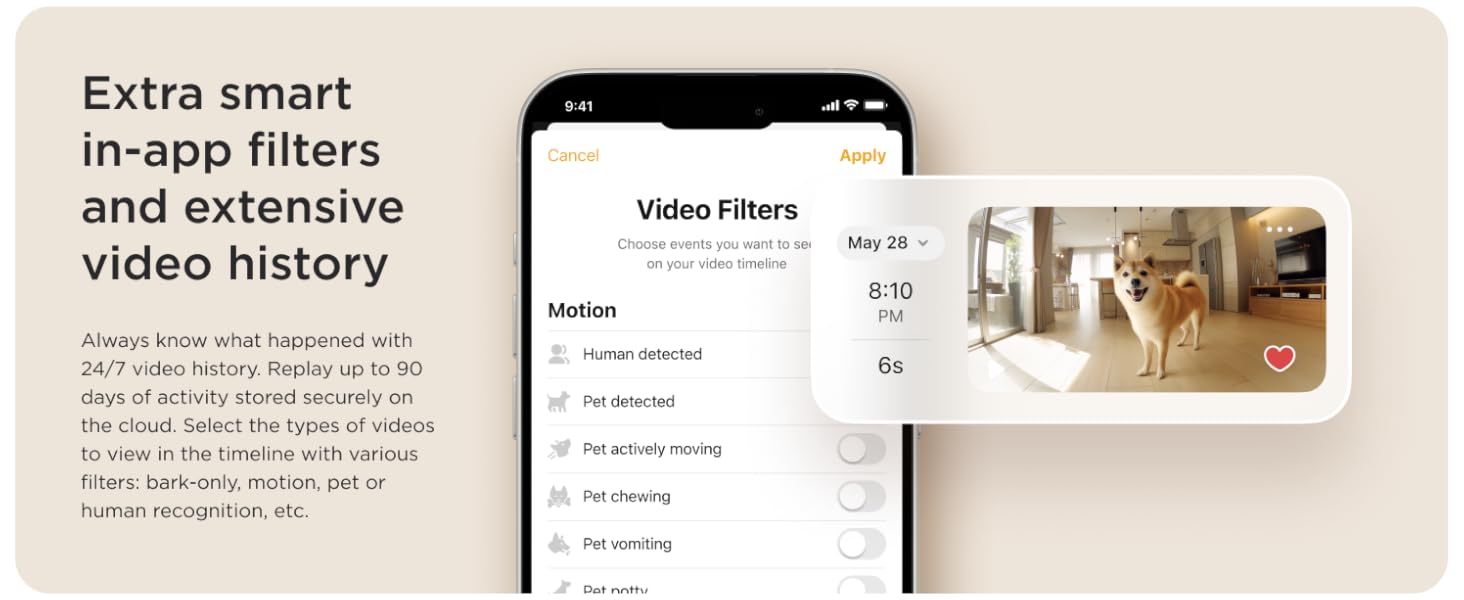
Receive AI-powered instant sound and motion alerts directly to your phone. These alerts feature real-time identification for humans and pets. With an optional Petcube Care subscription, you can access up to 90 days of video history, save your favorite moments, and utilize smart filters for specific events like barking, motion, or pet recognition.

Onderhoud
To ensure optimal performance and longevity of your Petcube Cam, regular maintenance is recommended:
- Skoonmaak: Gently wipe the camera lens and body with a soft, dry, lint-free cloth. Avoid using harsh chemicals or abrasive materials that could damage the device.
- Sagteware-opdaterings: Keep your Petcube app and camera firmware updated to the latest versions. Updates often include performance improvements, new features, and security enhancements. The app will typically notify you when an update is available.
- Krag siklus: If you experience minor issues, try unplugging the camera from the power outlet for 10-15 seconds and then plugging it back in. This can often resolve temporary glitches.
Probleemoplossing
If you encounter issues with your Petcube Cam, refer to the following common troubleshooting tips:
- Kamera vanlyn:
- Ensure the camera is properly plugged into a working power outlet.
- Check your Wi-Fi connection. The camera requires a stable 2.4GHz Wi-Fi network.
- Herbegin jou Wi-Fi-router.
- Beweeg die kamera nader aan jou Wi-Fi-router om seinsterkte te verbeter.
- Swak videogehalte:
- Verify your internet speed. A stable and fast internet connection is crucial for HD streaming.
- Maak seker dat die kameralens skoon en vry van stof of vlekke is.
- Check for any obstructions in the camera's field of view.
- 2-rigting oudio probleme:
- Check the microphone and speaker settings within the Petcube app.
- Ensure your phone's volume is turned up.
- Minimize background noise near the camera for clearer audio.
- Waarskuwings nie ontvang nie:
- Check your app's notification settings and your phone's system notification settings for the Petcube app.
- Ensure the camera is in an active monitoring mode (e.g., Petcube Care Awake mode if subscribed).
- Adjust the sensitivity settings for motion and sound detection in the app.
For further assistance, please refer to the Petcube app's help section or contact Petcube customer support.
Spesifikasies
| Kenmerk | Detail |
|---|---|
| Model Naam | Petcube Cam |
| Modelnommer | CC10US |
| Video-opname-resolusie | 1080p HD |
| Viewing Hoek | 110 grade |
| Digitale zoom | 8x |
| Nagsigreeks | 30 Voet |
| Oudio | 2-rigting oudio |
| Verbindingstegnologie | Draadloos (Wi-Fi) |
| Wi-Fi-versoenbaarheid | 2.4GHz (ondersteun nie 5GHz nie) |
| Binne/buiteluggebruik | Binneshuise |
| Kragbron | Elektries met koord |
| Montage tipe | Wall Mount (with 3M tape) |
| Afmetings (L x B x H) | 2.13 x 2.39 x 3.22 duim |
| Item gewig | 8.4 ons |
| UPC | 854592007318 |
Waarborg en Ondersteuning
For information regarding the product warranty, please refer to the documentation included with your Petcube Cam or visit the official Petcube website. For technical support, troubleshooting assistance beyond this manual, or any other inquiries, please contact Petcube customer support directly through their website or the Petcube app.
Ask a question about this manual
Ask about setup, troubleshooting, compatibility, parts, safety, or missing instructions. Manuals+ will review the question and use this page’s manual context to help answer it.