
Inleiding
Thank you for choosing the Waykar 296 Pints Commercial Dehumidifier. This manual provides essential information for the safe operation, installation, maintenance, and troubleshooting of your dehumidifier. Please read it thoroughly before use and retain it for future reference.
This commercial-grade dehumidifier is designed for large spaces up to 9,000 square feet, effectively removing up to 296 pints (37 gallons) of moisture per day. It is suitable for basements, industrial or commercial spaces, garages, cellars, workshops, libraries, laboratories, and flood restoration.
Belangrike veiligheidsinligting
Om die risiko van brand, elektriese skok of besering te verminder, volg altyd hierdie basiese voorsorgmaatreëls:
- Lees alle instruksies voordat u die toestel gebruik.
- Maak seker dat die kragtoevoer ooreenstem met die graderingsetiket op die eenheid.
- Moenie die ontvochtiger met 'n beskadigde koord of prop gebruik nie.
- Ontkoppel altyd die eenheid voordat dit skoongemaak of versien word.
- Moenie luginlate of -uitlate blokkeer nie.
- Keep the unit on a level surface to prevent water leakage.
- Hierdie toestel is nie bedoel vir gebruik deur persone (insluitend kinders) met verminderde fisiese, sensoriese of geestelike vermoëns, of 'n gebrek aan ervaring en kennis nie, tensy hulle toesig of instruksies oor die gebruik van die toestel gegee is deur 'n persoon wat verantwoordelik is vir hul veiligheid.
Produk verbyview
Komponente en kenmerke
The Waykar 296 Pints Commercial Dehumidifier features a robust design with intelligent controls for efficient moisture removal.
Figuur 1: Intelligente aanraakbeheerpaneel
Displays humidity, temperature, and allows setting adjustments.

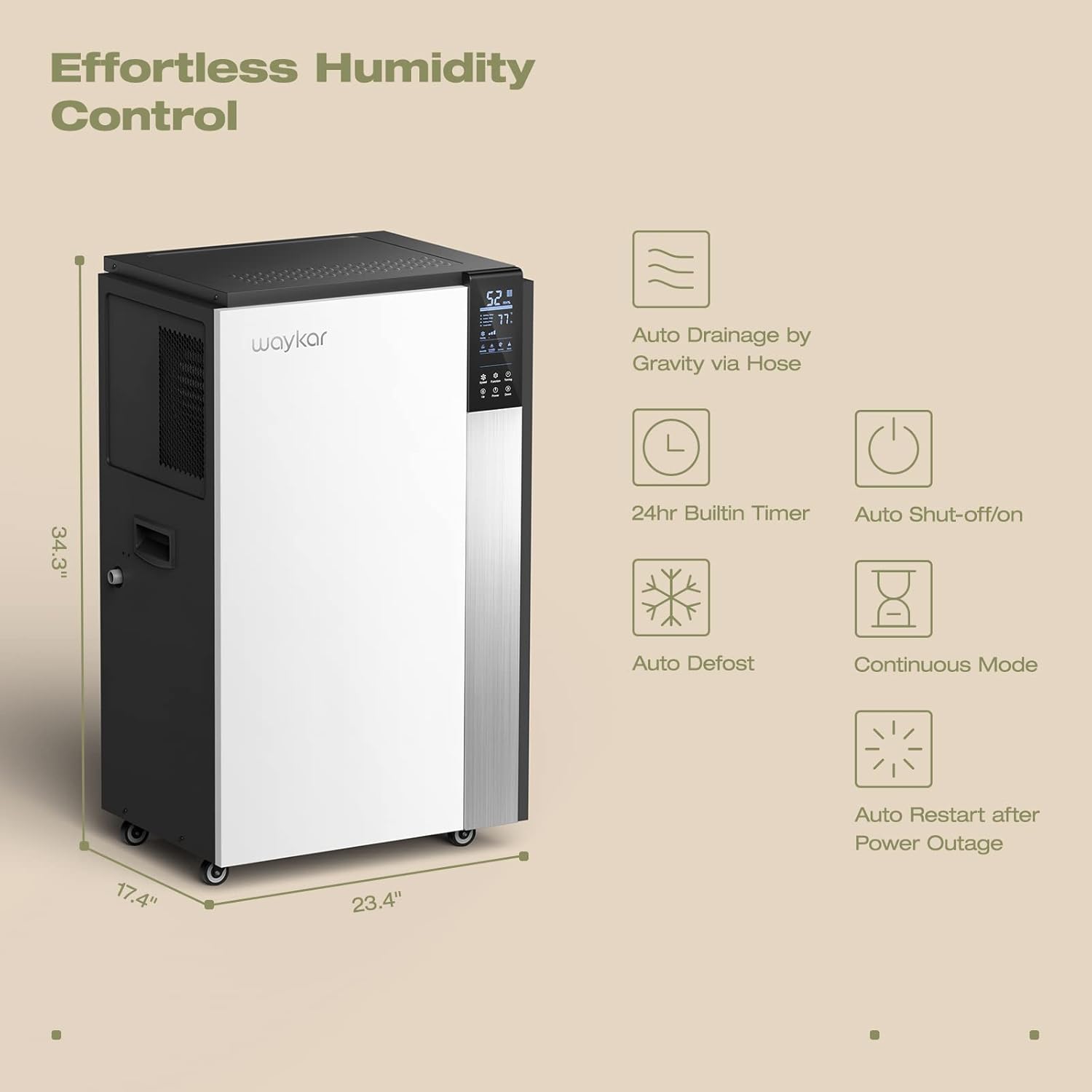
Figure 2: Dehumidifier Dimensions and Key Features
Illustrates the unit's dimensions (34.3" H x 23.4" W x 17.4" D) and highlights features like auto drainage, 24hr timer, auto shut-off/on, auto defrost, continuous mode, and auto restart after power outage.
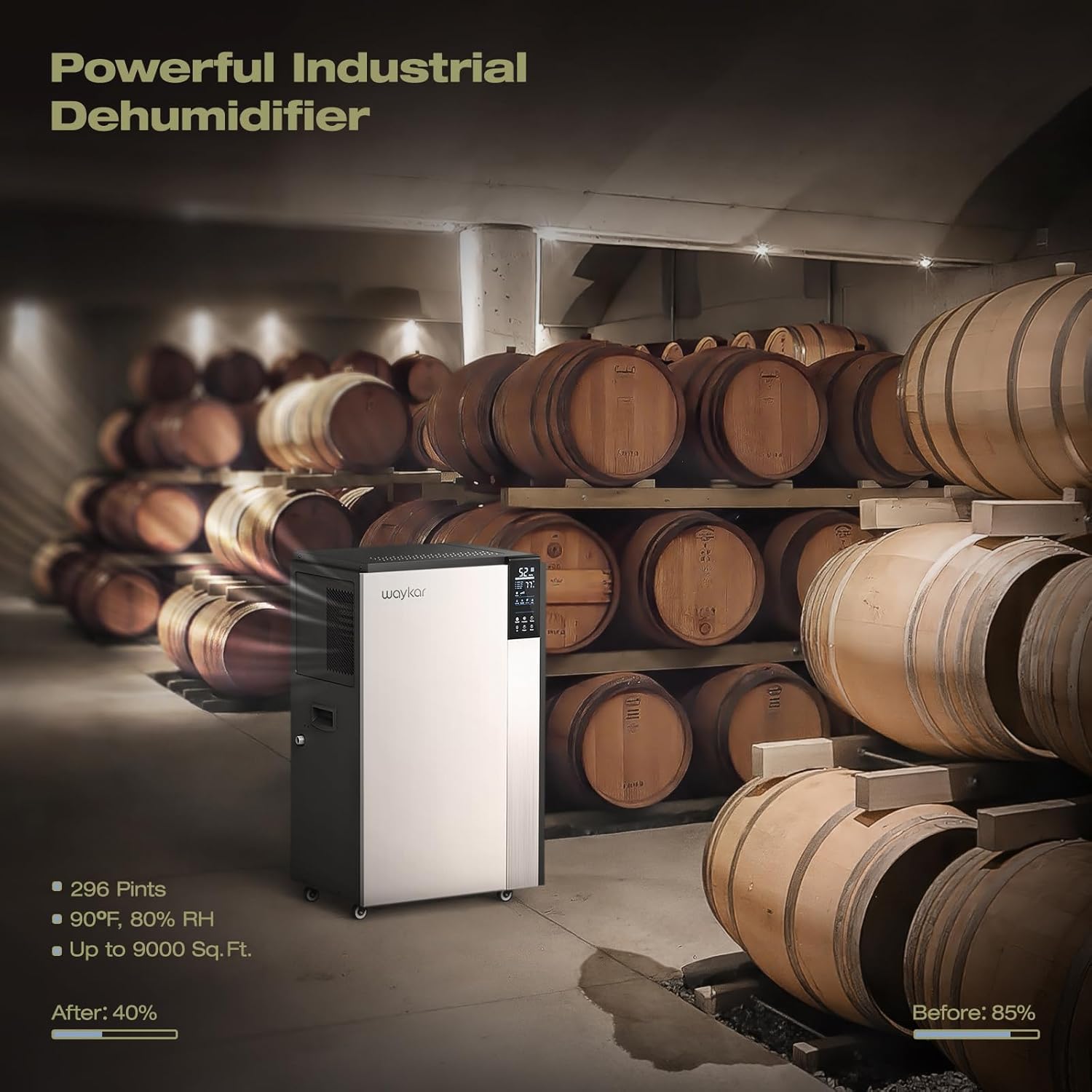
Figure 3: Continuous Drainage Setup and Detachable Filter
Shows the connection for the continuous drain hose and the location of the washable air filter.
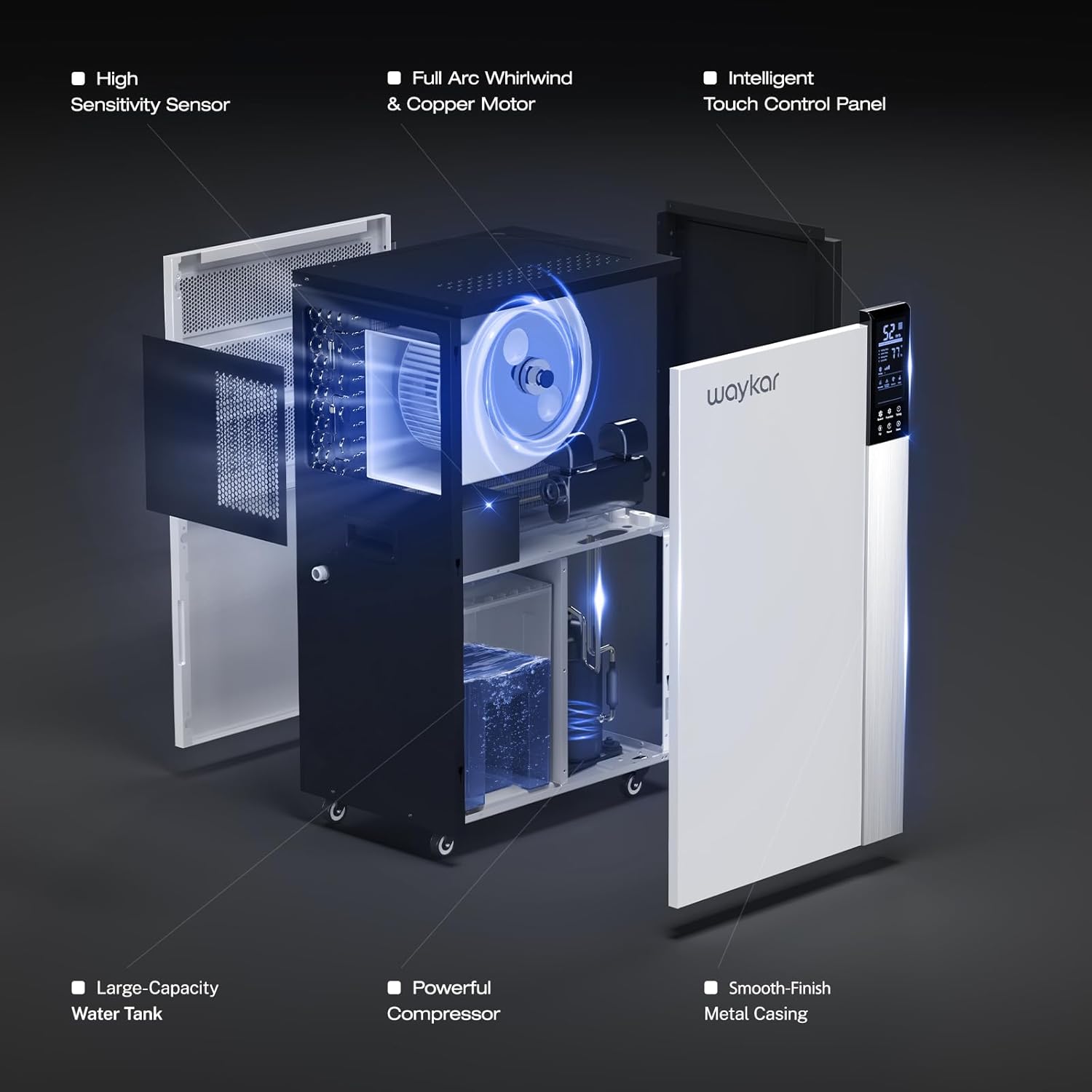
Figure 4: Internal Structure and Components
'n ontplof view showing the high sensitivity sensor, full arc whirlwind & copper motor, intelligent touch control panel, large-capacity water tank, powerful compressor, and smooth-finish metal casing.
Opstel instruksies
- Uitpak: Verwyder die ontvochtiger versigtig uit sy verpakking. Inspekteer vir enige versendingskade.
- Plasing: Position the dehumidifier on a level, stable surface in the desired area. Ensure there is at least 8 inches (20 cm) of space around the unit for proper airflow. The unit is equipped with four universal wheels and two ergonomically placed handles for easy movement.
- Aanvanklike bystand: Na vervoer, laat die eenheid vir ten minste 24 uur regop staan voordat dit ingeprop word. Dit laat die koelmiddel toe om te sak.
- Kragverbinding: Steek die kragkabel in 'n geaarde elektriese aansluiting met die korrekte volumetage (refer to the rating label).
- Dreinering Opstelling:
- Continuous Drainage (Recommended): For continuous operation without manual emptying, connect the included 40-inch (100 cm) drain hose to the drainage port on the unit. Ensure the hose is sloped downwards to allow gravity drainage to a suitable floor drain or container.
- Water Bucket (Internal): If continuous drainage is not used, the unit will collect water in its internal bucket. The unit will automatically shut off when the bucket is full.
Bedryfsinstruksies
Beheerpaneel funksies
The intelligent touch control panel allows for easy operation and monitoring.
- Kragknoppie: Druk om die eenheid AAN of AF te skakel.
- Humidity Setting (Up/Down Buttons): Adjust the desired humidity level between 10% and 90% Relative Humidity (RH). The unit will automatically operate to maintain this level.
- Fan Speed Button: Kies tussen Hoë en Lae waaiersnelhede.
- Timer-knoppie: Stel 'n 24-uur-timer vir outomatiese AAN/AF-werking.
- Vertoon: Shows current room humidity, set humidity, and operating temperature.
Bedryfsmodusse
- Outomatiese humiditeitsbeheer: Set your desired humidity level. The dehumidifier will sense the room's humidity and automatically turn on or off to maintain the pre-set level.
- Deurlopende modus: For maximum dehumidification, select continuous mode. The unit will run continuously regardless of the humidity level. This mode is typically used with continuous drainage.
- Outomatiese ontdooiing: The unit features an automatic defrost function that activates when frost builds up on the evaporator coils, ensuring efficient operation in low-temperature environments.
- Herbegin outomaties: In die geval van 'n krag outage, die eenheid sal outomaties herbegin met die vorige instellings sodra krag herstel is.
Onderhoud
Gereelde onderhoud verseker optimale werkverrigting en verleng die lewensduur van jou ontvochtiger.
- Skoonmaak van die lugfilter:
- The unit has a "Clean Reminder" feature for the filter.
- Skakel die ontvochtiger af en koppel dit uit.
- Remove the detachable air filter (refer to Figure 3 for location).
- Wash the filter with warm, soapy water. Rinse thoroughly and allow it to air dry completely before reinstalling.
- Maak die filter elke twee weke of meer gereeld skoon, afhangende van gebruik en luggehalte.
- Skoonmaak van die buitekant van die eenheid:
- Vee die buitekant af met 'n sagte, damp lap. Moenie harde chemikalieë of skuur skoonmaakmiddels gebruik nie.
- Drainage System Check:
- Periodically check the drain hose for kinks, blockages, or algae growth if using continuous drainage.
- If using the internal water bucket, empty and clean it regularly to prevent mold and mildew growth.
- Berging:
- Indien die eenheid vir 'n lang tydperk gestoor word, maak seker dat dit skoon en droog is.
- Drain any remaining water from the internal bucket and hose.
- Store the unit upright in a cool, dry place. The back housing can be opened to store the drain hose and other accessories inside.
Probleme oplos
Voordat u kliëntediens kontak, verwys asseblief na die volgende algemene probleme en oplossings:
| Probleem | Moontlike oorsaak | Oplossing |
|---|---|---|
| Ontvochtiger skakel nie aan nie. | No power, power cord loose, full water bucket. | Check power connection, ensure outlet is functional. Empty water bucket if full. |
| Unit runs but does not remove moisture. | Air filter clogged, room temperature too low, humidity setting too high. | Clean air filter. Ensure room temperature is above 5°C (41°F). Lower the desired humidity setting. |
| Water lek uit die eenheid. | Unit not level, drain hose kinked or blocked, drain hose not properly connected. | Place unit on a level surface. Check and clear drain hose. Ensure hose connection is secure. |
| Eenheid is raserig. | Air filter clogged, unit not on a stable surface, internal component issue. | Clean air filter. Ensure unit is on a firm, level surface. If noise persists, contact customer support. |
| Foutkode E6 (soos genoem in reviews). | Defrost sensor issue or other internal fault. | Refer to specific troubleshooting steps provided by Waykar customer service, potentially involving disconnecting a low voltage wire. Contact customer support for guidance. |
Spesifikasies
| Kenmerk | Detail |
|---|---|
| Model | Waykar 296 Pints Commercial Dehumidifier |
| Vogverwyderingskapasiteit | 296 Pints (37 Gallons) per day |
| Dekkingsgebied | Tot 9,000 XNUMX vk. Ft. |
| Item gewig | 50.8 kg |
| Kleur | Wit |
| Spesiale kenmerke | Portable, Intelligent Touch Control, Auto Defrost, 24H Timer, Auto Shut-off/on, Auto Restart, Continuous Drainage |
| Ingesluit komponente | Waykar 296 Pints Dehumidifier x 1, Drain Hose |
| Dreineer die slanglengte | 40 duim (100 cm) |
Waarborg en kliëntediens
Waykar stands behind its products with comprehensive warranty and support services:
- Geld terug waarborg: 30-Days Money Back if you are not satisfied with the product.
- Waarborg: 1-year warranty, with an option for a 2nd-year warranty extension.
- Tegniese ondersteuning: Lifetime expert technical support is available.
- Kontak: For any questions or issues, please contact Waykar customer support. They aim to reply within 12 hours to assist with problem resolution.