
Wasp WPL308
Wasp WPL308 Desktop Barcode Printer Instruction Manual
Model: WPL308 | Brand: Wasp
Produk verbyview
The Wasp WPL308 Desktop barcode printer is a versatile medium-duty barcode printer designed for various printing applications. It features a durable double-wall clamshell design and a 3.5-inch color TFT display with a real-time clock. This printer supports both thermal transfer and direct thermal printing methods, achieving print speeds of up to 8 inches per second at a 203 DPI resolution. It is equipped with 128 MB Flash memory and 128 MB SDRAM, suitable for producing high-volume 4x6 shipping labels, high-resolution product marking, and graphic solutions, including labels for electronics marking applications.
Standard connectivity options include USB 2.0, USB-A Host, 10/100 Mbps Ethernet, and Serial interfaces. An optional 802.11a/b/g/n Wi-Fi interface is also available.
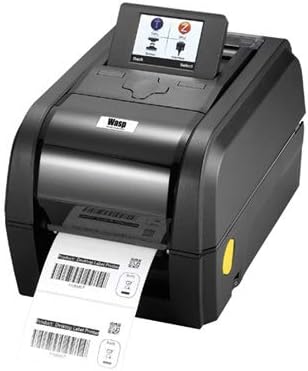
Image: The Wasp WPL308 Desktop Barcode Printer, showcasing its compact design and front-facing label output.
Sleutel kenmerke
- Up to 203 mm (8 in) per sec. print speed
- 128 MB Flash memory and 128 MB SDRAM memory
- microSD Flash memory expansion up to 32 GB
- User-friendly clamshell design
- Serial, internal Ethernet USB 2.0 & USB host interfaces standard
- 3.5 inches TFT Display
- Label capacity up to 127 mm (5 inches) OD
- Ribbon capacity up to 300 m (984 feet)
- WPL firmware for plug-n-play ease
- ENERGY STAR® gekwalifiseer
Pakketinhoud
Before beginning installation, please verify that all items are present and undamaged:
- Wasp WPL308 Barcode Printer
- 203 dpi Thermal Printhead (pre-installed)
- Kragkabel

Image: The Wasp WPL308 printer with its clamshell cover open, revealing the internal mechanism for loading a roll of labels.
Opstelgids
- Uitpak: Verwyder die drukker en alle bykomstighede versigtig uit die verpakking. Bewaar die verpakking vir toekomstige vervoer of berging.
- Kragverbinding: Connect the provided power cable to the printer's power input port and then to a suitable electrical outlet.
- Dataverbinding: Connect the printer to your computer or network using a USB, Ethernet, or Serial cable as required by your setup. Ensure the cable is securely connected to both the printer and the host device.
- Bestuurder installasie: Install the necessary printer drivers and software from the manufacturer's website or any included media. Follow the on-screen instructions for a complete installation.
- Laai media: Open the printer's clamshell cover. Load the label roll onto the media supply spindle, ensuring it feeds smoothly through the guides and under the printhead. For thermal transfer printing, install the ribbon according to the printer's internal diagrams, ensuring it is taut and correctly aligned. Close the cover securely.
Operasie
Once the printer is set up and connected, power it on. The 3.5-inch color TFT display will illuminate, showing the printer's status and menu options. Use the display and control buttons to navigate settings, perform calibrations, and monitor print jobs. Ensure your labels and ribbon (if applicable) are correctly loaded and aligned before sending print commands. Initiate print jobs from your computer application, ensuring the WPL308 is selected as the target printer.
Onderhoud
Regular maintenance is crucial for extending the life of your WPL308 printer and ensuring consistent print quality.
- Skoonmaak van drukkop: Gebruik 'n pluisvrye lap liggiesampened with isopropyl alcohol to gently wipe the printhead surface. Perform this cleaning regularly, especially after replacing a roll of labels or ribbon.
- Platen Roller Cleaning: Clean the platen roller with isopropyl alcohol to remove any adhesive or dust buildup. Rotate the roller manually to clean the entire surface.
- Algemene skoonmaak: Periodically clean the exterior and interior of the printer with a soft, dry cloth to remove dust and debris. Avoid using abrasive cleaners or solvents.
- Vervanging van voorraad: Replace label rolls and ribbons as they are depleted. Always use Wasp-approved supplies for optimal performance and to prevent damage to the printer.
Opsporing van algemene probleme
- Drukker reageer nie: Check that the power cable is securely connected and the printer is powered on. Verify that the data cable (USB, Ethernet, Serial) is properly connected to both the printer and the computer/network. Ensure printer drivers are correctly installed and updated.
- Swak drukgehalte: Clean the printhead as described in the Maintenance section. Verify that the labels and ribbon (if used) are compatible with the printer and are loaded correctly. Adjust print darkness settings if necessary.
- Etikette word nie korrek ingevoer nie: Ensure the label roll is properly seated on the media supply spindle and that labels are threaded correctly through the guides. Check for any obstructions in the label path.
- Foutboodskappe op vertoning: Refer to the printer's 3.5-inch TFT display for specific error codes or messages. Consult the Wasp support website or the full user manual for detailed explanations and solutions for each error.
Tegniese spesifikasies
| Spesifikasie | Detail |
|---|---|
| Handelsmerk | Wesp |
| Model Naam | WPL308 Barcode Printer |
| Druk tegnologie | Thermal (Direct Thermal/Thermal Transfer) |
| Maksimum drukspoed (monochroom) | 8 inches per second (203 mm/s) |
| Produk afmetings | 13.1 x 8.9 x 7.8 duim |
| Item gewig | 8.27 pond |
| Geheue berging kapasiteit | 128 MB flits, 128 MB SDRAM |
| Hardeware-koppelvlak | Ethernet, Serial Interface, USB |
| Verbindingstegnologie | Networkable, USB |
| Ingesluit komponente | 203 dpi Thermal Printhead, WPL308 Power Cable |
| Druk Media | Etikette |
| Spesiale kenmerk | Energy Star gekwalifiseer |
Waarborg en Ondersteuning
The Wasp WPL308 printer includes a 2-year manufacturer's warranty that covers material defects. For enhanced protection and coverage beyond the standard warranty, WaspProtect extended service plans are available, which can also cover accidental breakage.
For technical assistance, troubleshooting, or to inquire about warranty claims and WaspProtect plans, please contact Wasp Barcode Technologies customer service. Visit the official Wasp Barcode Technologies website for the most current support information and contact details.
Verwante Dokumente - WPL308
 |
TSC TX210 Series Desktop Barcode Printer User Manual User manual for the TSC TX210 Series desktop barcode printers, covering specifications, setup, operation, maintenance, and troubleshooting for models TX210, TX310, and TX610. Learn about features, connectivity, and best practices for efficient label printing. |
 |
3nStar LTT334: 4" Direct Thermal & Thermal Transfer Label Printer Discover the 3nStar LTT334, a 4-inch direct thermal and thermal transfer label printer offering professional printing at an affordable price. Features high speed, multiple emulations, and Bartender software. |
 |
Wasp WPL406 Industriële Termiese Etiketdrukker Gebruikershandleiding Omvattende gebruikershandleiding vir die Wasp WPL406 industriële termiese etiketdrukker. Dek produkkenmerke, spesifikasies, opstelling, werking, media- en lintinstallasie, LCD-kieslysfunksies, diagnostiek, probleemoplossing en onderhoud. |
 |
PC300T/PC310T Desktop Printer Quick Start Guide Get started quickly with your Honeywell PC300T/PC310T desktop printer. This guide covers setup, operation, and basic troubleshooting for thermal transfer and direct thermal printing. |
 |
E1000 Handheld Etiketmaker Gebruikersgids Omvattende gebruikersgids vir die E1000 hand-etiketmaker, wat inligting oor werking, kenmerke, probleemoplossing en waarborginligting dek. Leer hoe om verskeie etikettipes te skep, strepieskodes te druk en jou toestel te onderhou. |
 |
TSC MH261 Series User Manual: Industrial Barcode Printer Explore the TSC MH261 Series industrial barcode printers (MH261T, MH361T) with this comprehensive user manual. Learn about setup, operation, specifications, and maintenance for high-performance thermal transfer and direct thermal printing solutions. |
Ask a question about this manual
Ask about setup, troubleshooting, compatibility, parts, safety, or missing instructions. Manuals+ will review the question and use this page’s manual context to help answer it.