
OJ Electronics UDG-4999
OJ Microline UTN4-4999 Nie-programmeerbare termostaat gebruikershandleiding
Model: UDG-4999 | Brand: OJ Electronics
1. Inleiding
This manual provides detailed instructions for the installation, operation, and maintenance of your OJ Microline UTN4-4999 (Model UDG-4999) Non-Programmable Thermostat. This thermostat is designed for electric radiant floor heating systems and features dual sensing (air and floor) and dual voltage capabilities (120V & 240V). It includes a built-in Class A GFCI for enhanced safety.
The OJ Microline UTN4-4999 offers straightforward temperature control without complex programming, making it ideal for users seeking a simple and effective solution for their floor heating needs.

Figuur 1: Voorkant view of the OJ Microline UTN4-4999 Non-Programmable Thermostat, displaying time and temperature.
2. Veiligheidsinligting
Belangrike veiligheidsinstruksies:
- Elektriese gevaar: Installation must be performed by a qualified electrician in accordance with local and national electrical codes. Disconnect power at the circuit breaker before installation or servicing.
- Grondfoutstroombaanonderbreker (GFCI): This thermostat includes a built-in Class A GFCI, which is required for all underfloor heating systems. Test the GFCI regularly as per local codes and manufacturer recommendations.
- Voltage Verenigbaarheid: Maak seker dat die termostaat se volumetage (120V or 240V) matches your heating system's voltage.
- vloersensor: The included floor sensor must be properly installed to prevent overheating and ensure accurate temperature control.
- Moenie onderdompel nie the thermostat or sensor in water.
- Moenie opereer nie the thermostat with damaged wiring or if it has been dropped or damaged.

Figure 2: The OJ Microline thermostat installed in a bathroom, highlighting its sleek design and integration.
3. Opstelling en Installasie
Installation of the OJ Microline UTN4-4999 thermostat requires adherence to electrical safety standards. It is recommended that a qualified electrician performs the installation.
3.1 Kontrolelys voor die installasie
- Verify that the power supply to the heating system is disconnected at the main circuit breaker.
- Bevestig die voltage of your heating system (120V or 240V) matches the thermostat's capabilities.
- Ensure you have all necessary tools: screwdriver, wire strippers, electrical tape, etc.
- Locate a suitable wall box for mounting the thermostat.
3.2 Bedradingsdiagram
Refer to the wiring diagram below for proper connection. All connections must be secure and comply with local electrical codes.
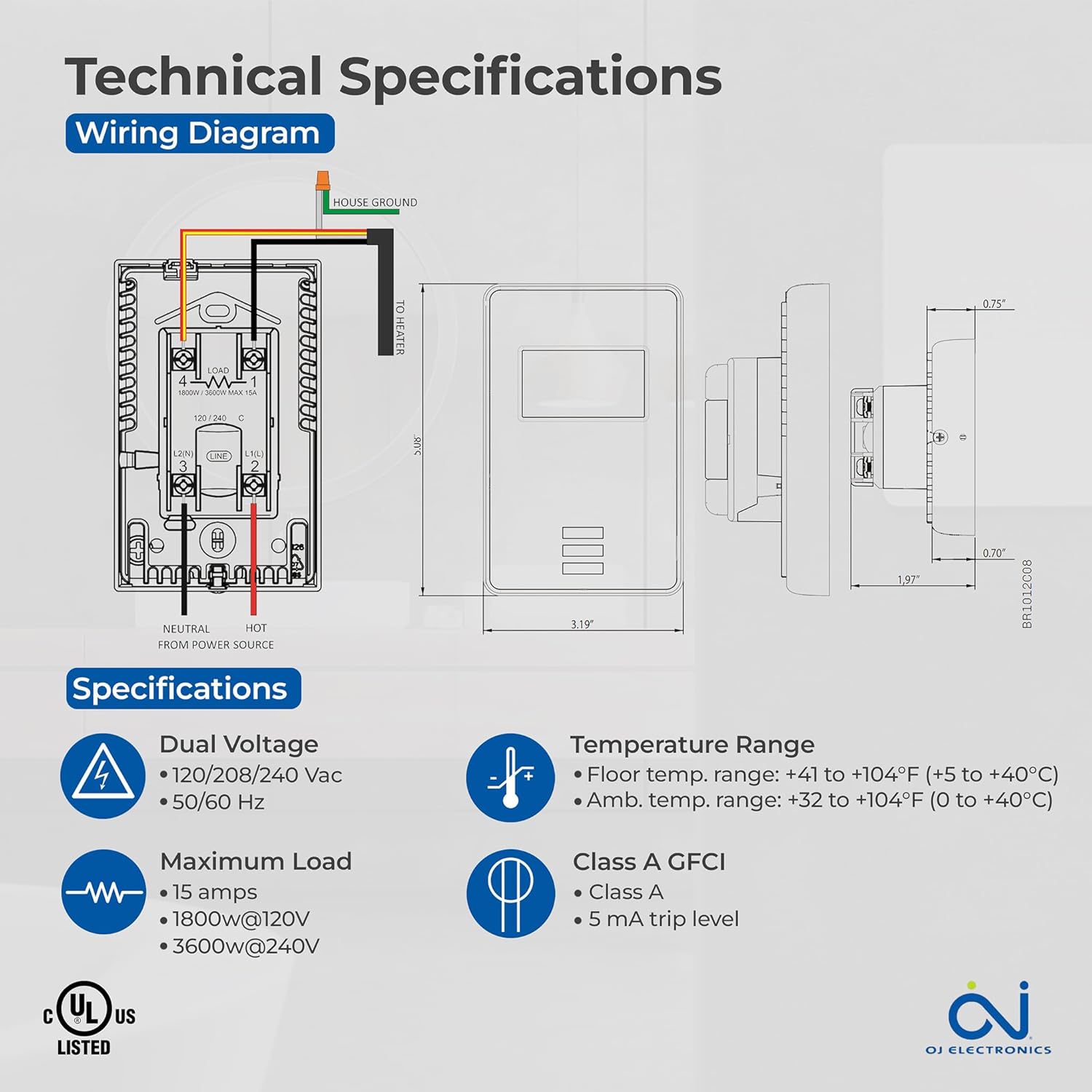
Figure 3: Detailed wiring diagram and technical specifications for the thermostat. Shows connections for House Ground, Neutral, Hot from Power Source, and To Heater.
3.3 Floor Sensor Installation
The 10Kohm floor sensor is included and essential for floor temperature control and protection. Install the sensor cable in a conduit or directly within the floor heating system, ensuring it is positioned centrally between heating elements for accurate readings. Do not cut or splice the sensor cable unless specifically instructed by the heating system manufacturer.

Figure 4: The included OJ Microline floor sensor, a black cable with a small probe at the end.
3.4 Montering van die termostaat
- After wiring, carefully push the thermostat into the wall box.
- Secure the thermostat to the wall box using the provided screws.
- Heg die voorplaat aan.
- Herstel krag by die stroombreker.
4. Operasie
The OJ Microline UTN4-4999 is a non-programmable thermostat designed for simple and direct temperature control.
4.1 Aanpassing van temperatuur
To adjust the desired temperature (setpoint), use the Up en Af arrow buttons located below the display. The display will show the current temperature and the setpoint. The heating system will activate or deactivate to maintain the setpoint.

Figure 5: A hand interacting with the thermostat's buttons to adjust the temperature setting.
4.2 Beheermodusse
The thermostat offers three control modes, selectable based on your heating requirements and floor type:
- (A) Ambient temperature with Floor protection: The thermostat controls based on the room's air temperature, but will limit the floor temperature to prevent overheating, especially important for sensitive floor coverings like laminate or engineered wood.
- (B) Floor temperature with Floor protection: The thermostat controls directly based on the floor sensor reading, also with an upper limit for floor protection. This mode is ideal for maintaining a consistent floor surface temperature.
- (C) Ambient temperature without Floor protection: The thermostat controls solely based on the room's air temperature, without an upper limit on floor temperature. Use this mode only if your floor covering can withstand high temperatures.
Consult your heating system installer or the thermostat's advanced settings (if available, refer to the full technical manual for details) to select the appropriate control mode.
5. Onderhoud
The OJ Microline UTN4-4999 thermostat is designed for minimal maintenance.
- Skoonmaak: Wipe the thermostat's surface with a soft, damp cloth. Do not use abrasive cleaners, solvents, or chemical sprays, as these can damage the display or casing.
- GFCI toets: Regularly test the built-in GFCI as per local electrical codes, typically monthly. Press the "TEST" button on the thermostat. The display should indicate a trip, and the heating will turn off. Press the "RESET" button to restore normal operation. If the GFCI does not trip or reset, contact a qualified electrician.
- Inspeksie: Periodically inspect the thermostat and wiring for any signs of damage or loose connections. If any issues are found, disconnect power and consult a qualified electrician.
6. Probleemoplossing
As jy probleme met jou termostaat ondervind, raadpleeg die volgende algemene probleme en oplossings:
| Probleem | Moontlike oorsaak | Oplossing |
|---|---|---|
| Termostaatskerm is leeg. | Geen krag na die termostaat nie. | Check the circuit breaker. Ensure all wiring connections are secure. |
| Heating system not turning on. | Setpoint is below ambient/floor temperature; GFCI tripped; wiring issue. | Increase setpoint. Check and reset GFCI. Verify wiring connections. |
| GFCI skakel gereeld af. | Ground fault in heating cable or wiring. | Immediately disconnect power and consult a qualified electrician to diagnose the ground fault. |
| Onakkurate temperatuurlesing. | Improper sensor placement; sensor damage; air drafts. | Ensure sensor is correctly placed. Inspect sensor for damage. Minimize drafts near the thermostat. |
If the problem persists after attempting these solutions, contact customer support or a qualified electrician.
7. Spesifikasies
| Kenmerk | Detail |
|---|---|
| Modelnommer | UDG-4999 |
| Handelsmerk | OJ Electronics |
| Tipe beheerder | Termostaat |
| Styl | Nie programmeerbaar nie |
| Voltage | 120V, 208V, 240V AC (Dual Voltage) |
| Maksimum vrag | 15A (1800W @ 120V, 3600W @ 240V) |
| Frekwensie | 50/60 Hz |
| GFCI | Built-in Class A (5 mA trip level) |
| Sensors | Built-in Air Sensor, 10Kohm Floor Sensor (included) |
| Floor Limit Range | +41 tot +104°F (+5 tot +40°C) |
| Omgewingstemperatuurreeks | +32 tot +104°F (0 tot +40°C) |
| Tipe vertoon | Digital with Backlight |
| Beheer metode | Knoppiebeheer (aanraking) |
| Montage tipe | Muurmontering |
| Voldoening | c UL us Listed for USA and Canada |
| Afmetings | 6 x 3.5 x 2.75 duim (Pakket) |
| Item gewig | 16 onse (1 pond) |

Figure 6: Key features of the thermostat including energy efficiency, simple operation, dual sensing, and built-in GFCI.
8. Waarborginligting
The OJ Microline UTN4-4999 Thermostat comes with a manufacturer's limited 3 jaar waarborgHierdie waarborg dek defekte in materiaal en vakmanskap onder normale gebruik en diens. Bewaar asseblief u bewys van aankoop vir waarborgeise.
For detailed warranty terms and conditions, please refer to the documentation included with your product or visit the OJ Electronics official webwebwerf.
9. Kliëntediens
For technical assistance, troubleshooting beyond this manual, or warranty inquiries, please contact OJ Electronics customer support.
- Aanlyn ondersteuning: Visit the official OJ Electronics webwebwerf vir algemene vrae, bykomende hulpbronne en kontakvorms.
- E-pos ondersteuning: Verwys na u produkverpakking of die amptelike webwebwerf vir spesifieke e-posadresse.
- Telefoonondersteuning: Verwys na u produkverpakking of die amptelike webwebwerf vir kliëntediens telefoonnommers.
When contacting support, please have your product model number (UDG-4999) and purchase date available.
Ask a question about this manual
Ask about setup, troubleshooting, compatibility, parts, safety, or missing instructions. Manuals+ will review the question and use this page’s manual context to help answer it.