
1. Inleiding
The ScopeAround MS450 Digital Otoscope Ear Camera is designed to provide a clear and detailed view of the ear canal and eardrum. This device features a 4.5-inch IPS screen, a high-definition camera with adjustable LED lights, and an intelligent gyroscope for image stabilization. It is intended for personal ear inspection and can assist in monitoring ear health. This manual provides essential information for the safe and effective use of your otoscope.
2. Veiligheidsinligting
- Do not insert the otoscope too deeply into the ear canal. Excessive insertion can cause injury to the eardrum or inner ear structures.
- Always use the provided ear specula to prevent over-insertion and protect the ear canal.
- Clean the camera lens and ear specula thoroughly before and after each use with alcohol wipes to prevent infection.
- This device is for observation and minor earwax removal only. For significant earwax impaction or ear infections, consult a medical professional.
- Hou die toestel buite bereik van kinders. Volwasse toesig is nodig indien dit op kinders gebruik word.
- Avoid using the device if you experience pain, discomfort, or bleeding during examination. Seek medical attention immediately.
- Moenie probeer om die toestel uitmekaar te haal of te wysig nie. Dit kan die waarborg ongeldig maak en veiligheidsrisiko's inhou.
3. Pakketinhoud
Verifieer dat alle items in die pakket teenwoordig is:
- MS450 Otoscope Camera Unit
- Laaikabel (USB Tipe-C)
- Gebruikershandleiding
- 4 x Silicone Ear Spoons (various types)
- 3 x Ear Specula (protective cones)
- 1 Pack of Alcohol Prep Pads
- 32GB MicroSD Memory Card (pre-installed or included separately)

4. Produk verbyview
The MS450 otoscope consists of a main display unit and a connected camera probe. Familiarize yourself with the components and controls:

- Vertooneenheid: Features a 4.5-inch IPS screen for real-time viewing.
- Kameraondersoek: Equipped with an HD camera, 6 adjustable LED lights, and a gyroscope.
- Beheerknoppies: Power, Photo/Video, Light Control, Mode Switch, Navigation (Up/Down), OK, and Settings.
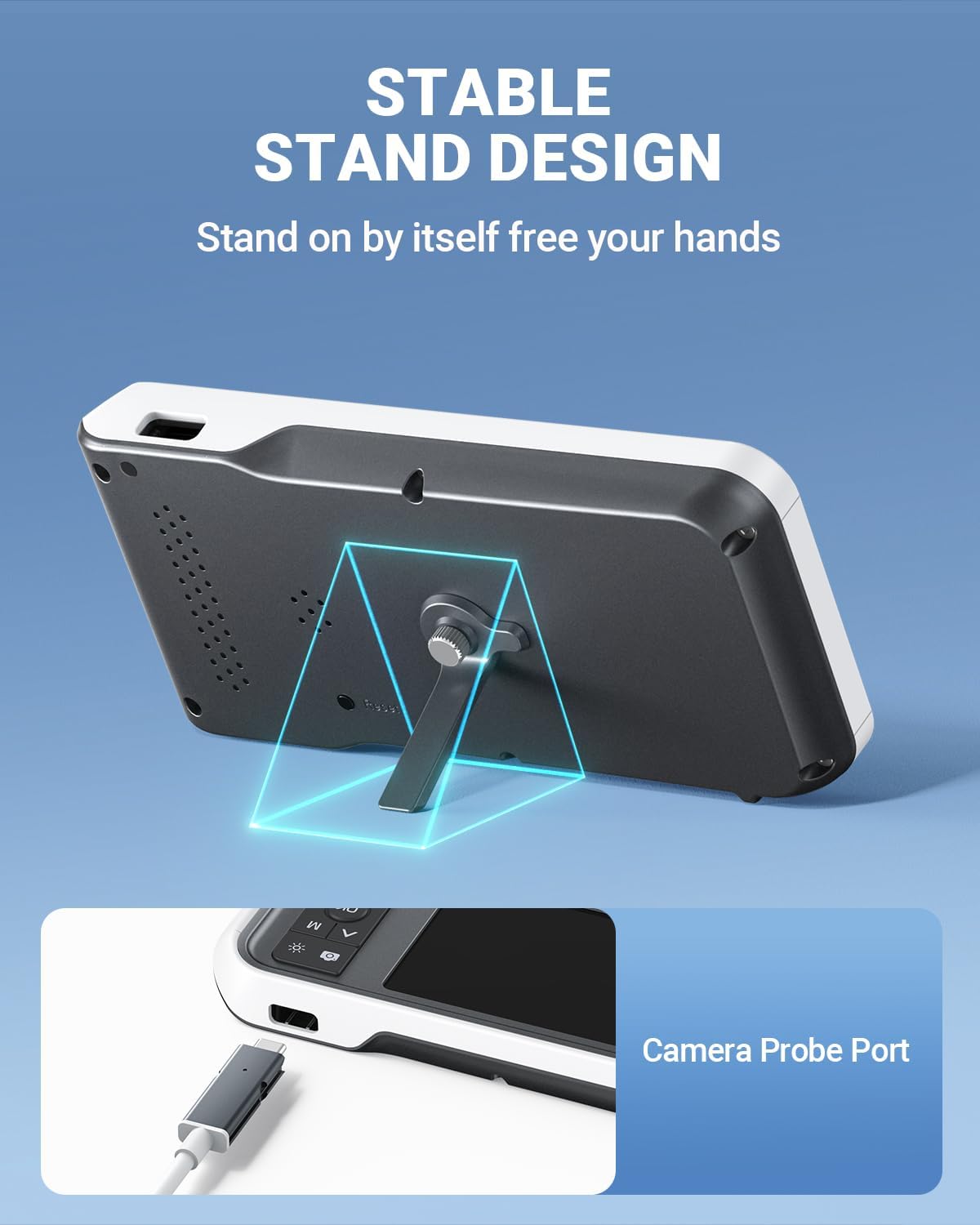
- Poorte: USB Type-C Charging Port, TF Card Slot, Camera Probe Connector.
- Geïntegreerde Staanplek: Allows for hands-free operation.
5. Opstelling
- Laai die toestel: Before first use, fully charge the otoscope using the provided USB Type-C cable and a compatible power adapter (not included). The charging port is located on the side of the display unit. A full charge provides over 4 hours of continuous use.
- Voeg MicroSD-kaart in: Ensure the 32GB MicroSD card is properly inserted into the TF Card Slot. This card is used to store photos and videos.
- Heg kamerasonde aan: Connect the camera probe cable securely to the Camera Probe Connector on the display unit.
- Select and Attach Specula/Ear Spoon: Choose an appropriate ear speculum (protective cone) or silicone ear spoon. Gently push it onto the tip of the camera probe until it is secure. Always use a speculum to protect the ear canal.


6. Bedryfsinstruksies
- Krag aan: Press and hold the Power Button (blue button) for a few seconds until the screen turns on.
- Pas LED-helderheid aan: Use the Light Control Button (sun icon) to cycle through 3 levels of LED brightness to achieve optimal illumination for your ear canal.
- Posisionering: Gently insert the camera probe into the ear canal. The 4.5-inch IPS screen will display a real-time view. The intelligent directional gyroscope helps stabilize the image, preventing disorientation.
- Handvrye werking: Utilize the integrated stand on the back of the display unit to position the device on a flat surface, allowing for hands-free viewing and easier manipulation of the probe.
- Capture Photos/Videos:
- Press the Mode Switch Button (M) to switch between photo and video modes.
- In photo mode, press the Photo/Video Button (camera icon) once to take a picture.
- In video mode, press the Photo/Video Button once to start recording, and press again to stop.
- Review Media: Use the navigation buttons (Up/Down) to browse captured photos and videos. Press the OK button to view 'n geselekteerde item.
- Data-oordrag: Connect the device to a computer using the USB Type-C cable to transfer photos and videos from the MicroSD card. Alternatively, remove the MicroSD card and insert it into a card reader.
- Skakel af: Press and hold the Power Button until the screen turns off.

7. Onderhoud
- Skoonmaak van die kameralens: After each use, gently wipe the camera lens with an alcohol prep pad or a soft, dry cloth. Ensure no residue remains.
- Cleaning Ear Spoons/Specula: Wash reusable ear spoons and specula with soap and water, then sterilize with alcohol prep pads. Replace disposable specula after each use.
- Toestel skoonmaak: Wipe the main unit with a soft, dry cloth. Do not immerse the main unit in water. The camera probe is waterproof and can be cleaned with water and alcohol.
- Berging: Store the otoscope in a clean, dry place at room temperature, away from direct sunlight and extreme temperatures.
- Batterysorg: Om die batterylewe te verleng, vermy om die toestel gereeld heeltemal te ontlaai. Laai dit gereeld, selfs al word dit nie vir lang tye gebruik nie.

8. Probleemoplossing
| Probleem | Moontlike oorsaak | Oplossing |
|---|---|---|
| Toestel skakel nie aan nie. | Lae battery; toestel gevries. | Charge the device fully. If unresponsive, press the Reset button with a pin. |
| Geen beeld op die skerm nie. | Camera probe not connected; faulty probe. | Ensure camera probe is securely connected. If problem persists, contact support. |
| Beeld is vaag. | Dirty lens; incorrect focal distance. | Clean the camera lens. Ensure the probe is within the optimal focal distance (approx. 1 inch / 2.5 cm). |
| Kan nie foto's/video's neem nie. | MicroSD card full or not inserted; incorrect mode. | Check MicroSD card status and ensure it is inserted. Verify device is in photo or video mode. |
| LED-ligte werk nie. | Lights turned off or set to lowest brightness. | Press the Light Control Button to adjust brightness levels. |
9. Spesifikasies
- Model: MS450
- Vertoon: 4.5-duim IPS-skerm
- Kamera resolusie: Full HD (1080P for images, 720P for video)
- Ligbron: 6 adjustable LED lights (3 brightness levels)
- Battery: 2500mAh Litiumpolimeer (herlaaibaar)
- Batterylewe: Ongeveer 4 uur se deurlopende gebruik
- Berging: 32GB MicroSD Card (included)
- Brandpuntsafstand: Approximately 1 inch (2.5 cm)
- Gyroscoop: Intelligent directional gyroscope for image stabilization
- Verbinding: USB Type-C for charging and data transfer
- Produk afmetings: 5.9 x 2.9 x 0.79 duim
- Item gewig: 12 onse
- Materiaal: Glass (lens), other components as specified by manufacturer
10. Waarborg
ScopeAround products are covered by a limited manufacturer's warranty against defects in materials and workmanship. Please refer to the warranty card included in your package or visit the official ScopeAround webwebwerf vir gedetailleerde waarborgbepalings en -voorwaardes. Bewaar u bewys van aankoop vir waarborgeise.
11. Ondersteuning
For technical assistance, troubleshooting, or product inquiries, please contact ScopeAround customer support:
- Webwebwerf: Visit the official ScopeAround webwebwerf vir algemene vrae en ondersteuningsbronne.
- E-pos: Verwys na u produkverpakking of die amptelike webwebwerf vir kliëntediens-e-pos.
- Telefoon: Verwys na u produkverpakking of die amptelike webwebwerf vir kliëntediens telefoonnommer.
Our US-based after-sales support team is available to assist you.