
1. Inleiding
Thank you for choosing the Xiaomi Mi 55-inch 4K UHD Smart Android TV. This manual provides essential information for the safe and efficient use of your television. Please read it thoroughly before operating the device and retain it for future reference.

Beeld 1.1: Voorkant view of the Xiaomi Mi 55-inch 4K UHD Smart Android TV.
2. Veiligheidsinligting
Om veilige werking te verseker en skade te voorkom, neem die volgende voorsorgmaatreëls:
- Moenie die TV aan reën of vog blootstel nie.
- Moenie ventilasie-openinge blokkeer nie.
- Verseker behoorlike aarding vir die kragprop.
- Vermy die plasing van die TV op onstabiele oppervlaktes.
- Hou die TV weg van direkte sonlig, hittebronne en oop vlamme.
- Ontkoppel die TV tydens weerligstorms of wanneer dit vir lang tye nie gebruik word nie.
- Verwys alle diens na gekwalifiseerde dienspersoneel.
3. Pakketinhoud
Verifieer dat alle items in die pakket teenwoordig is:
- 1 × Xiaomi Mi 55-inch TV
- 1 × Remote control with voice control
- 1 × Remote control batteries
- 1 × Kragkabel
- 1 × User manual (this document)
- 1 × Support legs
- 4 × Screws for support legs
4. Opstelling
4.1. Fisiese installasie
Your TV can be installed on a stand or wall-mounted. The TV is VESA mounting standard compatible.
4.1.1. Staaninstallasie
- Plaas die TV versigtig met die gesig na onder op 'n sagte, plat oppervlak om skermskade te voorkom.
- Attach the support legs to the designated slots at the bottom of the TV using the provided screws. Ensure they are securely fastened.
- Plaas die TV op 'n stabiele, gelyk oppervlak.
4.1.2. Muurbevestiging (Opsioneel)
If you choose to wall-mount your TV, use a VESA-compatible wall mount kit (sold separately) and follow the instructions provided with the wall mount. Ensure the wall can support the weight of the TV.
4.2. Aansluiting van randapparatuur
Koppel jou eksterne toestelle aan die TV se poorte:
- HDMI: Connect Blu-ray players, game consoles, or set-top boxes to the HDMI ports (3 available). HDMI ARC is supported for audio return channel functionality.
- USB: Koppel USB-bergingstoestelle vir mediaterugspeel (2 beskikbaar).
- LAN: Vir 'n bedrade internetverbinding, koppel 'n Ethernet-kabel aan die LAN-poort.
- Digitale klankuitvoer (opties): Connect to an external audio system for high-quality digital sound.
4.3. Aanvanklike aanskakeling
- Koppel die kragkabel aan die TV en dan aan 'n kragpunt.
- Druk die aan/uit-knoppie op die afstandbeheerder of op die TV.
- Volg die instruksies op die skerm om die aanvanklike opstelling te voltooi, insluitend taalkeuse, netwerkverbinding (Wi-Fi of Ethernet) en aanmelding by Google-rekening.
5. Bedryfsinstruksies
5.1. Afstandbeheer
The included remote control allows you to navigate the TV's features. It supports voice control for convenient interaction with Google Assistant.
- Kragknoppie: Skakel die TV aan of af.
- Navigasie-knoppie (Op/Af/Links/Regs/OK): Navigeer deur spyskaarte en kies opsies.
- Volume knoppies: Pas die klankvlak aan.
- Kanaalknoppies: Verander TV-kanale.
- Google Assistent-knoppie: Aktiveer stembeheer.
- Tuisknoppie: Keer terug na die Android TV-tuisskerm.
- Terug-knoppie: Keer terug na die vorige skerm.
- App-knoppies: Dedicated buttons for popular apps like Netflix and YouTube.
5.2. Slim-TV-funksies (Android TV)
Your TV runs on Android TV (version 9), providing access to a wide range of smart features:
- Google Assistent: Gebruik stemopdragte om inhoud te soek, slimhuistoestelle te beheer en inligting te kry.
- Google Play Winkel: Download and install various apps, games, and streaming services.
- Ingeboude Chromecast: Saai inhoud direk vanaf jou slimfoon, tablet of rekenaar na die TV uit.
- Vooraf geïnstalleerde toepassings: Access Netflix, YouTube, and a web blaaier direk.
- SmartThings App Support: Integrate with other compatible smart home devices.
5.3. Beeld- en klankinstellings
Pas beeld- en klankinstellings aan om jou viewondervinding:
- Prentmodusse: Select from various presets (e.g., Standard, Vivid, Movie, Game) or customize brightness, contrast, color, and sharpness.
- HDR: The TV supports HDR for enhanced contrast and color with compatible content.
- Klankmodusse: Kies uit voorafinstellings soos Standaard, Musiek, Fliek, of pasmaak gelykmakerinstellings.
- DTS/Dolby Audio: The TV supports DTS and Dolby audio technologies for immersive sound.
6. Onderhoud
6.1. Skoonmaak
To clean your TV:
- Ontkoppel altyd die TV voordat u skoonmaak.
- Gebruik 'n sagte, droë lap om die skerm en kas af te vee.
- Vir hardnekkige merke, liggiesampMaak die lap skoon met water of 'n gespesialiseerde skermreiniger. Moet nooit die skoonmaakmiddel direk op die skerm spuit nie.
- Vermy die gebruik van skuur skoonmakers of oplosmiddels.
6.2. Sagteware-opdaterings
Periodically check for software updates to ensure your TV has the latest features and performance improvements. Updates can usually be found in the TV's settings menu under 'About' or 'System Update'.
7. Probleemoplossing
Indien u probleme ondervind, verwys na die volgende algemene probleme en oplossings:
| Probleem | Moontlike Oplossing |
|---|---|
| Geen krag nie | Check if the power cable is securely connected and the power outlet is working. Try a different outlet. |
| Geen beeld nie, maar klank is teenwoordig | Maak seker dat die korrekte invoerbron gekies is. Kontroleer kabelverbindings na eksterne toestelle. |
| Geen klank nie, maar beeld is teenwoordig | Kontroleer volumevlak en demp-instellings. Verifieer oudiokabelverbindings. Indien eksterne oudio gebruik word, maak seker dat dit aangeskakel en korrek gekonfigureer is. |
| Afstandbeheer werk nie | Replace batteries. Ensure there are no obstructions between the remote and the TV. Re-pair the remote if it's a Bluetooth remote. |
| Kan nie aan Wi-Fi koppel nie | Check if the Wi-Fi router is on and working. Re-enter the Wi-Fi password. Try restarting the TV and router. |
| Programme is stadig of stort vas | Close unused apps. Clear app cache. Restart the TV. Ensure sufficient internet speed. |
As die probleem voortduur, kontak kliëntediens.
8. Spesifikasies
| Kenmerk | Detail |
|---|---|
| Modelnommer | L55M5-5ASP |
| Skerm grootte | 55 duim |
| Vertoon tegnologie | LED |
| Resolusie | 3840 x 2160 (4K UHD) |
| Herlaaitempo | 60Hz |
| Viewing Hoek | 178 grade |
| Video-kenmerke | HDR ondersteuning |
| Bedryfstelsel | Android TV (Android 9) |
| RAM | 2 GB |
| Berging kapasiteit | 8 GB |
| Oudio-uitset | 2 x 10W-luidsprekers |
| Oudiotegnologieë | DTS/Dolby Audio |
| Slim kenmerke | Google Assistant, Google Play, Web Browser, SmartThings app support, YouTube, Netflix (subscription not included), Chromecast built-in, DVB-T2 + DVB-C tuner |
| Konnektiwiteit | 3 x HDMI (with ARC), 2 x USB, 1 x LAN (Ethernet 100Mbps), 1 x Digital Optical Audio Out, Built-in Wi-Fi (2.4G/5G), Bluetooth 4.2 |
| Aspekverhouding | 16:9 |
| Monteringsstandaard | VESA-versoenbaar |
| Produkafmetings (B x D x H) | 124.2 x 24.5 x 78 cm (met staander) |
| Produk Gewig | 13 kg |
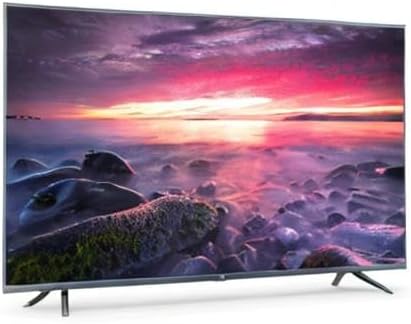
Image 8.1: Energy efficiency label for the Xiaomi Mi 55-inch TV.
9. Waarborg en Ondersteuning
Vir waarborginligting, verwys asseblief na die waarborgkaart wat by u produk ingesluit is of besoek die amptelike Xiaomi-webwerf. webwebwerf vir jou streek. Bewaar jou aankoopbewys as bewys van aankoop.
For technical support, troubleshooting assistance beyond this manual, or service inquiries, please contact Xiaomi customer service through their official channels.