
Inleiding
Dankie vir die aankoopasing the LEXiBOOK Cyber Arcade Mini Handheld Game Console. This manual provides essential information for the safe and efficient use of your device. Please read it thoroughly before operation and retain it for future reference.

Beeld: Voorkant view of the LEXiBOOK Cyber Arcade Mini handheld game console, showing the screen, directional pad, and action buttons.
Pakketinhoud
- 1 x LEXiBOOK Cyber Arcade Mini Handheld Game Console (Model JL1890)
- 1 x Gebruikershandleiding

Image: The LEXiBOOK Cyber Arcade Mini handheld game console in its retail packaging, highlighting the "8-in-1" games and 1.8" LCD screen.
Opstelling
1. Battery Installasie
The LEXiBOOK Cyber Arcade Mini requires 3 x LR03/AAA alkaline batteries (not included) for operation.
- Locate the battery compartment cover on the back of the console.
- Using a small screwdriver, carefully unscrew the battery compartment cover.
- Insert 3 new LR03/AAA alkaline batteries, ensuring correct polarity (+/-).
- Plaas die deksel van die batterykompartement terug en maak dit met die skroef vas.
Belangrik: Do not mix old and new batteries. Do not mix alkaline, standard (carbon-zinc), or rechargeable (nickel-cadmium) batteries. Remove batteries if the device will not be used for an extended period.
Bedryfsinstruksies
1. Skakel aan/af
- To power on the console, press the Kragknoppie (usually marked with a circle and a vertical line) located on the top left of the console.
- To power off the console, press and hold the Kragknoppie totdat die skerm afskakel.
2. Spelkeuse
- Once powered on, the main menu will display a list of available games.
- Gebruik die Rigtingblok (D-pad) on the left side of the console to navigate through the game list.
- Druk die START-knoppie or a designated action button (e.g., 'A' or 'B') to select and launch a game.
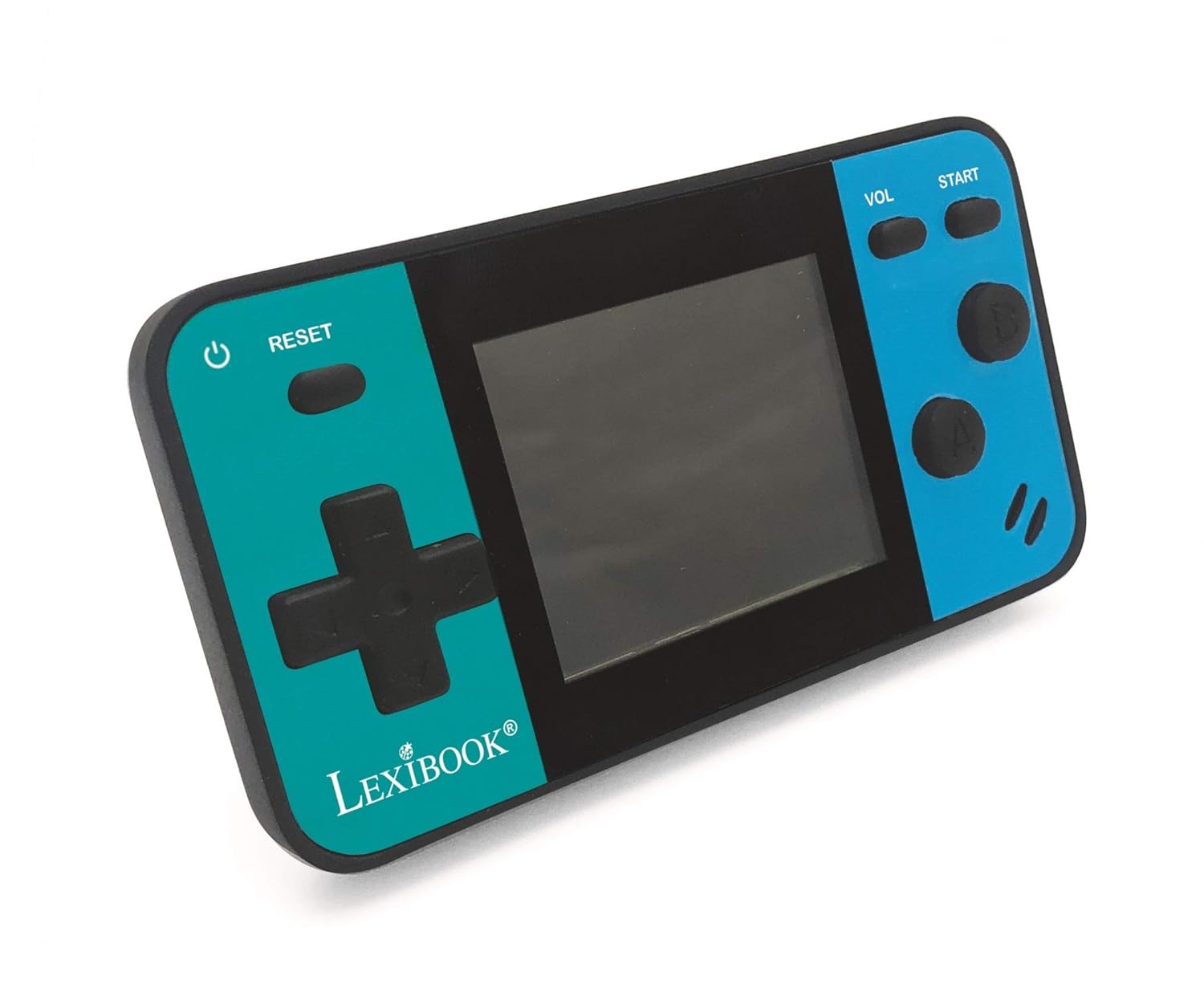
Image: A person holding the LEXiBOOK Cyber Arcade Mini, actively playing one of the built-in games on its 1.8-inch color LCD screen.
3. Spelkontroles
- Rigtingpad (D-pad): Used for movement and navigation within games.
- Action Buttons (A, B, etc.): Used for jumping, shooting, interacting, and other in-game actions. Specific functions vary by game.
- START-knoppie: Typically used to start games, pause, or confirm selections.
- VOL-knoppie: Pas die volumevlak van die ingeboude luidspreker aan.
- RESET-knoppie: Resets the current game or returns to the main menu.
4. Volume aanpassing
Druk die VOL knoppie repeatedly to cycle through different volume levels or mute the sound.
Onderhoud
- Keep the console dry. Avoid exposure to moisture or liquids.
- Clean the console with a soft, dry cloth. Do not use abrasive cleaners or solvents.
- Bêre die konsole op 'n koel, droë plek weg van direkte sonlig en uiterste temperature.
- Do not attempt to disassemble or modify the console, as this will void the warranty and may cause damage.
Probleemoplossing
| Probleem | Moontlike oorsaak | Oplossing |
|---|---|---|
| Konsole skakel nie aan nie. | Batterye is leeg of verkeerd geïnstalleer. | Replace batteries with new LR03/AAA alkaline batteries, ensuring correct polarity. |
| Die skerm is leeg of flikker. | Lae batterykrag; interne verbindingsprobleem. | Vervang batterye. Indien die probleem voortduur, kontak kliëntediens. |
| Geen geluid of lae volume nie. | Die volume is gedemp of te laag gestel. | Druk die VOL knoppie to increase volume or unmute. |
| Die spel vries of stort vas. | Sagtewarefout. | Druk die RESET-knoppie to restart the game or return to the main menu. If frequent, replace batteries. |
Spesifikasies
- Model: JL1890
- Skerm: 1.8" (4.5 cm) Color LCD
- Speletjies: 8 built-in games (8-bit graphics)
- Kragtoevoer: 3 x LR03/AAA batteries (not included)
- Afmetings: Ongeveer 3.7 x 2.01 x 0.91 duim (9.4 x 5.1 x 2.3 cm)
- Gewig: Ongeveer 0.08 kg (0.18 lbs)
- Materiaal: Plastiek
- Aanbevole ouderdom: 3+ jaar
Waarborg en Ondersteuning
Vir waarborginligting of tegniese ondersteuning, verwys asseblief na die kontakbesonderhede wat op die produkverpakking verskaf word of besoek die amptelike LEXiBOOK-webwerf. webwebwerf. Bewaar u aankoopbewys as bewys van aankoop.
Aanlyn ondersteuning: www.lexibook.com