
1. Produk verbyview
The Baseus W09 TWS Wireless Earphones (Model: Encok W09) are designed for convenient audio playback and communication. These in-ear earphones feature touch control and connect wirelessly via Bluetooth, offering a stereo bass sound experience.

Image 1: The Baseus W09 TWS Wireless Earphones securely placed within their charging case. The case is open, revealing both earbuds.
2. Opstelling
2.1 Laai die oorfone en houer
Before initial use, ensure both the earphones and the charging case are fully charged. The charging case contains a built-in Lithium Ion battery.
- Plaas die oorfone in die laaikas.
- Connect the charging case to a power source using a compatible charging cable (not specified, assume USB).
- 'n Volle lading neem gewoonlik ongeveer 1.5 uur.
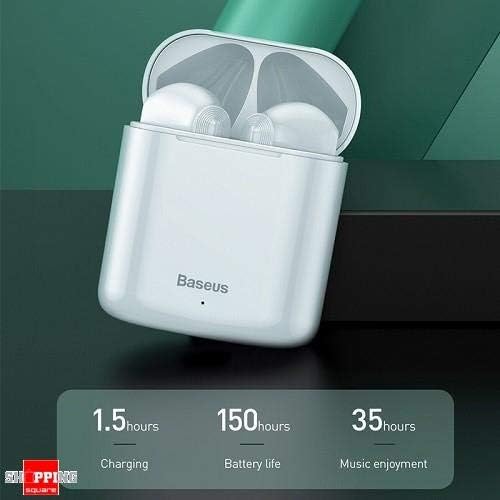
Image 2: The Baseus W09 charging case, illustrating its charging time of 1.5 hours, a standby battery life of 150 hours, and 35 hours of music enjoyment.
2.2 Bluetooth -koppeling
The Baseus W09 earphones are designed for quick and instant connection.
- Maak seker dat die oorfone gelaai is.
- Maak die laaikas oop.
- Verwyder die oorfone uit die laaikas. Hulle sal outomaties in paringsmodus gaan.
- Aktiveer Bluetooth op jou toestel (slimfoon, tablet, ens.) en soek vir beskikbare toestelle.
- Select "Baseus Encok W09" or a similar name from the list to connect.
- Sodra dit gekoppel is, sal jy 'n klankprompt hoor, en die oorfone sal gereed wees vir gebruik.

Image 3: A hand demonstrating the "Pick up and Connect" feature, showing an earphone being removed from its charging case, initiating quick Bluetooth connection.
3. Bedryfsinstruksies
3.1 Dra van die oorfone
Gently insert each earphone into the corresponding ear canal (L for left, R for right). Adjust them for a comfortable and secure fit to ensure optimal sound quality and stability.
3.2 Aanraakbeheerfunksies
The Baseus W09 earphones feature intelligent touch controls for various functions. Specific gestures may vary; please refer to the product packaging or the official Baseus website for detailed touch control instructions.
- Speel/pouse: Typically a single tap on either earphone.
- Beantwoord/beëindig oproep: Usually a single tap during an incoming call.
- Volgende / vorige snit: Often a double or triple tap on a specific earphone.
- Aktiveer stemassistent: May involve a long press or specific tap sequence.
3.3 Batterylewe
The Baseus W09 earphones and charging case offer extended usage times:
- Music Enjoyment: Up to 35 hours (with charging case).
- Bystandtyd: Tot 150 uur.
4. Onderhoud
4.1 Skoonmaak
- Gebruik 'n sagte, droë, pluisvrye lap om die oorfone en laaikas skoon te maak.
- Moenie skuurmiddels, alkohol of chemiese oplosmiddels gebruik nie.
- Ensure no moisture enters the earphone speakers or charging ports.
4.2 Berging
- Wanneer dit nie gebruik word nie, bêre die oorfone in hul laaikassie om hulle te beskerm en gelaai te hou.
- Berg in 'n koel, droë plek weg van direkte sonlig en uiterste temperature.
5. Probleemoplossing
If you encounter issues with your Baseus W09 earphones, try the following steps:
- Geen klank: Ensure earphones are charged, connected to your device, and volume is up on both the earphones and your device.
- Kan nie koppel nie: Maak seker dat Bluetooth op jou toestel geaktiveer is en dat die oorfone in paringsmodus is. Probeer om Bluetooth op jou toestel af en weer aan te skakel.
- Intermitterende verbinding: Ensure there are no obstructions between the earphones and your device. Try moving closer to your device.
- Laai kwessies: Check the charging cable and power adapter. Ensure the charging contacts on the earphones and case are clean.
- Herstel: If issues persist, try resetting the earphones. Refer to the official Baseus website or product packaging for specific reset instructions.
6. Spesifikasies
| Kenmerk | Detail |
|---|---|
| Handelsmerk | Baseus |
| Modelnommer | Encok W09 |
| Tik | In Oor |
| Verbindingstegnologie | Draadloos (Bluetooth) |
| Beheer metode | Raak |
| Mikrofoon Ingesluit | Ja |
| Geraasonderdrukking | Nee |
| Battery Tipe | Litiumioon (ingesluit) |
| Laai tyd | Ongeveer. 1.5 uur |
| Music Enjoyment Time | Tot 35 uur (met laadkas) |
| Bystandtyd | Tot 150 uur |
| Versoenbaar met | Alle Bluetooth-geaktiveerde toestelle |
| Kleur | Wit |
| Pakket afmetings | 14.6 x 11 x 4 cm |
| Item gewig | 170 g |
7. Waarborg en Ondersteuning
For warranty information, technical support, or further assistance, please refer to the documentation included with your product or visit the official Baseus webwebwerf. Bewaar u bewys van aankoop vir waarborgeise.


