
Inleiding
Thank you for choosing the Donerton P32 Smartwatch. This manual provides essential information for setting up, operating, maintaining, and troubleshooting your device. Please read it carefully to ensure optimal performance and longevity of your smartwatch.
Wat is in die boks
- Donerton P32 Smartwatch
- Magnetiese USB-laaikabel
- Gebruikershandleiding
Opstelgids
1. Laai die slimhorlosie
Before first use, fully charge your smartwatch. Connect the magnetic charging cable to the charging contacts on the back of the watch and plug the USB end into a standard USB power adapter (not included) or a computer USB port.
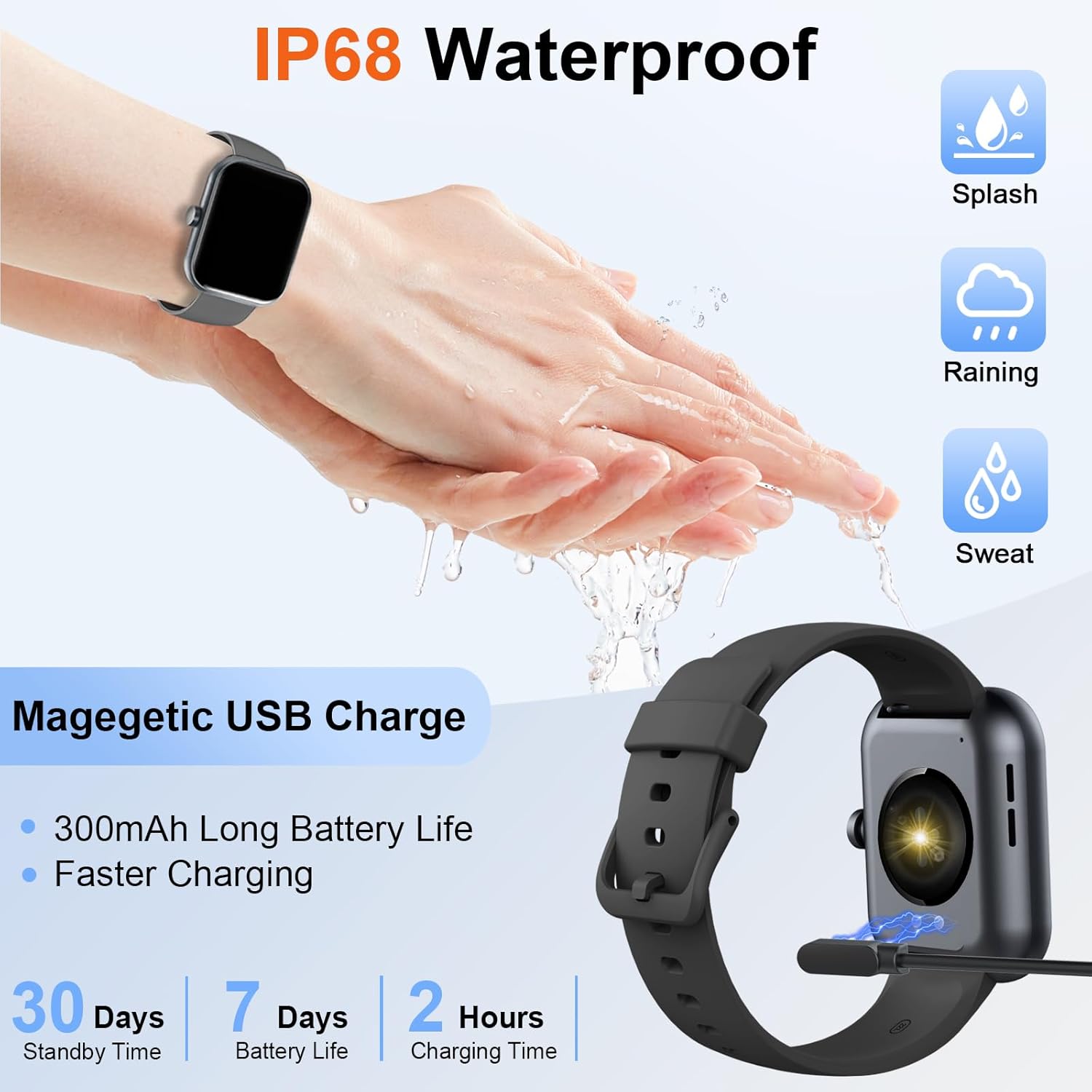
Image: The Donerton P32 Smartwatch connected to its magnetic USB charging cable, illustrating the charging process. Icons for IP68 waterproof rating and battery life are also visible.
A full charge typically takes approximately 1.5 to 2 hours. The battery indicator on the screen will show the charging status.
2. App Installation (Glory Fit)
To unlock all features and synchronize data, download the "Glory Fit" app on your smartphone. You can find it on the App Store (for iOS devices) or Google Play Store (for Android devices).
- Scan the QR code in the manual or on the watch screen (if available) to directly download the app.
- Alternatively, search for "Glory Fit" in your phone's app store.
- Install the app and grant necessary permissions for Bluetooth, notifications, and location services.
3. Koppeling van toestelle
Maak seker dat jou slimfoon se Bluetooth geaktiveer is.
- Open the "Glory Fit" app on your smartphone.
- Navigate to the "Device" or "Mine" section within the app.
- Tap "Add Device" or "Bind Device" and select your Donerton P32 Smartwatch from the list of available Bluetooth devices. The watch name usually appears as "P32" or similar.
- Bevestig die paringsversoek op beide jou foon en slimhorlosie.
- Sodra dit gekoppel is, sal die horlosie tyd en data met jou foon sinchroniseer.
Bedryfsinstruksies
Basiese navigasie
- Raakskerm: Veeg links/regs, op/af om deur spyskaarte en funksies te navigeer. Tik om te kies.
- Syknoppie: Press to wake up the screen, return to the previous screen, or go to the main watch face.
- Polsgevoel: The screen will illuminate automatically when you raise your wrist.

Image: The Donerton P32 Smartwatch showcasing its main features through a series of icons, including alarm, sedentary reminder, stopwatch, calorie tracking, step counting, multiple sports modes, find phone function, and a full touch screen interface.
Sleutel kenmerke
- Activity Tracking (Pedometer, Distance, Calories): The integrated high-performance motion sensor accurately records your steps, distance covered, and calories burned throughout the day. View detailed statistics in the Glory Fit app.
- Hartklopmonitor: The smartwatch continuously tracks your heart rate in real-time. This data helps you monitor your cardiovascular health and optimize workout intensity.
- Slaap dop: Automatically monitors your sleep duration and quality, distinguishing between light, deep, and REM sleep stages. Access comprehensive sleep analysis in the Glory Fit app to understand your sleep patterns.
- 24 Sportmodusse: Select from a variety of sports modes to track specific activities. The watch records relevant data for each mode, such as duration, calories, and heart rate.

Image: A man running outdoors, wearing the Donerton P32 Smartwatch. The image highlights the '100+ Sport Modes Fitness Tracker' feature, displaying activity tracking metrics such as steps, distance, and calories on the watch face and a smartphone screen.
- Boodskapkennisgewings: Receive alerts for incoming calls, SMS messages, and notifications from social media apps (Facebook, Messenger, Twitter, WhatsApp, Instagram) directly on your wrist.
- Bluetooth Call and Answer: Maak en ontvang oproepe direk vanaf jou slimhorlosie wanneer dit via Bluetooth aan jou foon gekoppel is.

Image: A man interacting with the Donerton P32 Smartwatch to manage a Bluetooth call. The watch screen displays options for dialing, an incoming call, call history, and contacts, demonstrating its call management capabilities.
- Weervoorspelling: After setting your location in the app, view current and upcoming weather conditions directly on your smartwatch.
- Wekker: Set alarms through the Glory Fit app to wake you up or remind you of important events.
- Musiekbeheer: Beheer musiekweergawe op jou slimfoon (speel, pouseer, slaan snitte oor) direk vanaf jou horlosie.
- Sittende herinnering: The watch can remind you to move if you've been inactive for too long, promoting a healthier lifestyle.
- Stophorlosie en timer: Utilize built-in stopwatch and timer functions for various activities.
- Soek foon: If your phone is misplaced, use this feature on your watch to make your phone ring (if within Bluetooth range).
- Kamerabeheer: Remotely control your smartphone's camera by shaking your wrist while the camera function is active in the app.

Image: The Donerton P32 Smartwatch interface showing a selection of its multifunctional capabilities, including weather forecasts, alarm clock settings, camera remote control, timer, flashlight, and the 'Find Phone' feature.
Onderhoud
Waterbestandheid (IP68)
The Donerton P32 Smartwatch is IP68 waterproof, meaning it is resistant to daily moisture such as hand washing, bathing, and swimming. It is not necessary to remove it frequently for these activities.
Belangrike nota: Do not use the smartwatch for diving or in hot water environments like hot springs or saunas, as extreme temperatures and high-pressure water can compromise the seal and cause damage.
Skoonmaak
- Wipe the watch screen and strap regularly with a soft, dry cloth.
- Vir hardnekkige vuiligheid, gebruik 'n effense damp doek en droog dan deeglik af.
- Avoid using harsh chemicals or abrasive materials, which can damage the finish.
Battery sorg
- Vermy om die battery gereeld heeltemal te ontlaai.
- Charge the watch when the battery level is low.
- Bêre die horlosie op 'n koel, droë plek indien dit nie vir lang tye gebruik word nie.
Probleemoplossing
| Probleem | Moontlike Oplossing |
|---|---|
| Horlosie skakel nie aan nie | Maak seker dat die horlosie volledig gelaai is. Koppel dit vir ten minste 10 minute aan die laaier. |
| Kan nie met foon saambind nie | 1. Maak seker dat Bluetooth op jou foon geaktiveer is. 2. Make sure the watch is within Bluetooth range. 3. Herbegin beide die horlosie en jou foon. 4. Vee die Bluetooth-kasgeheue op jou foon uit (indien van toepassing). 5. Ensure the "Glory Fit" app has necessary permissions. |
| Kennisgewings nie ontvang nie | 1. Check if the watch is successfully paired with the app. 2. Ensure notification permissions are granted to the "Glory Fit" app on your phone. 3. Verify that app notifications are enabled within the "Glory Fit" app settings. 4. Make sure your phone's notification settings allow the app to display alerts. |
| Onakkurate gesondheidsdata | 1. Ensure the watch is worn snugly on your wrist, about one finger's width from the wrist bone. 2. Keep the sensor clean and free from sweat or dirt. 3. Note that smartwatches are not medical devices and data is for reference only. |
| Kort batterylewe | 1. Verminder die skermhelderheid. 2. Beperk gereelde skermwake. 3. Turn off unnecessary features if not in use. 4. Maak seker dat die horlosie volledig gelaai is. |
Spesifikasies
| Kenmerk | Detail |
|---|---|
| Handelsmerk | Donerton |
| Modelnommer | P32 |
| Skerm grootte | 1.69 inches TFT-LCD |
| Bedryfstelsel | Proprietary (Compatible with Android, iOS) |
| Konnektiwiteit | Bluetooth 5.0 |
| Versoenbare toestelle | Smartphones with iOS 9.0+ / Android 5.0+ |
| Battery Tipe | Litium-polimeer |
| Batterylewe (tipiese gebruik) | Tot 7 dae |
| Bystandtyd | Tot 30 dae |
| Laai tyd | Ongeveer 1.5 - 2 uur |
| Waterweerstand | IP68 |
| Program Naam | Glorie Fit |
Waarborg en Ondersteuning
For warranty information and customer support, please refer to the documentation provided with your purchase or contact Donerton customer service directly. Details are typically available on the official Donerton webwebwerf of deur jou kleinhandelaar.