
1. Inleiding
This manual provides instructions for the KIMEX HDMI 2.0 HDCP 2.2 1x16 Splitter. This device allows a single HDMI source to be simultaneously displayed on up to sixteen HDMI-compatible monitors or projectors. It supports HDMI 2.0 and HDCP 2.2 standards, offering resolutions up to 3840x2160 at 60Hz. The splitter also features EDID management and RS232 control for enhanced flexibility in various professional audio-visual setups.
The splitter can also function as a signal regenerator, extending the reach of long HDMI cables.
2. Kenmerke
- Supports HDMI 2.0 and HDCP 2.2.
- Distributes one HDMI input to sixteen HDMI outputs simultaneously.
- Supports video resolutions up to 4K (3840x2160) at 60Hz.
- Supports data rates up to 6Gbps per TMDS clock, totaling 600MHz.
- Ondersteun 8/10/12-bis diep kleur.
- Integrated EDID management for optimal display compatibility.
- RS232 control port for external system integration.
3. Pakketinhoud
Verifieer asseblief dat alle items in die pakket teenwoordig is:
- KIMEX HDMI 2.0 HDCP 2.2 1x16 Splitter
- Kragadapter
- Gebruikershandleiding
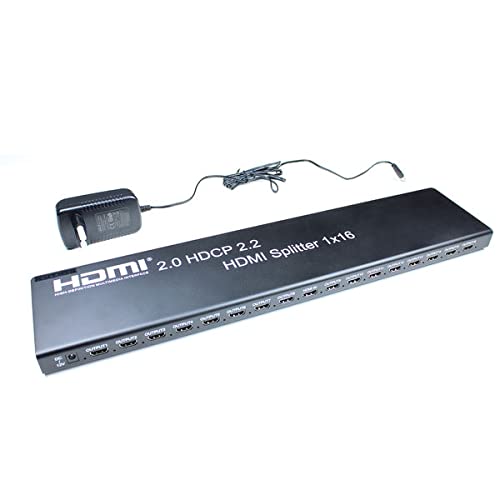
Image 3.1: KIMEX HDMI 1x16 Splitter with its power adapter.
4. Veiligheidsinstruksies
- Moenie hierdie toestel aan water of vog blootstel nie.
- Moenie die toestel naby hittebronne plaas nie.
- Gebruik slegs die meegeleverde kragadapter.
- Moenie probeer om die toestel self oop te maak of te herstel nie. Verwys alle diens na gekwalifiseerde personeel.
- Verseker behoorlike ventilasie rondom die toestel om oorverhitting te voorkom.
5. Opstelling
5.1 Verbindingsdiagram
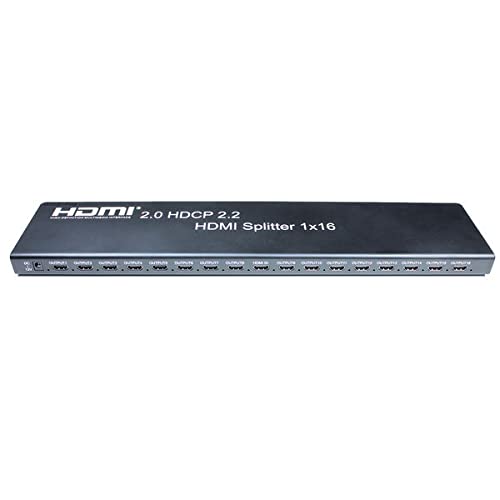
Image 5.1: Front panel of the HDMI Splitter, illustrating the input and sixteen output ports.
5.2 Installasiestappe
- Skakel toestelle af: Ensure all source devices (e.g., DVD player, computer) and display devices (e.g., monitors, projectors) are powered off before making connections.
- Koppel HDMI-bron: Connect an HDMI cable from your source device to the HDMI INPUT port on the splitter.
- Koppel HDMI-skerms: Connect HDMI cables from the sixteen HDMI OUTPUT ports on the splitter to your display devices.
- Koppel krag: Plug the provided power adapter into the DC 5V port on the splitter, then plug the adapter into a power outlet.
- Krag aan toestelle: Power on the display devices first, then the HDMI source device.
- Verifieer sein: Check that the video and audio signals are correctly displayed on all connected monitors.

Beeld 5.2: 'n Eksample of a multi-display setup, demonstrating the application of a video splitter.
6. Bedryfsinstruksies
Once all connections are made and devices are powered on, the HDMI splitter will automatically detect the input signal and distribute it to all connected output displays. No additional configuration is typically required for basic operation.
6.1 EDID Bestuur
The splitter features EDID (Extended Display Identification Data) management to ensure compatibility between the source and various displays. The device will typically read the EDID from the lowest numbered output port (Output 1) and apply it to the source. If there are compatibility issues, ensure that the primary display connected to Output 1 supports the desired resolution and features.
6.2 RS232 Beheer
The RS232 port allows for external control of the splitter by a control system. This feature is typically used in professional installations for integrated system management. Refer to the RS232 command set documentation (usually provided separately or available from the manufacturer) for detailed control protocols.
7. Onderhoud
- Hou die toestel skoon deur dit met 'n sagte, droë lap af te vee.
- Vermy die gebruik van harde chemikalieë of skuur skoonmakers.
- Ensure the device is placed in a well-ventilated area to prevent dust accumulation and overheating.
- Kontroleer kabelverbindings gereeld om te verseker dat hulle stewig is.
8. Probleemoplossing
8.1 No Picture on Display
- Kontroleer krag: Ensure the splitter and all connected devices are powered on.
- Kontroleer kabels: Verify that all HDMI cables are securely connected to both the splitter and the displays/source. Try replacing cables if necessary.
- Input/Output Selection: Confirm that the correct HDMI input is selected on your display devices.
- Resolusie-versoenbaarheid: Ensure your source device's output resolution is supported by all connected displays. The splitter will attempt to match the EDID of the first connected display.
- Herbegin toestelle: Power cycle the source, splitter, and displays in sequence (displays first, then splitter, then source).
8.2 Intermittent Signal
- Kabelgehalte: Use high-quality HDMI 2.0 certified cables, especially for 4K60Hz signals and longer distances.
- Kabellengte: Excessive cable length can cause signal degradation. Consider using shorter cables or active HDMI cables if issues persist.
- Kragtoevoer: Ensure the power adapter is providing stable power to the splitter.
8.3 EDID Issues
- If a display is not showing the correct resolution or features, try connecting a display with the desired capabilities to Output 1.
- Some advanced splitters may have EDID modes; consult specific product documentation if available.
9. Spesifikasies
| Kenmerk | Spesifikasie |
|---|---|
| Modelnommer | KIMEX 130-2016 |
| HDMI weergawe | HDMI 2.0 |
| HDCP weergawe | HDCP 2.2 |
| Invoerpoorte | 1 x HDMI |
| Uitsetpoorte | 16 x HDMI |
| Maksimum resolusie | 3840x2160 @ 60Hz |
| Maksimum datatempo | 6Gbps per TMDS clock (600MHz total) |
| Ondersteuning vir diep kleure | 8/10/12-bis |
| Beheerpoort | RS232 |
| Afmetings (L x B x H) | 48 x 11 x 2.5 cm |
| Gewig | 1.8 kilogram |
| Kragtoevoer | DC 5V (adapter included) |
| Versoenbare toestelle | DVD Player, Computer, etc. |
10. Waarborginligting
This KIMEX product is covered by a standard manufacturer's warranty. Please retain your proof of purchase for warranty claims. The availability of spare parts is typically 3 years from the date of purchase. For specific warranty terms and conditions, please refer to the documentation provided with your purchase or contact KIMEX customer support.
11. Ondersteuning
For technical assistance, troubleshooting, or further information regarding your KIMEX HDMI Splitter, please contact KIMEX customer support. Contact details can typically be found on the official KIMEX webwebwerf of op die produkverpakking.