
TWS i17
i17 Dual Earbuds User Manual
Model: i17 | Brand: TWS
1. Inleiding
Dankie vir die aankoopasing the TWS i17 Dual Earbuds. This manual provides essential information for setting up, operating, and maintaining your new wireless earbuds. Please read this manual thoroughly before use to ensure optimal performance and longevity of your device.
2. Veiligheidsinligting
To prevent damage to your earbuds or injury to yourself or others, please observe the following precautions:
- Moenie die oordopjes of laaikas aan uiterste temperature, humiditeit of vloeistowwe blootstel nie.
- Vermy om die toestel te laat val, te stamp of uitmekaar te haal.
- Do not use abrasive cleaners or solvents. Clean with a soft, dry cloth.
- Luister teen matige volumevlakke om gehoorskade te voorkom.
- Hou buite bereik van kinders.
- This product is not water resistant. Avoid exposure to water or excessive moisture.
3. Pakketinhoud
Verifieer dat alle items in jou pakket teenwoordig is:
- TWS i17 Dual Earbuds (Left and Right)
- Laaikas
- USB-laaikabel
- Gebruikershandleiding

Image: The TWS i17 Dual Earbuds, with one earbud partially removed from its charging case, showcasing die slanke swart ontwerp.
4. Opstelling
4.1 Laai die oordopjes en houer
Laai die oordopjes en die laaikassie volledig voor die eerste gebruik.
- Plaas albei oorfone in die laaikas. Maak seker dat hulle behoorlik vas is.
- Connect the USB charging cable to the charging port on the bottom of the case and the other end to a USB power source (e.g., computer, wall adapter).
- The indicator light on the case will show charging status. It will turn off or change color when fully charged.
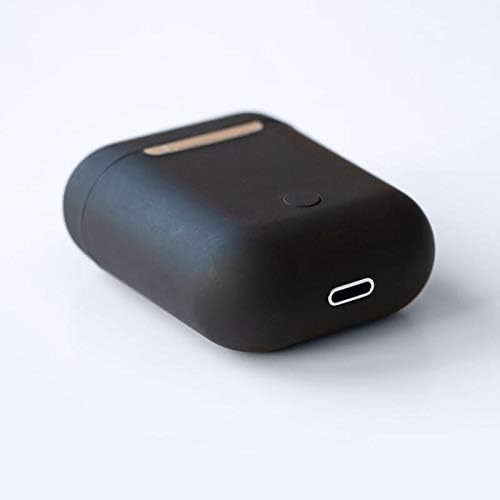
Beeld: 'n Nabyskoot view of the bottom of the TWS i17 charging case, highlighting the USB charging port and a small button.
4.2 Koppeling met jou toestel
The i17 earbuds use Bluetooth for wireless connection.
- Maak seker dat die oordopjes gelaai is.
- Maak die laaikas oop. Die oorfone sal outomaties in paringsmodus gaan (aanwyserliggies sal flikker).
- On your mobile phone or Bluetooth-enabled device, go to Bluetooth settings and turn Bluetooth on.
- Soek vir available devices. Select "i17" from the list.
- Once connected, the indicator lights on the earbuds will stop flashing. You are now ready to use your earbuds.

Image: The TWS i17 Dual Earbuds resting inside their open charging case, ready for pairing or use.
5. Bedryfsinstruksies
5.1 Krag aan/af
- Krag aan: Take the earbuds out of the charging case. They will automatically power on and connect to the last paired device.
- Skakel af: Plaas die oorfone terug in die laaikas. Hulle sal outomaties afskakel en begin laai.
5.2 Musiekweergawe
- Speel/pouse: Tik een keer op enige oordopjes.
- Volgende snit: Dubbeltik op die regteroorknoppie.
- Vorige snit: Tik twee keer op die linker oordop.
5.3 Oproepbestuur
- Beantwoord/beëindig oproep: Tik een keer op enige oordopjes.
- Verwerp oproep: Druk en hou enige oordopjes vir 2 sekondes.
5.4 Stemassistent
- Aktiveer Stemassistent (Siri/Google Assistent): Tik drie keer op enige van die oordopjes.
6. Onderhoud
Proper maintenance ensures the longevity of your earbuds:
- Skoonmaak: Gebruik 'n sagte, droë, pluisvrye lap om die oorfone en laaikas skoon te maak. Moenie vloeistowwe of spuitmiddels gebruik nie.
- Berging: Wanneer dit nie gebruik word nie, bêre die oorfone in hul laaikassie om hulle te beskerm en gelaai te hou. Bêre op 'n koel, droë plek.
- Batterysorg: Om die batterylewe te verleng, vermy om die oorfone gereeld heeltemal te ontlaai. Laai hulle gereeld.

Image: The TWS i17 Dual Earbuds securely stored within their closed charging case, ready for transport or charging.
7. Probleemoplossing
| Probleem | Moontlike oorsaak | Oplossing |
|---|---|---|
| Oorknoppies koppel nie | Low battery; Out of range; Not in pairing mode; Bluetooth off on device. | Charge earbuds; Move closer to device; Ensure case is open for pairing; Turn on Bluetooth on device. |
| Slegs een koptelefoon werk | One earbud not charged; Earbuds not properly synced. | Ensure both earbuds are charged; Place both earbuds back in case, close, then reopen to re-sync. |
| Geen klank nie | Volume too low; Not connected; Media paused. | Increase volume on device; Reconnect earbuds; Check media playback status. |
| Laaikas laai nie | Faulty cable/adapter; Loose connection. | Try a different USB cable or power adapter; Ensure cable is securely plugged in. |
8. Spesifikasies
| Kenmerk | Detail |
|---|---|
| Modelnommer | i17 |
| Handelsmerk | TWS |
| Verbindingstegnologie | Draadloos (Bluetooth) |
| Oorfone vorm faktor | In-Oor |
| Mikrofoon Ingesluit | Ja |
| Geraasonderdrukking | Nee |
| Versoenbaar met | Selfone |
| Kleur | Swart |
| Materiaal | Plastiek |
| Kabelkenmerk | Cable-free |
| Waterweerstandvlak | Nie waterbestand nie |
| Versending Afmetings | 12.6 x 8.8 x 3.6 cm |
| Gewig | 96 gram |
| Eerste Beskikbare Datum | 15 Januarie 2020 |
9. Waarborg en Ondersteuning
For warranty information and customer support, please refer to the contact details provided on the product packaging or the official TWS webwebwerf. Bewaar u bewys van aankoop vir waarborgeise.
For further assistance, please contact TWS customer service.
Ask a question about this manual
Ask about setup, troubleshooting, compatibility, parts, safety, or missing instructions. Manuals+ will review the question and use this page’s manual context to help answer it.