
GLIDiC TW-5000s
GLIDiC Sound Air TW-5000s Ware Draadlose Oordopjes Instruksiehandleiding
Model: TW-5000s
1. Inleiding
Dankie vir die aankoopasing the GLIDiC Sound Air TW-5000s True Wireless Earbuds. This manual provides essential information for the safe and effective use of your device. Please read it thoroughly before use and retain it for future reference.
2. Veiligheidsinligting
- Moenie die oordopjes of laaikas aan uiterste temperature, direkte sonlig of hoë humiditeit blootstel nie.
- Avoid dropping, impacting, or disassembling the device. This may cause damage and void the warranty.
- Keep the device away from water and liquids. While sweatproof, immersion can cause damage.
- Gebruik slegs die meegeleverde laaikabel of 'n gesertifiseerde ekwivalent.
- Langdurige luister teen hoë volumevlakke kan gehoorskade veroorsaak. Verstel die volume na 'n veilige vlak.
- Be aware of your surroundings when using earbuds, especially in traffic or hazardous environments.
3. Pakketinhoud
Verifieer dat alle items in jou pakket teenwoordig is:
- GLIDiC Sound Air TW-5000s True Wireless Earbuds (Left and Right)
- Laaikas
- USB-laaikabel (tipe A na mikro-USB)
- Veelvuldige groottes oorpunte (S, M, L)
- Instructiehandleiding (hierdie dokument)
4. Produk verbyview
Familiarize yourself with the components of your GLIDiC Sound Air TW-5000s earbuds and charging case.

Figure 4.1: GLIDiC Sound Air TW-5000s Earbuds and Charging Case. The image displays the black charging case with the GLIDiC logo on top, positioned next to the two black earbuds.
Oordopkomponente
- Multifunksionele knoppie: Located on the outer surface of each earbud, used for playback control, call management, and voice assistant activation.
- LED-aanwyser: Provides status information (pairing, charging, power).
- Mikrofoon: For voice calls and voice assistant commands.
- Laai kontakte: Located on the underside of each earbud, for charging within the case.
- Oorpunt: Silicone tip for in-ear comfort and sound isolation.
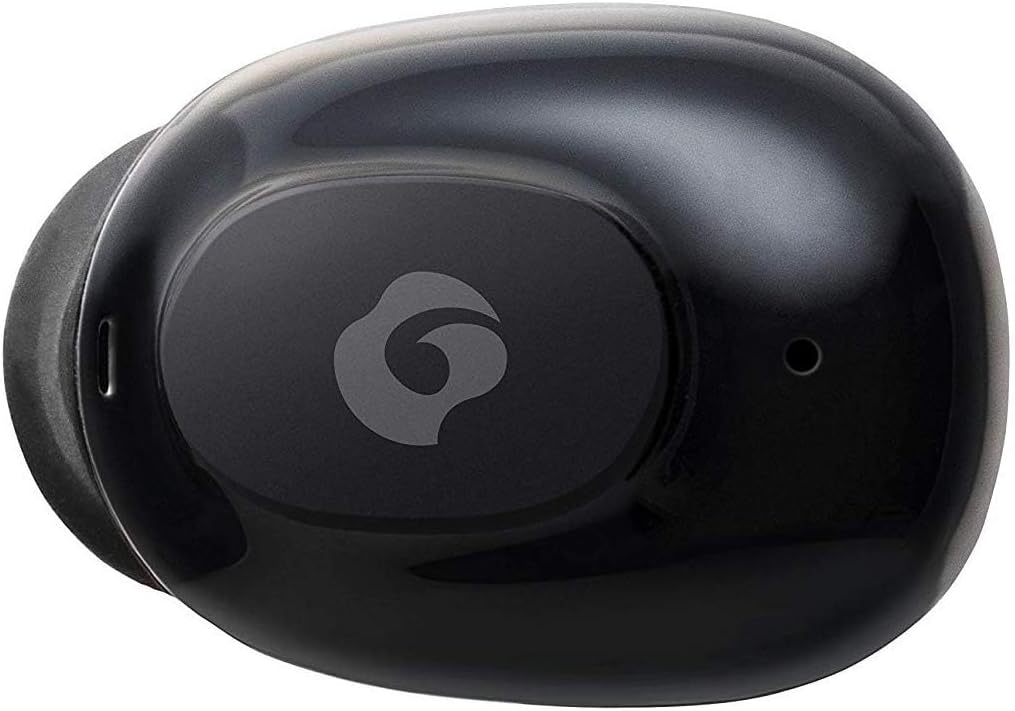
Figuur 4.2: Close-up view of a single GLIDiC earbud, highlighting the multifunction button with the GLIDiC logo and the microphone opening.
Laaikaskomponente
- Laaipoorte: Internal contacts for earbuds, external port for case charging.
- Omhulsel LED-aanwyser: Shows charging status of the case.
- Deksel: Protects earbuds and secures them during charging.
5. Opstelling
5.1 Aanvanklike laai
- Place both earbuds into the charging case. Ensure they are correctly seated, and the LED indicators on the earbuds illuminate.
- Koppel die USB-laaikabel aan die laaipoort op die kas en steek die ander kant in 'n USB-kragbron (bv. rekenaar, muuradapter).
- The case LED indicator will show charging status. Allow approximately 2 hours for a full charge of both earbuds and the case.
- Once fully charged, disconnect the charging cable. The earbuds offer up to 60 days of standby time when stored in the fully charged case.
5.2 Koppeling met 'n Bluetooth-toestel
- Maak seker dat die oordopjes gelaai is.
- Maak die laaikas oop. Die oorfone sal outomaties in paringsmodus gaan, en hul LED-aanwysers sal flikker.
- Gaan na die Bluetooth-instellings op jou Bluetooth-geaktiveerde toestel (slimfoon, tablet, ens.).
- Soek vir available devices. Select "GLIDiC TW-5000s" from the list.
- Once connected, the earbud LED indicators will stop flashing and may show a solid light or turn off, depending on the model. A voice prompt may also confirm the connection.
- Indien paring misluk, plaas die oordopjes terug in die houer, maak die deksel toe, wag 'n paar sekondes en herhaal dan die stappe.
6. Bedryfsinstruksies
6.1 Krag aan/af
- Krag aan: Open the charging case, or press and hold the multifunction button on each earbud for approximately 3 seconds.
- Skakel af: Place the earbuds back into the charging case and close the lid, or press and hold the multifunction button on each earbud for approximately 5 seconds.
6.2 Musiekweergawe
- Speel/pouse: Press the multifunction button once on either earbud.
- Volgende snit: Double-press the multifunction button on the right earbud.
- Vorige snit: Double-press the multifunction button on the left earbud.
- Volume op: Triple-press the multifunction button on the right earbud.
- Volume af: Triple-press the multifunction button on the left earbud.
6.3 Oproepbestuur
- Beantwoord/beëindig oproep: Press the multifunction button once on either earbud.
- Verwerp oproep: Press and hold the multifunction button on either earbud for approximately 2 seconds.
6.4 Stemassistent
- Aktiveer stemassistent: Press and hold the multifunction button on either earbud for approximately 2 seconds (when not on a call).
6.5 Multi-Communication Mode
The GLIDiC Sound Air TW-5000s features a multi-communication mode that allows select ambient sounds to be heard without compromising audio quality. This enhances user awareness and safety.
- Activate/Deactivate Multi-Communication Mode: Consult the specific instructions provided with your device, as activation methods can vary. Typically, this involves a specific press sequence on the multifunction button or an option within a companion app if available.
7. Onderhoud
7.1 Skoonmaak
- Vee die oorfone en laaikas af met 'n sagte, droë, pluisvrye lap.
- Moenie skuurmiddels, alkohol of chemiese oplosmiddels gebruik nie.
- Gently remove ear tips and clean them with mild soap and water if necessary. Ensure they are completely dry before reattaching.
- Gebruik 'n droë wattestokkie om die laaikontakte op beide die oordopjes en die houer versigtig skoon te maak.
7.2 Berging
- Wanneer dit nie gebruik word nie, bêre die oorfone in hul laaikassie om hulle te beskerm en te verseker dat hulle gelaai bly.
- Bêre die toestel op 'n koel, droë plek, weg van direkte sonlig en uiterste temperature.
8. Probleemoplossing
If you encounter issues with your GLIDiC Sound Air TW-5000s, refer to the following common problems and solutions:
| Probleem | Moontlike Oplossing |
|---|---|
| Oordopjes skakel nie aan nie. | Ensure earbuds are charged. Place them in the charging case and connect the case to a power source. |
| Oordopjes koppel nie met toestel nie. |
|
| Slegs een oortjie het klank. |
|
| Laaikas laai nie. |
|
| Klankgehalte is swak of afwisselend. |
|
9. Spesifikasies
| Kenmerk | Detail |
|---|---|
| Model Naam | TW-5000s |
| Verbindingstegnologie | Draadloos (Bluetooth) |
| Bluetooth-reeks | 10 meter |
| Frekwensiereeks | 20 Hz - 20 000 Hz |
| Battery Life (Carrying Case Standby) | Tot 60 dae |
| Waterweerstandvlak | Waterbestand (Sweetbestand) |
| Tipe beheer | Media Control, Touch, Voice |
| Spesiale kenmerke | Microphone Included, Noise Cancellation, Multi-communication mode |
| Materiaal | Plastic, TPE, and Silicone |
| Afmetings (Oorfone) | 0.98 x 0.67 x 0.91 duim (ongeveer) |
| Item gewig | 9.6 onse (totale pakketgewig) |
| UPC | 811559030024 |
10. Waarborg en Ondersteuning
GLIDiC products are designed for reliability and performance. For specific warranty details, please refer to the warranty card included with your purchase or visit the official GLIDiC website. If you require technical support or have questions not covered in this manual, please contact GLIDiC customer service through their official channels.
Behou asseblief jou aankoopbewys vir waarborgeise.
Ask a question about this manual
Ask about setup, troubleshooting, compatibility, parts, safety, or missing instructions. Manuals+ will review the question and use this page’s manual context to help answer it.