
1. Inleiding
Thank you for choosing the FeinTech LED Desk Lamp LTL00600. This high-quality desk lamp is designed to provide optimal lighting for your workspace while offering convenient features such as a USB charging port, adjustable brightness, and customizable color temperature. Please read this manual thoroughly before use to ensure proper operation and to maximize the lifespan of your product.
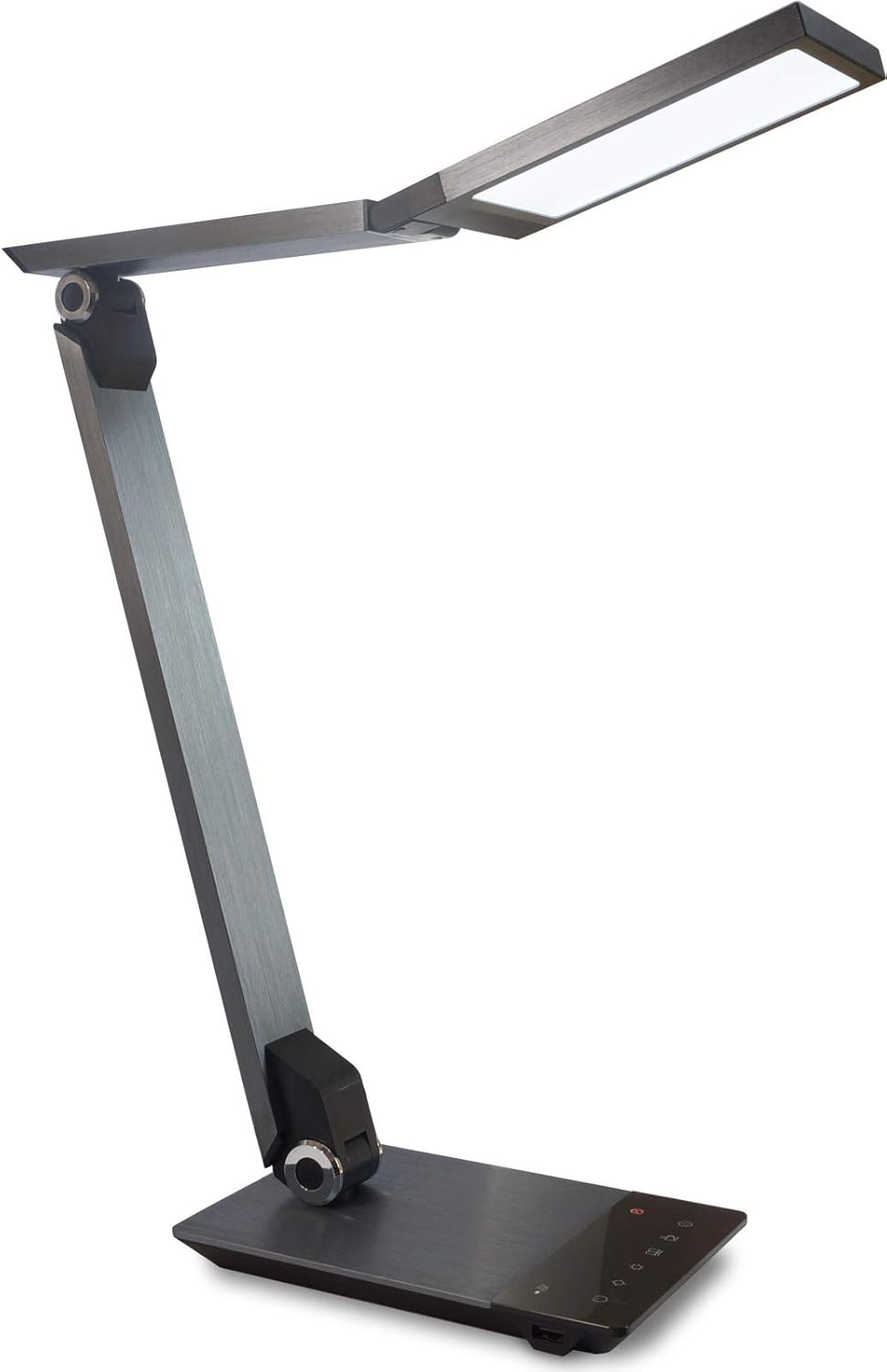
Image 1.1: FeinTech LED Desk Lamp LTL00600. This image displays the lamp in sy regop posisie, wysasing its brushed aluminum finish and sleek design.
2. Veiligheidsinstruksies
Om skade of beserings te voorkom, neem asseblief die volgende veiligheidsmaatreëls in ag:
- Maak seker dat die kragadapter aan 'n geskikte kragaansluiting gekoppel is.
- Moenie die l blootstel nieamp aan water of oormatige humiditeit.
- Avoid disassembling or modifying the lampHerstelwerk moet slegs deur gekwalifiseerde personeel uitgevoer word.
- Hou die lamp weg van hittebronne en direkte sonlig.
- Maak die l skoonamp only with a soft, dry cloth. Do not use abrasive cleaners or solvents.
- Do not look directly into the LED light source for extended periods.
3. Pakketinhoud
Kontroleer asseblief dat alle items in die pakket teenwoordig is:
- FeinTech LED Desk Lamp (Model: LTL00600)
- Kragadapter (12V/2A)
4. Produk verbyview
Familiarize yourself with the components of your FeinTech LED Desk Lamp:
- Lamp Hoof: Bevat die LED-ligbron.
- Verstelbare arms: Multiple joints for flexible positioning.
- Basis: Provides stability and houses the control panel and USB port.
- Beheerpaneel: Touch-sensitive buttons for power, brightness, color temperature, and timer.
- USB-laaipoort: Located on the side of the base for device charging.

Beeld 4.1: Bo-na-onder view van die lamp's base and control panel. This image highlights the touch-sensitive buttons for various functions.

Beeld 4.2: Sykant view van die lamp's base, showing the integrated USB charging port. This port allows for convenient charging of compatible devices.
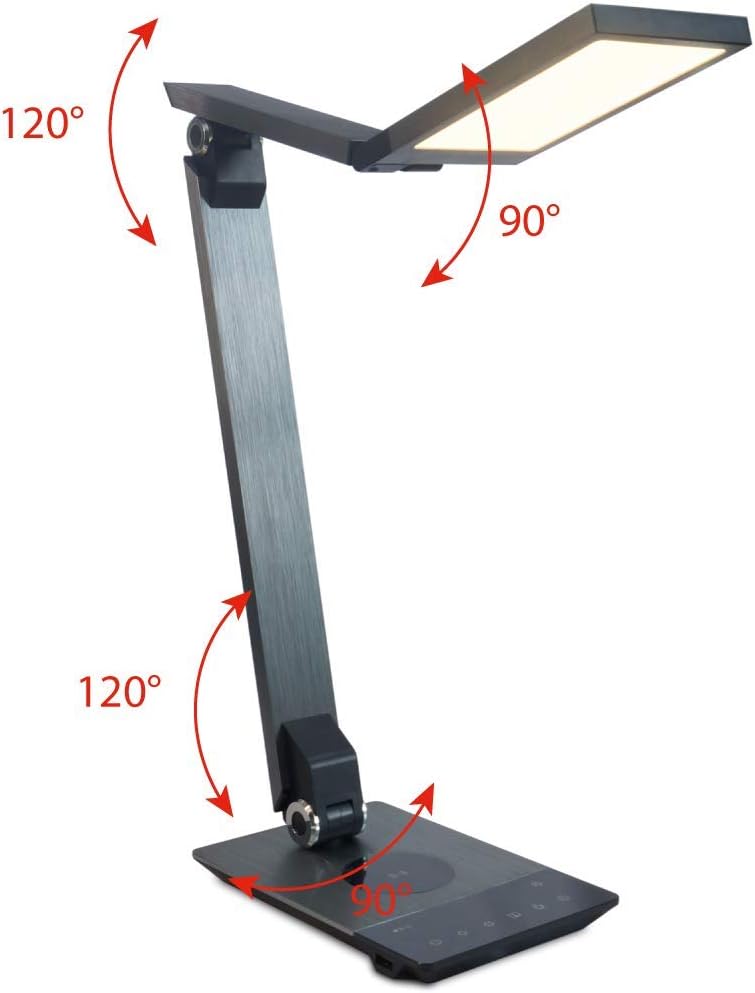
Image 4.3: Diagram illustrating the articulation angles of the lamp's joints. The lamp head can rotate 90 degrees, the upper arm 120 degrees, and the lower arm 120 degrees, allowing for flexible positioning.
5. Opstelling
Volg hierdie stappe vir aanvanklike opstelling:
- Pak uit: Verwyder alle komponente versigtig uit die verpakking.
- Plasing: Plaas die lamp base on a stable, flat surface. Ensure there is enough space for the lamp to be adjusted without obstruction.
- Koppel krag: Insert the power adapter cable into the DC input port on the back of the lamp base. Plug the power adapter into a standard electrical outlet.
6. Bedryfsinstruksies
The FeinTech LED Desk Lamp features intuitive touch controls on its base.
6.1 Krag aan/af
- Raak die Kragknoppie on the control panel (refer to Image 4.1) to turn the lamp aan of af.
6.2 Brightness Adjustment (Dimming)
- Met die lamp on, touch and hold the Helderheid op or Helderheid af buttons (refer to Image 4.1) to steplessly adjust the light intensity.
- Die lamp base will vibrate slightly when the minimum or maximum brightness level is reached.
6.3 Kleurtemperatuuraanpassing
- Met die lamp on, touch and hold the Color Temperature Up or Color Temperature Down buttons (refer to Image 4.1) to steplessly adjust the light color from warm white (2700K) to cool white (6500K).
- Die lamp base will vibrate slightly when the minimum or maximum color temperature is reached.
6.4 Favorite Settings
- Die lamp allows you to store and recall 3 favorite light settings (brightness and color temperature).
- To save a setting: Adjust the brightness and color temperature to your desired level. Then, touch and hold one of the Gunsteling knoppies (refer to Image 4.1) until the lamp flashes briefly, indicating the setting is saved.
- To recall a setting: Simply touch the corresponding Gunsteling knoppie.
- The last used brightness and color temperature settings are automatically saved even after the lamp is afgeskakel.
6.5 USB-laaifunksie
- Connect your smartphone or other compatible device to the USB charging port on the side of the lamp base (refer to Image 4.2) using a suitable USB cable.
- The intelligent USB port delivers up to 2.4A for fast charging.
- An LED indicator will signal ongoing and completed charging status.
6.6 Timer-funksie
- Raak die Timer knoppie (refer to Image 4.1) to activate the timer function.
- The first touch activates a 3-minute timer.
- A second touch activates a 1-hour timer.
- Die lamp will automatically turn off after the selected time period.
7. Onderhoud
Om jou lamp's appearance and functionality:
- Ontkoppel altyd die lamp van die kragtoevoer af voor skoonmaak.
- Vee die l afamp met 'n sagte, droë, pluisvrye lap.
- Do not use liquid or aerosol cleaners, as they may damage the finish or internal components.
- Avoid scratching the brushed aluminum surface.
8. Probleemoplossing
As jy probleme ondervind met jou lamp, verwys na die volgende algemene probleme en oplossings:
| Probleem | Moontlike oorsaak | Oplossing |
|---|---|---|
| Lamp skakel nie aan nie. | Geen kragtoevoer. | Check if the power adapter is securely connected to the lamp and the electrical outlet. Test the outlet with another device. |
| USB-laai werk nie. | Toestel nie versoenbaar nie of kabel foutief. | Ensure your device is compatible with USB charging. Try a different USB cable. Verify the lamp is aangeskakel. |
| Raakkontroles reageer nie. | Tydelike sagtewarefout of kragprobleem. | Disconnect the power adapter for 30 seconds, then reconnect it. Ensure your fingers are clean and dry when operating the touch controls. |
9. Spesifikasies
| Modelnommer | LTL00600 |
| Afmetings (L x B x H) | 36 x 13.5 x 44 cm (ongeveer 14.2 x 5.3 x 17.3 duim) |
| Gewig | 1.84 kg (ongeveer 4.06 lbs) |
| Materiaal | Geborselde aluminium |
| Ligbron | LED |
| Max. Light Output | 500 lumens (1000 lux at 40 cm distance) |
| Kleurtemperatuur (CCT) | 2700 K (Warm White) to 6500 K (Cool White) |
| Power Consumption (Lamp slegs) | Maks. 10 W |
| Power Consumption (Lamp & Charging) | Maks. 22 W |
| USB-uitset | Tot 2.4 A |
| Invoer Voltage (Adapter) | 12 V / 2 A |
| Skakel Tipe | Raak |

Image 9.1: Diagram showing the dimensions of the FeinTech LED Desk Lamp. Die lamp measures approximately 36 cm in length, 13.5 cm in width, and 44 cm in height.
10. Waarborg en Ondersteuning
FeinTech products are designed for reliability and performance. For warranty information or technical support, please refer to the warranty card included with your purchase or visit the official FeinTech webwebwerf. Bewaar asseblief u bewys van aankoop vir waarborgeise.