
Inleiding
The LogiLink UA0356 is a compact USB-C to 3.5mm TRRS audio adapter designed to provide high-fidelity audio output and microphone input for devices lacking a dedicated 3.5mm jack or requiring an audio upgrade. It features an integrated Digital-to-Analog Converter (DAC) to ensure clear and high-quality sound. This manual provides essential information for the proper setup, operation, and maintenance of your UA0356 sound card.
Veiligheidsinligting
- Keep the device dry. Do not expose it to moisture or extreme temperatures.
- Moenie probeer om die toestel uitmekaar te haal of te wysig nie. Dit kan die waarborg ongeldig maak en skade veroorsaak.
- Vermy om die toestel te laat val of aan sterk impakte te onderwerp.
- Hou buite bereik van kinders.
- Gooi die toestel weg volgens plaaslike regulasies vir elektroniese afval.
Pakketinhoud
- 1 x LogiLink UA0356 USB-C Sound Card
Produk verbyview
The LogiLink UA0356 is a compact adapter with a USB-C male connector on one end and a 3.5mm TRRS female jack on the other. It integrates a Digital-to-Analog Converter (DAC) for enhanced audio performance.

Figuur 1: Voorkant view of the LogiLink UA0356, highlighting the 3.5mm TRRS audio jack.

Figuur 2: Agter view of the LogiLink UA0356, showing the USB-C male connector.
Opstel instruksies
- Identifiseer USB-C-poort: Locate an available USB-C port on your smartphone, tablet, laptop, or other compatible device.
- Connect UA0356: Insert the USB-C male connector of the LogiLink UA0356 into the USB-C port of your device. Ensure it is fully seated.
- Koppel oorfone: Plug your 3.5mm TRRS headset (with or without an integrated microphone) into the 3.5mm female jack of the UA0356.
- Outomatiese herkenning: The device is plug-and-play and typically requires no additional drivers. Your operating system should automatically recognize the new audio device.
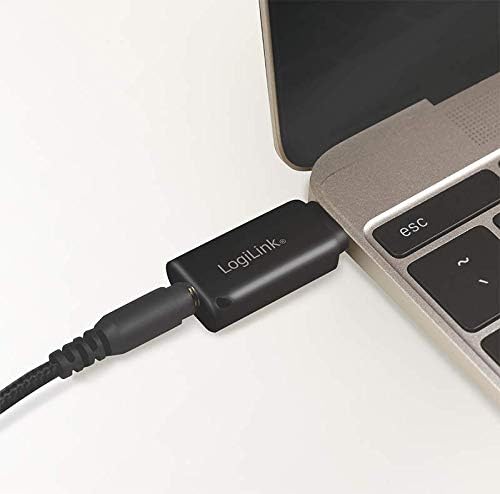
Figure 3: The UA0356 connected to a laptop, ready for use with a headset.
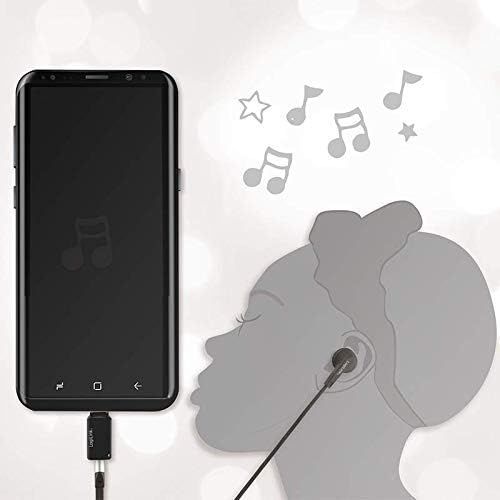
Figure 4: The UA0356 connected to a smartphone, enabling audio output to a headset.
Bedryfsinstruksies
Once connected, the LogiLink UA0356 functions as your device's primary audio output and input. You can control volume and other audio settings directly from your connected device.
- Oudioterugspeel: Play any audio content (music, videos, calls) on your device. Sound will be routed through the UA0356 to your connected 3.5mm headset.
- Mikrofooninvoer: If your headset has a built-in microphone, it will be enabled for voice calls, recordings, or voice commands through the UA0356. Ensure your device's audio settings recognize the external microphone.
- DAC Functionality: The integrated DAC processes digital audio signals from your device into high-quality analog sound for your headset, improving the overall audio experience.

Figure 5: Illustrates the connection of a 3.5mm TRRS headset to the UA0356.

Figure 6: The UA0356's integrated Digital-to-Analog Converter (DAC) enhances audio quality.
Onderhoud
- Skoonmaak: Gebruik 'n sagte, droë lap om die buitekant van die toestel skoon te maak. Moenie vloeibare skoonmaakmiddels of skuurmiddels gebruik nie.
- Berging: Store the UA0356 in a cool, dry place when not in use.
- Hantering: Avoid bending or twisting the connectors excessively to prevent internal damage.
Probleemoplossing
| Probleem | Moontlike oorsaak | Oplossing |
|---|---|---|
| Geen klankuitset nie |
|
|
| Mikrofoon werk nie |
|
|
| Swak klank kwaliteit |
|
|
Spesifikasies
| Kenmerk | Detail |
|---|---|
| Handelsmerk | LogiLink |
| Model Naam | UA0356 |
| Hardeware-koppelvlak | USB-C (manlik) |
| Oudio-uitset | 3.5mm TRRS (Female) |
| Klankuitvoermodus | Digitaal |
| Versoenbare toestelle | Headsets, Smartphones, Tablets, Laptops with USB-C |
| Surround Sound Channel-konfigurasie | 2.0 |
| Maksimum Sample Koers | 44.1 kHz |
| Verhouding sein-tot-ruis (SNR) | 120 dB |
| Kleur | Swart |
Waarborg en Ondersteuning
LogiLink products are designed for reliability and performance. This product is covered by a manufacturer's warranty. For specific warranty terms, technical support, or service inquiries, please refer to the warranty card included with your purchase or visit the official LogiLink webwebwerf.
Behou asseblief jou aankoopbewys vir waarborgeise.