
HOCO BS31 - Army green
Hoco BS31 Bright Sound Sports Wireless Speaker - Instruction Manual
1. Inleiding
Thank you for choosing the Hoco BS31 Bright Sound Sports Wireless Speaker. This manual provides essential information for the proper setup, operation, and maintenance of your device. Please read it thoroughly before use to ensure optimal performance and longevity.
2. Produk verbyview en kenmerke
The Hoco BS31 is a compact and portable wireless speaker designed for versatile audio playback. It features robust connectivity options and a durable design, making it suitable for various environments.
- Wireless V4.2 JLAC6928B for stable and efficient connection.
- Integrated 53mm speaker for clear audio output.
- Class A polymer battery with 500mAh capacity for extended playback.
- Multiple playback modes: Wireless (Bluetooth), TF card, and AUX input.
- Compact and lightweight design, weighing only 140g.
- Supports A2DP, AVRCP, HFP, HSP protocols for broad compatibility.

Beeld: Voorkant view of the Hoco BS31 speaker in army green, showcasing its compact design and front controls.

Image: The Hoco BS31 speaker held in a hand, demonstrating its small, palm-sized, and portable nature.
3. Pakketinhoud
Kontroleer asseblief die pakket vir die volgende items:
- Hoco BS31 Wireless Speaker
- USB-laaikabel
- Gebruikershandleiding
4. Kontroles en koppelvlakke
Familiarize yourself with the speaker's buttons and ports for proper operation.
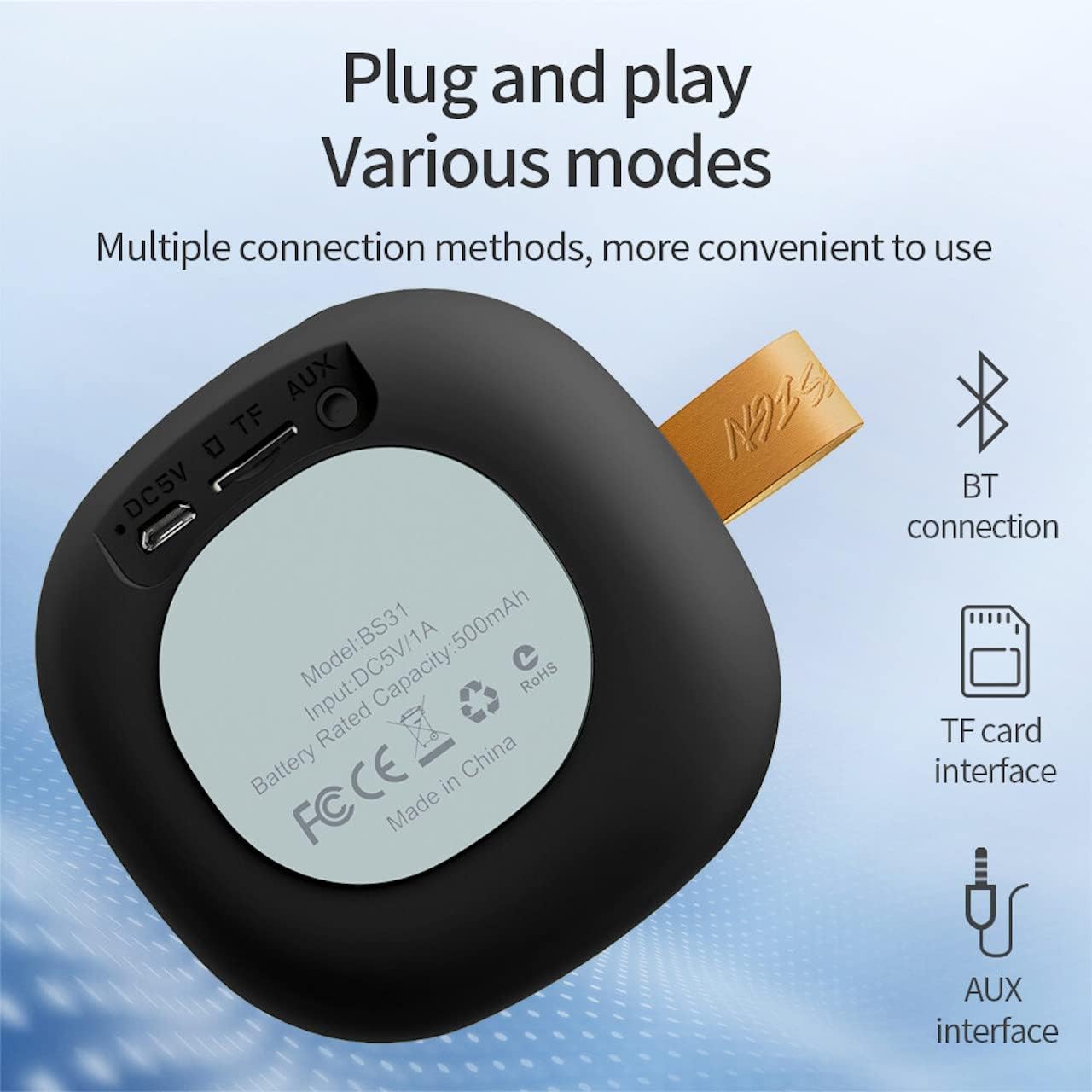
Image: A diagram illustrating the functions of the control buttons on the Hoco BS31 speaker.
- Aan/af-knoppie (⏻): Press and hold to switch on/off. Short press to play/pause music or answer/end calls.
- Previous Song / Volume Up (⏮): Short press for previous song. Long press to increase volume.
- Next Song / Volume Down (⏭): Short press for next song. Long press to decrease volume.
- Mode Button (⏸): Short press to switch between Bluetooth, TF card, and AUX modes.

Beeld: Agter view of the Hoco BS31 speaker, highlighting the DC 5V charging port, TF card slot, and AUX input.
- DC 5V Poort: Vir die laai van die luidspreker met behulp van die meegeleverde USB-kabel.
- TF-kaartgleuf: Insert a TF (MicroSD) card for direct music playback.
- AUX-poort: Koppel eksterne oudiotoestelle met 'n 3.5 mm-oudiokabel.
5. Opstelling
5.1. Laai die luidspreker op
Before first use, fully charge the speaker. Connect the provided USB charging cable to the DC 5V port on the speaker and the other end to a USB power adapter (not included) or a computer's USB port. The charging time is approximately 2 hours. The indicator light will show charging status (e.g., red for charging, off when fully charged).
5.2. Skakel aan/af
To power on the speaker, press and hold the Power button (⏻) until you hear an audible prompt. To power off, press and hold the Power button again until the speaker shuts down.
6. Bedryfsinstruksies
6.1. Bluetooth-koppeling
- Ensure the speaker is powered on and in Bluetooth pairing mode (indicated by a flashing blue light or audible prompt). If not, short press the Mode button (⏸) to switch to Bluetooth mode.
- Aktiveer Bluetooth op jou mobiele toestel (slimfoon, tablet, ens.) en soek vir beskikbare toestelle.
- Select "Hoco BS31" from the list of found devices.
- Once paired, the speaker will indicate a successful connection (e.g., solid blue light or audible prompt).
- You can now play audio from your device through the Hoco BS31 speaker.
6.2. TF-kaartmodus
Plaas 'n TF (MicroSD) kaart met MP3-klank in files into the TF card slot. The speaker will automatically detect the card and switch to TF card playback mode. Use the Previous/Next Song buttons to navigate tracks.
6.3. AUX-modus
Connect one end of a 3.5mm audio cable (not included) to the AUX port on the speaker and the other end to the audio output jack of your external device (e.g., MP3 player, computer). The speaker will automatically switch to AUX mode. Control playback from your external device.

Image: Visual representation of the Hoco BS31's multiple connection methods, including Bluetooth, TF card, and AUX.
6.4. Musiekterugspeel en oproepfunksies
- Speel/pouse: Short press the Power button (⏻).
- Volgende liedjie: Short press the Next Song button (⏭).
- Vorige liedjie: Short press the Previous Song button (⏮).
- Volume op: Long press the Previous Song button (⏮).
- Volume af: Long press the Next Song button (⏭).
- Beantwoord/beëindig oproep: Short press the Power button (⏻) when a call comes in.
- Verwerp oproep: Press and hold the Power button (⏻) when a call comes in.

Image: The Hoco BS31 speaker positioned next to a smartphone, demonstrating its use for music playback.
7. Onderhoud en versorging
- Keep the speaker dry. Do not expose it to water or excessive moisture.
- Maak die luidspreker skoon met 'n sagte, droë lap. Moenie skuurmiddels of oplosmiddels gebruik nie.
- Vermy uiterste temperature. Moenie die luidspreker in baie warm of koue omgewings bêre nie.
- Do not attempt to disassemble or repair the speaker yourself. This will void the warranty and may cause damage.
- Laai die luidspreker gereeld, selfs al word dit nie gebruik nie, om die battery se gesondheid te handhaaf.
8. Probleemoplossing
| Probleem | Moontlike oorsaak | Oplossing |
|---|---|---|
| Luidspreker skakel nie aan nie. | Lae battery. | Laai die luidspreker vir ten minste 30 minute. |
| Kan nie met Bluetooth-toestel saambind nie. | Luidspreker nie in paringsmodus nie; toestel Bluetooth af; te ver uitmekaar. | Ensure speaker is in pairing mode. Turn Bluetooth on/off on device. Move devices closer. |
| Geen klank nie. | Volume te laag; verkeerde modus; toestel speel nie. | Increase speaker/device volume. Check correct mode (BT, TF, AUX). Ensure audio is playing on source device. |
| TF-kaart word nie herken nie. | Card inserted incorrectly; unsupported format; corrupted card. | Plaas die TF-kaart weer in. Maak seker files are MP3 format. Try a different TF card. |
9. Spesifikasies
| Kenmerk | Detail |
|---|---|
| Model | BS31 |
| Luidsprekergrootte | 53 mm |
| Afmetings | 86 x 86 x 44 mm |
| Gewig | 140g |
| Draadlose weergawe | V4.2 (JLAC6928B) |
| Ondersteunde protokolle | A2DP, AVRCP, HFP, HSP |
| Battery kapasiteit | 500mAh (Class A polymer battery) |
| Laai Voltage | DC 5V |
| Laai tyd | Ongeveer 2 uur |
| Musiek/Oproeptyd | Ongeveer 3 uur |
| Verbindingsopsies | Wireless (Bluetooth), TF card, AUX |
| Maksimum uitsetkrag | 5 Watt |
10. Waarborg en Ondersteuning
Hoco products are manufactured to high quality standards. For warranty information and technical support, please refer to the warranty card included with your product or visit the official Hoco webwebwerf.
Amptelik Webwebwerf: www.hocotech.com
Ask a question about this manual
Ask about setup, troubleshooting, compatibility, parts, safety, or missing instructions. Manuals+ will review the question and use this page’s manual context to help answer it.