
Inleiding
The Power Dynamics PDM25 is a compact and versatile 100V amplifier designed for small installations such as shops, restaurants, and offices. It offers easy operation, reliable performance, and a range of features including Bluetooth connectivity, an integrated MP3 player, USB input, AUX input, and a wireless remote control. This manual provides essential information for the safe and efficient use of your PDM25 amplewendiger.
Veiligheidsinstruksies
- Lees hierdie handleiding deeglik voordat u die produk gebruik.
- Bewaar hierdie handleiding vir toekomstige verwysing.
- Neem alle waarskuwings in ag en volg alle instruksies.
- Moenie hierdie toestel naby water gebruik nie.
- Maak slegs skoon met 'n droë lap.
- Moenie enige ventilasie-openinge blokkeer nie. Installeer volgens die vervaardiger se instruksies.
- Moenie naby enige hittebronne soos verkoelers, hitteregisters, stowe of ander toerusting (insluitend ampversterkers) wat hitte produseer.
- Moenie die veiligheidsdoel van die gepolariseerde of aardingstipe prop verslaan nie. 'n Gepolariseerde prop het twee lemme met een wyer as die ander. 'n Aardingsprop het twee lemme en 'n derde aardpunt. Die wye lem of die derde tand word voorsien vir jou veiligheid. Indien die voorsiene prop nie in jou uitlaat pas nie, raadpleeg 'n elektrisiën vir die vervanging van die verouderde uitlaat.
- Beskerm die kragkoord teen geloop of vasgeknyp, veral by proppe, geriefshouers en die punt waar dit uit die apparaat kom.
- Gebruik slegs aanhegsels/bykomstighede gespesifiseer deur die vervaardiger.
- Ontkoppel hierdie apparaat tydens weerligstorms of wanneer dit vir lang tye ongebruik word.
- Verwys alle diens na gekwalifiseerde dienspersoneel. Versorging word vereis wanneer die apparaat op enige manier beskadig is, soos kragtoevoerkoord of prop beskadig is, vloeistof gemors is of voorwerpe in die apparaat geval het, die apparaat aan reën of vog blootgestel is, nie normaal werk nie. , of laat vaar is.
- WAARSKUWING: Om die risiko van brand of elektriese skok te verminder, moenie hierdie apparaat aan reën of vog blootstel nie.
- WAARSKUWING: Do not open the cover. No user-serviceable parts inside. Refer servicing to qualified personnel only.
Produk verbyview
The PDM25 amplifier features a user-friendly front panel with controls for various audio sources and volume adjustments, along with a clear digital display. The rear panel provides all necessary connections for speakers, external audio sources, and power.

Figuur 1: Voorpaneel oorview of the PDM25 Amplewendiger.

Figure 2: Rear Panel Connections of the PDM25 Amplewendiger.
Opstelling
1. Uitpak
Verwyder die amplifier from its packaging. Inspect the unit for any signs of damage during transit. Retain the original packaging for future transport or storage.
2. plasing
Plaas die amplifier on a stable, flat surface. Ensure adequate ventilation around the unit to prevent overheating. Avoid placing it near heat sources or in direct sunlight.
3. Luidsprekerverbinding
The PDM25 supports both 100V line speakers and low impedance (4-16 Ohm) speakers.
- For 100V Line Speakers: Connect the positive (+) terminal of your 100V speaker system to the "100V" terminal on the amplifier's rear panel. Connect the negative (-) terminal to the "COM" terminal.
- For Low Impedance Speakers (4-16 Ohm): Connect the positive (+) terminal of your speaker to the "4-16 Ohm" terminal on the amplifier's rear panel. Connect the negative (-) terminal to the "COM" terminal.
Ensure correct polarity (+ to + and - to -) for optimal sound quality. Do not connect both 100V and low impedance speakers simultaneously to the same output.
4. Oudiobronverbinding
- AUX-invoer: Connect external audio devices (e.g., CD player, mixer) to the RCA "AUX" input jacks on the rear panel using an RCA cable.
- Mikrofooninvoer: Connect a microphone to the 6.3mm jack on the front panel.
- USB-invoer: Plaas 'n USB-flash drive wat MP3 bevat files in die USB-poort op die voorpaneel.
5. Kragverbinding
Connect the supplied power cable to the AC inlet on the rear panel of the amplifier and then to a suitable mains power outlet (230 Vac/50 Hz).
Bedryfsinstruksies
1. Skakel aan/af
Press the "ON/OFF" switch on the front panel to power on or off the amplewendiger.
2. Bronkeuse
Use the "MODE" button on the front panel or the remote control to cycle through available input sources: Bluetooth, USB/MP3, AUX, and Radio. The selected mode will be displayed on the digital screen.

Figure 3: Front Panel Controls and USB Input.
3. Volumebeheer
- Meester volume: Adjust the main output volume using the large "VOLUME" knob on the front panel.
- Individual Source Volume: Adjust the volume for MP3, AUX, and MIC inputs using their respective smaller "VOLUME" knobs.
4. Toonbeheer
Use the "TREBLE" and "BASS" knobs on the front panel to adjust the high and low frequencies of the audio output.
5. Bluetooth-werking
- Select "Bluetooth" mode using the "MODE" button. The display will show "BLUE".
- On your Bluetooth-enabled device (smartphone, tablet, etc.), search for available devices and select "PDM25".
- Sodra dit gekoppel is, kan jy klank draadloos na die amplewendiger.
6. USB/MP3 Player Operation
- Insert a USB flash drive into the USB port. The amplifier will automatically switch to USB mode and begin playing MP3 files.
- Use the play/pause, next, and previous track buttons on the front panel or remote control to manage playback.
7. Radio-operasie
In Radio mode, use the control buttons to scan for and select radio stations.
8. Afstandbeheer
The included remote control provides convenient access to power, mode selection, volume, track control, and equalizer presets.
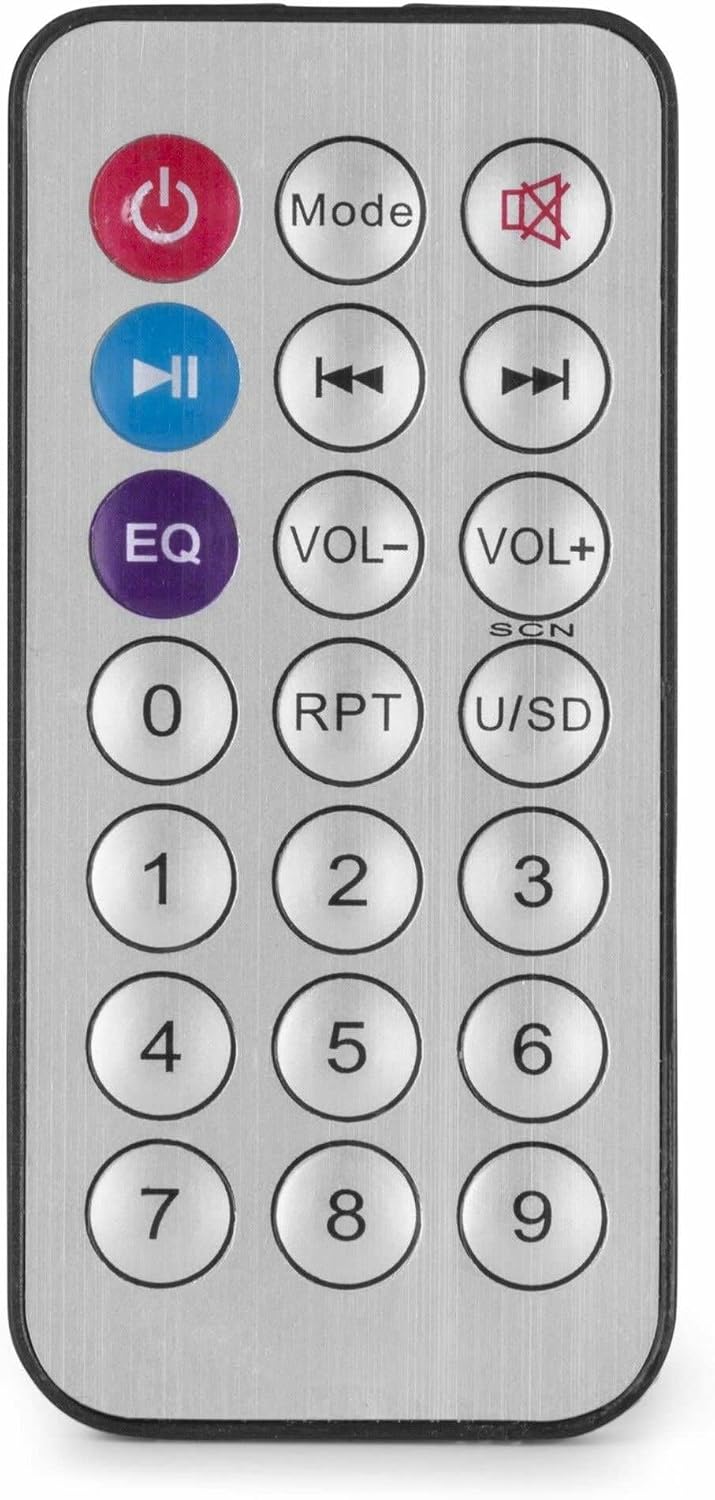
Figure 4: Wireless Remote Control.
Onderhoud
- Skoonmaak: Disconnect the power before cleaning. Use a soft, dry cloth to wipe the exterior of the ampMoenie vloeibare skoonmaakmiddels of aërosols gebruik nie.
- Ventilasie: Ensure that the ventilation openings are clear of dust and debris to maintain proper airflow.
- Berging: Indien die eenheid vir 'n lang tydperk gestoor word, ontkoppel dit van die kragtoevoer en bêre dit op 'n koel, droë plek, verkieslik in die oorspronklike verpakking.
Probleemoplossing
| Probleem | Moontlike oorsaak | Oplossing |
|---|---|---|
| Geen krag nie | Power cable not connected; Power outlet faulty; Ampverligter afskakel. | Check power cable connection; Test power outlet; Ensure amplifier switch is ON. |
| Geen klankuitset nie | Incorrect source selected; Volume too low; Speaker connections faulty; Mute activated. | Select correct input source; Increase master and source volume; Check speaker wiring; Deactivate mute function on remote. |
| Bluetooth verbind nie | Amplifier not in Bluetooth mode; Device too far; Device already paired with another unit. | Verseker amplifier is in Bluetooth mode ("BLUE" displayed); Move device closer; Disconnect from other devices and try again. |
| USB-terugspeelprobleme | USB-skyf nie korrek geformateer nie; Onversoenbaar file formaat; USB-skyf foutief. | Ensure USB drive is FAT32 formatted; Use MP3 files; Try a different USB drive. |
| Verwronge klank | Volume too high; Incorrect impedance matching for speakers; Faulty audio source. | Reduce volume; Verify speaker impedance matches amplifier output; Test with a different audio source. |
Spesifikasies
- Uitset krag: 25 W
- Luidspreker Uitset: 100V and 4-16 Ohm
- Frekwensiereeks: 50 Hz - 18 kHz
- Sein-tot-geraas-verhouding: > 75 dB
- Verbinding Voltage: 230 Vac/50 Hz
- Afmetings (L x B x H): 205 x 285 x 65 mm
- Gewig: 1.5 kg
- Kenmerke: Bluetooth, USB MP3 Player, Radio, AUX Input, Microphone Input, Bass/Treble Control, Integrated Equalizer, Remote Control
- Modelnommer: PDM25
- Vervaardiger: Tronios BV
Waarborg en Ondersteuning
For warranty information and technical support, please refer to the documentation provided with your purchase or visit the official Power Dynamics webwebwerf. Bewaar u bewys van aankoop vir enige waarborgeise.
Vervaardiger: Tronios BV
Webwebwerf: www.power-dynamics.eu