
1. Inleiding en oorview
The AVMATRIX VS0601 is a compact, multi-format 6-channel video switcher designed for live production environments. It supports a variety of input signals, including 4 SDI and 2 HDMI inputs, and offers scaled outputs for both SDI and HDMI Program (PGM) feeds. The device also features HDMI and SDI multiview outputs for comprehensive monitoring, various transition effects (CUT, AUTO, T-BAR, FADE, WIPE, MIX), GPIO Tally, Picture-in-Picture (PIP), and Fade-to-Black (FTB) functionalities. Its portable design makes it suitable for diverse applications.
2. Produkkenmerke
- Multi-format 6-Channel Input: Accepts 4 SDI and 2 HDMI input signals.
- Scaled Outputs: SDI and HDMI PGM outputs with scaling capabilities.
- Veelvuldigview Monitering: Dedicated HDMI and SDI multiview outputs for monitoring all inputs simultaneously.
- Oorgangseffekte: Supports CUT, AUTO, T-BAR transitions, along with FADE, WIPE, and MIX effects.
- GPIO Tally Interface: For integration with live tally systems.
- Prent-in-prent (PIP): Allows for overlaying one video source onto another.
- Fade-to-Black (FTB): Smooth transition to a black screen.
- Kompakte ontwerp: Portable and easy to transport for on-location use.
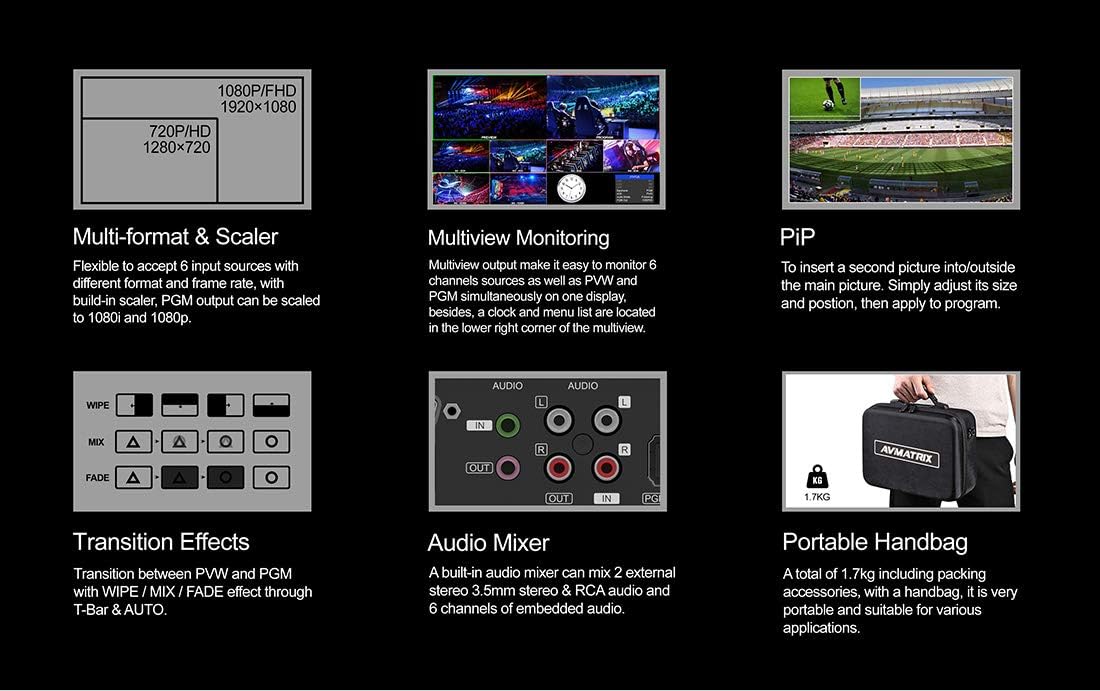
Figuur 2.1: Belangrike kenmerke oorview
3. Opstelling
3.1 Uitpak en inspeksie
Carefully unpack the AVMATRIX VS0601 and all accessories. Inspect the unit for any signs of damage during transit. Retain the packaging materials for future transport or storage.
3.2 Aansluitkrag
Connect the provided DC 12V power adapter to the 'DC 12V' input port on the rear panel of the switcher. Plug the adapter into a suitable power outlet. Ensure the power switch is in the 'OFF' position before connecting power.
3.3 Video Input Connections
The VS0601 supports 4 SDI inputs and 2 HDMI inputs. Connect your video sources (cameras, media players, computers) to the corresponding input ports on the rear panel.
- SDI Inputs: Connect up to four SDI sources to the 'SDI IN 1-4' ports.
- HDMI-insette: Connect up to two HDMI sources to the 'HDMI IN 5-6' ports.

Figuur 3.1: Agterpaneelverbindings
3.4 Video Output Connections
Connect your display monitors or recording devices to the output ports.
- Program (PGM) Output: Connect your main program display or recorder to the 'PGM OUT' (SDI or HDMI) ports.
- Veelvuldigview Uitset: Connect a monitor to the 'MULTIVIEW OUT' (HDMI or SDI) for simultaneous viewing of all inputs, program, and preview.
- USB-uitset: Connect to a computer via the 'USB OUT' port for streaming applications.
3.5 Oudioverbindings
The switcher includes audio input and output options.
- Oudio-invoer: Connect external audio sources to the 'AUDIO IN' (RCA L/R or 3.5mm stereo) ports.
- Oudio-uitvoer: Connect to external audio monitoring or recording devices via the 'AUDIO OUT' (RCA L/R or 3.5mm stereo) ports.
3.6 Tally and LAN Connections
- Telling: Connect a Tally system to the 'TALLY' (DB-15) port for visual indication of program and preview bronne.
- LAN: Connect an Ethernet cable to the 'LAN' (RJ45) port for network control and firmware updates.
4. Bedryfsinstruksies
4.1 Voorpaneelkontroles
The front panel provides intuitive controls for selecting inputs, managing transitions, and adjusting audio.

Figuur 4.1: Voorpaneeluitleg
- PGM (Program) Buttons: Select the input currently live on the program output.
- PVW (Preview) Knoppe: Select the input to be previewed before transitioning to program.
- T-staaf: Manually control transitions between preview en program.
- CUT Button: Instantly switch from preview te programmeer.
- AUTO-knoppie: Execute a transition with a pre-set speed.
- MENU Knob: Navigate and select options within the on-screen display (OSD) menu.
- AUDIO/EFFECTS Buttons: Access audio mixer controls, keying functions (Chroma, Luma, DSK), and Picture-in-Picture (PIP) settings.
4.2 Basic Switching
- Power on the unit using the switch on the rear panel.
- Op die Multiview monitor, observe all connected inputs.
- Press a button in the PVW row to select an input for preview. This input will appear on the preview section of your multiview monitor.
- Press a button in the PGM row to select an input for program. This input will immediately go live.
- To transition from the previewed source to the program output, use the T-Bar, SNY button for an instant switch, or AUTO button for a timed transition.
4.3 Audio Mixing
The VS0601 features an integrated audio mixer. Access the audio controls via the front panel buttons and the OSD menu to adjust levels for embedded audio from HDMI/SDI inputs and external analog audio inputs.
- Gebruik die AFV (Audio Follow Video) function to automatically switch audio with video transitions.
- Manually adjust individual audio channel levels using the menu and rotary knob.
4.4 Keying and PIP
The switcher supports various keying effects and Picture-in-Picture functionality.
- Chroma Key: Use for green screen or blue screen effects.
- Luma Key: Key based on brightness levels.
- DSK (Downstream Key): Overlay graphics or text onto the program output.
- PIP (Picture-in-Picture): Display a smaller video source within the main program video. Adjust size and position through the OSD menu.
5. Spesifikasies
| Kategorie | Detail |
|---|---|
| Model | VS0601 |
| Insette | 4x SDI (SD/HD/3G-SDI), 2x HDMI (Type-A) |
| Analoog oudio-insette | 1x 3.5mm stereo audio, 1x RCA (L/R) audio |
| PGM Uitsette | 1x SDI (SD/HD/3G-SDI), 1x HDMI (Type-A) |
| AUX-uitvoer | 1x SDI (SD/HD/3G-SDI) |
| Veelvuldigview Uitsette | 1x SDI (SD/HD/3G-SDI), 1x HDMI (Type-A) |
| Analoog Audio Output | 1x 3.5mm stereo audio, 1x RCA (L/R) audio |
| LAN-koppelvlak | RJ45 x1, Synchronize local time |
| Tally Interface | DB-15 x1 |
| SDI-invoerformaatondersteuning | 1080p 60/50/30/25/24, 1080i 60/50, 720p 60/50, 576i, 480i |
| Ondersteuning vir HDMI-invoerformaat | 1080p 60/50/30/25/24, 1080i 60/50, 720p 60/50, 576p, 576i, 480p, 480i |
| PGM-uitvoerformaat | 1080p 60/50/30/25/24, 1080i 60/50 |
| Veelvuldigview Uitset formaat | 1080p 60 |
| SDI-nakoming | SMPTE 292M/SMPTE 259M/SMPTE 424M |
| Afmetings (LWD) | 249.2 x 172.3 x 55 mm |
| Gewig | 1 kg (2.2 lbs) |
| Werkstemperatuur | -20~60°C |
| Bergingstemperatuur | -30~70°C |
| Huidige | GS 12V, 1.2A |
| Voltage | DC 6-17V |
| Kragtoevoer | GS 12V, 2A |

Figuur 5.1: Tegniese Spesifikasies
6. Onderhoud
- Skoonmaak: Gebruik 'n sagte, droë lap om die buitekant van die eenheid skoon te maak. Moenie vloeibare of aërosol skoonmaakmiddels gebruik nie.
- Ventilasie: Verseker behoorlike ventilasie rondom die eenheid om oorverhitting te voorkom. Moenie enige ventilasie-openinge blokkeer nie.
- Berging: When not in use for extended periods, store the switcher in a cool, dry place, preferably in its original packaging.
- Firmware -opdaterings: Periodically check the AVMATRIX official website for firmware updates to ensure optimal performance and access to new features. Follow the instructions provided with the firmware update carefully.
7. Probleemoplossing
7.1 Geen video-uitvoer nie
- Verify that the power adapter is securely connected and the unit is powered on.
- Check all video cables (SDI, HDMI) for secure connections at both the switcher and the display/source.
- Ensure the correct input is selected on the PGM row.
- Confirm that the output resolution of the switcher is compatible with your display device.
- Test with different cables or display devices if possible.
7.2 Geen klankuitvoer nie
- Kontroleer alle oudiokabels vir veilige verbindings.
- Verify audio levels in the mixer settings via the OSD menu. Ensure no channels are muted.
- Confirm that the audio source is active and producing sound.
- If using embedded audio, ensure the video source is providing audio.
7.3 Controls Unresponsive
- Restart the unit by powering it off and then on again.
- Ensure no foreign objects are obstructing buttons or the T-Bar.
- If connected via LAN, check network connection and control software status.
8. Waarborg en Ondersteuning
For warranty information and technical support, please refer to the official AVMATRIX webwebwerf of kontak u plaaslike verspreider. Bewaar u aankoopbewys as bewys van aankoop vir waarborgeise.
Aanlyn hulpbronne:
- AVMATRIX Official Webwebwerf
- LILLIPUT Store on Amazon (Manufacturer/Seller)