
1. Belangrike veiligheidsinstruksies
Lees asseblief alle veiligheids- en gebruiksinstruksies sorgvuldig deur voordat u hierdie televisie gebruik. Bewaar hierdie instruksies vir toekomstige verwysing.
- Kragbron: Connect the TV only to the power supply indicated on the label.
- Ventilasie: Verseker behoorlike ventilasie. Moenie ventilasie-openinge blokkeer nie.
- Skoonmaak: Ontkoppel die TV van die muurprop voordat u dit skoonmaak. Gebruik 'n sagte, droë lap. Moenie vloeibare skoonmaakmiddels of aërosolskoonmakers gebruik nie.
- Water en vog: Do not use this TV near water, such as a bathtub, washbowl, kitchen sink, laundry tub, swimming pool, or in a wet basement.
- Hitte: Position the TV away from heat sources such as radiators, heat registers, stoves, or other products (including ampversterkers) wat hitte produseer.
- kabels: Beskerm die kragkabel teen trap of knyp, veral by proppe, gerieflikheidsaansluitings en die punt waar hulle uit die TV kom.
- Weerlig: Ontkoppel hierdie TV tydens weerligstorms of wanneer dit vir lang tye ongebruik word.
- Diens: Do not attempt to service this TV yourself. Refer all servicing to qualified service personnel.
2. Produk verbyview
The CHIQ L40H7N is a 40-inch Full HD Smart TV designed to provide an immersive viewing experience with integrated smart features. It offers a resolution of 1080p and includes connectivity options such as Wi-Fi and Bluetooth.
Sleutel kenmerke:
- Full HD (1080p) Resolution: Lewer duidelike en gedetailleerde beelde.
- Smart TV-funksionaliteit: Access popular streaming services like Netflix, YouTube, and Prime Video.
- Integrated Wi-Fi and Bluetooth: For wireless connectivity and device pairing.
- Verskeie konnektiwiteitspoorte: Includes 3 HDMI and 2 USB ports for various external devices.
- Drievoudige ontvanger: Supports DVB-T/T2/C/S/S2 for versatile broadcast reception.
- Dolby Audio: Enhanced sound experience.
- HDR10 Ondersteuning: Provides improved contrast and color reproduction.
- Vierkern-SVE: Ensures smooth performance for smart features and applications.

Beeld: Voorkant view of the CHIQ L40H7N Smart TV, showcasing sy slanke rand en skerm.
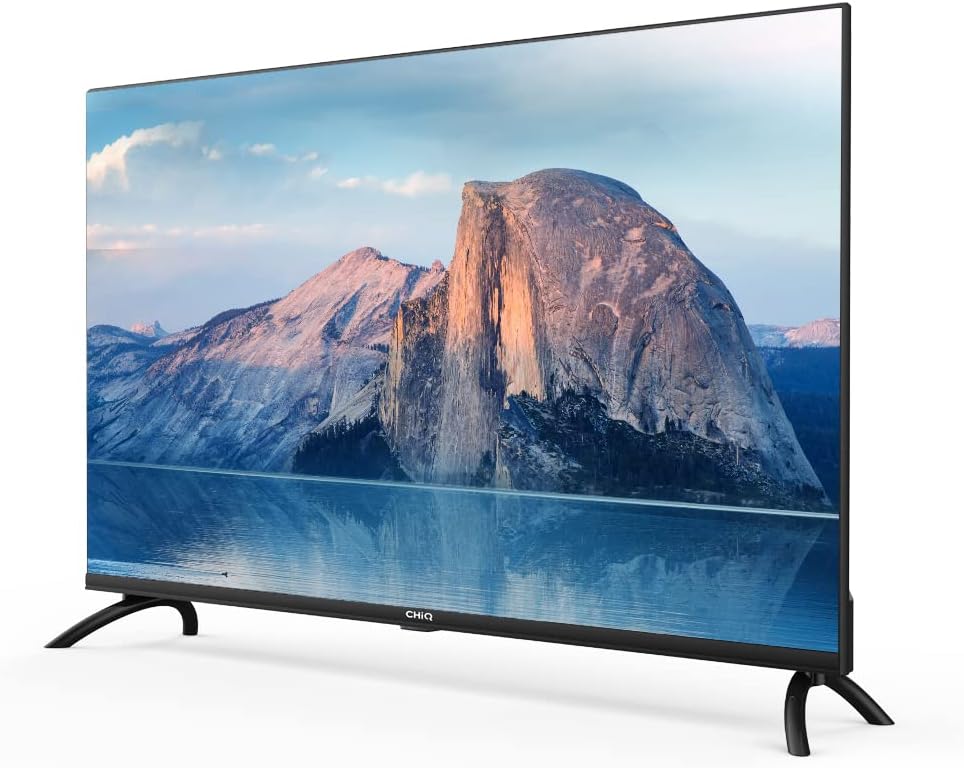
Beeld: Sykant view of the CHIQ L40H7N Smart TV, highlighting its thin profile.
3. Opstelling
3.1 Uitpak
- Maak die verpakking versigtig oop en verwyder die TV en alle bykomstighede.
- Ensure all components are present: TV unit, remote control, batteries, power cord, stand components, and user manual.
- Bewaar die verpakkingsmateriaal vir toekomstige vervoer of onderhoud.
3.2 Staaninstallasie
Om die TV-staander te installeer:
- Plaas die TV met die gesig na onder op 'n sagte, plat oppervlak (bv. 'n kombers of skuim) om skermskade te voorkom.
- Rig die pote van die staander met die ooreenstemmende gleuwe aan die onderkant van die TV.
- Maak die pote van die staander vas met die meegeleverde skroewe. Maak seker dat hulle stewig vasgedraai is.

Image: Diagram showing the dimensions of the CHIQ L40H7N TV, including height with stand (568.9mm), width (900.3mm), and depth with stand (178.9mm).
3.3 Muurbevestiging (Opsioneel)
If you choose to wall mount your TV, please consult a professional installer and refer to the specific instructions provided with your wall mount bracket. Ensure the wall mount is compatible with the TV's VESA mounting pattern.
3.4 Aansluiting van randapparatuur
Koppel jou eksterne toestelle aan die TV se poorte:
- HDMI: Connect Blu-ray players, game consoles, or set-top boxes to the HDMI ports (HDMI1, HDMI2, HDMI3).
- USB: Insert USB drives for media playback into the USB ports (USB1, USB2).
- Antenna/kabel: Koppel jou antenna- of kabeltelevisiesein aan die toepaslike invoer.
- Ethernet: Vir 'n stabiele bedrade internetverbinding, koppel 'n Ethernet-kabel aan die LAN-poort.
3.5 Kragverbinding
After connecting all necessary cables, plug the power cord into the TV's power input, then into a wall outlet.
3.6 Aanvanklike aanskakeling
Press the power button on the remote control or on the TV. Follow the on-screen instructions to complete the initial setup, including language selection, network connection, and channel scanning.
4. Bediening van die TV
4.1 Afstandbeheerfunksies
Die afstandbeheerder laat jou toe om deur die TV se funksies te navigeer:
- Kragknoppie: Skakel die TV aan of af.
- Volume +/-: Pas die volumevlak aan.
- Kanaal +/-: Verander TV-kanale.
- Invoer/bron: Kies die invoerbron (HDMI, USB, TV).
- Navigasieknoppies (Op/Af/Links/Regs/OK): Navigeer deur spyskaarte en bevestig keuses.
- Tuis/Slim Hub: Kry toegang tot die Smart TV-koppelvlak.
- App-knoppies: Dedicated buttons for Netflix, YouTube, Prime Video, etc.
4.2 Slim-TV-funksies
Your CHIQ L40H7N TV provides access to a range of smart features and applications:
- Toegang tot toepassings: Press the Home button or dedicated app buttons to launch applications like Netflix, YouTube, and Prime Video.
- App Store: Laai bykomende toepassings af en installeer dit vanaf die geïntegreerde toepassingswinkel.
- Skermspieëling: Cast content from compatible smartphones or tablets to your TV.

Image: The CHIQ Smart TV displaying the Netflix application interface, along with other streaming apps like YouTube and Prime Video.

Image: A CHIQ Smart TV screen showing a variety of content from streaming services, indicating a rich media experience.
4.3 Netwerkverbinding
To use Smart TV features, connect your TV to the internet:
- Wi-Fi: Go to Settings > Network > Wi-Fi, select your network, and enter the password.
- Ethernet: Connect an Ethernet cable from your router to the TV's LAN port. The TV will automatically detect the wired connection.
4.4 Bluetooth-konnektiwiteit
Pair Bluetooth devices like headphones or speakers:
- Enable Bluetooth on your external device and set it to pairing mode.
- On the TV, go to Settings > Remotes & Accessories > Bluetooth.
- Kies jou toestel uit die lys en volg die aanwysings op die skerm om te koppel.
4.5 Invoerkeuse
Press the 'Input' or 'Source' button on your remote to switch between connected devices (HDMI1, HDMI2, HDMI3, USB, TV Tuner).
4.6 Beeld- en klankinstellings
Adjust display and audio preferences via the Settings menu:
- Prentmodus: Choose from standard, dynamic, movie, or custom settings.
- Helderheid/kontras/kleur: Verfyn beeldkwaliteit.
- Klankmodus: Select audio presets like standard, music, movie, or custom.
- Dolby Audio: The TV supports Dolby Audio for enhanced sound.
- HDR10: Experience improved contrast and color with HDR10 content.

Image: The CHIQ L40H7N TV displaying a scene with the Dolby Audio logo, indicating support for enhanced sound.

Image: A split-screen comparison on the CHIQ L40H7N TV, demonstrating the visual improvement with HDR10 technology, showing richer colors and contrast.

Image: An illustration of a Quad Core CPU, representing the processing power within the CHIQ L40H7N TV for smooth operation.

Image: The CHIQ L40H7N TV positioned on a media console in a living room, showcasing its aesthetic integration into a home environment.
5. Onderhoud
5.1 Skoonmaak van die TV
Om die TV se voorkoms en werkverrigting te behou:
- Skerm: Vee die skerm liggies af met 'n sagte, pluisvrye lap. Vir hardnekkige merke, vee liggiesampMaak die lap skoon met water of 'n gespesialiseerde skermreiniger (moenie direk op die skerm spuit nie).
- Kabinet: Vee die TV-kas af met 'n sagte, droë lap. Vermy die gebruik van skuurmiddels of oplosmiddels.
- Ontkoppel altyd die TV voordat u skoonmaak.
5.2 Sagteware-opdaterings
Regular software updates can improve performance and add new features:
- Outomatiese opdaterings: Ensure your TV is connected to the internet for automatic updates.
- Handmatige kontrole: You can manually check for updates in the Settings menu (e.g., Settings > About > System Update).
6. Probleemoplossing
As jy probleme met jou TV ondervind, raadpleeg die volgende algemene probleme en oplossings:
- Geen krag:
- Check if the power cord is securely plugged into the TV and the wall outlet.
- Ensure the wall outlet is functioning by testing it with another device.
- Try pressing the power button on the TV itself, not just the remote. - Geen beeld nie, maar klank is teenwoordig:
- Check the input source. Ensure it matches the device you are trying to view (e.g., HDMI1 for a Blu-ray player).
- Verify that the external device is powered on and functioning correctly.
- Try a different HDMI cable or port. - Geen klank nie, maar beeld is teenwoordig:
- Check the volume level and ensure the TV is not muted.
- Verify audio output settings in the TV menu (e.g., internal speakers, external audio system).
- If using an external device, check its volume and audio settings. - Afstandbeheer werk nie:
- Vervang die batterye in die afstandbeheerder.
- Maak seker dat daar geen obstruksies tussen die afstandbeheerder en die TV se IR-sensor is nie.
- Point the remote directly at the TV. - Netwerkverbindingsprobleme:
- Restart your router and modem.
- Check Wi-Fi password if connecting wirelessly.
- If using a wired connection, ensure the Ethernet cable is properly connected.
If the problem persists, consult the CHiQ customer support or a qualified technician.
7. Spesifikasies
Below are the technical specifications for the CHIQ L40H7N Smart TV:
| Kenmerk | Spesifikasie |
|---|---|
| Handelsmerk | CHiQ |
| Model Naam | L40H7N |
| Skerm grootte | 40 duim |
| Vertoon tegnologie | LCD |
| Resolusie | 1080p (Volle HD) |
| Herlaaitempo | 60 Hz |
| Spesiale kenmerk | Full HD, Smart TV, HDR10, Dolby Audio |
| Verbindingstegnologie | Bluetooth, Ethernet, HDMI (3 ports), USB (2 ports), Wi-Fi |
| Ondersteunde internetdienste | Amazon Kitsvideo, Netflix, YouTube |
| Versoenbare toestelle | Laptop, Smart Speaker, Smart Watch, Tablet, Car Audio System, Cellphone |
| Kragverbruik (SDR) | 47.0 W |
| Energiedoeltreffendheidklas (SDR) | G |
| Screen Diagonal (cm) | 100.3 cm |
| Screen Resolution (pixels) | 1920 x 1080 |
| Minimum Guaranteed Software Updates Until | 20-01-2030 |
| Minimum Guaranteed Spare Parts Until | 20-01-2029 |
Vir meer inligting oor energie, verwys asseblief na die EPREL-databasis: https://eprel.ec.europa.eu/qr/454406

Image: The EU Energy Label for the CHIQ L40H7N TV, showing an energy efficiency class G and consumption of 47 kWh/1000h.
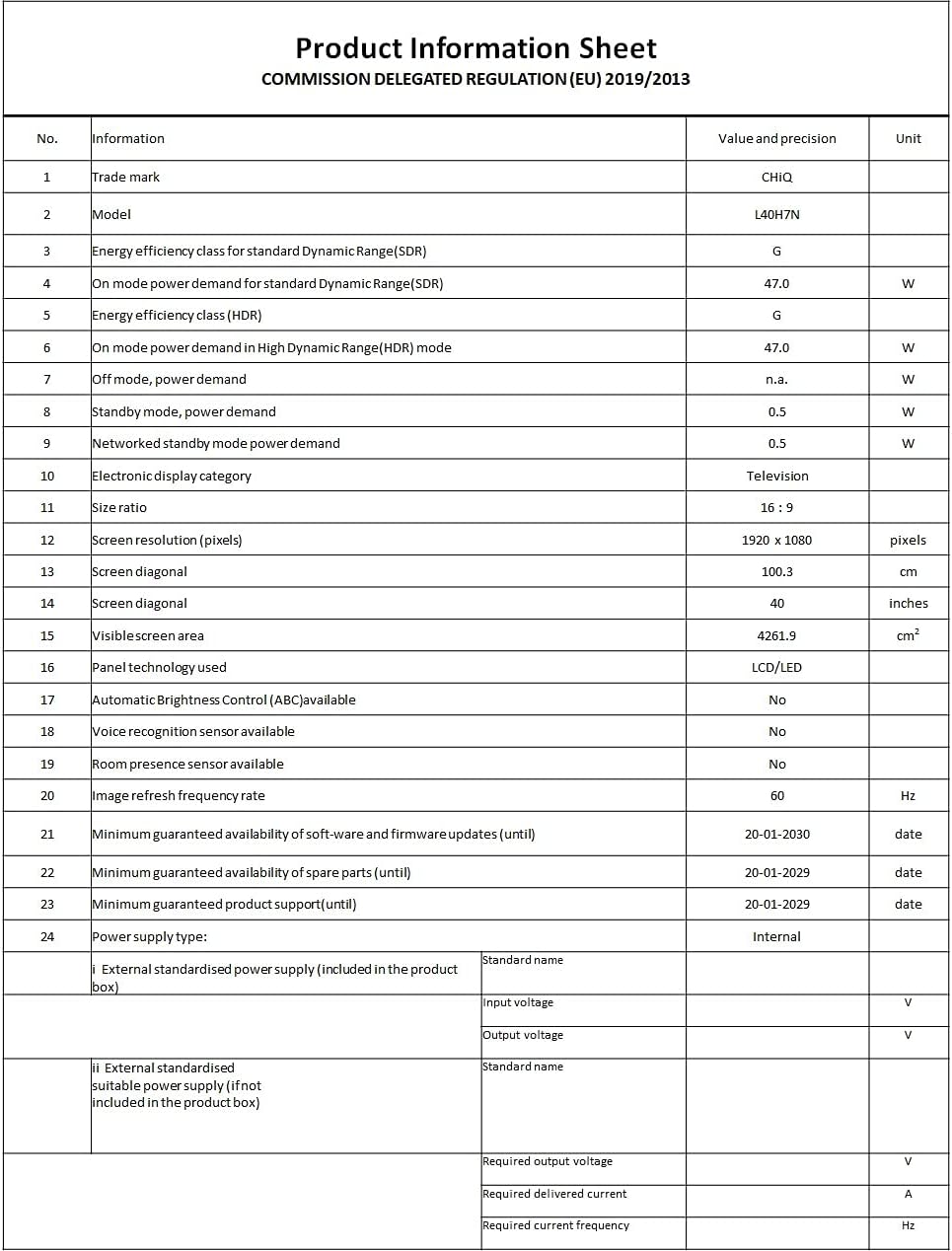
Image: A Product Information Sheet for the CHIQ L40H7N, detailing various specifications and compliance with COMMISSION DELEGATED REGULATION (EU) 2019/2013.
8. Waarborg en Ondersteuning
Your CHIQ L40H7N Smart TV comes with a manufacturer's warranty. Please refer to the warranty card included in your product packaging for specific terms and conditions, including warranty period and coverage details.
Kliëntediens:
For technical assistance, troubleshooting, or warranty claims, please contact CHiQ customer support. Contact information can typically be found on the CHiQ official webwebwerf of in jou produkdokumentasie.