
ROCCAT ROC-12-940-BN
Roccat Vulcan 122 Mechanical Gaming Keyboard User Manual
Model: ROC-12-940-BN
1. Inleiding
The Roccat Vulcan 122 is a high-performance mechanical gaming keyboard designed for precision and durability. It features Roccat's unique Titan switches, advanced AIMO RGB lighting, and a robust aluminum construction. This manual provides detailed instructions for setting up, operating, maintaining, and troubleshooting your keyboard.

Image: The Roccat Vulcan 122 keyboard shown with a Roccat mouse and headset, demonstrating its vivid, dynamic lighting synergy with AIMO.
Sleutel kenmerke:
- Unique design with lowered keycaps and reduced reaction time.
- RGB lighting with configurable LED effects and adjustable AIMO effects.
- High-quality and resistant design with robust materials and an anodized aluminum surface.
- Advanced anti-ghosting with N-Key Rollover (NKRO).
- Programmable macro keys and ROCCAT Easy-Shift[+].
2. Opstelling
2.1 Die sleutelbord koppel
To connect your Roccat Vulcan 122 keyboard:
- Unpack the keyboard and its accessories.
- Steek die USB-aansluiting van die sleutelbord in 'n beskikbare USB-poort op jou rekenaar.
- Die bedryfstelsel sal outomaties die nodige drywers opspoor en installeer.
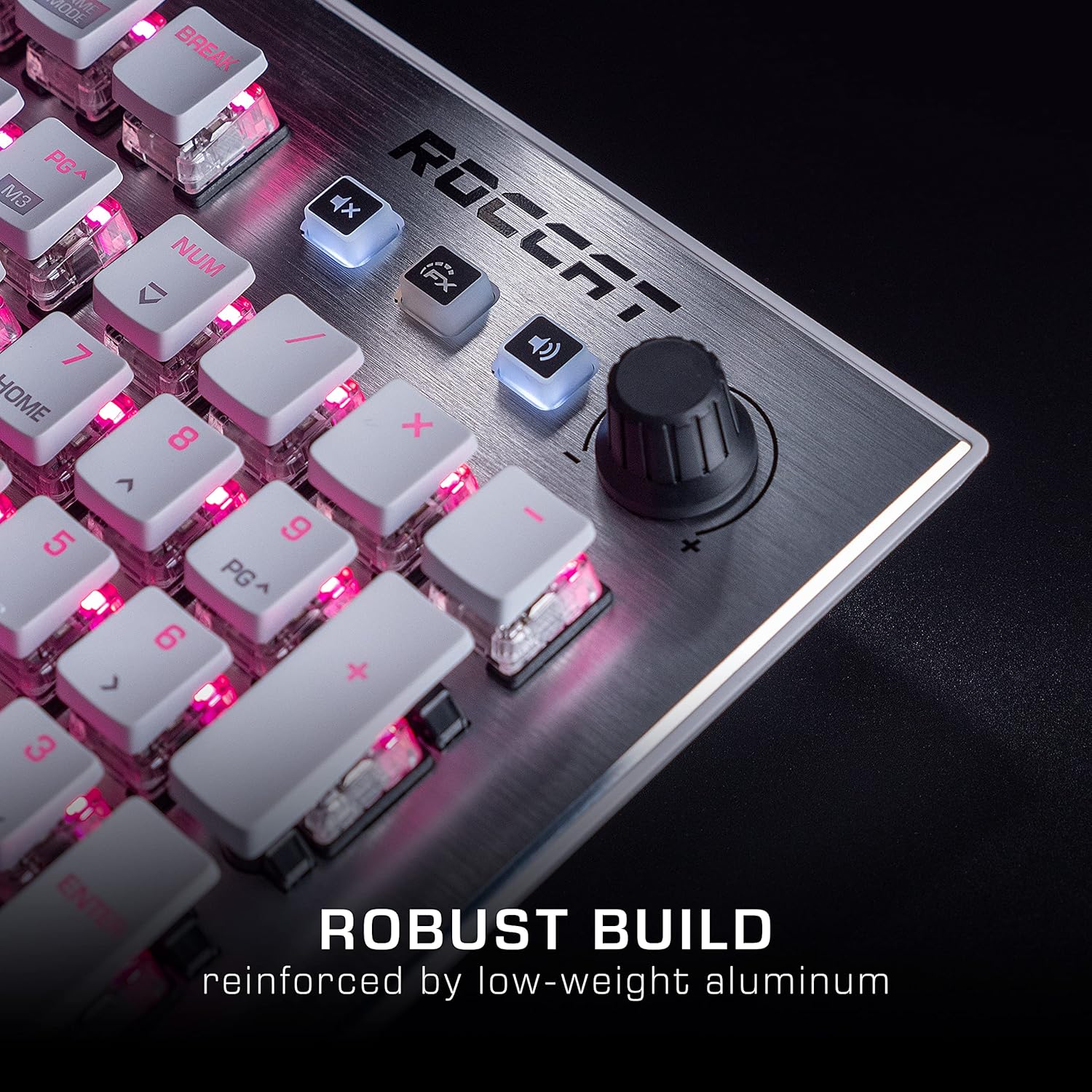
Image: The Roccat Vulcan 122 keyboard shown with its detachable wrist rest, ready for connection.
2.2 Sagteware-installasie (ROCCAT Swarm)
For full functionality and customization, install the ROCCAT Swarm software:
- Besoek die amptelike ROCCAT webwerf (www.roccat.com) en navigeer na die ondersteuningsafdeling.
- Download the latest version of the ROCCAT Swarm software for your operating system.
- Begin die installeerder en volg die instruksies op die skerm.
- After installation, launch ROCCAT Swarm to configure your keyboard settings, lighting, and macros.
3. Bediening van die sleutelbord
3.1 Standard Key Functions
The Vulcan 122 functions as a standard QWERTY keyboard. All alphanumeric keys, function keys (F1-F12), navigation keys, and the numeric keypad operate as expected.
3.2 Mediakontroles
The keyboard features dedicated media controls for convenient audio management.
- Volumeknop: Located in the upper right corner, rotate to adjust system volume.
- Demp-knoppie: Druk om klank te demp/ontdemp.
- FX-knoppie: Cycles through lighting effects or other programmable functions.

Beeld: 'n Nabyskoot view of the mixer-style media controls on the Roccat Vulcan 122, including the volume knob and dedicated function keys.
3.3 RGB Lighting Customization (AIMO)
The Vulcan 122 features advanced RGB lighting with Roccat's AIMO intelligent lighting system. Use the ROCCAT Swarm software to:
- Select from various pre-set lighting effects.
- Customize individual key illumination.
- Pas die helderheid en spoed van effekte aan.
- Synchronize lighting with other AIMO-compatible devices.
3.4 Programmable Macro Keys and Easy-Shift[+]
The keyboard includes programmable macro keys and the Easy-Shift[+] function, allowing you to assign secondary functions to keys.
- Use the ROCCAT Swarm software to record and assign macros to designated keys.
- Easy-Shift[+] allows you to double the number of assignable functions by holding down the Easy-Shift[+] key (usually Caps Lock by default, configurable in Swarm) and pressing another key.
3.5 Anti-Ghosting with NKRO
The Vulcan 122 features advanced anti-ghosting technology with N-Key Rollover (NKRO), ensuring that every key press is registered accurately, even when multiple keys are pressed simultaneously.

Image: A hand demonstrating typing on the Roccat Vulcan 122 keyboard, emphasizing the ergonomic design of the keys for comfortable use.
4. Onderhoud
4.1 Skoonmaak van die sleutelbord
To ensure the longevity and optimal performance of your Vulcan 122 keyboard, regular cleaning is recommended.
- Ontkoppel die sleutelbord van jou rekenaar voordat jy dit skoonmaak.
- Gebruik 'n sagte, pluisvrye lap effens dampened with water or a mild cleaning solution to wipe the keycaps and surface. Avoid harsh chemicals.
- For dust and debris between keys, use compressed air. The raised keycap design makes cleaning easier.
- Ensure the keyboard is completely dry before reconnecting it.

Image: A close-up of the Roccat Vulcan 122 keyboard keys, illustrating their design which facilitates easy cleaning and resistance to dust and liquids.
5. Probleemoplossing
If you encounter issues with your Roccat Vulcan 122 keyboard, refer to the following common problems and solutions:
- Sleutelbord reageer nie:
- Maak seker dat die USB-kabel stewig aan beide die sleutelbord en die rekenaar gekoppel is.
- Probeer om die sleutelbord in 'n ander USB-poort te koppel.
- Herbegin jou rekenaar.
- Check if the keyboard is disabled in your operating system's device manager.
- RGB-beligting werk nie of is verkeerd:
- Ensure the ROCCAT Swarm software is installed and up to date.
- Kontroleer beligtingsinstellings binne die Swarm-sagteware.
- Perform a firmware update for the keyboard via Swarm.
- Sleutels registreer nie of spook nie:
- Clean the affected keys as described in the Maintenance section.
- Maak seker dat die sleutelbord se firmware op datum is.
- Toets die sleutelbord op 'n ander rekenaar om stelselspesifieke probleme uit te sluit.
- ROCCAT Swarm software not detecting keyboard:
- Maak seker dat die sleutelbord behoorlik gekoppel is.
- Restart the Swarm software and your computer.
- Installeer die ROCCAT Swarm-sagteware weer.
- Kontroleer vir enige botsende sagteware of drywers.
6. Spesifikasies
| Kenmerk | Detail |
|---|---|
| Handelsmerk | ROCCAT |
| Model Naam | Vulcanus 122 |
| Modelnommer | ROC-12-940-BN |
| Sleutelbordbeskrywing | Meganies |
| Skakel Tipe | Taktiel |
| Materiaal | Aluminium |
| Spesiale kenmerke | Agterlig |
| Versoenbare toestelle | Laptop (PC) |
| Ondersteuning van bedryfstelsels | Windows 10, Windows 7, Windows 8 |
| Produk afmetings | 46.2 x 23.5 x 3.2 cm |
| Item gewig | 1.15 kg |

Beeld: 'n Ontplofte view diagram illustrating the components of a Roccat Titan Tactile mechanical switch, highlighting its design for swift and precise response.
7. Waarborg en Ondersteuning
7.1 Waarborginligting
Your Roccat Vulcan 122 keyboard is covered by a manufacturer's warranty. The specific terms and duration of the warranty may vary by region and retailer. Please retain your proof of purchase for warranty claims. For detailed warranty information, refer to the warranty card included with your product or visit the official ROCCAT webwebwerf.
7.2 Tegniese Ondersteuning
For technical assistance, driver updates, or further inquiries, please visit the official ROCCAT support page:
Jy kan algemene vrae, probleemoplossingsgidse en kontakbesonderhede vir kliëntediens op hul webwerf vind. webwebwerf.
Verwante Dokumente - ROC-12-940-BN
 |
ROCCAT Vulcan AIMO Meganiese Speletjiesleutelbord Vinnige Installasiegids 'n Vinnige installasiegids vir die ROCCAT Vulcan AIMO meganiese speltoetsbord, met besonderhede oor die opstelling, kenmerke soos Titan-skakelaars en AIMO-beligting, en sagteware-installasie. |
 |
ROCCAT Vulcan AIMO-sleutelbord: Spoed, duursaamheid en beligting Ontdek die ROCCAT Vulcan AIMO-sleutelbord, met Titan-skakelaars vir verbeterde spoed en presisie, duursame konstruksie met 'n aluminiumplaat en intelligente AIMO-beligting vir 'n lewendige spel-estetika. Sluit 'n vinnige installasiegids en produkinligting in. |
 |
ROCCAT Pyro-speletjiesleutelbord Vinnige begingids Hierdie gids bied vinnige begininstruksies vir die ROCCAT Pyro meganiese spelsleutelbord, insluitend opstelling, tegniese spesifikasies en sagteware-installasie. |
 |
ROCCAT Kain 120/122 AIMO Vinnige installasiegids 'n Vinnige installasiegids vir die ROCCAT Kain 120/122 AIMO-speelmuis, met besonderhede oor die opstelling, tegniese spesifikasies en veiligheidsinligting. |
 |
ROCCAT Ryos MK Pro Mechanical Gaming Keyboard Quick Installation Guide This guide provides quick installation instructions for the ROCCAT Ryos MK Pro mechanical gaming keyboard. Learn about its advanced features including per-key illumination, Easy-Shift[+]™ for doubled key functions, Macro Live! recording, and high-quality CHERRY® MX key switches. Includes system requirements and technical specifications. |
 |
ROCCAT Kain 200/202 Vinnige Installasiegids Hierdie gids bied vinnige installasie-instruksies vir die ROCCAT Kain 200/202 draadlose spelmuis, insluitend opstelling, knoppietoewysings en tegniese spesifikasies. |
Ask a question about this manual
Ask about setup, troubleshooting, compatibility, parts, safety, or missing instructions. Manuals+ will review the question and use this page’s manual context to help answer it.