
PatrolEyes DV10 PRO
PatrolEyes DV10 PRO Body Camera User Manual
Model: DV10 PRO
Inleiding
This manual provides detailed instructions for the setup, operation, and maintenance of your PatrolEyes DV10 PRO 1080p WiFi Police Body Camera. The DV10 PRO is a high-definition video recorder designed for law enforcement, featuring 1080p HD video, a 140° wide-angle lens, 64GB of storage, GPS tracking, night vision, and WiFi connectivity. Please read this manual thoroughly to ensure proper use and to maximize the camera's capabilities.
Produk verbyview
The PatrolEyes DV10 PRO is built for durability and performance, offering essential features for reliable recording in various conditions. Key features include:
- True 1080p HD video recording
- 140° groothoeklens
- Tot 12 uur se batterylewe
- Ingeboude 64 GB berging
- Integrated GPS for embedding location data
- Automatic infrared night vision
- WiFi function for smartphone connectivity and file review
- AES256 file encryption for data security
- IP67 waterproof and dustproof rating
- EIS 6-axis image stabilization
Kamera-komponente
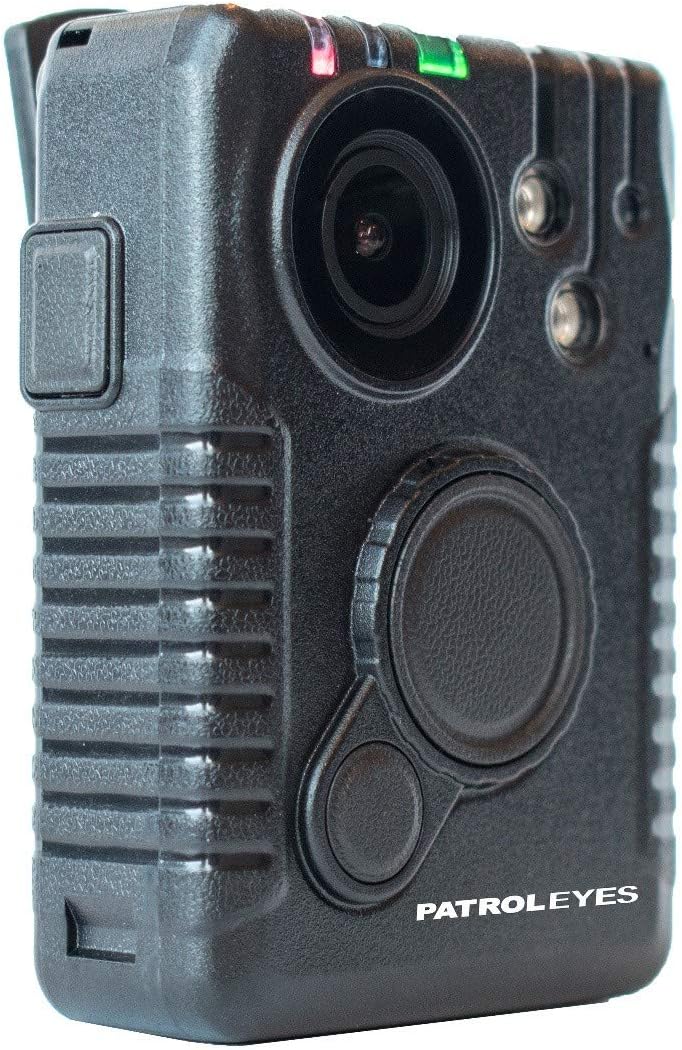
Figuur 1: Voorkant View. This image displays the front of the DV10 PRO body camera, highlighting the central camera lens, two infrared (IR) lights for night vision, and the primary recording and function buttons.

Figuur 2: Kant View met USB-poort. This image shows the side of the camera, featuring a protective cover over the USB port, used for charging and data transfer.

Figuur 3: Terug View. The rear of the camera is shown, displaying the PatrolEyes product label and the attachment point for the body clip or mounting accessories.

Figuur 4: Onder View. This image illustrates the bottom of the camera, revealing the metallic contact pins used for charging the device when placed in a compatible charging dock.
Opstelling
1. Aanvanklike laai
Before first use, fully charge the DV10 PRO camera. Connect the camera to a power source using the provided USB cable or charging dock. The battery indicator will show charging status and turn solid when fully charged. A full charge can provide up to 12 hours of recording time.
2. Skakel aan/af
- To power on: Press and hold the Power button until the indicator lights illuminate.
- To power off: Press and hold the Power button until the indicator lights turn off.
3. Software Installation (Windows/PC Only)
The DV10 PRO requires specific software for full functionality, including viewing GPS data and managing settings. This software is compatible with Windows/PC operating systems only and will not work with Apple/MAC computers. Refer to the included software CD or the manufacturer's website for download and installation instructions. Install the software before connecting the camera to your computer for the first time.
Bedien die kamera
1. Opname van video
To begin recording, press the dedicated Record button. Recording can start even when the camera is initially off. Press the Record button again to stop recording. The camera will save video files in AVI format to its internal 64GB storage.
2. Nagvisie
The DV10 PRO features an automatic infrared sensor for night vision. In low-light conditions, the camera will automatically activate its infrared lights to capture clear video. No manual activation is required.
3. GPS-opsporing
The built-in GPS module automatically embeds location coordinates onto each video file. These coordinates can be viewed on maps using the dedicated software installed on your Windows/PC computer.
4. WiFi Function and Smartphone Connectivity
The camera's WiFi function allows you to connect your smartphone to the camera's WiFi signal. This enables remote control functionalities such as starting/stopping recordings and reviewing saved video, photo, or audio files directly from your smartphone. Consult the software manual for detailed instructions on connecting via WiFi.
5. File Enkripsie
The DV10 PRO utilizes AES256 file encryption to secure all recorded data. This ensures that your camera files remain protected. Access to encrypted files typically requires the proprietary software.
Onderhoud
1. Skoonmaak
Regularly clean the camera lens and body with a soft, dry cloth. Avoid using abrasive cleaners or solvents that could damage the device. Ensure the USB port cover is securely closed to maintain the IP67 rating.
2. Berging
Store the camera in a cool, dry place away from direct sunlight and extreme temperatures. When storing for extended periods, ensure the battery is partially charged (around 50%) to prolong its lifespan.
3. Firmware-opdaterings
Periodically check the PatrolEyes website for any available firmware updates. Keeping your camera's firmware up-to-date can improve performance and add new features.
Probleemoplossing
- Kamera skakel nie aan nie: Ensure the battery is fully charged. If the issue persists, try connecting to a power source and attempting to power on.
- Opnameprobleme: Check if the internal storage is full. Transfer files na 'n rekenaar om spasie vry te maak.
- GPS data not appearing: Maak seker die kamera het 'n deursigtige view of the sky to acquire a GPS signal. Verify that the viewing software is correctly installed and updated on your Windows/PC.
- WiFi connectivity problems: Ensure the camera's WiFi function is enabled. Check your smartphone's WiFi settings to ensure it is connected to the camera's network.
- Files inaccessible on Mac: The camera's software and file management are designed for Windows/PC only. Direct access or full functionality on Apple/MAC computers is not supported.
Spesifikasies
| Handelsmerk | Patrollie Ja |
| Modelnommer | DV10 PRO |
| Video-opname-resolusie | 1080p |
| Veld van View | 140 grade |
| Internasionale Beskermingsgraad | IP67 (Waterdig en Stofdig) |
| Video-opname-formaat | AVI |
| Ligbrontipe | Infrarooi |
| Draadlose kommunikasietegnologie | Wi-Fi |
| Verbindingstegnologie | USB, Wi-Fi |
| Versoenbare toestelle | Smartphone (for WiFi function) |
| Kragbron | Battery aangedrewe |
| Interne berging | 64 GB |
| Batterylewe | Tot 12 uur |
| File Enkripsie | AES256 |
| GPS | Built-in, embeds coordinates |
| Sagteware-versoenbaarheid | Windows/PC only |
| Datum Eerste Beskikbaar | 13 September 2019 |
| UPC | 683318834330 |
| ASIN | B07XVRTZVV |
Waarborg en Ondersteuning
For warranty information, technical support, or service inquiries, please refer to the documentation included with your product or visit the official PatrolEyes webwebwerf. Bewaar u aankoopbewys as bewys van aankoop vir waarborgeise.
Amptelike Produkvideo's
Geen amptelike verkopervideo's is tans beskikbaar vir inbedding nie.
Ask a question about this manual
Ask about setup, troubleshooting, compatibility, parts, safety, or missing instructions. Manuals+ will review the question and use this page’s manual context to help answer it.