
Amazon Basics MDUDP-35AEN1-BA8
Amazon Basics Large Dehumidifier User Manual
Model: MDUDP-35AEN1-BA8 (35 Pint Standard)
1. Inleiding
Thank you for choosing the Amazon Basics Large Dehumidifier. This manual provides important information for the proper setup, operation, and maintenance of your dehumidifier. Please read this manual thoroughly before using the appliance to ensure safe and efficient operation. Keep this manual for future reference.
Belangrike veiligheidsinligting
- Plaas die ontvochtiger altyd op 'n gelyke, stabiele oppervlak.
- Ensure proper clearance around the unit for adequate airflow.
- Moenie die eenheid met 'n beskadigde kragkoord of prop gebruik nie.
- Ontkoppel die eenheid voordat u skoonmaak of enige onderhoud uitvoer.
- Hou buite bereik van kinders en troeteldiere.
2. Produk verbyview
The Amazon Basics Large Dehumidifier is designed to effectively reduce humidity in spaces up to 2,500 square feet, maintaining optimal indoor humidity between 45-55% for enhanced comfort and air quality.

Figuur 2.1: Voorkant view of the Amazon Basics Large Dehumidifier.
Sleutelkomponente
- Beheerpaneel: Located on the top of the unit for easy access to settings.
- Luginlaat: Waar vogtige lug die eenheid binnedring.
- Luguitlaat: Where dehumidified air exits the unit.
- Watertenk: Collects condensed water. Features a visible water level indicator.
- Herbruikbare filter: Located behind the air inlet, designed for easy cleaning.
- Caster wiele: Vir maklike mobiliteit van die eenheid.

Figuur 2.2: oorview of the dehumidifier's key features including the control panel, auto-defrost, overflow protection, and auto-restart functionality.
Beheerpaneel
The intuitive control panel allows for effortless dehumidification. It includes buttons for power, fan speed, timer, and humidity settings, along with indicator lights for various functions.

Figure 2.3: Detail of the control panel and water tank full indicator (A).
3. Opstelling
Uitpak en plasing
- Verwyder die ontvochtiger versigtig uit sy verpakking.
- Place the unit upright on a firm, level surface in the desired location. Ensure there is at least 8 inches (20 cm) of space around the unit for proper air circulation.
- Laat die eenheid vir ten minste 24 uur regop staan voordat jy dit inprop. Dit laat die koelmiddel toe om te sak.
Kragverbinding
Plug the grounded power cord into a suitable electrical outlet. The unit is designed for standard household electrical supply.
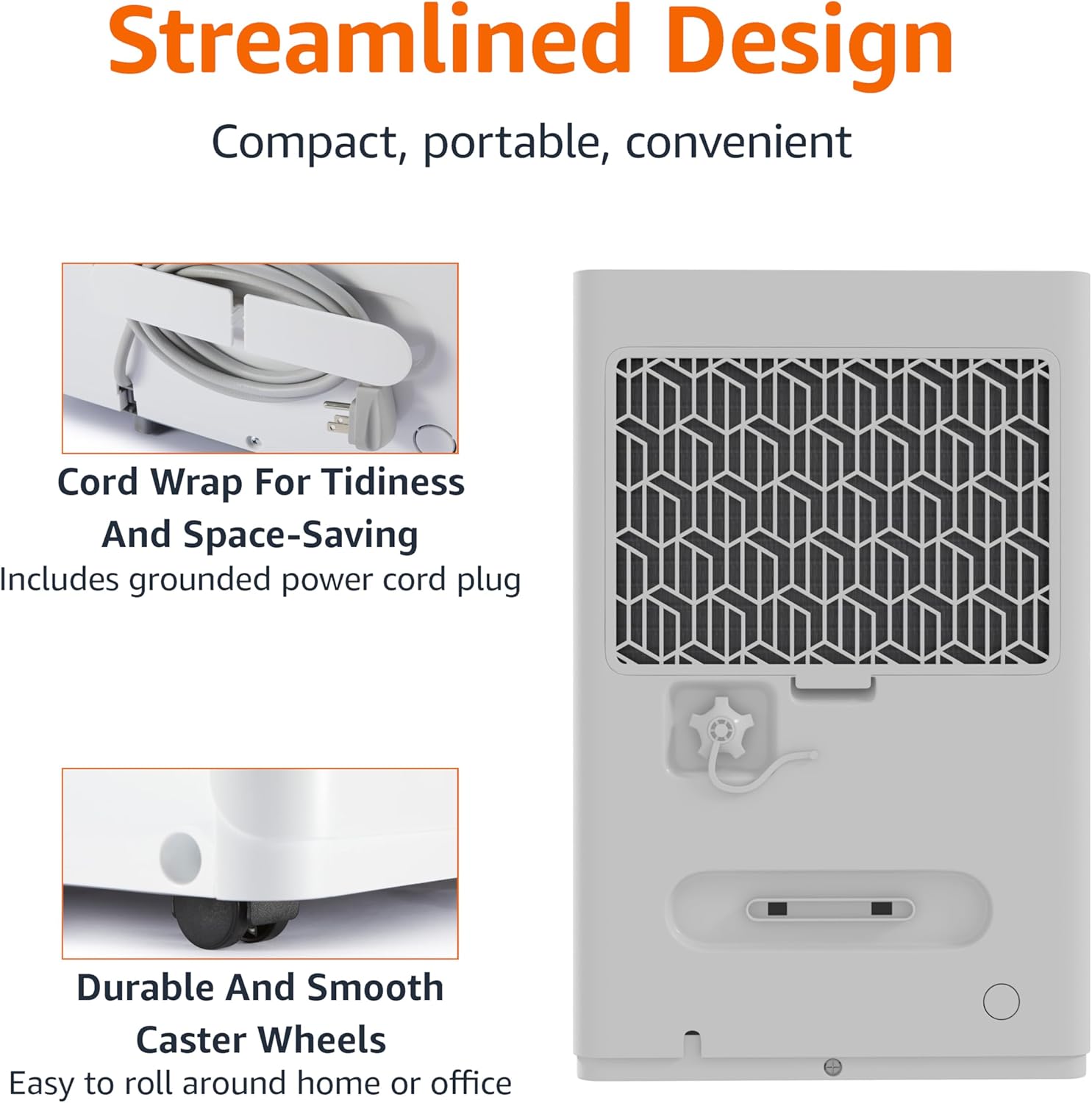
Figure 3.1: The dehumidifier features a cord wrap for tidiness and durable caster wheels for easy movement.
4. Bedryfsinstruksies
Skakel aan/af
- Druk die Krag knoppie op die beheerpaneel om die eenheid aan of af te skakel.
Instelling van humiditeitsvlak
The dehumidifier maintains optimal indoor humidity between 45-55%. You can adjust the target humidity using the control panel.
- Gebruik die Up en Af arrow buttons to set your desired humidity level. The display will show the current humidity.
Timer funksie
The unit features a timer for scheduled operation.
- Druk die Afteller button to set the desired operating time (from 0.5 to 24 hours). The unit will turn off or on after the set time.

Figure 4.1: The dehumidifier is ideal for standard 8 ft / 2.4 m ceilings and features a schedule on/off timer from 0.5 to 24 hours.
Auto-Defrost
The auto-defrost feature prevents frost build-up on the coils, ensuring continuous and efficient operation, especially in cooler environments.
Auto Re-start Function
In die geval van 'n krag outage, the dehumidifier will automatically resume operation with your previous settings once power is restored, providing consistent humidity control without manual intervention.
5. Onderhoud
Maak die watertenk leeg
When the water tank is full, the unit will stop operating and an indicator light will illuminate. The water tank has a capacity of 1.59 gallons (6 liters).
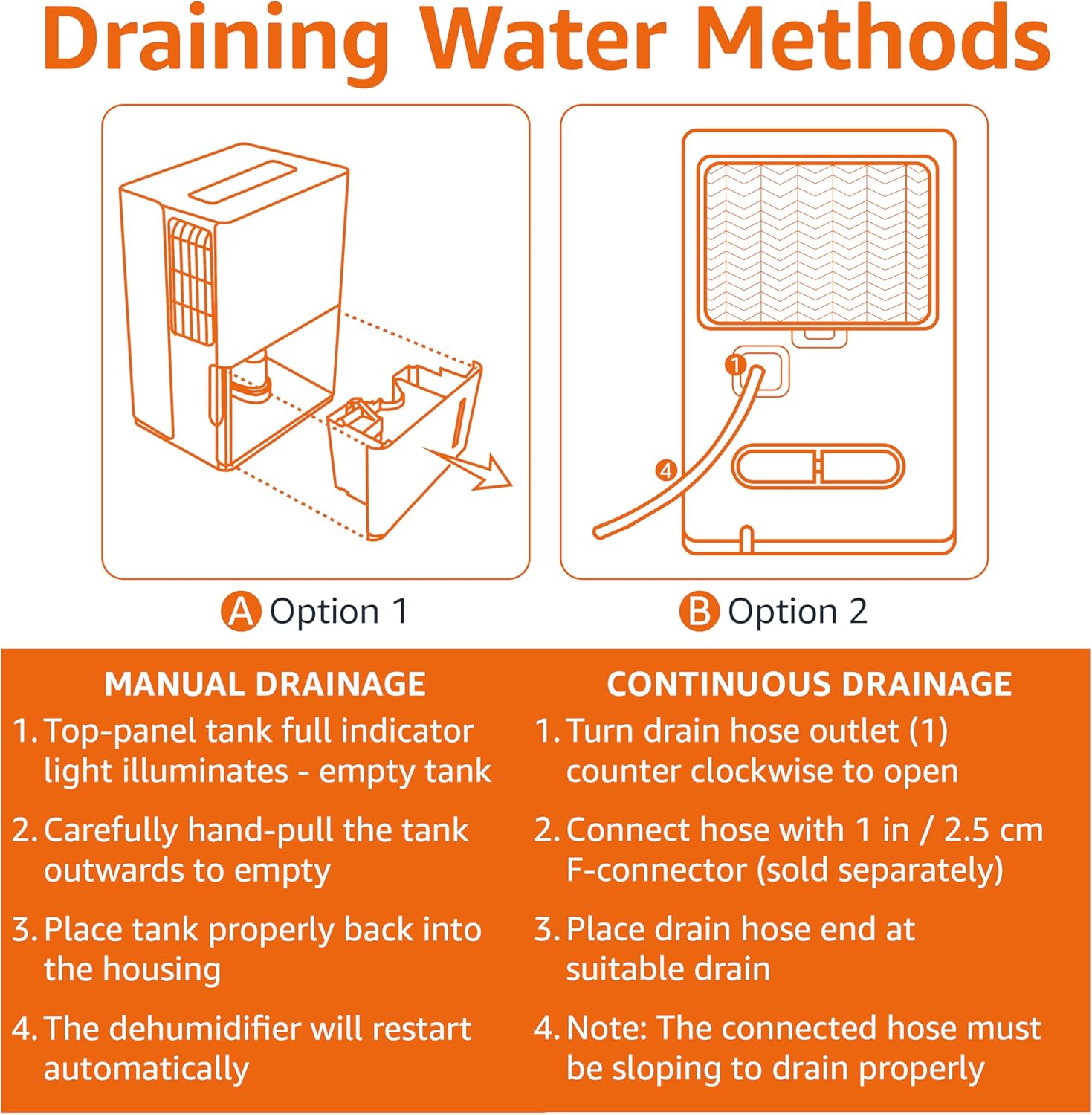
Figure 5.1: Manual and Continuous Drainage Methods.
Manual Drainage (Option 1)
- When the top-panel tank full indicator light illuminates, carefully pull the tank outwards to empty.
- Maak die versamelde water leeg.
- Place the tank properly back into the housing. The dehumidifier will restart automatically.
Continuous Drainage (Option 2)
- Turn the drain hose outlet counter-clockwise to open.
- Connect a standard garden hose (sold separately) with a 1 inch / 2.5 cm F-connector to the outlet.
- Place the drain hose end at a suitable drain (e.g., floor drain, sink).
- Let wel: The connected hose must be sloping downwards to drain properly.
Cleaning the Reusable Filter
The reusable filter is simple to clean, ensuring the unit performs at its best without frequent replacements.
- Ontkoppel die ontvochtiger van die kragtoevoer.
- Verwyder die filter van die agterkant van die eenheid.
- Maak die filter skoon met warm seepwater. Spoel deeglik af.
- Laat die filter heeltemal lugdroog word voordat dit weer in die eenheid geplaas word.
- Steek die ontvochtiger weer in.
6. Probleemoplossing
If you experience issues with your dehumidifier, please refer to the following common troubleshooting steps. For more detailed assistance, consult the full User Manual PDF or contact customer support.
| Probleem | Moontlike oorsaak | Oplossing |
|---|---|---|
| Ontvochtiger skakel nie aan nie. | No power supply; Power cord not securely plugged in. | Check power outlet and ensure cord is fully inserted. |
| Die eenheid versamel nie water nie. | Water tank is full or not properly seated; Air filter is clogged; Room temperature is too low. | Empty and re-seat water tank; Clean air filter; Ensure room temperature is above 41°F (5°C). |
| Unit is running but humidity is not decreasing. | Room size exceeds unit capacity; Doors/windows are open; Air filter is clogged. | Ensure unit is appropriate for room size; Close all doors and windows; Clean air filter. |
| Eenheid is raserig. | Unit is not on a level surface; Air filter is dirty. | Plaas die eenheid op 'n gelyk oppervlak; Maak die lugfilter skoon. |
7. Spesifikasies
| Kenmerk | Detail |
|---|---|
| Handelsmerk | Amazon Basics |
| Model Naam | MDUDP-35AEN1-BA8 |
| Kapasiteit | 35 pinte per dag |
| Vloeroppervlaktedekking | Tot 2500 XNUMX vierkante voet |
| Tenk Volume | 35 Pints (1.59 Gallons / 6 Liters) |
| Produk Afmetings (D x B x H) | 11.1" D x 15.43" B x 24.25" H |
| Item gewig | 39.2 pond |
| Kleur | Wit |
| Energiesertifisering | Energy Star-gesertifiseer |
| Bedryfsmodus | Standaard |
| Vervaardiger | Amazon |
| UPC | 810004816732 |
8. Waarborg en Ondersteuning
Beperkte waarborg
This Amazon Basics Dehumidifier comes with a 1-year limited warranty from the date of purchase. This warranty covers defects in materials and workmanship under normal use. For full warranty terms and conditions, please refer to the official User Manual PDF available online or contact Amazon Basics customer support.
Beskermingsplanne
Extended protection plans are available for purchase to provide additional coverage beyond the standard manufacturer's warranty. These plans offer peace of mind for longer periods.
- 3-jaar beskermingsplan: Extends coverage for an additional 3 years.
- 4-jaar beskermingsplan: Extends coverage for an additional 4 years.
- Volledige beskerming: 'n Maandelikse plan wat alle kwalifiserende vorige en toekomstige aankope dek.
Vir besonderhede oor aankoopasing these plans, please visit the product page on Amazon.com or contact Amazon customer service.
Kliënte ondersteuning
For any questions, technical assistance, or warranty claims, please contact Amazon customer support through your Amazon account or visit the Amazon Basics Store online.
You can also access the official User Manual (PDF) for detailed instructions and diagrams: Laai gebruikershandleiding af (PDF)
Ask a question about this manual
Ask about setup, troubleshooting, compatibility, parts, safety, or missing instructions. Manuals+ will review the question and use this page’s manual context to help answer it.