
1. Inleiding
The Maxell Bass 13 Wireless Headphones (Model B13-WHPS) are designed to provide a versatile audio experience. These headphones feature 40mm drivers for clear sound, an integrated microphone for communication, and comfortable ear pads for extended listening. They offer both wireless Bluetooth connectivity and a traditional 3.5mm wired option.
2. Wat is in die boks
- Maxell Bass 13 Wireless Headphones
- USB-laaikabel
- 3.5mm Audio Cable (if applicable, not explicitly listed but common for hybrid headphones)
- Gebruikershandleiding
3. Produk verbyview
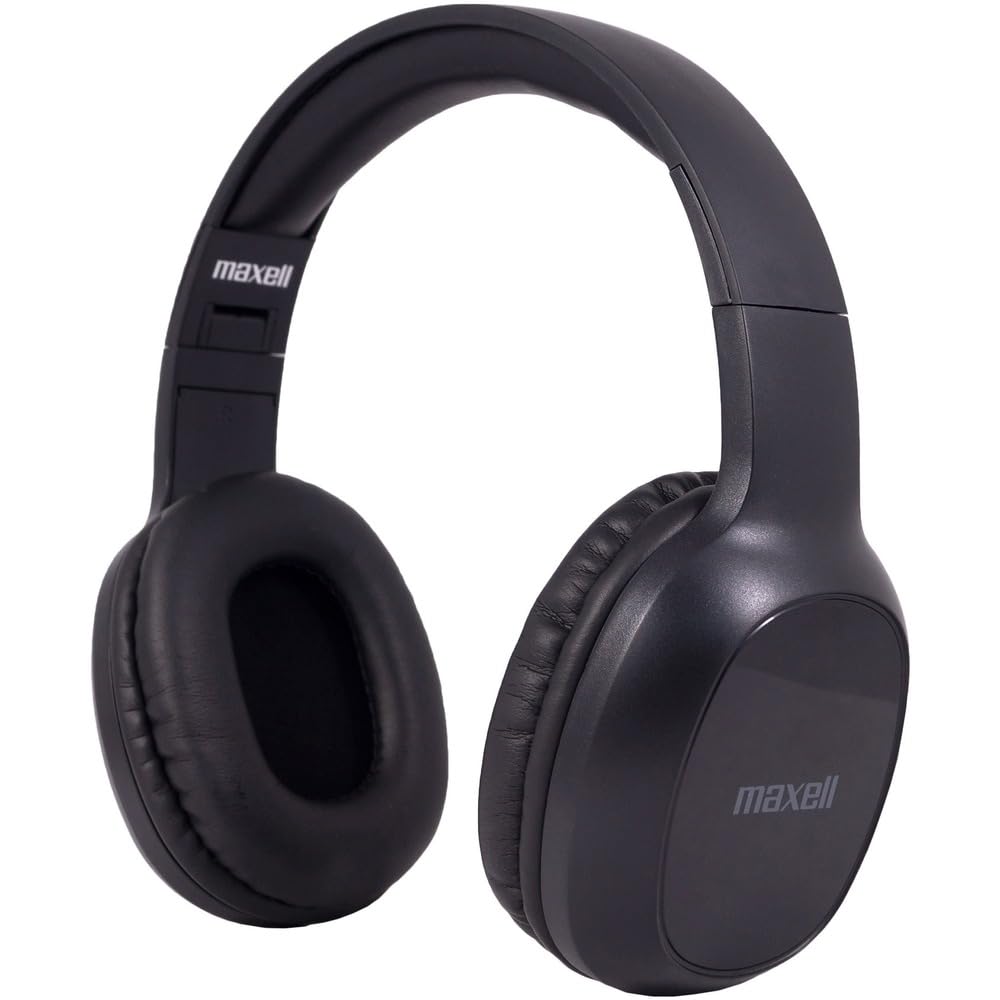
Figure 1: Maxell Bass 13 Wireless Headphones

Figure 2: Earcup Controls (Power, Volume, Play/Pause)
Sleutel kenmerke:
- 40 mm dinamiese drywers: Deliver clear and powerful audio performance.
- Geïntegreerde mikrofoon: Maak handvrye oproepe moontlik.
- Noise-Isolating Earpads: Provide comfort and help reduce external distractions.
- Bluetooth 5.0-verbinding: Vir stabiele draadlose verbinding.
- 3.5 mm oudio-aansluiting: Allows for wired connection to compatible devices.
- Verstelbare kopband: Verseker 'n gemaklike pasvorm vir verskillende kopgroottes.
- Tot 8 uur batterylewe: For extended listening and talk time.
4. Opstelling
4.1 Laai die oorfone

Figure 3: Connecting the USB Charging Cable
- Locate the charging port on the headphone earcup.
- Connect the small end of the provided USB charging cable to the headphone's charging port.
- Koppel die groter punt van die USB-kabel aan 'n USB-kragbron (bv. 'n rekenaar se USB-poort, USB-muuradapter).
- The LED indicator on the headphones will illuminate to show charging status. It will typically turn off or change color when fully charged.
- A full charge provides up to 8 hours of continuous talk/play time.
4.2 Bluetooth -koppeling
- Maak seker dat die oorfone volledig gelaai is.
- Press and hold the Power button on the headphone earcup until the LED indicator flashes blue and red, indicating pairing mode.
- Gaan na die Bluetooth-instellings op jou toestel (slimfoon, tablet, rekenaar).
- Soek vir available devices. Select "Maxell Bass 13" from the list.
- Once paired, the LED indicator will typically show a solid blue light or flash blue slowly.
- Indien gevra word vir 'n wagwoord, voer "0000" in.
4.3 Bedrade verbinding (3.5 mm-klankaansluiting)

Figure 4: Connecting the 3.5mm Audio Cable
For devices without Bluetooth or when battery is low, you can use the 3.5mm audio cable:
- Plug one end of the 3.5mm audio cable into the audio input jack on the headphone earcup.
- Steek die ander kant in die 3.5 mm-klankuitvoeraansluiting van jou toestel.
- The headphones will operate in passive mode, and Bluetooth functionality will be disabled.
5. Bedryfsinstruksies
5.1 Krag aan/af
- Krag aan: Druk en hou die aan/af-knoppie vir ongeveer 3 sekondes in totdat die LED-aanwyser aanskakel.
- Skakel af: Druk en hou die aan/af-knoppie vir ongeveer 3-5 sekondes totdat die LED-aanwyser afskakel.
5.2 Volumebeheer
- Verhoog volume: Druk die Volume Op (+) knoppie.
- Verlaag volume: Druk die Volume Verlaag (-) knoppie.
5.3 Musiekweergawe
- Speel/pouse: Press the Multi-function button (often the Power button or a dedicated Play/Pause button) once.
- Volgende snit: Press and hold the Volume Up (+) button (or double-press, refer to specific product button layout).
- Vorige snit: Press and hold the Volume Down (-) button (or double-press, refer to specific product button layout).
5.4 Oproepbestuur
- Beantwoord/beëindig oproep: Druk een keer op die Multifunksie-knoppie.
- Verwerp oproep: Druk en hou die multifunksieknoppie vir ongeveer 2 sekondes in.
- Herbel laaste nommer: Dubbeldruk die multifunksieknoppie.
6. Onderhoud
6.1 Skoonmaak
- Vee die oorfone af met 'n sagte, droë, pluisvrye lap.
- Moenie skuurmiddels, oplosmiddels of aërosolspuitmiddels gebruik nie.
- Vermy dat vog in enige openinge kom.
6.2 Berging

Figure 5: Headphones Folded for Storage
- Bêre die oorfone op 'n koel, droë plek weg van uiterste temperature.
- When not in use for extended periods, ensure the headphones are fully charged before storage to preserve battery health.
- The headphones feature a foldable design for compact storage and portability.
6.3 Batterysorg
- Vermy om die battery gereeld heeltemal te ontlaai.
- Charge the headphones regularly, even if not used often.
- Do not expose the battery to excessive heat or direct sunlight.
7. Probleemoplossing
| Probleem | Moontlike oorsaak | Oplossing |
|---|---|---|
| Oorfone skakel nie aan nie | Lae battery | Laai die oorfone ten volle. |
| Kan nie via Bluetooth koppel nie | Oorfone nie in paringsmodus nie; Toestel Bluetooth af; Te ver van toestel af | Maak seker dat die oorfone in paringsmodus is (flikkerend blou/rooi). Skakel die toestel se Bluetooth aan. Beweeg die oorfone nader aan die toestel. |
| Geen klank nie | Volume too low; Incorrect audio source; Headphones not connected | Increase headphone and device volume. Check if headphones are properly paired/connected. Verify audio output settings on your device. |
| Swak oproepkwaliteit | Weak Bluetooth signal; Microphone obstructed | Move closer to your device. Ensure microphone is not covered. |
8. Spesifikasies
| Kenmerk | Detail |
|---|---|
| Modelnommer | B13-WHPS |
| Handelsmerk | Maxell |
| Verbindingstegnologie | Bluetooth 5.0 |
| Oudiobestuurdergrootte | 40 mm |
| Batterylewe | Up to 8 Hours (continuous talk/play time) |
| Koptelefoonaansluiting | 3.5 mm-aansluiting |
| Geraasbeheerfunksies | Sound Isolation, Noise Cancelling |
| Impedansie | 32 ohm |
| Sensitiwiteit | 100 dB |
| Frekwensierespons | 20 Hz |
| Oorplasing | Op Oor |
| Vormfaktor | Oor Oor |
| Produk afmetings | 7.25 x 3 x 9 duim |
| Item gewig | 8.4 onse |
| Materiaal | Electronic Components, Foam, Plastic, Wire |
| Versoenbare toestelle | Tablets, Laptops, Desktops, Portable Devices with 3.5mm Audio Jack |
9. Amptelike Produkvideo
Video 1: Maxell Bass 13 Bluetooth Headphones Overview. This video provides a visual demonstration of the headphones' features and design.
10. Waarborg en Ondersteuning
Maxell products are designed for reliability and performance. For specific warranty information, please refer to the warranty card included with your purchase or visit the official Maxell website. For technical support or customer service inquiries, please contact Maxell customer support through their official channels.