
Inleiding
Dankie vir die aankoopasing the ThreeH Digital Wooden LED USB Alarm Clock. This elegant and functional clock is designed to provide accurate time, date, and temperature readings, along with convenient alarm and voice control features. Please read this manual carefully to ensure proper setup and operation of your device.

Figuur 1: Voorkant view of the ThreeH Digital Wooden LED USB Alarm Clock.
Opstelling
Kragtoevoer
The ThreeH Digital Wooden LED USB Alarm Clock can be powered by two methods:
- USB-kragkabel: Connect the included USB power cord to the DC5V port on the back of the clock and plug the other end into a USB power adapter (not included) or a computer USB port.
- AAA batterye: For portable use or as a backup, insert 4 x AAA batteries (not included) into the battery compartment on the back of the clock. Ensure correct polarity.

Figure 2: Power supply options for the clock, including USB and AAA batteries.
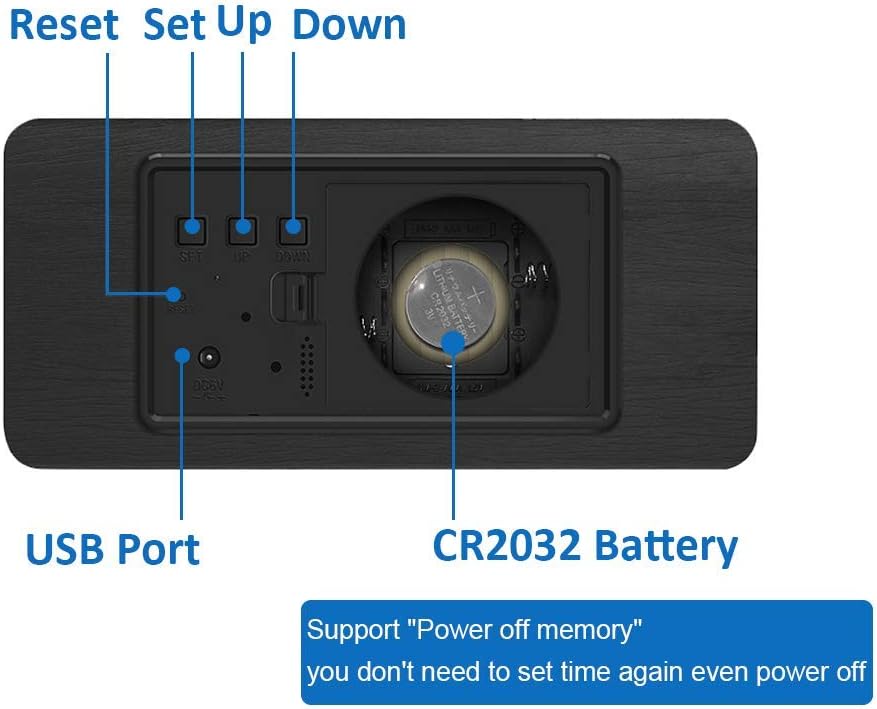
Figure 3: Rear panel of the clock with battery compartment and USB port.
Initial Setup (Time and Date)
Upon first power-up or after a power reset, you may need to set the time and date. The clock supports a time memory function via a CR2032 battery (included) to retain settings during power outages.
- Locate the 'SET', 'UP', and 'DOWN' buttons on the back of the clock.
- Press the 'SET' button to enter the setting mode. The first setting (e.g., 12/24 hour format) will flash.
- Use the 'UP' and 'DOWN' buttons to adjust the value.
- Press 'SET' again to confirm the current setting and move to the next one (e.g., Hour, Minute, Year, Month, Day).
- Herhaal stappe 3 en 4 totdat alle instellings gekonfigureer is.

Figure 4: Control buttons and ports on the back of the clock.
Bedryf
Vertoonmodusse
The clock cycles through different display modes: Time, Date, and Temperature. You can typically adjust the display cycle or set it to show only time by pressing the 'SET' button repeatedly outside of setting mode.
Alarm instellings
Die horlosie ondersteun tot drie onafhanklike alarms (A1, A2, A3).
- In normal display mode, press 'SET' until 'ON:A1' (or 'ON:A2', 'ON:A3') appears.
- Use 'UP' or 'DOWN' to toggle the alarm ON/OFF.
- Press 'SET' to confirm and proceed to set the alarm hour and minute using 'UP' and 'DOWN'.
- Herhaal vir A2 en A3 indien verkies.

Figure 5: Setting multiple alarms (A1, A2, A3).
Stembeheerfunksie
This feature allows the display to turn on when a sound louder than 60dBm is detected (e.g., clapping hands, tapping the clock). The display will automatically turn off after a few seconds to save power.
- Press the 'DOWN' button.
- Select 'ON: Sd' to activate voice control mode.
- Select '--: Sd' to deactivate voice control mode.
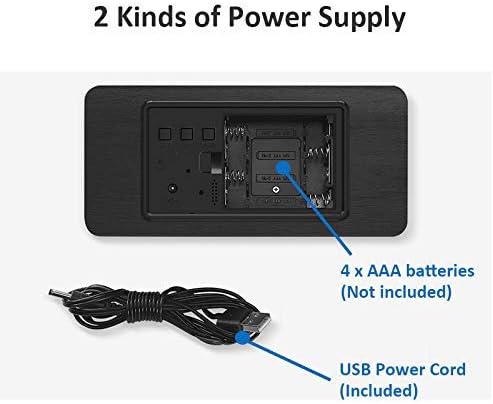
Figure 6: Demonstrating the sound control feature.

Figure 7: Comparison of silent auto-dimming and sound-activated display.
Helderheid aanpassing
The clock features soft LED lights that are clear at night without glare. The brightness may adjust automatically or can be manually set depending on the specific model version. Refer to the included mini-manual for detailed steps if manual adjustment is desired.

Figure 8: Display brightness variations.
Onderhoud
Skoonmaak
To clean the clock, gently wipe the surface with a soft, dry cloth. Do not use abrasive cleaners, solvents, or immerse the clock in water.
Battery vervanging
If using AAA batteries, replace all four batteries when the display becomes dim or unresponsive. For the CR2032 memory battery, replace it if the time settings are lost after a power disconnection.
Probleemoplossing
| Probleem | Moontlike oorsaak | Oplossing |
|---|---|---|
| Die skerm is af of dof. | No power, low batteries, or in power-saving mode. | Check USB connection. Replace AAA batteries. Tap the clock or make a sound to activate display if in voice control mode. |
| Die alarm lui nie. | Alarm not set or turned off. | Verify alarm settings (ON:A1/A2/A3) and ensure the correct time is set. |
| Time/Date settings are lost after power disconnection. | CR2032 memory battery is dead or missing. | Replace the CR2032 button cell battery on the back of the clock. |
| Stembeheer werk nie. | Voice control mode is off or ambient noise is too low. | Press 'DOWN' and select 'ON: Sd'. Ensure sound is louder than 60dBm. |
Spesifikasies
- Modelnommer: H-AC11Black_White
- Produkafmetings (L x B x H): 7 x 3.81 x 15 cm
- Gewig: 200 gram
- Kragbron: USB (DC5V) or 4 x AAA Batteries (not included)
- Geheue battery: 1 x CR2032 (ingesluit)
- Vertoon tipe: Digitale LED
- Spesiale kenmerke: Temperature Display (F/C), Alarm (3 sets), Large Display, Voice Control, Time Memory Function, Power Saving Mode
- Kleur: Black Wood with White LED display
Waarborg en Ondersteuning
Waarborg inligting
This product comes with a standard manufacturer's warranty. Please retain your purchase receipt as proof of purchase. For specific warranty terms and conditions, refer to the documentation provided at the time of purchase or contact the retailer.
Kliënte ondersteuning
If you encounter any issues or have questions regarding your ThreeH Digital Wooden LED USB Alarm Clock that are not covered in this manual, please contact ThreeH customer support through the retailer's platform or the official ThreeH website. Provide your model number (H-AC11Black_White) and a detailed description of the issue for faster assistance.


