
Inleiding
This manual provides comprehensive instructions for the proper use and maintenance of your ELECTROPRIME 8GB Rechargeable USB LCD Digital Voice Recorder, Model ASH20BEBUBEB26998. Please read this manual thoroughly before operating the device to ensure optimal performance and longevity. Keep this manual for future reference.
Produk verbyview
The ELECTROPRIME Digital Voice Recorder is a compact and versatile device designed for high-quality audio recording and MP3 playback. It features an LCD screen for easy navigation, 8GB of internal storage, and a rechargeable battery.
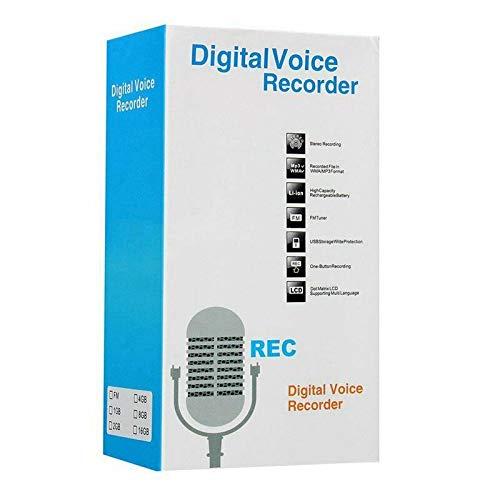
Figure 1: ELECTROPRIME Digital Voice Recorder with included accessories, including earphones, USB cable, and telephone adapter.
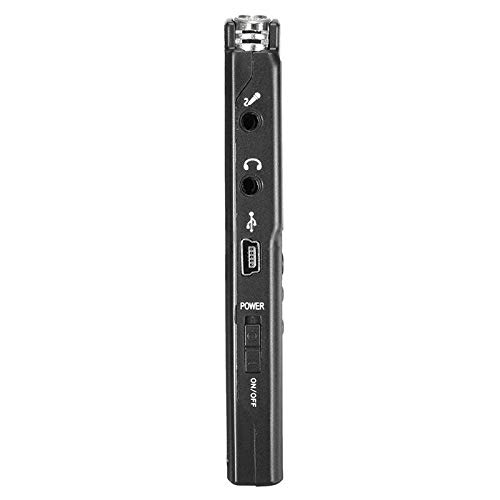
Figuur 2: Kant view of the recorder, highlighting the USB port, headphone jack, microphone input, and power switch.
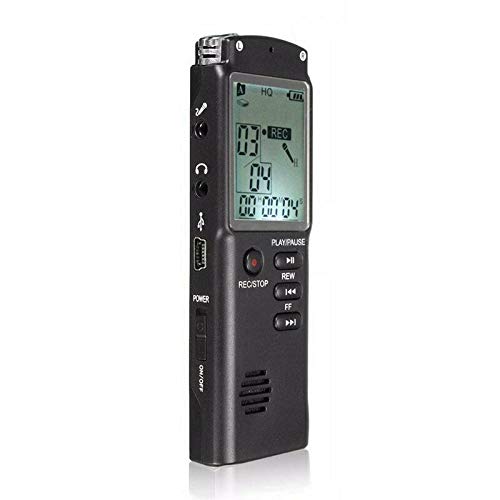
Figuur 3: Voorkant view of the recorder, displaying the LCD screen with recording information and control buttons.
Opstelling
- Laai die toestel: Connect the recorder to a computer's USB port or a USB wall adapter using the provided USB cable. The LCD screen will indicate charging status. A full charge typically takes 2-3 hours.
- Skakel aan/af: Locate the ON/OFF switch on the side of the device. Slide it to the "ON" position to power on and to the "OFF" position to power off.
- Aanvanklike opstelling: Upon first power-on, you may need to set the date and time. Use the navigation buttons (REW, FF) and Play/Pause button to adjust and confirm settings.
Bedryfsinstruksies
Opneem oudio
- Begin opname: Met die toestel aangeskakel, druk die REC/STOP button once. The LCD will display "REC" and a timer, indicating that recording has started.
- Onderbreek opname: Tydens opname, druk die SPEEL/POUSEER button to pause. Press it again to resume.
- Stop opname: Druk die REC/STOP button again to stop recording. The recording will be saved automatically.
Speel opnames terug
- Toegang tot opnames: In standby mode, use the REW or FF buttons to navigate through your saved recordings.
- Speel/pouse: Druk die SPEEL/POUSEER button to start playback of the selected recording. Press again to pause.
- Pas volume aan: Use the volume control buttons (if present, typically on the side or via menu) to adjust playback volume.
Oordrag Files na 'n rekenaar
- Koppel: Connect the recorder to your computer using the USB cable.
- Access Device: Die opnemer sal as 'n verwyderbare skyfaandrywer op jou rekenaar verskyn.
- oordra: Open the drive, locate your audio files (usually in a folder like "RECORD" or "VOICE"), and copy them to your computer.
Using as an MP3 Player
Die toestel ondersteun MP3-klankterugspeel. Dra MP3 oor files to the device's internal storage via USB connection. Use the REW en FF buttons to select tracks and SPEEL/POUSEER om terugspeel te beheer.
Onderhoud
- Skoonmaak: Gebruik 'n sagte, droë lap om die buitekant van die toestel skoon te maak. Moenie vloeibare skoonmaakmiddels of oplosmiddels gebruik nie.
- Batterysorg: Om die batterylewe te verleng, vermy om die toestel gereeld heeltemal te ontlaai. Laai die toestel gereeld, selfs al word dit nie vir lang tye gebruik nie.
- Berging: Bêre die toestel op 'n koel, droë plek weg van direkte sonlig, uiterste temperature en hoë humiditeit.
- Vermy impak: Beskerm die toestel teen val en impakte, wat interne komponente kan beskadig.
Probleemoplossing
| Probleem | Moontlike Oplossing |
|---|---|
| Toestel skakel nie aan nie. | Ensure the battery is charged. Connect to a USB power source and try again. Check the ON/OFF switch position. |
| Cannot record audio. | Check if the device has sufficient memory. Delete old files if necessary. Ensure the microphone is not obstructed. |
| Toestel word nie deur rekenaar herken nie. | Try a different USB port or cable. Ensure the device is powered on when connected. Restart your computer. |
| Swak klank kwaliteit. | Ensure the recording environment is quiet. Keep the device close to the audio source. Check recording settings (if adjustable). |
Spesifikasies
- Handelsmerk: ELEKTROPRIME
- Modelnommer: ASH20BEBUBEB26998
- Geheue berging kapasiteit: 8 GB
- Oudioformaat: MP3
- Hardeware-koppelvlak: USB
- Versoenbare toestelle: MP3-speler
- Kragbron: Rechargeable Battery (USB charging)
Waarborg en Ondersteuning
Specific warranty information for this product is not provided in the available documentation. For warranty claims or technical support, please contact your retailer or the manufacturer, ELECTROPRIME, directly. Retain your proof of purchase for any warranty-related inquiries.
For further assistance, please refer to the official ELECTROPRIME webwebwerf of kontak hul kliëntediensafdeling.