
1. Inleiding
This manual provides essential instructions for the safe and effective operation of your Goopow H11 Kids Digital Camera. Please read this manual thoroughly before using the product and retain it for future reference.
2. Pakketinhoud
Verifieer dat al die items wat hieronder gelys word, in jou pakket ingesluit is:
- Goopow H11 Kids Digital Camera (with soft silicone cover)
- USB-laaikabel
- 32GB mikro SD kaart
- Lanyard
- Gebruikershandleiding
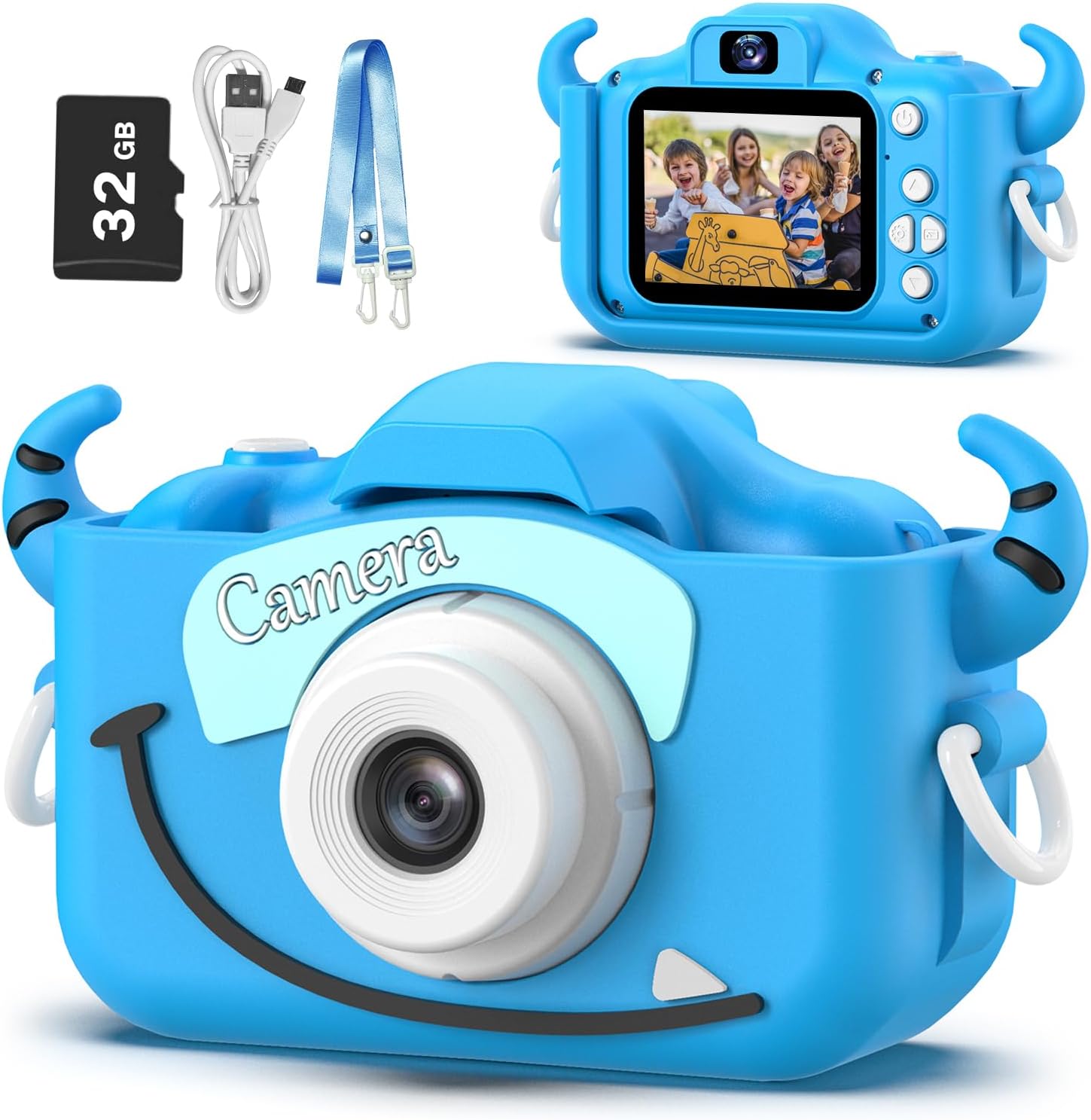
Image: Goopow H11 Kids Digital Camera, 32GB SD card, USB cable, and lanyard.
3. Produk verbyview
The Goopow H11 is a compact digital camera designed for children, featuring a durable soft silicone cover. It supports photo capture, video recording, playback, and includes built-in games.

Image: Dimensions of the Goopow H11 Kids Digital Camera, highlighting its compact size.
Sleutel kenmerke:
- 2.0" LCD-skerm: Vir viewfoto's en video's te gebruik.
- 1080P video-opname: Capture clear video moments.
- 8X digitale zoom: Vir die vasvang van verafgeleë onderwerpe.
- Selfie-modus: Front-facing camera for self-portraits.
- Veelvuldige funksies: Photo capture, video recording, playback, games, time-lapse, and various scene selections/frames.
- Duursame silikoonbedekking: Provides protection against drops and bumps.
- Ingeboude herlaaibare battery: 3.7V Lithium battery, USB rechargeable.
- 32GB SD-kaart ingesluit: Ample berging vir foto's en video's.
Video: 'n Promosievideovertoningasing the Goopow Kids Camera, highlighting its design, various colors, and features like selfie mode, digital zoom, and fun filters.
4. Opstelling
4.1. Laai die kamera
Before first use, fully charge the camera. Connect the provided USB charging cable to the camera's charging port and a compatible USB power adapter (not included) or computer USB port. The charging indicator light will illuminate during charging and turn off when fully charged.
Belangrik: Use a charger with an output of no more than 1A. Avoid fast chargers, as they can damage the battery. Charging should be supervised by an adult.
4.2. Inserting/Removing the SD Card
The camera comes with a 32GB Micro SD card pre-installed. If you need to remove or insert the card:
- Gently lift the silicone cover to expose the SD card slot.
- To insert, push the Micro SD card into the slot until it clicks into place.
- To remove, gently push the card again until it pops out.
4.3. Bevestig die koord
Attach the provided lanyard to the camera for easy carrying and to prevent accidental drops. Thread the lanyard through the designated loops on the camera's silicone cover.
5. Bedryfsinstruksies
5.1. Skakel aan/af
Druk en hou die aan/af-knoppie (gewoonlik bo-op of aan die kant) vir 'n paar sekondes in om die kamera aan of af te skakel.

Image: The Goopow H11 Kids Digital Camera displaying its main menu with icons for camera, video, playback, settings, games, and music.
5.2. Navigasie
Use the directional buttons (up, down, left, right) to navigate through the menu options. Press the "OK" or shutter button to select an option.
5.3. Neem foto's
- From the main menu, select the camera icon.
- Raam jou skoot met behulp van die LCD-skerm.
- Press the shutter button (top right) to take a picture.
- To switch to selfie mode, use the appropriate button (refer to the camera's button layout).

Image: The Goopow H11 Kids Digital Camera in selfie mode, showing three children smiling on the screen.
5.4. Opneem van video's
- From the main menu, select the video camera icon.
- Druk die sluiterknoppie om opname te begin. Druk dit weer om te stop.

Image: The Goopow H11 Kids Digital Camera recording video, with a scene of children at a birthday party displayed on the screen.
5.5. Terugspeel
Select the playback icon from the main menu to view your captured photos and videos. Use the directional buttons to browse through them.
5.6. Spesiale kenmerke
- Frames and Filters: Access various fun frames and filters from the camera menu to add creative effects to your photos.
- Digitale zoom: Use the zoom buttons (if available) to adjust the 8X digital zoom.
- Speletjies: The camera includes multiple puzzle games for entertainment.

Image: The Goopow H11 Kids Digital Camera displaying various funny frames and filters that can be applied to photos.

Image: The Goopow H11 Kids Digital Camera demonstrating its 8X digital zoom capability, showing a child's face at different zoom levels.
6. Onderhoud
- Hou die kamera skoon deur dit met 'n sagte, droë lap af te vee.
- Avoid exposing the camera to extreme temperatures or direct sunlight for extended periods.
- Ensure the charging port and SD card slot are free from dust and debris.
7. Probleemoplossing
| Probleem | Oplossing |
|---|---|
| Kamera skakel nie aan nie. | Maak seker dat die battery gelaai is. Koppel aan 'n laaier en probeer weer. |
| Kan nie foto's/video's neem nie. | Check if the SD card is inserted correctly and has sufficient storage space. |
| Swak beeldkwaliteit. | Ensure adequate lighting. Clean the camera lens if it's dirty. |
| Kamera vries. | Press the reset button (if available, refer to product diagram) or hold the power button for 10 seconds to force a restart. |
8. Spesifikasies
- Model: H11
- Handelsmerk: Goopow
- Produk afmetings: 1.3 x 7.52 x 4.45 duim
- Item gewig: 3.7 onse
- Battery: 1 Litium Polimeer battery (ingesluit)
- Optiese zoom: 8x
- Maksimum Webkamerabeeldresolusie: 12 MP
- Ondersteun File Formaat: JPEG
- Beeldstabilisasie: Digitaal
9. Waarborg en Ondersteuning
For warranty information or technical support, please refer to the contact details provided with your purchase or visit the official Goopow webwebwerf. Bewaar u bewys van aankoop vir waarborgeise.