
APEKX BE1018
APEKX True Wireless Bluetooth 5.0 Sports Earbuds User Manual
Model: BE1018
Inleiding
Thank you for choosing APEKX True Wireless Bluetooth 5.0 Sports Earbuds. These earbuds are designed to provide a high-fidelity audio experience with the freedom of wireless connectivity, perfect for sports and active lifestyles. Featuring IPX7 waterproofing, a secure fit, and a portable charging case, they ensure your music accompanies you wherever you go. This manual provides detailed instructions on how to set up, operate, and maintain your earbuds for optimal performance.

Image: APEKX True Wireless Bluetooth 5.0 Sports Earbuds in their open charging case, showcasing the pink earhooks.
Verpakking Inhoud
Kontroleer asseblief die inhoud van die pakket om seker te maak dat alle items teenwoordig is:
- APEKX True Wireless Earbuds (Left and Right)
- Draagbare laaikas
- USB-laaikabel
- Gebruikershandleiding
- Grey Over-Ear Earhooks (1 pair)
- Small Earhooks (2 pairs, pink)
- Ear Caps (multiple sizes)

Image: Display of all items included in the product packaging, including earbuds, charging case, cables, and various earhook and ear cap options.
Produk verbyview
Familiarize yourself with the components of your APEKX earbuds and charging case:
- Power / Multi-function Button: Controls power, playback, calls, and voice assistant.
- LED-aanwyser: Displays status for power, pairing, and charging.
- Mikrofoon: Vir handvrye oproepe.
- Interchangeable Earhooks: Provide a secure fit for various activities.
- Laaipennetjies: Connect to the charging case for power.
- Laaibak: Provides additional battery life for on-the-go charging.

Image: Detailed diagram pointing out the Power/Multi-function Button, LED Indicator, Microphone, Interchangeable Earhooks, and Charging Pins on the earbuds. Also shows battery life information: 4 hours from a single charge, plus 18 hours from the charging box for a total of 22 hours playtime.

Image: The earbuds in their charging case, alongside various earhook and ear cap accessories, highlighting their comfortable design.
Opstelling
Aanvanklike laai
Before first use, fully charge both the earbuds and the charging case. Connect the USB charging cable to the charging case and a power source. The LED indicators on the earbuds and case will show charging status. A full charge typically takes 1-2 hours.
Koppel aan u toestel
Follow these steps to pair your APEKX earbuds with your Bluetooth-enabled device:
- Ensure the charging case has power. Press the button on the charging case; both earbuds will show a red light.
- Take both earbuds out of the charging case. They will automatically enter pairing mode, indicated by flashing LED lights.
- Gaan na Bluetooth-instellings op jou toestel (slimfoon, tablet, ens.) en skakel Bluetooth aan.
- Soek vir available devices and select "TWS Earbuds-L" from the list.
- Confirm pairing if prompted. Once connected, the earbud LED indicators will stop flashing or show a steady light.
The earbuds will automatically turn off and recharge when placed back into the charging case after each use.
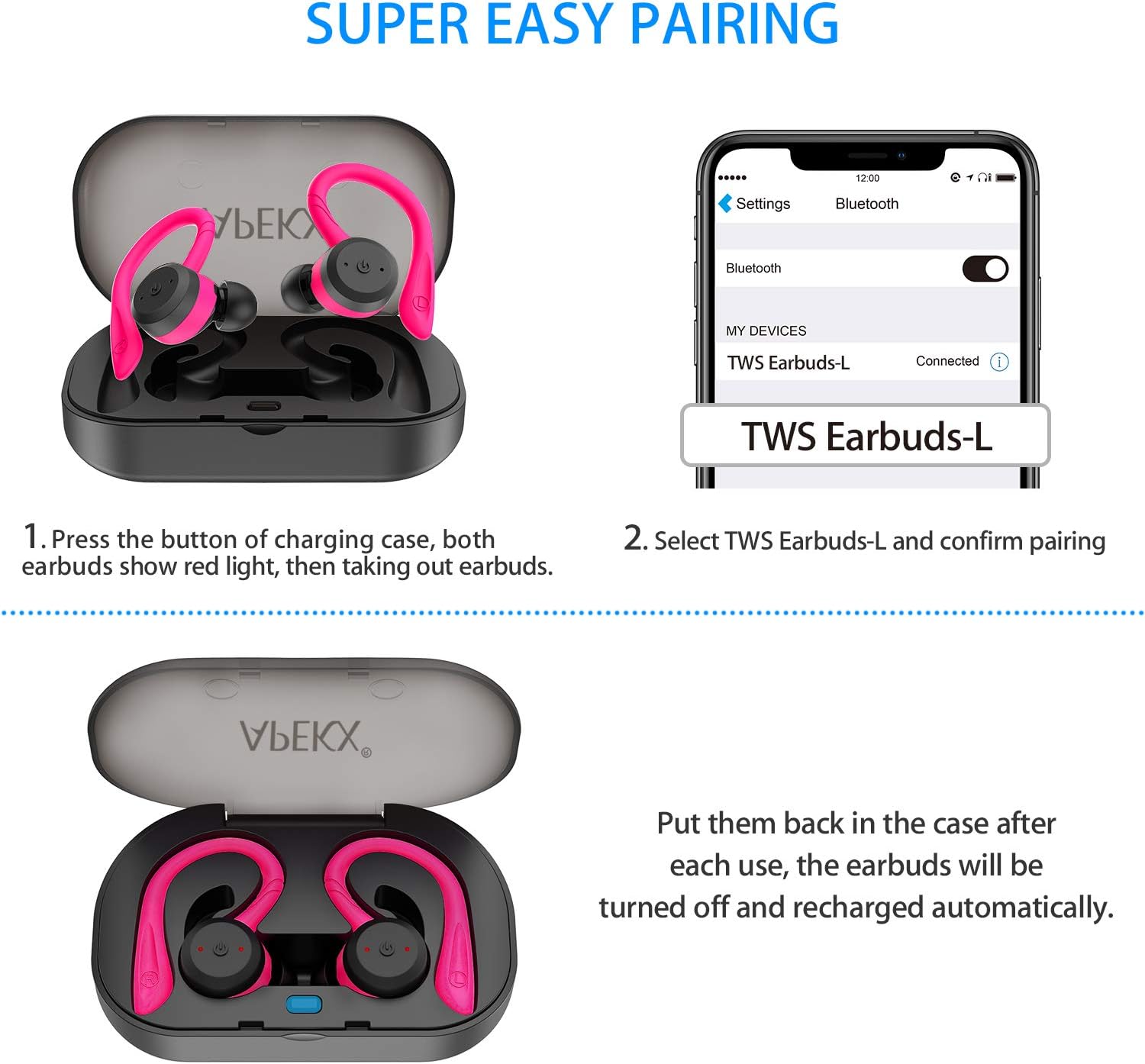
Image: Visual guide demonstrating the pairing process, showing the earbuds in the case with red lights, and a smartphone screen displaying "TWS Earbuds-L" as a connected Bluetooth device.
Bedryfsinstruksies
Krag aan/af
- Krag aan: Take the earbuds out of the charging case, and they will power on automatically. Alternatively, press and hold the Multi-function Button on each earbud for 3 seconds.
- Skakel af: Place the earbuds back into the charging case, and they will power off automatically. Alternatively, press and hold the Multi-function Button on each earbud for 5 seconds.
Musiek afspeel
- Speel/pouse: Press the Multi-function Button once on either earbud.
- Volgende snit: Double-press the Multi-function Button on the Right earbud.
- Vorige snit: Double-press the Multi-function Button on the Left earbud.
- Volume op: Triple-press the Multi-function Button on the Right earbud.
- Volume af: Triple-press the Multi-function Button on the Left earbud.
Belbestuur
- Beantwoord/beëindig oproep: Press the Multi-function Button once on either earbud.
- Verwerp oproep: Press and hold the Multi-function Button for 2 seconds on either earbud.
Stemassistent
- Aktiveer Stemassistent (Siri/Google Assistent): Press and hold the Multi-function Button for 1.5 seconds on either earbud.
Onderhoud
Skoonmaak
Maak jou oordopjes en laaikas gereeld skoon om optimale werkverrigting en higiëne te verseker. Gebruik 'n sagte, droë, pluisvrye lap. Vir oordopjes kan jy dit liggies met 'n effens droë lap afvee.amp cloth and mild soap, then dry thoroughly before reattaching. Do not use harsh chemicals or abrasive materials.
Berging
Wanneer dit nie gebruik word nie, bêre die oorfone in hul laaikassie om hulle teen stof en skade te beskerm. Bêre die kassie op 'n koel, droë plek weg van direkte sonlig en uiterste temperature.
Waterweerstand (IPX7)
The APEKX earbuds feature an IPX7 waterproof rating, meaning they can withstand immersion in water up to 1 meter for 30 minutes. This makes them suitable for intense workouts and use in rainy conditions. However, the charging case is not waterproof. Do not submerge the charging case in water. Ensure earbuds are dry before placing them back into the charging case to prevent damage to the charging pins.

Image: APEKX Earbuds in their charging case, with text highlighting their IPX7 waterproof and sweat-proof capabilities, shown with water droplets.
Probleemoplossing
Indien u probleme met u oorfone ondervind, verwys asseblief na die volgende algemene oplossings:
| Probleem | Moontlike oorsaak | Oplossing |
|---|---|---|
| Oorfone koppel nie met toestel nie | Oorfone nie in paringsmodus nie; Bluetooth af op toestel; voorheen gekoppelde toestel steur. | Ensure earbuds are taken out of case to enter pairing mode. Turn Bluetooth off and on again on your device. Forget previous pairings on your device. |
| Slegs een koptelefoon werk | Earbuds not properly synced; one earbud out of battery. | Place both earbuds back into the charging case, then take them out together. Ensure both earbuds are charged. |
| Oorknoppies laai nie | Charging pins dirty; charging cable faulty; case out of battery. | Clean charging pins on earbuds and case. Try a different USB cable. Ensure charging case is charged. |
| Lae volume of swak klankgehalte | Ear tips not sealed properly; earbud grilles blocked; low battery. | Try different sized ear tips for a better seal. Clean earbud grilles. Charge earbuds fully. |
Spesifikasies
- Model: BE1018
- Verbindingstegnologie: Draadloos
- Draadlose kommunikasietegnologie: Bluetooth 5.0
- Waterweerstandvlak: IPX7 (slegs oordopjes)
- Batterylewe: Approximately 4 hours (earbuds), up to 22 hours total with charging case
- Item gewig: 4 Ounces (total package)
- Produk afmetings: 4.7 x 3.4 x 2 duim
- Batterye: 3 Litium-ioonbatterye benodig (ingesluit)
- Kleur: Pienk
- Oorplasing: In Oor
- Vormfaktor: In Oor
- Geraasbeheer: Aktiewe geraaskansellasie
- Materiaal: Silikoon
Waarborg en Ondersteuning
APEKX products are manufactured with high-quality standards. For any product-related inquiries, technical support, or warranty claims, please refer to the contact information provided on the product packaging or the official APEKX webwebwerf. Bewaar asseblief u bewys van aankoop vir waarborgdiens.
For further assistance, please visit the official APEKX store page: APEKX Store on Amazon
Ask a question about this manual
Ask about setup, troubleshooting, compatibility, parts, safety, or missing instructions. Manuals+ will review the question and use this page’s manual context to help answer it.