1. Inleiding
Thank you for choosing TREBLAB Z2 Hybrid Active Noise Cancelling Wireless Headphones. This manual provides essential information for setting up, operating, and maintaining your headphones to ensure optimal performance and longevity. Please read it carefully before use.
2. Wat is in die boks
- TREBLAB Z2 Headphones
- TREBLAB Z2 Carrying Case
- 3.5mm-klankkabel (AUX)
- USB Type-C laaikabel
- User Manual; Quick Start Guide; Catalogue; Warranty card
3. Produk verbyview
Koptelefoonkenmerke
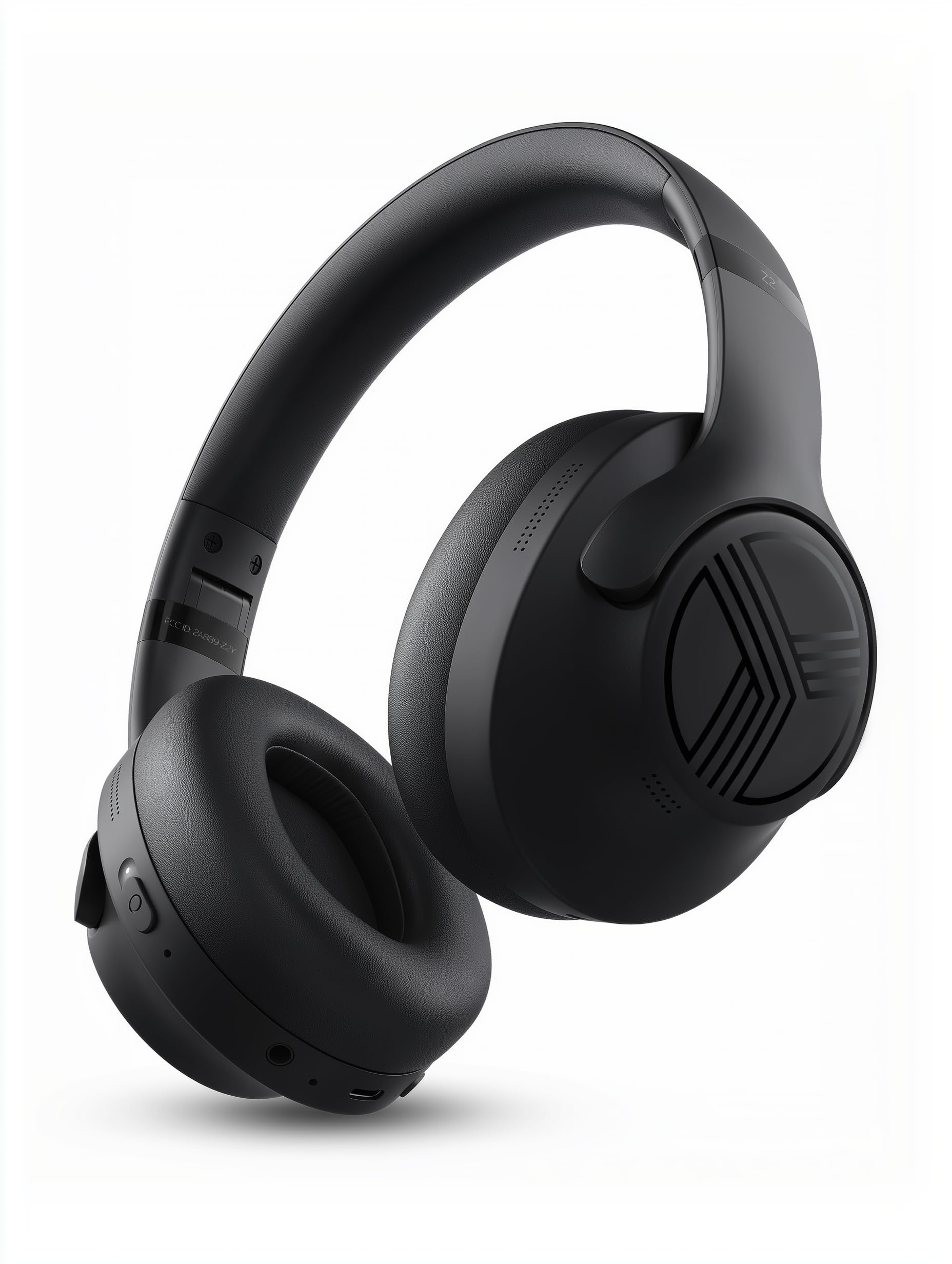
The TREBLAB Z2 headphones are designed for versatility and performance, featuring Hybrid Active Noise Cancelling (ANC) to minimize distractions, a long-lasting battery, and a comfortable, sweat-resistant design suitable for various activities.
- Hibriede Aktiewe Geraasdemping: Blocks external noise for immersive audio.
- Verlengde speeltyd: Up to 58 hours of battery life (without ANC, at 70% volume).
- Diep bas: Powerful audio with balanced sound.
- IPX4 Water Resistant & Sweatproof: Durable for workouts and outdoor use.
- Bluetooth 5.3 en meerpuntverbinding: Stable wireless connection to multiple devices.
- Ingeboude mikrofoon: Clear voice pickup for calls.
- Opvoubare ontwerp: Lightweight and comfortable for extended wear and easy storage.
Kontroles en poorte
The headphones feature intuitive button controls for playback, volume, calls, and ANC activation. All controls and ports are conveniently located on the earcups.
- Power/Play/Pause/Phone Button: Central control for power, media playback, and call management.
- Volume op/Volgende snit-knoppie: Adjust volume or skip to the next song.
- Volume Verlaag/Vorige Liedjie Knoppie: Adjust volume or go to the previous song.
- ANC On/Off Switch: Activate or deactivate Active Noise Cancelling.
- Micro USB/USB Type-C Charging Port: Vir die laai van die oorfone.
- AUX-invoer (3.5 mm-aansluiting): Vir bedrade verbinding.
- Mikrofoon: Vir handvrye oproepe en stemassistent-opdragte.
- LED-aanwyser: Wys krag-, parings- en laaistatus.
4. Opstelling
4.1 Laai die oorfone
Before first use, fully charge your TREBLAB Z2 headphones. A full charge takes approximately 3 hours.
- Connect the USB Type-C charging cable to the charging port on the headphone.
- Koppel die ander kant van die kabel aan 'n versoenbare USB-kragbron (bv. muuradapter, rekenaar se USB-poort).
- The LED indicator will show red during charging and turn off when fully charged.
4.2 Bluetooth -koppeling
Om jou oorfone via Bluetooth aan 'n toestel te koppel:
- Maak seker dat die oorfone gelaai en afgeskakel is.
- Press and hold the Power/Play/Pause button for a few seconds until the LED indicator flashes blue and red, indicating pairing mode.
- Aktiveer Bluetooth op jou toestel (slimfoon, tablet, rekenaar) en soek vir beskikbare toestelle.
- Select "TREBLAB Z2" from the list of found devices.
- Sodra dit suksesvol gekoppel is, sal die LED-aanwyser stadig blou flikker en jy sal 'n bevestigingstoon hoor.
For multipoint connection, pair the first device, then disable Bluetooth on the first device. Put the headphones back into pairing mode and connect to the second device. Once connected, re-enable Bluetooth on the first device, and the headphones should connect to both.
5. Bedryfsinstruksies
5.1 Krag aan/af
- Krag aan: Press and hold the Power/Play/Pause button for 3 seconds.
- Skakel af: Press and hold the Power/Play/Pause button for 5 seconds.
5.2 Musiekweergawe
- Speel/pouse: Druk kort op die Aan/Speel/Pause-knoppie.
- Volgende snit: Long press the Volume Up/Next Track button.
- Vorige snit: Long press the Volume Down/Previous Track button.
- Volume op: Short press the Volume Up/Next Track button.
- Volume af: Short press the Volume Down/Previous Track button.
5.3 Oproepbestuur
- Beantwoord oproep: Druk kort op die Aan/Speel/Pause-knoppie.
- Beëindig oproep: Druk kort op die Aan/Speel/Pause-knoppie tydens 'n oproep.
- Verwerp oproep: Long press the Power/Play/Pause button for 2 seconds.
- Herhaal: Dubbeldruk die Aan/Aan/Speel/Pause-knoppie.
5.4 Aktiewe Geraasdemping (ANC)
To activate ANC, slide the ANC switch on the left earcup to the 'ON' position. The LED indicator will light up. Slide to 'OFF' to deactivate.
5.5 Stemassistent
Activate your device's voice assistant (Siri, Google Assistant, Alexa) by pressing the Power/Play/Pause button for 1 second.
6. Onderhoud
- Clean headphones with a soft, damp lap. Moenie harde chemikalieë gebruik nie.
- Store headphones in the provided carrying case when not in use to protect them from dust and damage.
- Avoid exposing headphones to extreme temperatures, direct sunlight, or excessive moisture.
- Moenie probeer om die oorfone uitmekaar te haal of te wysig nie, aangesien dit die waarborg ongeldig sal maak.
7. Probleemoplossing
| Probleem | Oplossing |
|---|---|
| Oorfone sal nie aanskakel nie | Maak seker dat die oorfone volledig gelaai is. |
| Kan nie via Bluetooth koppel nie | Ensure headphones are in pairing mode (flashing blue/red LED). Turn off and on Bluetooth on your device. Clear previous pairings on your device. |
| Geen klank of lae volume nie | Check volume levels on both headphones and connected device. Ensure headphones are properly paired. Try a wired connection with the AUX cable. |
| ANC werk nie effektief nie | Ensure ANC switch is in the 'ON' position. Check for proper fit of earcups over ears. |
8. Spesifikasies
| Kenmerk | Detail |
|---|---|
| Model Naam | Z2 |
| Geraasbeheer | Hibriede aktiewe geraaskansellasie |
| Bluetooth weergawe | 5.3 |
| Bluetooth-reeks | 33 voet (10 meter) |
| Batterylewe (Maksimum) | Up to 58 hours (No ANC, 70% volume) |
| Batterylewe (ANC Aan) | Up to 51 hours (ANC + Wireless, 70% volume) |
| Laai tyd | 3 ure |
| Oudiobestuurdergrootte | 40 millimeter |
| Frekwensierespons | 20 Hz - 20 kHz |
| Sensitiwiteit | 103 dB |
| Impedansie | 32 ohm |
| Waterweerstandvlak | IPX4 (Water Resistant & Sweatproof) |
| Item gewig | 8.5 ons |
| Afmetings | 6.4 x 3.2 x 8 duim |
9. Waarborg en Ondersteuning
Your TREBLAB Z2 headphones are covered by a 1-YEAR WARRANTY & 30-DAY RETURNS. For any questions, suggestions, or issues, please refer to the warranty card included in the box or contact TREBLAB customer support.
10. Mediagalery
Produkbeelde