
1. Inleiding
Dankie vir die aankoopasing the VIVIBRIGHT GP100UP LED Projector. This manual provides essential information for the safe and efficient operation of your device. Please read it thoroughly before use and retain it for future reference.
The VIVIBRIGHT GP100UP is an Android 6.0-based LED projector featuring built-in Wi-Fi and Bluetooth, designed for home theater and office presentations. It supports Full HD content and offers a bright projection experience.
2. Veiligheidsinligting
- Kragtoevoer: Gebruik slegs die gespesifiseerde kragadapter. Maak seker dat die volumetage pas by jou plaaslike kragtoevoer.
- Ventilasie: Moenie ventilasie-openinge blokkeer nie. Verseker voldoende lugvloei rondom die projektor om oorverhitting te voorkom.
- Vloeistofblootstelling: Keep the projector away from water or other liquids. Do not operate in damp omgewings.
- Skoonmaak: Disconnect power before cleaning. Use a soft, dry cloth. Avoid liquid or aerosol cleaners.
- Voorwerpinvoeging: Never insert objects of any kind into the projector openings as they may touch dangerous voltage punte of kort-uit dele.
- Diens: Moenie probeer om hierdie produk self te onderhou nie. Verwys alle diens na gekwalifiseerde dienspersoneel.
- Oogbeskerming: Moenie direk in die projektorlens kyk wanneer die lamp is aan. Die helder lig kan oogskade veroorsaak.
3. Pakketinhoud
Verifieer dat al die items wat hieronder gelys word, in jou pakket ingesluit is:
- VIVIBRIGHT GP100UP Projector
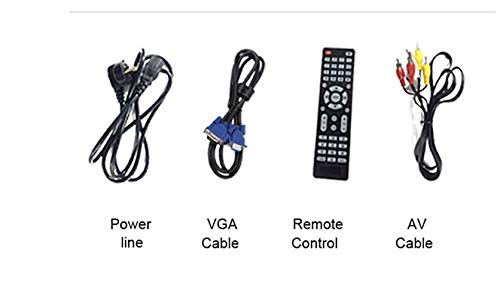
- Kragkabel
- VGA-kabel
- AV Cable
- Afstandbeheer
- Gebruikershandleiding (hierdie dokument)
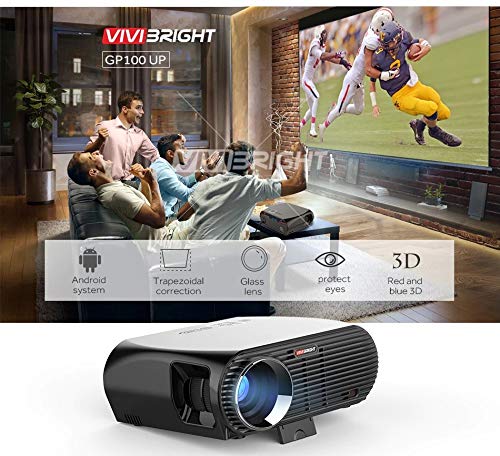
Figuur 3.1: Included accessories with the VIVIBRIGHT GP100UP projector, including power cable, VGA cable, remote control, and AV cable.
4. Produk verbyview
4.1. Projektor Afmetings
Figuur 4.1: Voor en bo view of the VIVIBRIGHT GP100UP projector with approximate dimensions: 11 inches (length), 8.85 inches (width), and 4 inches (height).
4.2. Invoer-/Uitvoerpoorte
The projector features various ports for connecting external devices:
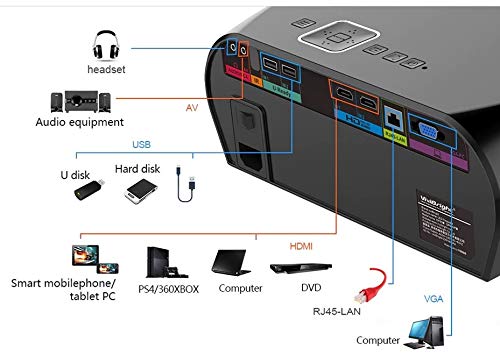
Figuur 4.2: Detailed diagram of the projector's rear panel, illustrating connectivity options including headset, audio equipment (AV), USB ports for U disk and hard disk, HDMI ports, RJ45-LAN, and VGA port.
- HDMI: Connect to Blu-ray players, gaming consoles, laptops, or other HDMI-enabled devices.
- USB: For connecting USB drives (U disk) or external hard drives.
- VAN: Vir die koppeling van ouer toestelle met behulp van saamgestelde video en stereo-klank.
- VGA: For connecting to computers or laptops with a VGA output.
- RJ45-LAN: Vir bedrade netwerkverbinding.
- Koptelefoonaansluiting: Vir die koppeling van eksterne oorfone of luidsprekers.
4.3. Afstandbeheer
The included remote control allows for convenient operation of the projector.
Figuur 4.3: Remote control layout with key functions: ON/OFF, Volume Up/Down, OK, Menu, Home, Speed, Mute, Back, Mouse Mode, and the USB receiver.
- AAN/UIT: Power on or off the projector.
- Volume +/-: Pas die klankvolume aan.
- OK: Bevestig seleksie.
- Spyskaart: Access projector settings.
- Tuis: Return to the main Android interface.
- Agter: Gaan terug na die vorige skerm.
- Muismodus: Activate/deactivate air mouse function (if applicable).
- Demp: Demp of ontdemp oudio.
5. Opstelling
5.1. plasing
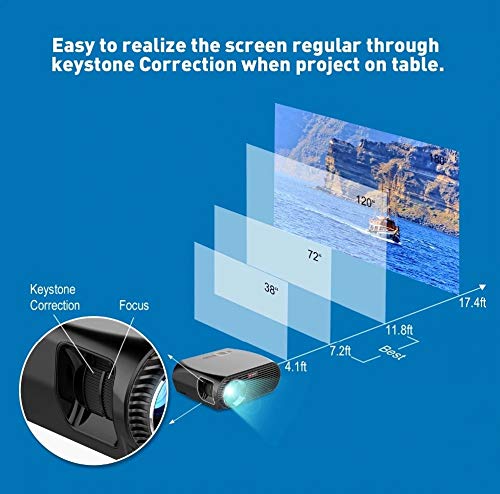
Place the projector on a stable, flat surface or mount it to the ceiling. Ensure there are no obstructions to the lens or ventilation ports. The optimal projection distance for a clear image is between 1 to 5 meters.
Figuur 5.1: Illustration of projection distances and corresponding screen sizes, along with the location of the keystone correction and focus rings on the projector.
- For a 72-inch screen, the recommended distance is approximately 7.2 feet (2.2 meters).
- For a 120-inch screen, the recommended distance is approximately 11.8 feet (3.6 meters).
5.2. Kragverbinding
- Koppel die kragkabel aan die projektor se kragtoevoer.
- Steek die ander kant van die kragkabel in 'n geskikte elektriese aansluiting.
- Die kragaanwyserliggie op die projektor moet brand.
5.3. Fokus en Keystone Correction
After powering on, adjust the image for clarity and proper geometry.
- Fokus: Draai die fokusring naby die lens totdat die geprojekteerde beeld skerp en duidelik is.
- Keystone-korreksie: If the projected image appears trapezoidal (wider at the top or bottom), use the keystone correction ring or lever (usually located near the focus ring) to adjust the image until it is rectangular. The GP100UP supports +/- 15 degrees vertical keystone correction.
6. Bedryfsinstruksies
6.1. Initial Power On and Android Interface
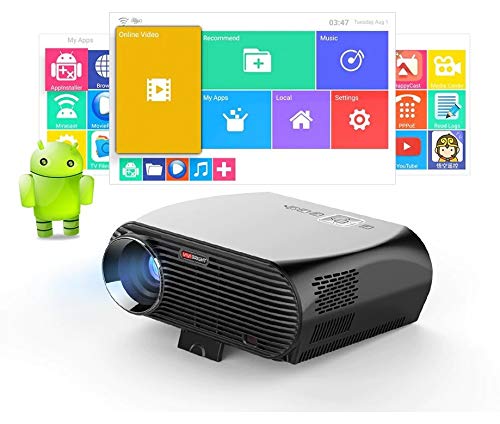
Press the power button on the projector or remote control to turn on the device. The projector will boot into its Android 6.0 operating system interface.
Figuur 6.1: The VIVIBRIGHT GP100UP projector in operation, highlighting its Android system capabilities and other features.
Navigate the Android interface using the remote control. You can access pre-installed applications, settings, and media files.
6.2. Verbinding van eksterne toestelle
To project content from external sources:
- Connect your device (e.g., laptop, gaming console, USB drive) to the appropriate port on the projector (HDMI, USB, AV, VGA).
- On the projector's Android interface, navigate to the "Input Source" or "Source" option.
- Select the corresponding input source (e.g., HDMI1, USB, AV, VGA) to display content from your connected device.
6.3. Wireless Connectivity (Wi-Fi, Bluetooth, Screen Mirroring)
The GP100UP supports various wireless functions:
- Wi-Fi:
- Go to "Settings" on the Android interface.
- Kies "Wi-Fi" en skakel dit aan.
- Choose your desired network and enter the password to connect.
- Bluetooth:
- Go to "Settings" on the Android interface.
- Select "Bluetooth" and turn it on.
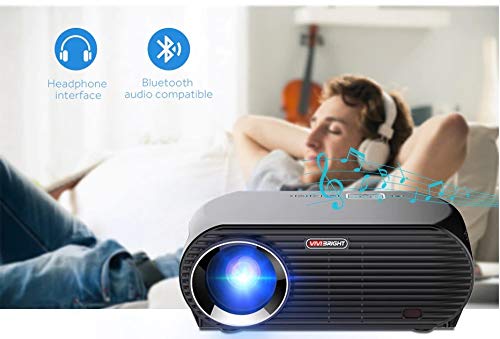
- Pair with Bluetooth audio devices like headphones or speakers.
Figuur 6.2: The projector's Bluetooth audio compatibility, allowing connection to wireless headphones or speakers.
- Screen Mirroring (Miracast/Airplay/DLNA):
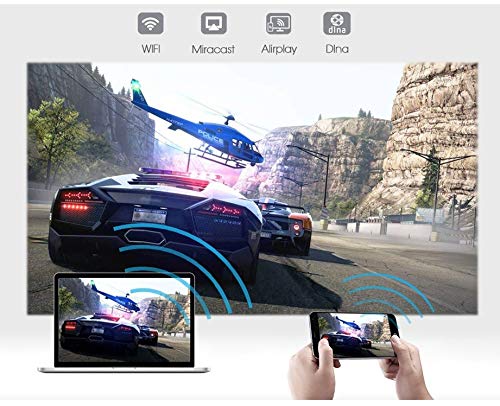
The projector supports mirroring content from compatible smartphones, tablets, and laptops via Wi-Fi, Miracast, Airplay, and DLNA.
- Maak seker dat beide jou toestel en die projektor aan dieselfde Wi-Fi-netwerk gekoppel is.
- On the projector's Android interface, open the relevant screen mirroring application (e.g., Miracast, Airplay, DLNA).
- On your smartphone/tablet/laptop, activate its screen mirroring function (e.g., "Screen Mirroring," "Smart View," "Cast," "AirPlay").
- Select the projector from the list of available devices to begin mirroring.

Figuur 6.3: Wireless screen mirroring capabilities, enabling content from mobile devices and laptops to be displayed on the projector.
7. Onderhoud
7.1. Skoonmaak van die lens
Gebruik 'n sagte, pluisvrye lap wat spesifiek vir optiese lense ontwerp is. Vee die lens saggies af om stof of vlekke te verwyder. Vermy die gebruik van skuurmiddels of harde chemikalieë.
7.2. Cleaning the Projector Casing
Vee die buitekant van die projektor af met 'n sagte, droë lap. Vir hardnekkige merke, gebruik 'n effens droë lap.amp 'n Lap kan gebruik word, gevolg deur 'n droë lap. Maak seker dat geen vloeistof in die ventilasie-openinge binnedring nie.
7.3. Air Filter (if applicable)
While LED projectors typically have sealed optical engines, regularly check ventilation openings for dust accumulation. Use a soft brush or compressed air to clear any blockages.
8. Probleemoplossing
| Probleem | Moontlike oorsaak | Oplossing |
|---|---|---|
| Geen prent word vertoon nie |
|
|
| Beeld is vaag |
|
|
| Beeld is trapesiumvormig |
|
|
| Geen klank nie |
|
|
| Wi-Fi/Bluetooth connection issues |
|
|
9. Spesifikasies
| Kenmerk | Detail |
|---|---|
| Modelnommer | GP100UP |
| Vertoon tegnologie | LCD |
| Inheemse resolusie | 1280x800dpi (WXGA) |
| Helderheid | 3500 Lumen |
| Kontrasverhouding | 1000:1-2000:1 |
| Ligbron | LED |
| Ligbron Lewe | Not specified (typically 20,000+ hours for LED) |
| Projeksie afstand | 1-5m |
| Geprojekteerde Dimensie | 40-300 inches (Best image size: 72-120 inches) |
| Skermskaal | 4:3/16:9 |
| Keystone-regstelling | Manual Correction, +/- 15 degrees (vertical) |
| Stelsel | Android 6.0.1, CPU: Quad core ARM Cortex-A53 |
| Geheue (RAM/ROM) | RAM: 1G / ROM: 8G |
| Draadlose konneksie | Wi-Fi, Bluetooth, DLNA, Miracast, Airplay |
| Invoerpoorte | HDMI, USB, AV, VGA, RJ45-LAN |
| Kragtoevoer | AC 90-240V, 50/60Hz |
| Kragverbruik | 140 W |
| Afmetings (ongeveer) | 37 x 30.5 x 15.9 cm |
| Gewig (ongeveer) | 2.6 kg |
| 3D-funksie | Red-blue 3D |
10. Waarborg en Ondersteuning
The VIVIBRIGHT GP100UP Projector comes with a 1-jaar waarborg vanaf die aankoopdatum. Hierdie waarborg dek vervaardigingsdefekte onder normale gebruik.
For technical support, warranty claims, or service inquiries, please contact your retailer or the official VIVIBRIGHT customer service channel. Please have your product model number (GP100UP) and proof of purchase ready when contacting support.