
UEi Test Instruments IRT803
UEi IRT803 Insulation Resistance Tester User Manual
Model: IRT803 | Brand: UEi Test Instruments
1. Inleiding
This manual provides essential information for the safe and effective operation of the UEi IRT803 Digital Insulation Resistance Tester. The IRT803 is a versatile instrument designed for measuring insulation resistance, AC/DC voltage, and continuity. It features a 1000V AC/DC measurement capability, auto-ranging, a backlit display, and a DMM rotary style selector. Key functions include Lock, Compare, and Polarization Index (PI)/Dielectric Absorption Ratio (DAR) tests. Please read this manual thoroughly before use to ensure proper handling and to maximize the instrument's performance.
2. Veiligheidsinligting
Always adhere to safety precautions when using electrical testing equipment. The IRT803 is designed with safety in mind, featuring a CATIV rating up to 600V and CATII up to 1000V, ensuring protection in various jobsite environments. Failure to follow safety instructions can result in electric shock, fire, or damage to the instrument.
- Moenie die toetser gebruik as dit beskadig lyk of as die toetsdrade gekompromitteer is nie.
- Maak seker dat die korrekte funksie en reeks gekies is voordat enige metings gemaak word.
- Always disconnect power to the circuit under test before connecting or disconnecting test leads for resistance measurements.
- Dra gepaste persoonlike beskermende toerusting (PPE), soos geïsoleerde handskoene en veiligheidsbril.
- Do not operate the tester in wet conditions or in the presence of explosive gases or dust.
- Vervang batterye dadelik wanneer die lae battery-aanwyser verskyn om akkurate lesings te verseker.
3. Wat is in die boks
Verifieer by uitpak dat al die items wat hieronder gelys word, teenwoordig en onbeskadig is:
- UEi IRT803 Insulation Resistance Tester
- Silicone test leads with alligator clips (red and black) (ATL57)
- Insulation test probe with alligator clips (red & black)
- 4 AA-batterye
- Gebruikershandleiding
- Sagte dratas

Image 3.1: All components included with the UEi IRT803 Insulation Resistance Tester, including the meter, test leads, probes, batteries, manual, and soft carrying case.
4. Produk verbyview
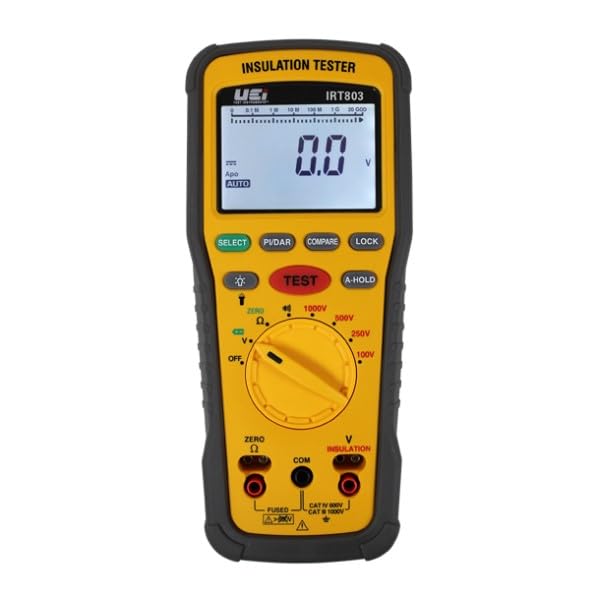
The IRT803 is designed for ease of use and durability. It features an easy-to-read LCD display with a backlight for visibility in various lighting conditions, and a work light to illuminate dark environments. The unit is protected by a rugged rubber boot, which also includes convenient test lead holders for compact storage. An auto power-off function helps conserve battery life.
4.1. Belangrike kenmerke en funksies
- 600V AC/DC Measurement: In staat om beide wisselstroom- en gelykstroomvolume te meettages tot 600V.
- Isolasie weerstand: Measures resistance from 0.01MΩ up to 2GΩ with test voltages van 50V, 100V, 250V, 500V en 1000V.
- Kontinuïteit: For checking circuit continuity.
- Compare Reading Function: Allows for comparison against a set reference value.
- PI/DAR Test: Automatic calculation of Polarization Index and Dielectric Absorption Ratio for advanced insulation diagnostics.
- A-Hold/Hold: Vries die vertoonde lesing vir gerieflike opname.
- Lock Reading: Locks the test voltage for continuous insulation testing.
- Rotary Dial Selector: Intuitive selection of measurement functions and test voltages.
- Protective Rubber Boot: Enhances durability and provides lead storage.

Beeld 4.1: Voorkant view of the IRT803 showing the LCD display, rotary selector, and function buttons.

Image 4.2: Visual representation highlighting the main functions and features of the IRT803.
5. Opstelling
5.1. Battery Installasie
The IRT803 requires four (4) AA batteries for operation. To install or replace batteries:
- Maak seker dat die toetser afgeskakel is.
- Vind die batterykompartement aan die agterkant van die eenheid.
- Gebruik 'n skroewedraaier om die batteryklepdeksel oop te maak.
- Insert the four AA batteries, observing the correct polarity (+/-) as indicated inside the compartment.
- Sluit die deksel van die batterykas veilig.
5.2. Verbinding van toetsdrade
Connect the test leads to the appropriate input jacks on the tester. For most measurements, the red lead connects to the 'V Ω INSULATION' jack and the black lead connects to the 'COM' (common) jack. Ensure connections are firm and secure.

Image 5.1: The IRT803 with test leads properly connected to the input jacks.
6. Bedryfsinstruksies
6.1. Powering On/Off and Display Backlight
- To power on the unit, rotate the selector dial from 'OFF' to any desired measurement function.
- To power off, rotate the selector dial back to 'OFF'. The unit also features auto power-off to save battery life after a period of inactivity.
- Druk die KIES button (often indicated by a light bulb icon) to toggle the display backlight on or off.
6.2. Toetsing van isolasieweerstand
The IRT803 can perform insulation resistance tests at various voltages.
- Kies Toetsvolumetage: Rotate the selector dial to the desired insulation test voltage (50V, 100V, 250V, 500V of 1000V).
- Koppel toetsleidrade: Connect the red test lead to the circuit under test and the black test lead to the ground or common point. Ensure the circuit is de-energized.
- Begin Toets: Press and hold the large red TOETS button to begin the insulation test. The test voltage will be applied, and the resistance reading will be displayed.
- Slotfunksie: For continuous testing, press the SLOT button after initiating the test. This will maintain the test voltage without needing to hold the TOETS knoppie. Druk TOETS again to unlock.
- Compare Function: Gebruik die VERGELYK button to set a reference value and compare subsequent readings against it.
- PI/DAR Test: Select the PI/DAR function on the dial. The meter will automatically perform the Polarization Index and Dielectric Absorption Ratio tests, displaying the calculated values.
- Read and Record: Observe the reading on the LCD. Use the HOU button to freeze the display for easier recording.
- Ontslag: After completing an insulation test, the circuit under test should be discharged. The IRT803 typically handles this automatically, but always exercise caution.

Image 6.1: The IRT803 being used to measure insulation resistance on electrical wiring.

Beeld 6.2: 'n Nabyskoot view of the test leads securely connected to the IRT803's input terminals.
6.3. Deeltage-toetsing (WS/GS)
Om AC of DC voltage up to 600V:
- Rotate the selector dial to the 'V' position.
- Connect the red test lead to the positive or live point and the black test lead to the negative or neutral/ground point of the circuit.
- Die skerm sal die gemete volume wystage. The meter will automatically detect AC or DC voltage.
6.4. Kontinuïteitstoetsing
To check for continuity in a circuit:
- Rotate the selector dial to the 'Ω' (Ohms) position, which typically includes continuity.
- Connect the test leads across the component or circuit path you wish to test.
- If there is continuity (low resistance), the meter will typically emit an audible beep and display a low resistance value.
7. Onderhoud
7.1. Skoonmaak
To maintain the accuracy and longevity of your IRT803:
- Vee die casing met advertensieamp lap en sagte skoonmaakmiddel. Moenie skuurmiddels of oplosmiddels gebruik nie.
- Ensure the unit is completely dry before storage or next use.
7.2. Battery vervanging
Replace batteries as described in Section 5.1 when the low battery indicator appears on the display. Always use fresh AA alkaline batteries.
7.3. Berging
When not in use, store the IRT803 in its soft carrying case in a cool, dry environment, away from direct sunlight and extreme temperatures. If storing for extended periods, remove the batteries to prevent leakage.
8. Probleemoplossing
If you encounter issues with your IRT803, refer to the following common problems and solutions:
| Probleem | Moontlike oorsaak | Oplossing |
|---|---|---|
| Tester does not power on | Dooie of verkeerd geïnstalleerde batterye | Kontroleer die polariteit van die batterye; vervang dit met vars AA-batterye. |
| No reading on display | Incorrect function selected; open circuit; poor test lead connection | Verify selector dial position; ensure test leads are firmly connected to the circuit and the meter; check for breaks in the circuit. |
| Onakkurate lesings | Low battery; environmental interference; incorrect range/function | Replace batteries; move away from strong electromagnetic fields; ensure correct function and test voltage are selected. |
| Test leads not working | Damaged leads; poor connection | Inspect leads for damage; ensure they are fully inserted into the jacks. Replace if damaged. |
If the problem persists after attempting these solutions, please contact UEi Test Instruments customer support.
9. Spesifikasies
| Parameter | Waarde |
|---|---|
| Modelnommer | IRT803 |
| Handelsmerk | UEi-toetsinstrumente |
| Isolasietoets Voltages | 50V, 100V, 250V, 500V, 1000V |
| Isolasieweerstandreeks | 0.01MΩ to 2GΩ |
| Insulation Resistance Accuracy | ±1.5-3% + 5 digits (0.01MΩ-500MΩ) |
| Voltage Meting | Tot 600V AC/DC |
| Continuity Range | 20.00 Ω to 20.0 kΩ (as per product description) |
| Veiligheidsgradering | CATIV 600V, CATII 1000V |
| Kragbron | 4 x AA-batterye |
| Vertoon | LCD met agterlig |
| Produk afmetings | 2.7 x 3.52 x 8.27 duim |
| Item gewig | 1.8 pond |
| Kleur | Geel |
10. Waarborginligting
The UEi IRT803 Insulation Resistance Tester is backed by a 1-jaar beperkte waarborg from the date of purchase. This warranty covers defects in materials and workmanship under normal use. It does not cover damage resulting from misuse, unauthorized modification, accident, or neglect. For specific terms and conditions, please refer to the warranty card included with your product or contact UEi Test Instruments customer support.
Beeld 10.1: Voorbeeldample of a Certificate of Conformity, indicating adherence to quality standards.
11. Ondersteuning
For technical assistance, troubleshooting beyond this manual, or warranty claims, please contact UEi Test Instruments customer support. You can find more information and contact details by visiting the official UEi Test Instruments webwebwerf of hul Amazon-winkelbladsy.
UEi Test Instruments Store: Besoek Winkel
Ask a question about this manual
Ask about setup, troubleshooting, compatibility, parts, safety, or missing instructions. Manuals+ will review the question and use this page’s manual context to help answer it.