
1. Inleiding
This manual provides detailed instructions for the safe and efficient operation of your Blackweb Portable Blu-ray/DVD Player, model SDVD1183-BW. Please read this manual thoroughly before using the device and retain it for future reference. This portable player features an 11.4-inch HD screen, USB and SD card slots for media playback, and supports both Blu-ray and DVD discs.
2. Veiligheidsinligting
- Kragbron: Use only the provided AC adapter. Ensure the voltage voldoen aan die vereistes wat op die adapter gespesifiseer is.
- Batteryveiligheid: The device contains a Lithium-Ion battery. Do not expose to extreme temperatures, puncture, or disassemble. Dispose of batteries according to local regulations.
- Ventilasie: Do not block ventilation openings. Ensure adequate airflow around the device during operation.
- Water en vog: Hou die toestel weg van water, reën en hoë humiditeit. Moenie met nat hande gebruik nie.
- Skoonmaak: Disconnect power before cleaning. Use a soft, dry cloth. Avoid liquid cleaners or aerosols.
- Skyfhantering: Handle discs by their edges. Avoid touching the playback surface. Keep discs clean and free from scratches.
- Temperatuur: Operate the device within a temperature range of 5°C to 35°C (41°F to 95°F).
- Kinders: This device is not a toy. Keep out of reach of small children.
3. Produk verbyview
Familiarize yourself with the components and controls of your portable Blu-ray/DVD player.

Figuur 3.1: Voorkant view of the Blackweb Portable Blu-ray/DVD Player (SDVD1183-BW) with the screen open. The 11.4-inch display is visible at the top, and the control panel with navigation buttons, volume controls, and disc tray area is at the bottom.
3.1 Front Panel Controls (Open View)
- Skerm: 11.4-inch HD display.
- Skyfbak: Area for inserting Blu-ray or DVD discs.
- Kragknoppie: Skakel die toestel aan of af.
- MODE/SOURCE Button: Switches between input sources (Disc, USB, SD).
- Navigation Buttons (Left/Right/Up/Down/Enter): Vir menu-navigasie en -keuse.
- Speel/Pause-knoppie: Begin of laat wag die afspeel.
- Stopknoppie: Stop afspeel.
- Snel vorentoe/terugspoel-knoppies: Skips chapters or fast forwards/rewinds playback.
- SETUP-knoppie: Kry toegang tot die stelselinstellingskieslys.
- VOL +/- knoppies: Pas die volumevlak aan.
- Luidsprekers: Geïntegreerde stereoluidsprekers.
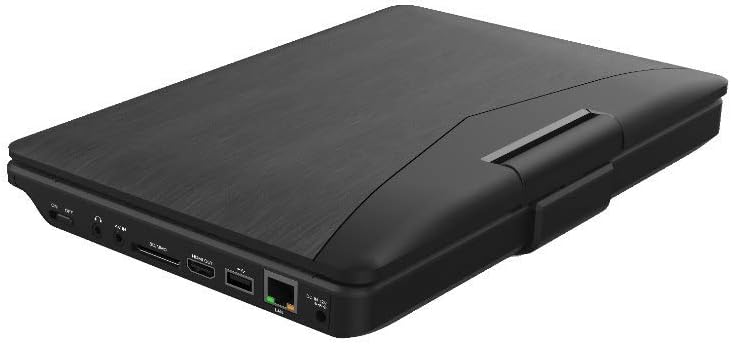
Figuur 3.2: Kant view of the Blackweb Portable Blu-ray/DVD Player (SDVD1183-BW) when closed, highlighting the various input/output ports. These include the DC IN port, USB port, SD card slot, HDMI OUT port, and LAN (RJ45) port.
3.2 Side Panel Ports
- DC IN: Kraginvoer vir die WS-adapter.
- USB-poort: Koppel USB-flash drives vir mediaweergawe.
- SD-kaartgleuf: Insert SD memory cards for media playback.
- HDMI UIT: Connect to an external display (TV, monitor) for larger viewing.
- LAN (RJ45) Poort: For wired network connection (if applicable for online features, though not explicitly stated for this model).
- Koptelefoonaansluiting: 3.5mm audio output for private listening.
4. Opstelling
4.1 Laai die battery
- Connect the supplied AC power adapter to the DC IN port on the player.
- Prop die ander kant van die AC-adapter in 'n standaard muuraansluiting.
- The charging indicator light will illuminate, typically red, during charging. It will change color (e.g., green or off) when fully charged.
- Wag ongeveer 4-6 uur vir 'n volle lading voor eerste gebruik.
4.2 Aan-/afskakel
- Om aan te skakel: Open the screen and press the KRAG button. The screen will light up.
- Om af te skakel: Druk en hou die KRAG knoppie totdat die skerm afskakel.
5. Bedryfsinstruksies
5.1 Playing Blu-ray/DVD Discs
- Maak seker dat die speler aangeskakel is.
- Maak die skyflaai se deksel versigtig oop.
- Place a Blu-ray or DVD disc onto the spindle with the label side facing up. Press down gently until it clicks into place.
- Close the disc tray cover. The player will automatically detect the disc and begin playback or display the disc menu.
- Gebruik die navigasieknoppies en ENTER to select options from the disc menu.
- Gebruik die SPEEL/POUSEER, STOP, FF, en REW knoppies om afspeel te beheer.
5.2 Playing Media from USB/SD Card
- Steek 'n USB-geheuestokkie in die USB-poort of 'n SD-kaart in die SD-kaartgleuf.
- Druk die MODUS/BRON button to select "USB" or "SD" as the input source.
- The player will display the file browser. Use the navigation buttons to browse your media files (video's, foto's, musiek).
- Druk ENTER to select and play a file.
5.3 Aanpassing van instellings
- Druk die OPSTEL button to access the system settings menu.
- Use the navigation buttons to select categories such as "Video Setup," "Audio Setup," "Language Setup," etc.
- Druk ENTER to enter a sub-menu and adjust settings like screen brightness, contrast, aspect ratio, audio output, and subtitle preferences.
- Druk OPSTEL weer om die spyskaart te verlaat.
5.4 Connecting to an External Display (HDMI)
- Ensure both the portable player and the external display (TV/monitor) are powered off.
- Koppel die een kant van 'n HDMI-kabel (nie ingesluit nie) aan die HDMI UIT port on the portable player.
- Connect the other end of the HDMI cable to an HDMI input port on your external display.
- Power on both devices. Select the corresponding HDMI input on your external display.
- The portable player's output will now be displayed on the external screen. The portable player's screen may turn off or mirror the content, depending on settings.
5.5 Gebruik oorfone
- Plug standard 3.5mm headphones into the headphone jack on the side of the player.
- The internal speakers will automatically mute when headphones are connected.
- Verstel die volume met die VOL +/- knoppies.
6. Onderhoud
6.1 Die skoonmaak van die toestel
- Ontkoppel altyd die kragadapter voor skoonmaak.
- Gebruik 'n sagte, droë, pluisvrye lap om die buite-oppervlaktes af te vee.
- For the screen, use a screen-specific cleaning cloth or solution, applying it to the cloth first, not directly to the screen.
- Moenie skuurmiddels, wasse of oplosmiddels gebruik nie.
6.2 Skyfversorging
- Handle discs by their edges to avoid fingerprints and scratches on the playing surface.
- Bêre skyfies in hul houer wanneer dit nie gebruik word nie.
- If a disc is dirty, wipe it gently from the center outwards with a soft, lint-free cloth. Do not use harsh chemicals.
7. Probleemoplossing
| Probleem | Moontlike oorsaak | Oplossing |
|---|---|---|
| Speler skakel nie aan nie. | Battery is leeg. Kragadapter nie gekoppel of foutief. | Connect the AC adapter and charge the battery. Ensure the AC adapter is securely connected to both the player and a working power outlet. |
| Geen prentjie op die skerm nie. | Screen brightness too low. HDMI cable connected to external display. | Adjust screen brightness in the SETUP menu. Disconnect HDMI cable or ensure external display is correctly configured. |
| Geen klank nie. | Die volume is te laag of gedemp. Oorfone is gekoppel. Audio settings incorrect. | Verhoog volume met behulp van VOL+ knoppie. Disconnect headphones if you want sound from speakers. Check audio settings in the SETUP menu. |
| Skyf speel nie. | Die skyf is vuil, gekrap of verkeerd geplaas. Skyfformaat word nie ondersteun nie. Region code mismatch. | Clean the disc and reinsert it correctly. Ensure the disc is a supported Blu-ray or DVD format. This player supports region-free or compatible region discs. |
| USB/SD media not recognized. | Verkeerde invoerbron gekies. File formaat word nie ondersteun nie. USB drive/SD card corrupted or incompatible. | Druk MODUS/BRON to select "USB" or "SD". Refer to specifications for supported file formate. Try a different USB drive or SD card. Ensure it is formatted correctly (e.g., FAT32). |
8. Spesifikasies
- Model: SDVD1183-BW
- Skermgrootte: 11.4 duim
- Skermresolusie: 1280x720
- Mediumtipe: Blu-Ray, DVD
- Verbinding: USB, SD Card Slot, HDMI Out, LAN (RJ45), 3.5mm Headphone Jack
- Kragbron: AC Adapter, Built-in Lithium Ion Battery
- Item gewig: Ongeveer 4.15 pond (1.88 kg)
- Produkafmetings (LxBxH): 16 x 14.5 x 3.5 duim (40.64 x 36.83 x 8.89 cm)
- Vervaardiger: Swartweb
9. Waarborg en Ondersteuning
For warranty information and technical support, please refer to the documentation provided at the time of purchase or contact the retailer. As this product is often sold as "Renewed," specific warranty terms may vary. Please consult the Amazon Renewed Guarantee for details regarding refurbished products purchased through Amazon.
For further assistance, you may also visit the official Blackweb ondersteun webwebwerf of kontak hul kliëntediens indien beskikbaar.