
MTX Audio JH15001
MTX Audio JH15001 Jackhammer Series 1500W Monoblock Class-D Car Audio Amplewendiger
Amptelike instruksiehandleiding
Inleiding
This manual provides detailed instructions for the installation, operation, and maintenance of your MTX Audio JH15001 Jackhammer Series 1500W Monoblock Class-D Car Audio Amplifier. The JH15001 is a high-performance monoblock amplifier designed to deliver powerful and clear audio to your car's subwoofer system. It features a Class-D design for efficiency, robust power output, and a range of adjustable controls to fine-tune your sound.
Sleutel kenmerke sluit in:
- 1500W Monoblock Class-D Amplewendiger
- Flexible power output: 650 watts x 1 ch. at 4 Ohm, 1100 watts x 1 ch. at 2 Ohm, 1650 watts x 1 ch. at 1 Ohm
- Wide frequency response: 20Hz - 250Hz
- Variable Low Pass Filter (40Hz - 250Hz, 12dB/Oct)
- Variable Subsonic Filter (20Hz - 50Hz, 12dB/Oct)
- Adjustable Bass Boost (0 - 12dB) at 45Hz
- Includes Remote Bass Knob for convenient control
Veiligheidsinligting
Lees asseblief alle instruksies sorgvuldig deur voordat u u toestel installeer en gebruik. amplifier. Failure to follow these guidelines may result in damage to the amplifier, your vehicle, or personal injury. Keep this manual for future reference.
- Kragbron: Always disconnect the vehicle's battery negative terminal before making any power connections to prevent electrical shorts.
- Bedrading: Use appropriate gauge wiring for power, ground, and speaker connections as recommended in the installation section. Improper wiring can lead to overheating and fire.
- Montering: Monteer die amplifier securely in a dry, well-ventilated area away from direct sunlight, heat sources, and moisture. Ensure adequate airflow around the amplifier for proper cooling.
- Volumevlakke: Langdurige blootstelling aan hoë volumevlakke kan gehoorskade veroorsaak. Pas die volume verantwoordelik aan.
- Professionele installasie: If you are unsure about any aspect of the installation, seek assistance from a qualified car audio professional.
Produk verbyview
The MTX Audio JH15001 amplifier is designed for robust performance and ease of use. Below are images illustrating the amplifier's design and control panel.

Figuur 1: Voorkant view of the MTX Audio JH15001 amplifier, showing the MTX Audio logo and Jackhammer JH15001 model name, along with the control knobs for Gain, LPF, Subsonic, and Bass Boost.
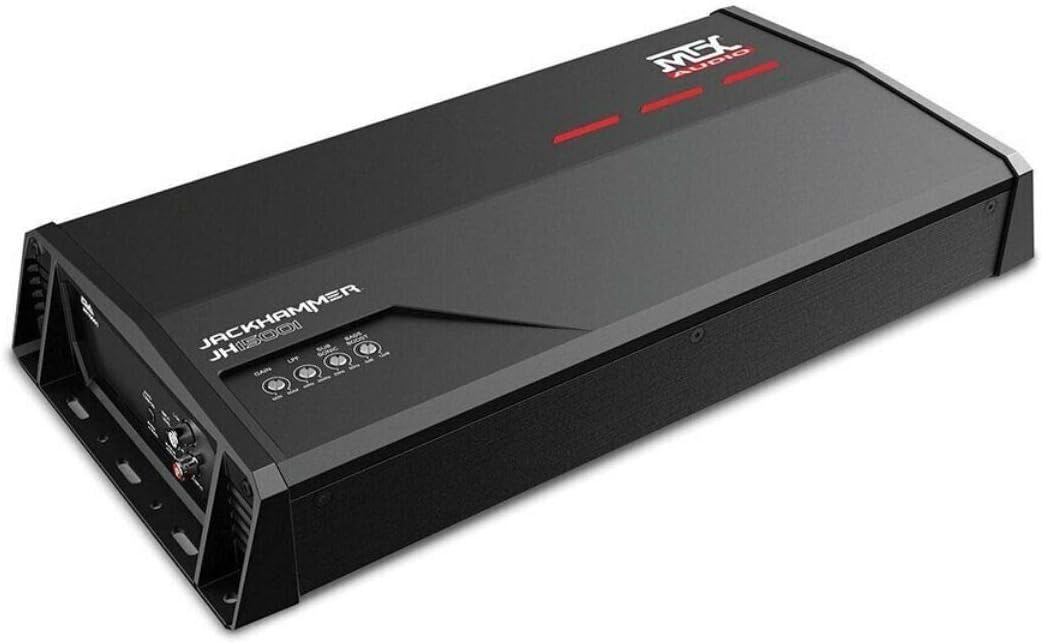
Figuur 2: Hoekig view of the MTX Audio JH15001 amplifier, providing a perspective of its compact design and heat sink fins.
Opstelling en installasie
Proper installation is crucial for optimal performance and safety. Follow these steps carefully.
Bedrading oorwegings
- Always use high-quality power and ground cables. For the JH15001, a minimum of 4-gauge power and ground wire is recommended.
- Install an in-line fuse holder within 18 inches of the vehicle's battery. The fuse rating should match the amplifier's requirements (typically 80-100A for this power level).
- Ensure all connections are clean, tight, and free from corrosion.
Kragverbindings

Figuur 3: Agter view of the MTX Audio JH15001 amplifier, detailing the Power Input (GND, REM, +12V) and Speaker Output terminals.
- Grond (GND): Connect the ground terminal to a clean, unpainted metal surface of the vehicle's chassis. The ground wire should be as short as possible, ideally less than 3 feet (1 meter).
- Afstandsbediening (REM): Connect the remote terminal to the remote turn-on output of your head unit. This wire signals the ampverligter om aan te skakel wanneer die hoofeenheid aktief is.
- + 12V: Connect the +12V terminal to the positive terminal of your vehicle's battery, via the in-line fuse holder.
Luidsprekerverbindings
The JH15001 is a monoblock amplifier, designed for a single subwoofer or multiple subwoofers wired to a single channel. Refer to Figure 3 for the speaker output terminals.
- Connect your subwoofer(s) to the "SPEAKER OUTPUT" terminals. Ensure correct polarity (+ to + and - to -).
- Die amplifier is stable down to 1 Ohm. Ensure your subwoofer's impedance (or combined impedance of multiple subwoofers) matches the ampdie verligter se vermoëns vir optimale prestasie en om skade te voorkom.
Invoerverbindings

Figuur 4: Agter view of the MTX Audio JH15001 amplifier, showing the Line Input (RCA) and Auto Turn On switch.
- Lyninvoer (RCA): Connect the RCA output from your head unit or signal processor to the "LINE INPUT" (L CH and R CH) on the amplewendiger.
- Outo-aanskakel: Hierdie skakelaar laat die amplifier to turn on automatically by sensing a DC offset or audio signal on the input. Set to "REM" if using a dedicated remote wire, or "AUDIO" if using signal sensing.
- Invoervlak: This switch adjusts the input sensitivity for either "PRE IN" (low-level RCA input) or "SPK IN" (high-level speaker input, if using a line output converter).
Remote Bass Knob
Connect the included remote bass knob to the "EBC" port on the amplifier (refer to Figure 4). This allows for convenient adjustment of the bass level from the driver's seat.
Bedryfsinstruksies
Once installed, you can fine-tune the amplifier's settings for optimal audio performance.
Wins aanpassing
The "GAIN" knob (refer to Figure 1) matches the ampdie verligter se insetgevoeligheid teenoor die uitsetvolumetage of your head unit. This is not a volume control. To set the gain:
- Turn the gain knob all the way down (counter-clockwise).
- Stel jou hoofeenheid se volume op ongeveer 75-80% van sy maksimum.
- Draai stadig die amplifier's gain knob clockwise until you hear slight distortion, then back it off slightly until the sound is clean.
Laagdeurfilter (LPF)
The "LPF" knob (refer to Figure 1) controls the low-pass crossover frequency. This filter allows only frequencies below the set point to pass through to the subwoofer. Adjust this between 40Hz and 250Hz to blend the subwoofer's output with your main speakers.
Subsoniese filter
The "SUBSONIC" knob (refer to Figure 1) controls a high-pass filter specifically for the subwoofer channel, preventing extremely low, inaudible frequencies from being played. These frequencies can waste amplifier power and potentially damage the subwoofer. Adjust this between 20Hz and 50Hz, typically set slightly below your LPF or subwoofer's resonant frequency.
Bas hupstoot
The "BASS BOOST" knob (refer to Figure 1) provides an adjustable boost (0-12dB) at 45Hz. Use this sparingly to enhance bass impact. Excessive bass boost can lead to distortion and potential damage to your subwoofer.
Outo skakel aan
As mentioned in the input connections, the "AUTO TURN ON" switch (Figure 4) allows the amplifier to power on without a dedicated remote wire. If your head unit does not have a remote output, set this to "AUDIO" to detect an audio signal, or "DC" (if available, though not explicitly labeled as DC on this model, it's implied by "AUDIO" vs "REM") to detect a DC offset on the speaker lines. For best results and reliability, using the "REM" setting with a remote wire from the head unit is recommended.
Onderhoud
Your MTX Audio amplifier requires minimal maintenance to ensure long-lasting performance.
- Skoonmaak: Vee gereeld die ampVee die buitekant van die verligter af met 'n sagte, droë lap. Moenie harde chemikalieë of skuurmiddels gebruik nie.
- Ventilasie: Maak seker dat die ampDie koelvinne van die verkoeler is vry van stof en puin. Goeie lugvloei is noodsaaklik om oorverhitting te voorkom.
- Verbindings: Occasionally check all power, ground, and speaker connections to ensure they remain tight and secure. Loose connections can cause performance issues or damage.
Probleemoplossing
As jy probleme ondervind met jou amplifer, raadpleeg die tabel hieronder vir algemene probleme en oplossings.
| Probleem | Moontlike oorsaak | Oplossing |
|---|---|---|
| Geen krag / Amplifer skakel nie aan nie | Blown fuse, loose power/ground/remote wire, incorrect Auto Turn On setting. | Check in-line fuse, verify all power connections are secure, ensure remote wire has +12V, or adjust Auto Turn On switch. |
| Geen klankuitset nie | Loose RCA cables, incorrect input level setting, speaker wires disconnected, amplifer in beskermingsmodus. | Check RCA connections, ensure Input Level switch is correct (PRE IN/SPK IN), verify speaker wiring, check for protect light (usually red). |
| Verwronge klank | Gain set too high, LPF/Subsonic settings incorrect, poor ground connection, damaged speaker. | Reduce gain, adjust LPF/Subsonic filters, check ground connection, inspect speaker for damage. |
| AmpOorverhitting van die verligter | Onvoldoende ventilasie, impedansie te laag, versterking te hoog gestel. | Verseker behoorlike lugvloei rondom amplifier, verify speaker impedance is not below 1 Ohm, reduce gain. |
Spesifikasies
Detailed technical specifications for the MTX Audio JH15001 amplewendiger.
| Kenmerk | Spesifikasie |
|---|---|
| Model | JH15001 |
| Tik | Monoblock Class-D Car Audio Amplewendiger |
| Aantal kanale | 1 |
| RMS-kraguitset (4 Ohm) | 650 watt x 1 kanaal |
| RMS-kraguitset (2 Ohm) | 1100 watt x 1 kanaal |
| RMS-kraguitset (1 Ohm) | 1650 watt x 1 kanaal |
| Frekwensierespons | 20 Hz - 250 XNUMX Hz |
| Low Pass Filter (Variable) | 40Hz - 250Hz, 12dB/Octave |
| Subsonic Filter (Variable) | 20Hz - 50Hz, 12dB/Octave |
| Bas hupstoot | 0 - 12dB teen 45Hz |
| Voltage | 12 Volt (DC) |
| Bedryfstemperatuur | 40 grade Celsius |
| Itemafmetings (L x B x H) | 18 x 12 x 6 duim |
| Item gewig | 10.18 pond |
| Montage tipe | Oppervlakmontering |
| Vervaardiger | MTX oudio |
| Spesifikasie Met | FCC |
| UPC | 715442242115 |
Waarborg en Ondersteuning
MTX Audio products are designed for reliability and performance. For information regarding warranty coverage, please refer to the warranty card included with your product or visit the official MTX Audio website. For technical support, troubleshooting assistance beyond this manual, or service inquiries, please contact MTX Audio customer service through their official channels.
Always ensure you have your product model number (JH15001) and purchase details available when contacting support.
Ask a question about this manual
Ask about setup, troubleshooting, compatibility, parts, safety, or missing instructions. Manuals+ will review the question and use this page’s manual context to help answer it.