
1. Inleiding
This manual provides detailed instructions for the safe and proper installation, operation, and maintenance of your Cabletech UCH0198-2 Full Motion TV Wall Mount. Please read this manual thoroughly before installation and retain it for future reference. This wall mount is designed to securely hold flat-panel or curved LED televisions ranging from 32 to 55 inches, with a maximum weight capacity of 35 kg (77 lbs).
2. Belangrike veiligheidsinligting
- Gewig kapasiteit: Do not exceed the maximum weight capacity of 35 kg (77 lbs). Exceeding this limit can result in serious injury or property damage.
- Skermgrootte: This mount is designed for TVs between 32 and 55 inches. While some larger TVs may fit VESA patterns, ensure they do not exceed the weight limit.
- VESA-versoenbaarheid: Verify your TV's VESA mounting pattern is compatible with the mount's supported patterns (75x75, 100x100, 100x150, 150x100, 150x150, 200x100, 100x200, 300x200, 300x300, 400x200, 400x300, 400x400).
- Muurstruktuur: Ensure the mounting surface (wall) can safely support the combined weight of the mount and your television. For wood stud installation, ensure studs are solid. For concrete or brick walls, use appropriate anchors (not always included). Consult a professional installer if unsure about your wall's integrity.
- Gereedskap: Use appropriate tools for installation. Always wear safety glasses.
- Vergadering: Do not attempt to install this product alone if the TV is heavy. Two or more people are recommended for safe installation.
- Kinders: Keep children away during installation. Small parts may be a choking hazard.
- Skade: Do not install if any parts are missing or damaged. Contact customer support for replacement parts.
3. Pakketinhoud
Please check to ensure all components are present and undamaged before beginning installation. If any parts are missing or damaged, do not proceed with installation and contact customer support.
- Muurplaat-samestelling
- TV-beugelarms (2x)
- Monteringshardeware-stel (verskeie skroewe, wassers, spasieerders vir TV en muur)
- Wall Anchors (for concrete/brick, if included)
- Vlak
- Instruksie Handleiding

Figuur 1: Voorkant view of the wall mount components.
4. Produkspesifikasies
| Modelnommer | UCH0198-2 |
| Handelsmerk | Kabeltegnologie |
| Versoenbare skermgroottes | 32" - 55" |
| Maksimum laaikapasiteit | 35 kg (77 lbs) |
| VESA-versoenbaarheid | 75x75, 100x100, 100x150, 150x100, 150x150, 200x100, 100x200, 300x200, 300x300, 400x200, 400x300, 400x400 |
| Kantelhoek | 0° tot -20° |
| Horizontal Level Adjustment | +3° tot -3° |
| Muurafstand (uitgebreid) | 78 mm - 400 mm (3.07" - 15.75") |
| Materiaal | Metaal |
| Kleur | Swart |
5. Opstelling en installering
Before you begin, ensure you have all necessary tools and have read the safety information. Two people are recommended for installation.
5.1 Benodigde gereedskap (Nie ingesluit nie)
- Potlood
- Stud Finder (for wood stud walls)
- Drill with appropriate drill bits (e.g., 10mm for concrete, 5.5mm for wood studs)
- Socket Wrench of Verstelbare Sleutel
- Phillips-kopskroewedraaier
- Maatband
- Veiligheidsbril
5.2 Attaching TV Brackets to Your TV
- Carefully place your TV face-down on a soft, clean surface to prevent screen damage.
- Identifiseer die VESA-monteringsgate aan die agterkant van jou TV.
- Select the correct diameter and length screws from the hardware kit that fit your TV's mounting holes. Use washers and spacers if necessary to ensure the screws do not penetrate too deeply or leave the bracket loose.
- Attach the two vertical TV bracket arms to the back of your TV using the selected screws. Ensure the hooks on the bracket arms are facing upwards (or towards the top of the TV) and are level with each other. Do not overtighten.
5.3 Mounting the Wall Plate to the Wall
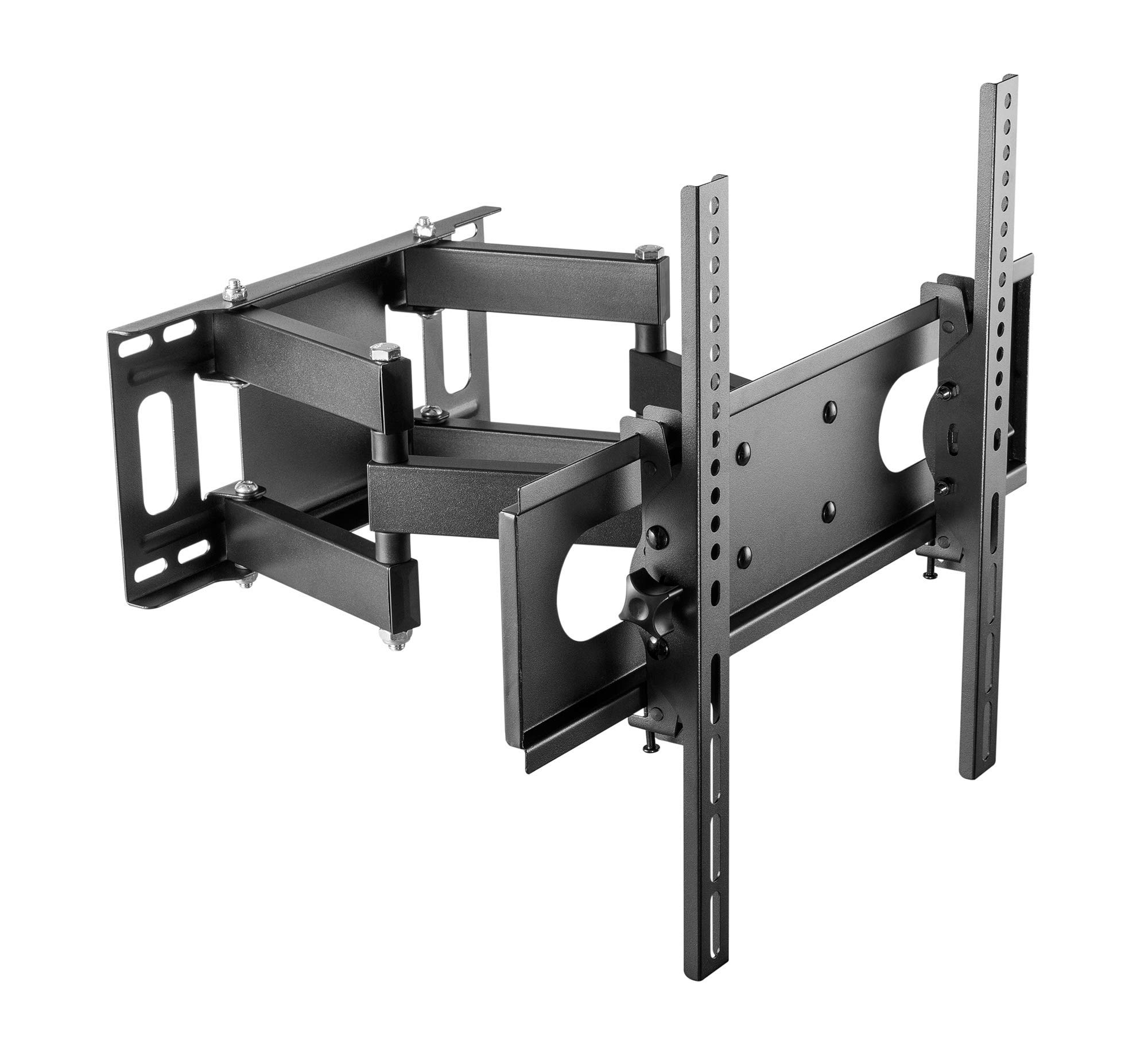
Figure 2: Cabletech UCH0198-2 wall mount in extended position.
- Bepaal Montage Plek: Decide on the desired height for your TV. Mark the center point on the wall.
- Vind stutte (vir houtstutmure): Use a stud finder to locate the edges and center of two adjacent wood studs. The wall plate must be mounted to at least two studs for secure installation.
- Position Wall Plate: Hold the wall plate against the wall at your desired height and center. Use a level to ensure it is perfectly horizontal. Mark the drilling locations through the holes on the wall plate.
- Boor loodsgate:
- Vir Houtknope: Drill pilot holes using a 5.5mm drill bit to a depth of approximately 60mm.
- Vir Solid Concrete/Brick Walls: Drill pilot holes using a 10mm drill bit to a depth of approximately 60mm. Insert the concrete anchors into the drilled holes until they are flush with the wall surface.
- Heg muurplaat aan: Align the wall plate with the drilled holes. Secure it to the wall using the lag bolts and washers provided in the hardware kit. Tighten all bolts firmly, but do not overtighten.
5.4 Die TV ophang
- With assistance, carefully lift the TV (with brackets attached) and hook the TV bracket arms onto the wall plate.
- Ensure the TV is securely seated on the wall plate. The safety screws or locking mechanisms on the bottom of the TV bracket arms should be engaged to prevent accidental dislodging.
- Gently test the stability of the mounted TV before releasing it completely.
6. Bedieningsinstruksies (Aanpassings)
Your Cabletech UCH0198-2 mount offers various adjustments for optimal viewing.
6.1 Extending and Retracting the TV

Figure 3: Wall mount extended, showing adjustable distance from wall.
- Gently pull or push the TV to extend it away from the wall (up to 400mm) or retract it closer to the wall (minimum 78mm).
- Ensure cables are not pinched or strained during movement.
6.2 Tilting the TV
- The mount allows for a tilt range of 0° to -20° (downwards).
- Loosen the tilt adjustment knobs or bolts on the TV bracket arms.
- Adjust the TV to the desired tilt angle.
- Retighten the knobs/bolts to secure the TV in position.
6.3 Swiveling the TV (Horizontal Adjustment)
- The articulating arm allows you to swivel the TV horizontally to achieve various viewhoeke.
- Gently push or pull the side of the TV to rotate it left or right.
- The mount also features a small horizontal level adjustment of +3° to -3° to correct for minor leveling issues after installation. This is typically adjusted by loosening specific bolts on the TV plate, leveling, and retightening. Refer to the detailed diagrams for specific adjustment points.
6.4 Kabelbestuur
- The mount includes a cable winder or clips to help organize and route cables along the articulating arm.
- Secure cables to prevent them from dangling or getting caught during TV movement. Ensure enough slack is provided for full range of motion.
7. Onderhoud
- Skoonmaak: Vee die monteerstuk af met 'n sagte, droë lap. Moenie skuurmiddels of oplosmiddels gebruik nie.
- Periodieke ondersoeke: Periodically check all screws and bolts to ensure they remain tight and secure. Retighten if necessary.
- Beweging: If the mount's movement becomes stiff, a small amount of silicone-based lubricant can be applied to the pivot points, avoiding contact with painted surfaces.
8. Probleemoplossing
| Probleem | Moontlike oorsaak | Oplossing |
|---|---|---|
| TV is nie gelyk na installasie nie. | Wall plate not perfectly level, or minor adjustment needed. | Use the horizontal level adjustment feature (+3° to -3°). Loosen the specific bolts on the TV plate, adjust with a level, and retighten. |
| Mount feels loose or unstable. | Mounting bolts not fully tightened, or wall structure is inadequate. | Check and retighten all wall mounting bolts. If the wall structure is compromised, consult a professional. Ensure TV safety screws are engaged. |
| TV cannot tilt or swivel smoothly. | Adjustment bolts are too tight, or pivot points need lubrication. | Loosen tilt adjustment knobs/bolts slightly. Apply a small amount of silicone-based lubricant to pivot points if necessary. |
| Cables are getting pinched. | Insufficient slack or improper cable routing. | Reroute cables using the integrated cable management. Ensure enough slack for full range of motion. |
9. Waarborg en Kliëntediens
This Cabletech UCH0198-2 TV Wall Mount comes with a manufacturer's warranty of 2 jaar vanaf die aankoopdatum.
For warranty claims, technical assistance, or if you have any questions regarding the installation or operation of your product, please contact Cabletech customer support through your retailer or the official Cabletech website. Please have your model number (UCH0198-2) and proof of purchase ready when contacting support.