
1. Inleiding
The MASTECH MS8260E is a versatile 2000-count digital multimeter designed for a wide range of electrical and electronic measurements. It features a large LCD display, non-contact voltage (NCV) detection, and capabilities for measuring AC/DC voltage, AC/DC current, resistance, capacitance, and inductance. This manual provides essential information for the safe and effective operation, maintenance, and troubleshooting of your device.
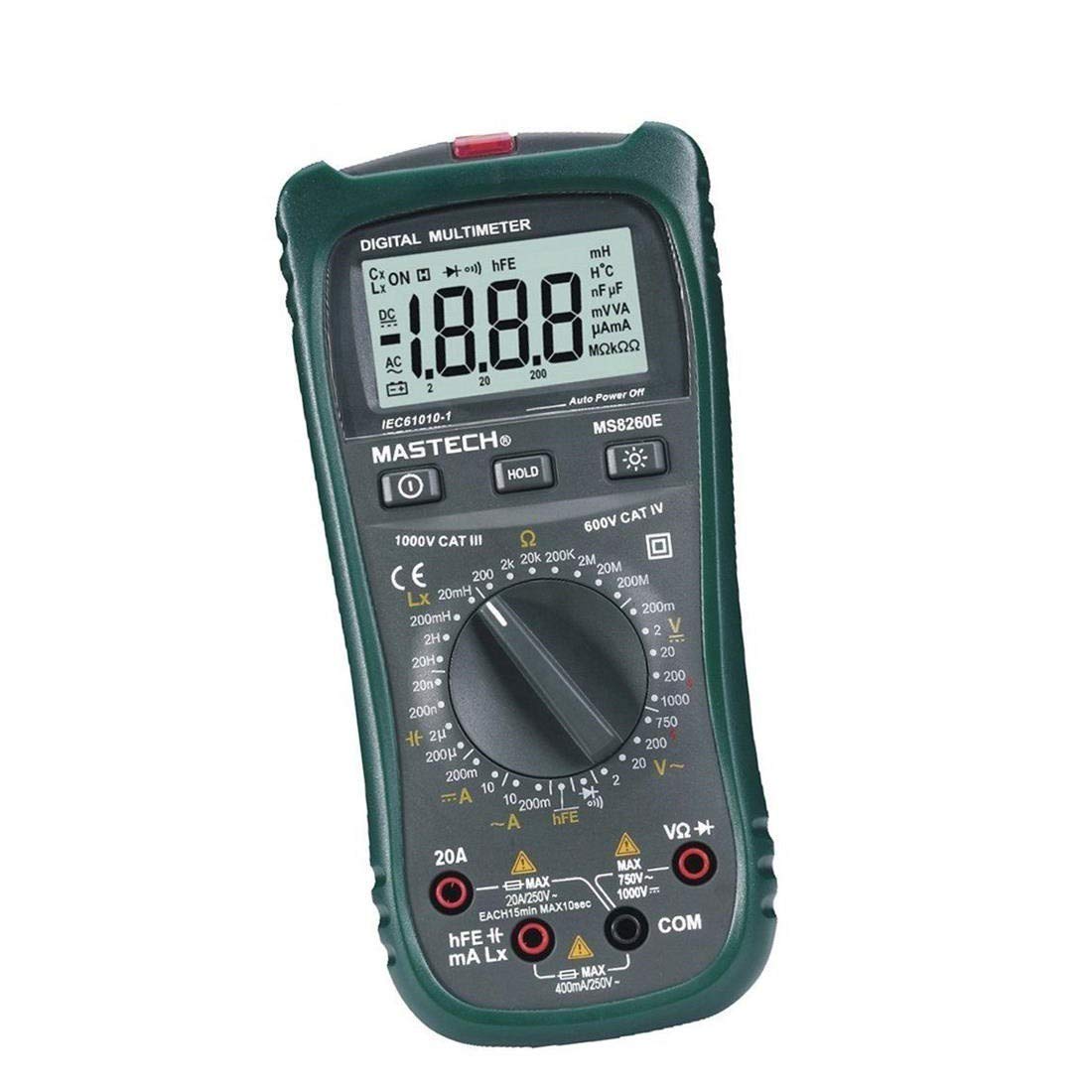
Figuur 1: Voorkant view of the MASTECH MS8260E Digital Multimeter, showing the LCD display, function rotary switch, and input jacks.
2. Veiligheidsinligting
To ensure safe operation and service of the meter, follow these safety guidelines:
- Read and understand all instructions in this manual before using the meter.
- Hou altyd by plaaslike en nasionale veiligheidskodes.
- Moenie die meter gebruik as dit beskadig lyk of as die isolasie op die toetsdrade gekompromitteer is nie.
- Observe the input limits for each measurement range to prevent electrical shock or damage to the meter. This meter is rated for CAT.IV 600V.
- Wees versigtig wanneer u met voltagbo 30V AC RMS, 42V piek, of 60V DC. Hierdie volumestagdit hou 'n skokgevaar in.
- Ontkoppel altyd die krag na die stroombaan en ontlaai alle hoëvolume.tage capacitors before making resistance, continuity, diode, or capacitance measurements.
- Vervang die battery onmiddellik wanneer die lae battery-aanwyser verskyn om akkurate lesings te verseker.
- Moenie die meter in plofbare gas-, damp- of stofomgewings gebruik nie.
3. Produk verbyview
The MS8260E multimeter is equipped with several features to facilitate accurate and convenient measurements:
- Large 2000 Counts LCD Display: Provides clear digital readings.
- Ingeboude nie-kontak Voltage (NCV) Detector: Bespeur AC voltage greater than 110V without physical contact, indicated by a flash warning.
- Data hou funksie: Vries die vertoonde lesing vir maklike opname.
- Vertoon Agterlig: Improves visibility in dimly lit conditions.
- Outo-afskakeling: Conserves battery life by automatically turning off the meter after a period of inactivity.
- Lae battery aanduiding: Waarsku die gebruiker wanneer die battery vervang moet word.
- Polariteit aanduiding: Automatically displays negative polarity.
- 30-Range Rotary Switch: Selects various measurement functions including AC/DC voltage, AC/DC current, resistance, capacitance, inductance, diode check, continuity test, and transistor (hFE) check.
4. Opstelling
4.1 Battery installasie
The MS8260E requires one 9V battery (NEDA 1604/6F22). To install or replace the battery:
- Ensure the meter is turned off and disconnect all test leads from the input terminals.
- Vind die batteryklepdeksel aan die agterkant van die meter.
- Draai die bevestigingsskroef(e) los en verwyder die deksel.
- Insert the 9V battery, observing the correct polarity.
- Plaas die batteryklepdeksel terug en maak dit vas met die skroef(e).
4.2 Verbinding van toetsdrade
Always connect the black test lead to the "COM" (common) input jack. Connect the red test lead to the appropriate input jack based on the desired measurement:
- Vir Voltage, Resistance, Capacitance, Inductance, Diode, Continuity, and hFE measurements: Connect the red lead to the "VΩCAPHz" jack.
- For Current measurements up to 200mA: Connect the red lead to the "mA" jack.
- Vir stroommetings tot 10A: Koppel die rooi draad aan die "10A"-aansluiting.
Ensure test leads are fully inserted into the jacks before taking measurements.
5. Bedryfsinstruksies
Turn the rotary switch to the desired function. The meter will display "OL" (Overload) if no input is present or if the input exceeds the range.
5.1 DC Voltage Meting (DCV)
- Set the rotary switch to the desired DCV range (200mV, 2V, 20V, 200V, 1000V).
- Connect the black test lead to the "COM" jack and the red test lead to the "VΩCAPHz" jack.
- Verbind die toetsdrade oor die komponent of stroombaan wat gemeet moet word, en let op die polariteit.
- Lees die voltage -waarde op die LCD -skerm.
5.2 AC Voltage Meting (ACV)
- Set the rotary switch to the desired ACV range (2V, 20V, 200V, 750V).
- Connect the black test lead to the "COM" jack and the red test lead to the "VΩCAPHz" jack.
- Verbind die toetsdrade oor die WS-volumetage bron.
- Lees die voltage -waarde op die LCD -skerm.
5.3 DC Current Measurement (DCA)
- Set the rotary switch to the desired DCA range (200mA, 10A).
- For measurements up to 200mA, connect the red lead to the "mA" jack. For measurements up to 10A, connect the red lead to the "10A" jack. The black lead connects to "COM".
- Maak die stroombaan oop waar die stroom gemeet moet word en koppel die meter in serie met die las.
- Lees die huidige waarde op die LCD-skerm.
5.4 AC Current Measurement (ACA)
- Set the rotary switch to the desired ACA range (200mA, 10A).
- For measurements up to 200mA, connect the red lead to the "mA" jack. For measurements up to 10A, connect the red lead to the "10A" jack. The black lead connects to "COM".
- Maak die stroombaan oop waar die stroom gemeet moet word en koppel die meter in serie met die las.
- Lees die huidige waarde op die LCD-skerm.
5.5 Weerstandsmeting (Ω)
- Set the rotary switch to the desired Ω range (200Ω, 2kΩ, 20kΩ, 200kΩ, 2MΩ, 20MΩ, 200MΩ).
- Connect the black test lead to "COM" and the red test lead to "VΩCAPHz".
- Ensure the circuit is de-energized and all capacitors are discharged.
- Verbind die toetsdrade oor die weerstand of komponent.
- Lees die weerstandswaarde op die LCD-skerm.
5.6 Capacitance Measurement (CAP)
- Set the rotary switch to the desired CAP range (20nF, 200nF, 2uF, 200uF).
- Connect the black test lead to "COM" and the red test lead to "VΩCAPHz".
- Maak seker dat die kondensator volledig ontlaai is voordat die toetsdrade gekoppel word.
- Verbind die toetsdrade oor die kondensator.
- Lees die kapasitansiewaarde op die LCD-skerm.
5.7 Inductance Measurement (L)
- Set the rotary switch to the desired Inductance range (20mH, 200mH, 2H, 20H).
- Connect the black test lead to "COM" and the red test lead to "VΩCAPHz".
- Connect the test leads across the inductor.
- Read the inductance value on the LCD display.
5.8 Diode-toets
- Stel die draaiskakelaar op die diodesimbool.
- Connect the black test lead to "COM" and the red test lead to "VΩCAPHz".
- Verbind die rooi draad aan die anode en die swart draad aan die katode van die diode. 'n Voorwaartse voluminiumtage drop (typically 0.5V to 0.8V for silicon diodes) will be displayed.
- Reverse the leads. The display should show "OL" for a good diode.
5.9 Kontinuïteitstoets
- Stel die draaiskakelaar op die Kontinuïteitsimbool.
- Connect the black test lead to "COM" and the red test lead to "VΩCAPHz".
- Verbind die toetsdrade oor die stroombaan of komponent.
- If the resistance is below approximately 30Ω, the buzzer will sound, indicating continuity.
5.10 Transistor (hFE) Test
- Stel die draaiskakelaar na die hFE-posisie.
- Identify the type (NPN or PNP) and pinout (Emitter, Base, Collector) of the transistor.
- Insert the transistor leads into the corresponding sockets in the hFE test socket on the meter.
- Read the hFE (DC current gain) value on the LCD display.
5.11 Nie-Kontak Voltage (NCV) Opsporing
- Stel die draaiskakelaar na die NCV-posisie.
- Hold the top front part of the meter near the AC voltage source (e.g., an electrical outlet or insulated wire).
- As AC voltage greater than 110V is detected, the NCV indicator light will flash, and the buzzer may sound.
6. Onderhoud
6.1 Skoonmaak
Vee die meter met advertensie afamp cloth and a mild detergent. Do not use abrasives or solvents. Ensure the meter is dry before use.
6.2 Batteryvervanging
When the "BAT" symbol appears on the display, the battery needs to be replaced. Refer to Section 4.1 for battery installation instructions.
6.3 Sekeringvervanging
If the current measurement function fails, the fuse may need replacement. This operation should only be performed by qualified personnel. Refer to the service manual or contact customer support for fuse specifications and replacement procedures.
6.4 Berging
If the meter is not to be used for an extended period, remove the battery to prevent leakage and damage to the meter. Store the meter in a cool, dry place away from direct sunlight.
7. Probleemoplossing
| Probleem | Moontlike oorsaak | Oplossing |
|---|---|---|
| Geen vertoon of dowwe vertoon | Low battery; Meter off | Replace battery; Turn on meter |
| "OL" displayed | Input exceeds range; Open circuit (for resistance/continuity) | Select higher range; Check circuit connection |
| Verkeerde lesings | Low battery; Incorrect range selected; Poor test lead contact | Replace battery; Select appropriate range; Ensure good contact |
| Stroommeting werk nie | Gebreekte lont | Replace fuse (by qualified personnel) |
8. Spesifikasies
| Metingsfunksie | Reeks | Akkuraatheid |
|---|---|---|
| DC Voltage (DCV) | 200mV, 2V, 20V, 200V, 1000V | ±0.5% (200mV-200V), ±0.8% (1000V) |
| AC Voltage (ACV) | 2V, 20V, 200V, 750V | ±0.8% (2V-200V), ±1.2% (750V) |
| DC-stroom (DCA) | 200mA, 10A | ±1.5% (200mA), ±2.0% (10A) |
| AC Current (ACA) | 200mA, 10A | ±1.8% (200mA), ±3.0% (10A) |
| Weerstand (Ω) | 200Ω, 2kΩ, 20kΩ, 200kΩ, 2MΩ, 20MΩ, 200MΩ | ±0.8% (200Ω-2MΩ), ±1.0% (20MΩ), ±5.0% (200MΩ) |
| Kapasitansie (CAP) | 20nF, 200nF, 2uF, 200uF | ±4.0% (20nF-2uF), ±5.0% (200uF) |
| Induktansie (L) | 20mH, 200mH, 2H, 20H | ±3.0% |
| Hoorbare kontinuïteit | Buzzer sounds at <30Ω | NVT |
| Diodetoets | 1mA, 2.8V | NVT |
| Transistor (hFE) | 0 - 1,000 | NVT |
Algemene spesifikasies:
- Vertoon: 2000 tellings LCD
- Veiligheidsgradering: CAT.IV 600V
- Krag: 9V battery (NEDA 1604/6F22)
- Gewig: Approximately 1 kg (including battery)
9. Waarborg en Ondersteuning
For warranty information, technical support, or service inquiries, please refer to the warranty card included with your product or visit the official Mastech website. Do not attempt to repair the meter yourself, as this may void the warranty and pose safety risks.