
TENMIYA A200
TENMIYA A200 Portable Bluetooth Speaker User Manual
Model: A200
Inleiding
The TENMIYA A200 Portable Bluetooth Speaker is designed to provide high-quality audio with versatile connectivity options. Featuring Bluetooth 5.0, FM radio, TF card, USB, and AUX input, this speaker offers a comprehensive audio experience for various environments, from home to outdoor gatherings. Its compact design and remote control functionality ensure ease of use and portability.

Image: The TENMIYA A200 speaker in beech color, showcasing its front panel with a large speaker grille, digital display, control buttons, and a remote control placed in front.
Wat is in die boks
Kontroleer asseblief die inhoud van die pakket om seker te maak dat alle items teenwoordig en in 'n goeie toestand is:
- 1 x TENMIYA A200 Bluetooth Speaker
- 1 x afstandbeheer
- 1 x AUX-kabel (3.5 mm)
- 1 x USB-laaikabel
- 1 x Gebruikershandleiding (hierdie dokument)
Opstelling
1. Laai die luidspreker op
Before first use, fully charge the speaker. Connect the provided USB charging cable to the speaker's DC 5V input port and the other end to a USB power adapter (not included) or a computer USB port. The charging indicator will show the charging status. A full charge typically takes about 3-4 hours.
2. Skakel aan/af
Locate the power switch on the side of the speaker. Slide it to the "ON" position to power on the speaker. Slide it to the "OFF" position to power off.
3. Bluetooth-verbinding
- Power on the speaker. It will automatically enter Bluetooth pairing mode, indicated by a flashing Bluetooth icon on the digital display.
- Aktiveer Bluetooth op jou toestel (slimfoon, tablet, skootrekenaar) en soek vir beskikbare toestelle.
- Select "TENMIYA A200" from the list of devices.
- Once connected, the speaker will emit a confirmation sound, and the Bluetooth icon on the display will stop flashing.

Image: The TENMIYA A200 speaker displaying "Bluetooth 4.1" (note: product specs state 5.0, this image might be older) and a smartphone screen showing music playback, illustrating Bluetooth connectivity.
4. AUX Input Connection
For devices without Bluetooth, use the provided 3.5mm AUX cable. Connect one end to the speaker's AUX input port and the other end to the audio output jack of your device (e.g., MP3 player, computer, TV). The speaker will automatically switch to AUX mode.
5. TF-kaart en USB-afspeel
Insert a TF (MicroSD) card or a USB flash drive containing MP3 music files into the respective slots on the side of the speaker. The speaker will automatically detect the storage device and begin playing music.
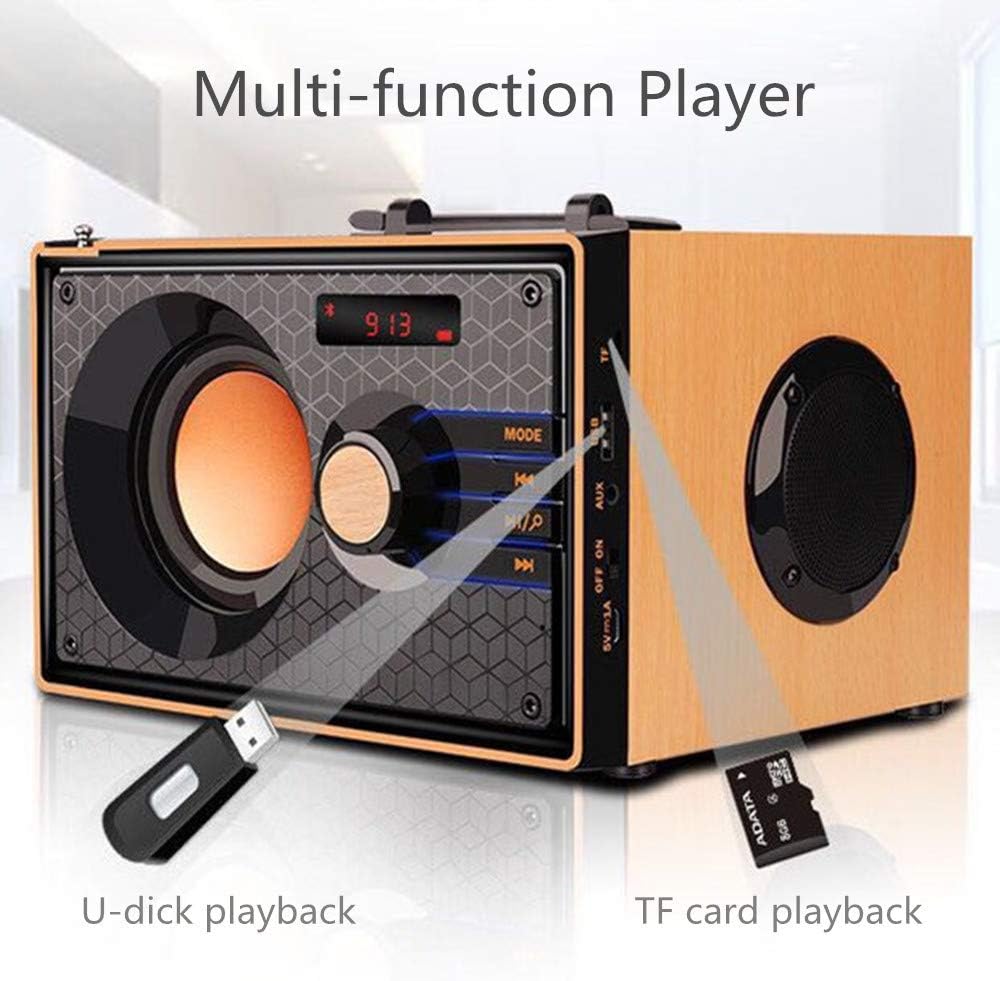
Image: A close-up of the side panel of the TENMIYA A200 speaker, highlighting the USB and TF card input slots with a USB drive and TF card inserted, demonstrating multi-function playback.
Bedryfsinstruksies
1. Moduskeuse
Druk die MODUS button on the speaker's front panel or the remote control to cycle through available modes: Bluetooth, FM Radio, AUX, TF Card, and USB.
2. Volumebeheer
Rotate the large knob on the front panel clockwise to increase volume and counter-clockwise to decrease volume. Alternatively, use the VOL+ en VOL- knoppies op die afstandbeheer.
3. Playback Control (Bluetooth, TF Card, USB)
- Druk die Speel / Pouse knoppie (▶▶) to play or pause the current track.
- Druk die Vorige Snit knoppie (◀◀) to go to the beginning of the current track or the previous track.
- Druk die Volgende Snit knoppie (▶▶) om na die volgende snit oor te slaan.
4. FM Radio Bedryf
- Skakel oor na FM-modus met behulp van die MODUS knoppie.
- To automatically scan and save available stations, press and hold the Speel / Pouse button. The speaker will scan and store stations with strong signals.
- To manually tune or navigate through saved stations, use the Vorige Snit en Volgende Snit knoppies.
- Extend the telescopic antenna on the back of the speaker for improved FM reception.

Image: A man relaxing on a couch, listening to the TENMIYA A200 speaker which has its telescopic antenna extended, indicating FM radio functionality.
5. Afstandbeheergebruik
The included remote control provides convenient access to all speaker functions from a distance of up to 10 feet. Functions include power on/off, mode selection, volume control, track navigation, play/pause, and direct station input for FM radio (if supported by the remote's number pad).
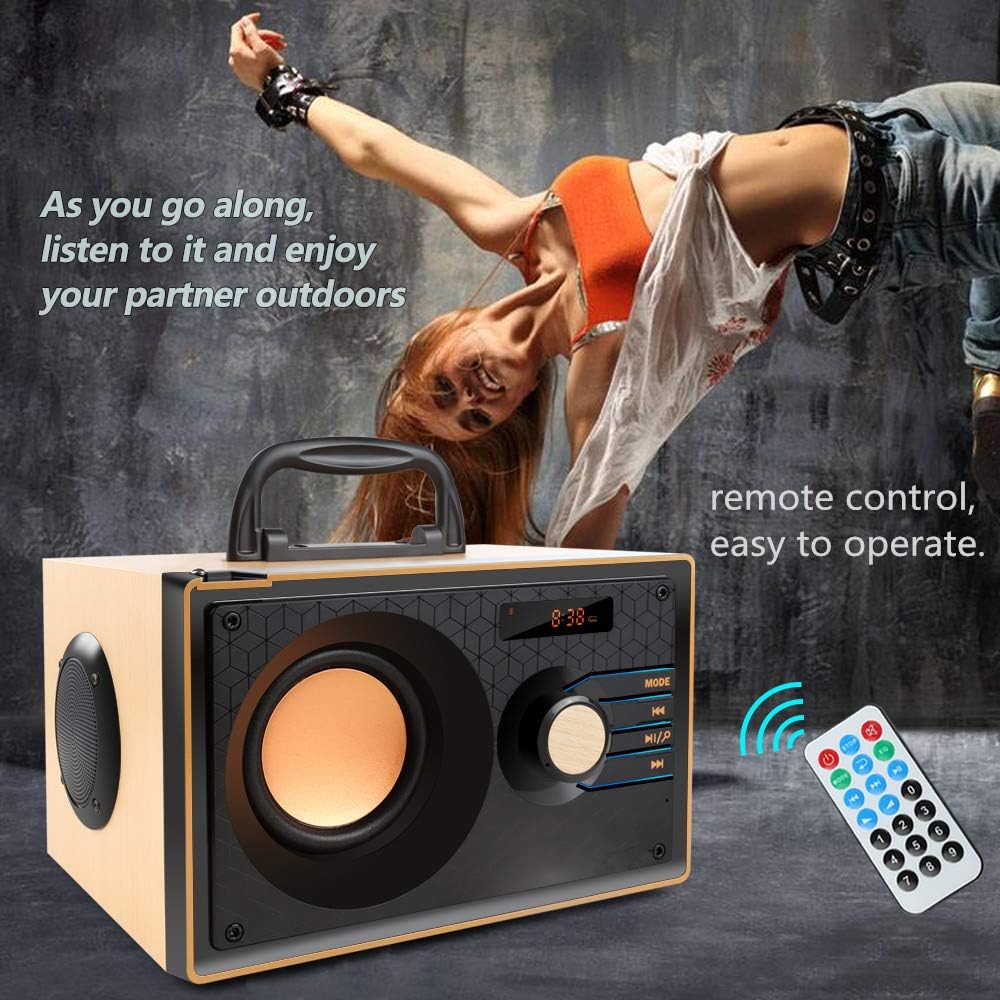
Image: The TENMIYA A200 speaker with its remote control, emphasizing the ease of operation from a distance.
Onderhoud
- Keep the speaker away from water, moisture, and direct sunlight.
- Maak die luidspreker skoon met 'n sagte, droë lap. Moenie skuurmiddels of oplosmiddels gebruik nie.
- Vermy om die luidspreker te laat val of dit aan harde impakte bloot te stel.
- Bêre die luidspreker op 'n koel, droë plek wanneer dit nie vir lang tye gebruik word nie.
Probleemoplossing
| Probleem | Moontlike oorsaak | Oplossing |
|---|---|---|
| Luidspreker skakel nie aan nie. | Low battery; Power switch is off. | Charge the speaker; Ensure the power switch is in the "ON" position. |
| Geen klank nie. | Volume te laag; Verkeerde modus gekies; Toestel nie behoorlik gekoppel nie. | Verhoog die volume; Druk die MODE-knoppie om die korrekte invoer te kies; Koppel die toestel weer aan. |
| Bluetooth-verbinding misluk. | Luidspreker nie in paringsmodus nie; Toestel Bluetooth af; Te ver van luidspreker. | Ensure speaker is in Bluetooth mode and flashing; Turn on device Bluetooth; Move device closer (within 10 meters/33 feet). |
| Swak FM-radio-ontvangs. | Antenna nie uitgestrek nie; Swak seinarea. | Fully extend the telescopic antenna; Try repositioning the speaker for better signal. |
| Afstandbeheer werk nie. | Battery depleted; Obstruction between remote and speaker; Too far from speaker. | Replace remote battery; Remove obstructions; Move closer to speaker (within 10 feet). |
Spesifikasies
| Kenmerk | Detail |
|---|---|
| Handelsmerk | TENMIYA |
| Model | A200 |
| Luidspreker uitset krag | 10W (5W + 2.5W x 2) |
| Luidsprekereenheid | 3" + 2" x 2 |
| Frekwensierespons | 60Hz - 20KHz |
| Bluetooth weergawe | 5.0 |
| Bluetooth-reeks | Tot 10 meter (33 voet) |
| Battery kapasiteit | 2200mAh |
| Laai tyd | Ongeveer. 3-4 uur |
| Speel Tyd | Ongeveer. 8 uur (teen 40% volume) |
| Invoerkrag | DC 5V |
| Afmetings (L x B x H) | 7.5 x 6.1 x 4.7 duim (190 x 155 x 120 mm) |
| Item gewig | 2.91 pond |
| Ondersteunde funksies | Bluetooth, FM Radio, TF Card, USB, AUX Input |
| Beheer metode | Manual buttons, Remote Control |

Image: The TENMIYA A200 speaker with its dimensions labeled (190mm length, 155mm depth, 120mm height), illustrating its compact size.
Waarborg en Ondersteuning
The TENMIYA A200 Portable Bluetooth Speaker comes with a worry-free 12-month warranty. If you encounter any issues or have questions regarding your product, please contact our customer service team. We are committed to providing the best customer service and will respond to your inquiries within 24 hours.
For support, please refer to the contact information provided on the product packaging or the seller's page where you purchased the item.
Ask a question about this manual
Ask about setup, troubleshooting, compatibility, parts, safety, or missing instructions. Manuals+ will review the question and use this page’s manual context to help answer it.