Geekee G350

Geekee G350 True Wireless Earbuds Instruction Manual

Model: G350

1. Inleiding

The Geekee G350 True Wireless Earbuds offer a high-fidelity audio experience with advanced Bluetooth 5.0 technology. Designed for comfort and versatility, these in-ear headphones feature deep bass, crystal clear treble, and noise-cancelling capabilities. They are sweatproof with an IPX5 rating, making them suitable for sports and active use. The earbuds provide a stable connection, instant pairing, and extended battery life with their portable charging case.

Geekee G350 True Wireless Earbuds in charging case

Image 1: Geekee G350 True Wireless Earbuds in their charging case.

2. Pakketinhoud

Verifieer asseblief dat alle items in u pakket teenwoordig is:

  • Geekee G350 Earphone x 2 (Left and Right Earbuds)
  • Laaikas x 1
  • Regular Ear Tips (Sizes S, M, L, XL) x 4 Pairs
  • Rubber Ear Pieces x 2 Pairs
  • Laaikabel x 1
  • Gebruikershandleiding x 1
Contents of the Geekee G350 Earbuds package

Image 2: All items included in the Geekee G350 package.

3. Opstelling

3.1 Aanvanklike paring

For the first-time use, follow these steps to pair your Geekee G350 earbuds:

  1. Verwyder beskermende film: Before charging or first use, remove the plastic protective film from the charging contact points located on the bottom of each earbud.
  2. Laai Oordopjes: Place both earbuds back into the charging case and allow them to charge for a short period.
  3. Automatic Power On & Pairing Mode: Haal albei oorfone uit die laaikas. Hulle sal outomaties aanskakel en in paringsmodus gaan.
  4. Koppel via Bluetooth: On your smartphone or Bluetooth-enabled device, go to the Bluetooth settings menu and select "Geekee G350" to connect.

After the initial connection, the earbuds will automatically turn on and connect to your smartphone when removed from the case, and automatically turn off and charge when placed back in the case.

Steps for instant pairing of Geekee G350 earbuds

Image 3: Visual guide for initial pairing of the earbuds.

3.2 Laai

The earbuds and charging case have separate battery capacities and charging times:

  • Oordop-batterykapasiteit: 50mAh/3.7V per earbud.
  • Oordoplaaityd: Ongeveer 1.5 uur vir 'n volle lading.
  • Laaibak Batterykapasiteit: 500mAh / 3.7V.
  • Laaikas Laaityd: Ongeveer 2.5 uur vir 'n volle lading.

The charging case provides additional power, extending the total playtime. A fully charged case can boost the earbuds' playtime from 3-3.5 hours to 15 hours. In mono mode, using one earbud while the other charges, playtime can be extended up to 28 hours.

Battery life and charging times for Geekee G350 earbuds

Beeld 4: verbyview of battery life and charging specifications.

4. Bedryfsinstruksies

4.1 Oorfoonkontroles

Each earbud features a multi-function button and an LED indicator. Refer to the diagram below for control functions:

Geekee G350 earbud function button and LED indicator guide

Image 5: Detailed functions of the earbud button and LED indicator.

  • Speel/pouse: Druk een keer op die funksieknoppie.
  • Volgende snit: Press the function button for 2 seconds (Right earbud).
  • Vorige snit: Press the function button for 2 seconds (Left earbud).
  • Aktiveer Stemassistent (Siri): Dubbeldruk die funksieknoppie.
  • Beantwoord/beëindig oproep: Druk een keer op die funksieknoppie.
  • Verwerp oproep: Druk die funksieknoppie vir 2 sekondes.

The LED indicator displays charging status and Bluetooth connection status.

4.2 Luistermodusse

The Geekee G350 earbuds support two listening modes:

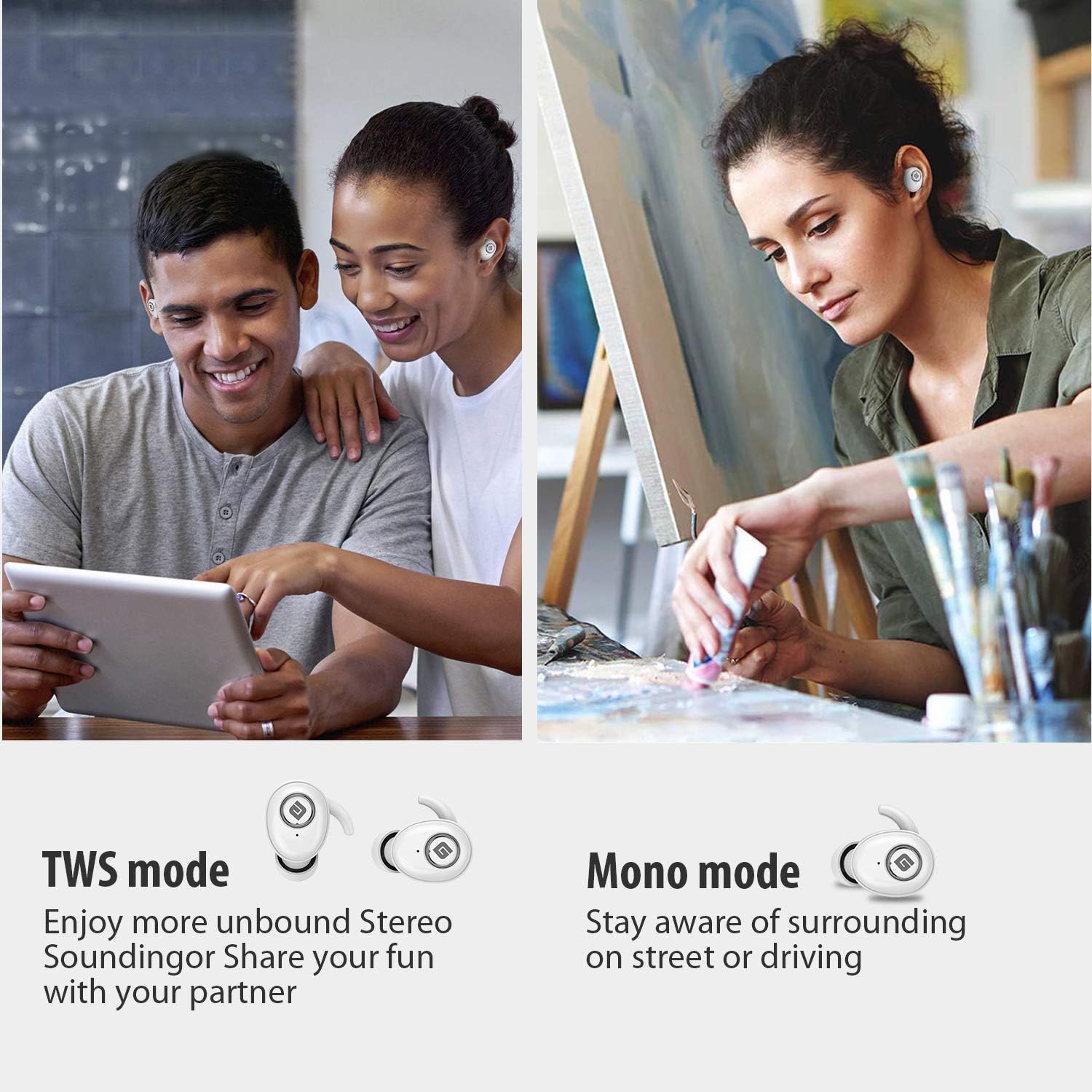
  • TWS (True Wireless Stereo)-modus: Use both earbuds simultaneously for a full stereo sound experience. This mode is ideal for immersive audio.
  • Mono-modus: Use a single earbud (only the Right earbud supports mono mode) to stay aware of your surroundings, such as when driving or walking in public.
Illustration of TWS and Mono listening modes for earbuds

Image 6: Comparison of TWS and Mono listening modes.

5. Onderhoud

  • Batterysorg: Keep your headphones charged when the battery life is low to ensure optimal Bluetooth connection and protect the battery's longevity.
  • Oorpuntkeuse: Choose suitable ear tips and wear your headphones snugly, especially during physical activities like running or cycling. This helps reduce wind noise and ensures a secure fit.
  • Skoonmaak: Regularly clean the earbuds and charging case with a soft, dry cloth to prevent dust and debris buildup. Avoid using harsh chemicals or abrasive materials.
  • Berging: Wanneer dit nie gebruik word nie, bêre die oorfone in hul laaikassie om hulle te beskerm en gelaai te hou. Bêre op 'n koel, droë plek weg van uiterste temperature.
  • Waterweerstand: The earbuds are IPX5 sweatproof, meaning they can resist a sustained, low-pressure water jet spray. They are not designed for submersion in water.

6. Probleemoplossing

If you encounter issues with your Geekee G350 earbuds, please refer to the following common solutions:

  • Oorfone laai nie:
    • Ensure the plastic protective film has been removed from the charging contacts on the earbuds.
    • Verify the charging cable is securely connected to both the case and a power source.
    • Check if the charging case itself has sufficient battery charge.
  • Earbuds Not Pairing/Connecting:
    • Maak seker dat Bluetooth op jou toestel geaktiveer is.
    • Ensure the earbuds are fully charged and out of the charging case.
    • Forget "Geekee G350" from your device's Bluetooth settings and attempt to pair again.
    • Probeer om jou toestel en die oorfone te herbegin.
  • Sound Issues (Low Volume, Distortion):
    • Adjust the volume on both your connected device and the earbuds.
    • Ensure ear tips are correctly sized and provide a snug fit to optimize sound quality and noise isolation.
    • Maak enige puin van die oordopjes se luidsprekers skoon.
  • Slegs een oordop werk:
    • Maak seker dat beide oordopjes gelaai is.
    • Place both earbuds back into the charging case, close the lid, wait a few seconds, then take them out again to re-establish the stereo connection.
    • If the issue persists, try resetting the earbuds (refer to the full user manual for specific reset instructions if available).

7. Spesifikasies

Kenmerk Detail
Bluetooth Standaard V5.0
Wireless Profile HFP, HSP, A2DP, AVRCP
Bedryfsreeks 10 m (33 voet)
Laai Voltage DC 5V 1A
Bystandtyd 160 uur
Talk / Playing Time 2~3 hours (single charge), up to 15 hours with charging case, up to 28 hours in mono mode
Charging Time (Headset) 1.5 uur
Laaityd (laaikas) 2.5 uur
Battery Capacity (Headset) 50mAh/3.7V
Batterykapasiteit (laaikas) 500mAh/3.7V
Item gewig 1.76 onse (ongeveer 50 g)
Produk afmetings 0.8 x 0.4 x 0.4 inches (per earbud)
Waterweerstand IPX5 Sweetbestand
Geraasbeheer Aktiewe geraaskansellasie
Mikrofoon Ingesluit

8. Waarborg en ondersteuning

Geekee is committed to providing high-quality service and professional support for its products. For any technical assistance or inquiries, please contact our support team.

  • Tegniese ondersteuning: Lifetime technical help is available.
  • Reaksie Tyd: Inquiries are typically responded to within 24 hours.
  • Kontak e-pos: support@getgeekee.com
Geekee customer support contact information

Image 7: Geekee customer support details.

Amptelike Produkvideo

Video 1: 'n Amptelike oorview of the Geekee G350 True Wireless Earbuds, highlighting key features and design.