
Inleiding
The Jaybird Vista True Wireless Sport Earbuds are engineered for active lifestyles, offering a secure fit, durable construction, and high-quality audio performance. Designed to withstand challenging environments, these earbuds provide extended battery life and customizable sound profiles for an optimized listening experience.
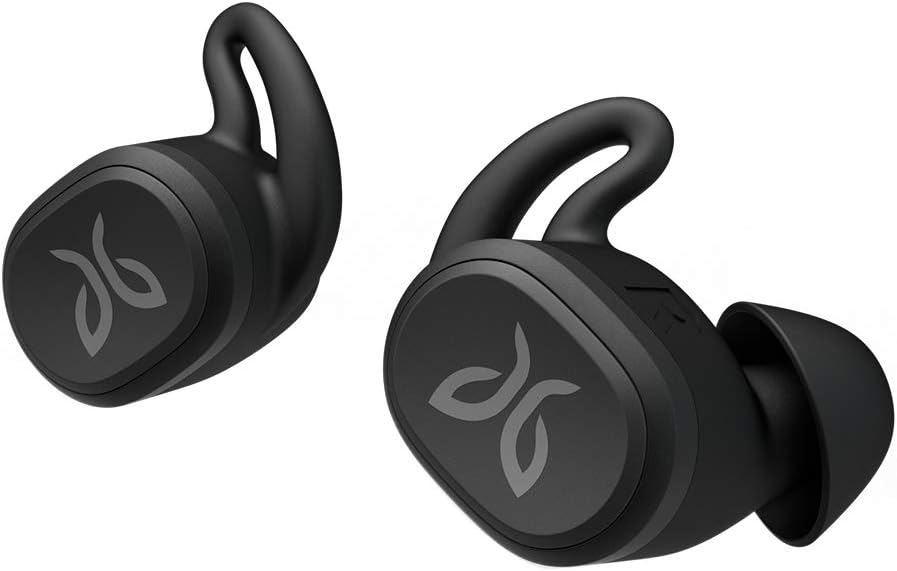
Figure 1: Jaybird Vista True Wireless Sport Earbuds.
Wat is in die boks
Your Jaybird Vista package includes the following items:
- Jaybird Vista True Wireless Earbuds
- Kompakte laaikas
- USB-C-laaikabel
- Multiple Sizes of Interchangeable Ear Gels (integrated ear tips and fins)
- Quick Start Guide and Documentation

Figure 2: All items included in the Jaybird Vista package.
Opstelling
Aanvanklike paring
- Maak seker dat die oorfone in die laaihouer is en dat die houer gelaai is.
- Open the charging case. The LED indicator on the case will begin to flash white, indicating pairing mode.
- Navigeer na die Bluetooth-instellings op jou oudiotoestel (slimfoon, tablet, ens.).
- Select "Jaybird Vista" from the list of available devices to complete the pairing process.
Jaybird App Installation
For full customization and advanced features, download the Jaybird App from your device's app store (iOS or Android). The app allows you to:
- Pas klankpro aanfiles with a parametric EQ.
- Adjust button controls.
- Access the "Find My Buds" feature.
- Manage auto-off settings.

Figure 3: Customize your sound profile using the Jaybird App's custom EQ.
Bedryfsinstruksies
Basiese kontroles
The Jaybird Vista earbuds feature physical buttons for control. These controls are customizable via the Jaybird App.
- Enkele pers: Default for Play/Pause. Can be customized for Google Assistant or custom functions.
- Dubbelpers: Default for Next Track. Can be customized for Google Assistant or custom functions.
- Druk en hou: Default for Power Off. Can be customized for Volume Up (Right bud) / Volume Down (Left bud).
Krag aan/af
- Krag aan: Remove earbuds from the charging case. They will automatically power on and connect to the last paired device.
- Skakel af: Place earbuds back into the charging case and close the lid. They will automatically power off. Alternatively, use the customizable Press & Hold function.
Belbestuur
Calls can be managed using the earbud controls:
- Beantwoord/beëindig oproep: Druk een keer op enige oordopje.
- Verwerp oproep: Druk en hou op enige oordopjes.
Stemassistent
Access your device's voice assistant (e.g., Google Assistant, Siri) by customizing the earbud controls in the Jaybird App.
Gerief en fiksheid
The Jaybird Vista earbuds are designed for a secure, weightless, and ultra-comfortable fit, essential for active use. They come with three sizes of interchangeable ear gels that integrate both the ear tip and stability fin into a single piece.
- Veilige pas: Choose the ear gel size that provides the snuggest fit without discomfort. This ensures the earbuds stay in place during intense workouts.
- Weightless Design: The compact and lightweight design minimizes ear fatigue during extended wear.

Figure 4: Earbud showing a secure and comfortable fit.
Duursaamheid en waterbestandheid
The Jaybird Vista earbuds feature EARTHPROOF IPX7 construction, making them fully waterproof, crushproof, dropproof, and sweatproof. This robust design ensures they can withstand any workout, running conditions, or weather.
- IPX7-gradering: Protects against immersion in water up to 1 meter for 30 minutes.
- MIL-SPEC STD810G Standards: Meets military-grade standards for shock, dust, and drop resistance.
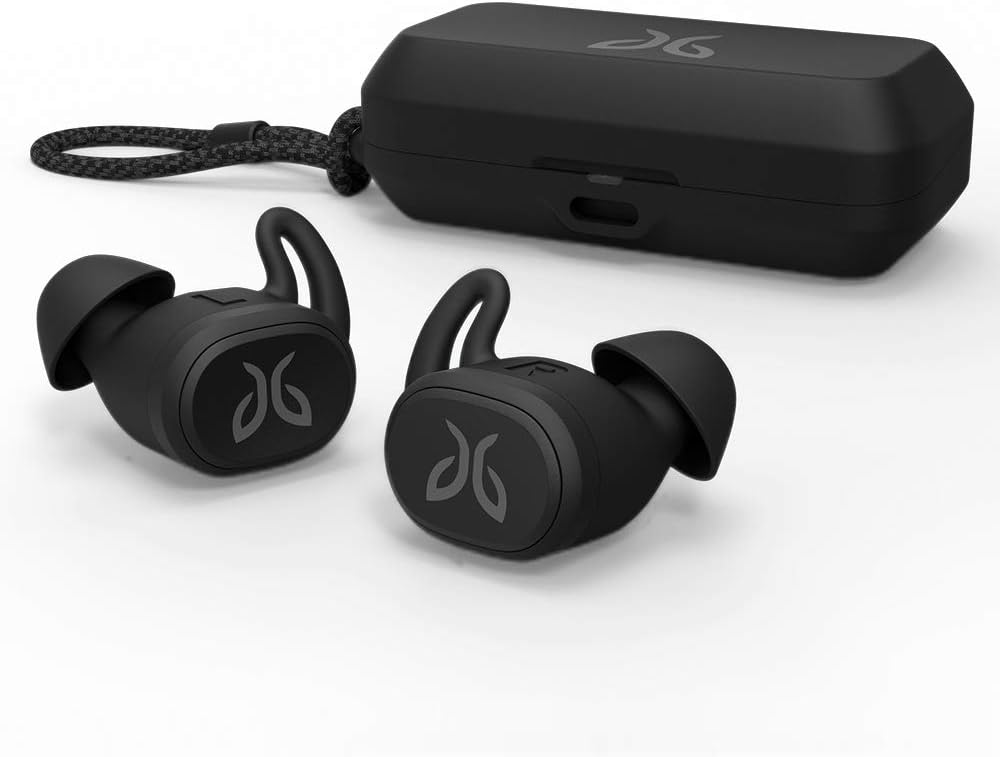
Figure 5: Jaybird Vista earbuds are sweat and waterproof with an IPX7 rating.
Batterylewe
The Jaybird Vista earbuds provide extended battery life to keep your music going through long sessions.
- Oortelefoon Speeltyd: Tot 6 uur op 'n volle lading.
- Laaikas: Provides an additional 10 hours of charge, totaling 16 hours of listening time.
- Single Bud Use: Extend total listening time to 32 hours by using one earbud at a time.
- Vinnige laai: A 5-minute quick charge provides approximately 1 hour of playtime.

Figure 6: The charging case provides additional battery life for extended use.
Klankkwaliteit
Experience premium sound quality with the Jaybird Vista's highly efficient 6mm drivers. The Jaybird App offers infinite EQ control to customize your audio experience.
- Aanpasbare EQ: Fine-tune bass, mids, and highs to match your personal preferences or choose from community presets.
- Passiewe geraasonderdrukking: The secure in-ear fit provides effective passive noise isolation.
Konnektiwiteit
The Jaybird Vista utilizes cutting-edge JBS1 true wireless Bluetooth technology for high-quality, zero-lag stereo sound and a reliable connection.
- Bluetooth 5.0: Verseker 'n stabiele en doeltreffende draadlose verbinding.
- Independent Bud Use: Each earbud can be used independently, allowing for flexible listening.
Amptelike Produkvideo's
Video 1: 'n Oorview of the Jaybird Vista True Wireless Earbuds, showcasing their design and features. This video highlights the product's compact size and suitability for active use.
Video 2: A brief demonstration of the Jaybird Vista True Wireless Bluetooth Sport Waterproof Earbuds, emphasizing their robust, waterproof design for sports and outdoor activities.
Onderhoud
To ensure the longevity and optimal performance of your Jaybird Vista earbuds, follow these maintenance guidelines:
- Skoonmaak: Regularly wipe the earbuds and charging case with a soft, dry, lint-free cloth. For ear gels, remove them and clean with mild soap and water, then dry thoroughly before reattaching.
- Berging: Bêre die oorfone in hul laaikassie wanneer dit nie gebruik word nie om hulle te beskerm en gelaai te hou. Vermy uiterste temperature.
- Laaipoort: Hou die USB-C-laaipoort vry van stof en puin.
Probleemoplossing
If you encounter issues with your Jaybird Vista earbuds, try the following steps:
- Geen klank/verbinding: Ensure earbuds are charged and within Bluetooth range of your device. Re-pair the earbuds by placing them in the case, closing the lid, then opening it to re-enter pairing mode.
- Pasprobleme: Experiment with different ear gel sizes to find the most secure and comfortable fit. An improper fit can affect sound quality and stability.
- Program reageer nie: Close and restart the Jaybird App. Ensure your device's Bluetooth is enabled and the earbuds are connected.
- Herstel: If problems persist, consult the Quick Start Guide for instructions on performing a factory reset.
Spesifikasies
| Kenmerk | Detail |
|---|---|
| Model Naam | Jaybird VISTA |
| Item Modelnommer | 985-000865 |
| Verbindingstegnologie | Bluetooth 5.0 |
| Waterweerstandvlak | IPX7 (Waterbestand) |
| Batterylewe (Oorfone) | 6 ure |
| Additional Charge (Case) | 10 ure |
| Tipe oudiobestuurder | Dinamiese bestuurder |
| Oudiobestuurdergrootte | 6 millimeter |
| Frekwensierespons | 20Hz - 20kHz |
| Beheer metode | App, Button |
| Item gewig | 0.212 onse (6 gram) |
| Produk afmetings | 5 x 1.9 x 7.2 duim |
| Materiaal | Plastiek |
| Kleur | Swart |
| UPC | 097855144676 |
Waarborg en Ondersteuning
For warranty information, technical support, or to access additional resources, please visit the official Jaybird support website or refer to the documentation included in your product package. Keep your proof of purchase for warranty claims.


