
Inleiding
This manual provides instructions for the proper setup, operation, and maintenance of your Calvas 2020B0-B1 remote control. This remote is designed to be compatible with Shaw LCD LED televisions, offering a convenient replacement or secondary control unit. Please read this manual thoroughly before using the device.

Beeld: Voorkant view of the Calvas 2020B0-B1 remote control.
Opstelling
1. Battery Installasie
- Vind die batterykompartement aan die agterkant van die afstandbeheer.
- Druk die grendel af en skuif die batteryklep af.
- Plaas twee AAA-batterye (nie ingesluit nie) in en maak seker dat die positiewe (+) en negatiewe (-) terminale korrek in lyn is met die merke binne-in die kompartement.
- Skuif die batterydeksel terug in plek totdat dit stewig klik.

Beeld: Agterkant view van die afstandbeheerder met die batterykompartement oop.
2. Quick Setup for TV Control
The remote features a quick setup function for initial pairing with your television. Follow these steps:
- Druk en hou die OPSTEL button until the LED light blinks twice.
- Druk die TV KRAG knoppie.
- Druk en hou die OK knoppie.
- Los die OK key when your TV turns off. This indicates successful pairing.
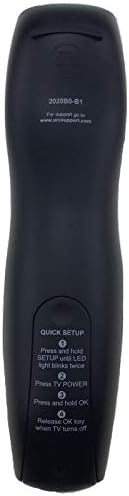
Image: Back of the remote control displaying quick setup instructions.
Note: If the TV does not turn off, repeat the steps or consult the TV's manual for specific remote programming codes if available.
Bedryfsinstruksies
The Calvas 2020B0-B1 remote control utilizes infrared (IR) technology. Ensure a clear line of sight between the remote's IR emitter and your TV's IR receiver for optimal performance.
Knoppie funksies:
- KRAG: Skakel die TV aan of af.
- VOL +/-: Verhoog of verlaag die volume.
- CH +/-: Verander die kanaal op of af.
- DEMPEL: Demp of ontdemp die TV-oudio.
- NOMMERBLOKKIES (0-9): Voer kanaalnommers direk in.
- GIDS: Vertoon die programgids.
- SPYSKAART: Kry toegang tot die TV se hoofkieslys.
- INLIGTING: Vertoon inligting oor die huidige program.
- OK / Navigasiepyle: Bevestig keuses en navigeer deur spyskaarte.
- UITGANG: Verlaat die huidige kieslys of skerm.
- LAASTE: Keer terug na die vorige viewed kanaal.
- DAY +/-: Navigates through days in the program guide.
- MUSIC / FAV: Accesses music channels or favorite channels (functionality may vary by TV model).
Onderhoud
Skoonmaak:
- Vee die afstandbeheerder af met 'n sagte, droë lap.
- Vir hardnekkige vuiligheid, effens dampen die lap met water of 'n sagte, nie-skuur skoonmaker.
- Moenie harde chemikalieë, oplosmiddels of skuurmiddels gebruik nie, aangesien dit die afstandbeheerder se oppervlak of interne komponente kan beskadig.
Battery vervanging:
- Replace batteries when the remote's response becomes sluggish or the LED indicator fails to light up.
- Always replace both batteries at the same time with new AAA batteries.
- Moenie ou en nuwe batterye, of verskillende tipes batterye meng nie.
- Verwyder batterye as die afstandbeheerder nie vir 'n lang tydperk gebruik gaan word om lekkasie te voorkom.
Berging:
- Bêre die afstandbeheerder op 'n koel, droë plek weg van direkte sonlig en uiterste temperature.
- Vermy om die afstandbeheerder te laat val of dit aan oormatige vog bloot te stel.
Probleemoplossing
- Afstandsbediening reageer nie:
- Kontroleer of die batterye korrek ingesit is en nie leeg is nie. Vervang indien nodig.
- Ensure there is a clear line of sight between the remote and the TV's IR receiver. Remove any obstructions.
- Try re-pairing the remote with the TV using the "Quick Setup" steps.
- Only some buttons work:
- This might indicate a partial pairing issue or a specific button malfunction. Try re-pairing the remote.
- Clean the remote's surface, especially around the unresponsive buttons, to ensure no debris is interfering.
- Kort bedryfstelsel:
- Vervang die batterye met nuwes.
- Maak seker dat geen sterk ligbronne (soos direkte sonlig of helder fluoresserende ligte) met die IR-sein inmeng nie.
Spesifikasies
| Handelsmerk | kaal kolle |
| Modelnommer | 2020B0-B1 (Mfr Part Number: CLS-D41D8CD98F00B204E9800998ECF8427E) |
| Versoenbare toestelle | Television (Shaw LCD LED TVs) |
| Verbindingstegnologie | Infrarooi (IR) |
| Tipe beheerder | Knoppie beheer |
| Maximum Number of Supported Devices | 1 |
| Maksimum reeks | 10 meter |
| Spesiale kenmerk | Ergonomiese ontwerp |
Waarborg inligting
This product is typically covered by a limited warranty provided by the seller or manufacturer. Please refer to your purchase documentation or contact the retailer directly for specific warranty terms and conditions. Keep your proof of purchase for any warranty claims.
Ondersteuning
For further assistance, technical support, or inquiries regarding your Calvas 2020B0-B1 remote control, please contact the seller or manufacturer through the platform where the product was purchased. Provide your model number (2020B0-B1) and any relevant purchase details when seeking support.