
1. Inleiding
The Zinnor Electronic Acupuncture Pen is a modern health device designed to stimulate acupuncture points. It operates on the principle of traditional Chinese medicine, aiming to restore balance by stimulating points where energy (qi) may be obstructed. This device helps to promote blood circulation, relieve discomfort, improve immunity, regulate internal secretion, and reduce muscular tension.
2. Belangrike veiligheidsinligting
Please read all safety warnings carefully before using the device.
- Do not use this device during pregnancy or menstrual periods.
- Avoid use on areas with abnormal skin conditions (e.g., open wounds, rashes, infections).
- Do not use if you have a high fever.
- This device is not intended for use by individuals with impaired expression ability.
- Hou buite bereik van kinders.
- Individuals with cardiac conditions, pacemakers, lung devices, or other implanted medical electronic equipment should not use this item. Consult a healthcare professional if you have any medical concerns.
3. Pakketinhoud
Verifieer dat alle items in die pakket teenwoordig is:
- 1 x Zinnor Electronic Acupuncture Pen
- 3 x Replacement Probes (Beauty, Middle Size, Small Size)
- 1 x Laaikabel
- 1 x Reflux Rod
- 1 x laaier
4. Produk verbyview
The Zinnor Electronic Acupuncture Pen features a compact design with an LCD digital display and adjustable controls for intensity, sensitivity, and frequency. It includes a hand probe with a grounding pole for proper operation.
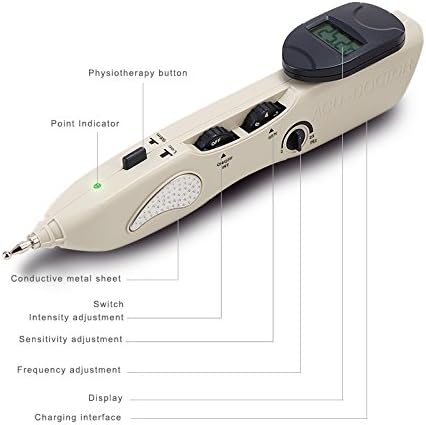
Figure 1: Labeled components of the Zinnor Electronic Acupuncture Pen.
The device comes with three interchangeable probes for targeted application:
- Beauty Probe: Designed for facial use.
- Middle Size Probe: Suitable for body application.
- Small Size Probe: Intended for use on ears and hands.

Figure 2: The Electronic Acupuncture Pen with its three interchangeable probes.
5. Opstelling
- Laai die toestel: Connect the charging cable to the device and a power source using the provided charger. The internal Li battery is rechargeable.
- Attach a Probe: Select the appropriate probe (Beauty, Middle Size, or Small Size) for your intended application and securely attach it to the tip of the acupuncture pen.
- Connect Reflux Rod: Ensure the reflux rod is connected and held by the user or another person to complete the circuit for effective operation.
6. Bedryfsinstruksies
- Krag aan: Skakel die toestel aan met die AAN/UIT-skakelaar.
- Adjust Sensitivity (SEN): Rotate the sensitivity adjustment dial to an appropriate level. The digital display will show a number that increases as the electric resistance of the skin lowers. A higher number indicates closer proximity to an acupuncture point.
- Locate Acupoints: Gently move the probe over the skin. When the device detects an acupuncture point, the loudspeaker will emit a sound signal, and the display screen will show a higher number.
- Adjust Intensity (INT): Once an acupoint is located, adjust the output intensity using the intensity adjustment dial (0-10mA) to a comfortable level.
- Pas frekwensie aan: The frequency can be adjusted between 6-23Hz using the frequency control dial.
- Duur van behandeling: Apply stimulation for approximately 3 to 5 minutes per acupoint or area. This can be done once or twice a day. Longer durations may be necessary in some cases, but always monitor your comfort.
- Toepassing Bvamples: The device can be used for various applications, including facial muscle stimulation and lymphatic drainage.

Figuur 3: Examples of facial application techniques.
7. Onderhoud
- Skoonmaak: After each use, wipe the probes and the tip of the pen with a clean, damp lap. Moenie die toestel in water dompel nie.
- Berging: Store the device in a cool, dry place, away from direct sunlight and extreme temperatures. Keep it in its original box or a protective case to prevent damage.
- Batterysorg: Recharge the device regularly, even if not in frequent use, to maintain battery health.
8. Probleemoplossing
If you encounter issues with your Zinnor Electronic Acupuncture Pen, refer to the following common problems and solutions:
| Probleem | Moontlike oorsaak | Oplossing |
|---|---|---|
| Toestel kan nie aangeskakel word nie. | Lae battery of toestel is af. | Ensure the device is fully charged. Check the ON/OFF switch. |
| Geen of swak sensasie. | Intensity too low, poor contact, or reflux rod not connected. | Increase intensity. Ensure the probe makes good contact with the skin. Verify the reflux rod is held correctly. |
| Difficulty locating acupoints. | Sensitivity too low or incorrect technique. | Increase sensitivity. Move the probe slowly over the skin until the display shows a higher number and a sound signal is heard. |
9. Spesifikasies
| Kenmerk | Spesifikasie |
|---|---|
| Uitset intensiteit | 0-10mA |
| Output Intensity Control | AAN/UIT 0-10mA |
| Kragtoevoer | DC3.7V (Rechargeable Li-battery) |
| Micro-current Output | 0 tot 2 mikroamps |
| Sensitivity Adjust Control | 0-10 |
| Uitset kanale | Een |
| Impulse Frequency | 6-23Hz (Verstelbaar) |
| Relatiewe humiditeit | 85% |
| Pakket afmetings | 10 x 4 x 2 duim |
| Item gewig | 12.64 onse |
10. Waarborg en Ondersteuning
For warranty information and customer support, please refer to the documentation provided with your purchase or contact the retailer. Keep your purchase receipt for warranty claims.