
This manual provides detailed instructions for the proper setup, operation, maintenance, and troubleshooting of your Casio HR-170RC Plus Mini-Desktop Printing Calculator. Please read this manual thoroughly before using the calculator to ensure correct usage and optimal performance.
1. Opstelling
Before using your Casio HR-170RC Plus calculator, follow these steps to prepare it for operation.
1.1 Unpacking and Power Supply
Carefully remove the calculator from its packaging. Ensure all components are present. The calculator operates using an AC adapter (not specified if included, assume standard power). Connect the AC adapter to the calculator's power input and then to a standard electrical outlet.
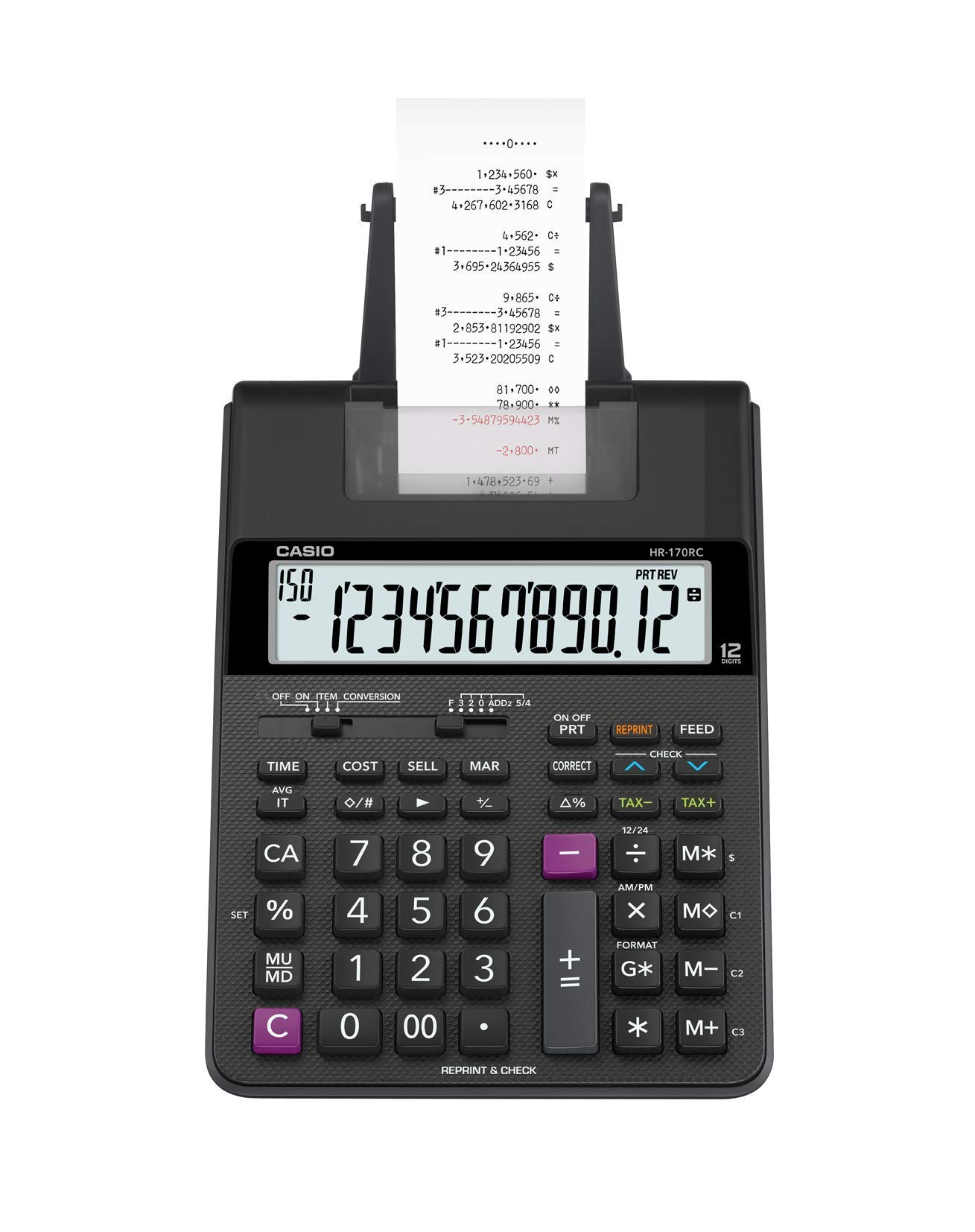
Image 1: Casio HR-170RC Plus Mini-Desktop Printing Calculator. This image displays the calculator's main unit, showing the keypad, display, and paper roll compartment.
1.2 Installasie van papierrol
- Open the paper roll compartment cover.
- Plaas 'n nuwe papierrol in die kompartement en maak seker dat die papier van onder af ingevoer word.
- Feed the leading edge of the paper through the printer slot until it emerges above the printer mechanism.
- Close the paper roll compartment cover.
1.3 Ink Roller/Ribbon Installation
- Locate the ink roller/ribbon compartment, typically near the printer mechanism.
- Remove the old ink roller/ribbon if present.
- Install the new ink roller/ribbon, ensuring it is correctly seated and aligned with the printer head. Refer to the markings on the ink roller/ribbon for proper orientation.
- Maak die deksel van die kompartement toe.
1.4 Initial Settings (Clock & Calendar)
To set the date and time for the Clock & Calendar function:
- Druk die TYD key. The display will show the current time or a default setting.
- Use the number keys to enter the correct time (e.g., HHMM for 24-hour format).
- Druk die DATUM key. The display will show the current date or a default setting.
- Use the number keys to enter the correct date (e.g., MMDDYY).
- Druk die # sleutel of TOTAAL sleutel om die instellings te bevestig.
2. Bedryfsinstruksies
This section details the various functions and operations of your Casio HR-170RC Plus calculator.
2.1 Basiese Berekeninge
Perform standard arithmetic operations:
- Byvoeging: Voer die eerste nommer in, druk +, voer die tweede nommer in, druk =.
- Aftrekking: Voer die eerste nommer in, druk -, voer die tweede nommer in, druk =.
- Vermenigvuldiging: Voer die eerste nommer in, druk x, voer die tweede nommer in, druk =.
- Afdeling: Voer die eerste nommer in, druk ÷, voer die tweede nommer in, druk =.
- Clear Entry: Druk CE to clear the last entered number.
- All Clear: Druk AC to clear all calculations and reset the calculator.
2.2 Check & Correct Function
Hierdie funksie laat jou toe om te herview and correct previous entries in a calculation sequence.
- After performing a series of calculations, press the KONTROLEER key. The display will show the first entry.
- Gebruik die ▲ (op) en ▼ (down) arrow keys to scroll through the entries.
- To correct an entry, navigate to it, enter the new number, and press the KORREK key. The calculation will be automatically re-evaluated.
2.3 After-Print Function
This feature allows you to print the calculation history after corrections have been made using the Check & Correct function.
- After using the Check & Correct function and making any necessary changes, press the AFTER PRINT key. The calculator will print the corrected calculation sequence.
2.4 Re-Print Function
To print duplicates of a previous calculation history:
- After a calculation has been performed and printed, press the HERDRUK key. The calculator will print the exact same calculation history again.
2.5 Clock & Calendar Function
To print the current time and date:
- Ensure the time and date are set as described in Section 1.4.
- Druk die TYD key to display the time, then press the DRUK key to print it.
- Druk die DATUM key to display the date, then press the DRUK key to print it.
2.6 Cost/Sell/Margin Function
This function simplifies profit calculations by allowing you to input any two values (Cost, Selling Price, or Margin) to automatically calculate the third.
- Enter the known KOSTE waarde, druk dan op die KOSTE sleutel.
- Enter the known VERKOOP waarde, druk dan op die VERKOOP sleutel.
- Enter the known MARGE persenttage, then press the MARGE sleutel.
- After entering two of the three values, the third value will be automatically calculated and displayed. For example, enter Cost and Sell, then press Margin to find the margin percentage.
3. Onderhoud
Behoorlike onderhoud verseker die lang lewensduur en betroubare werking van u sakrekenaar.
3.1 Skoonmaak
- Vee die buitekant van die sakrekenaar af met 'n sagte, droë lap.
- Vir hardnekkige vuiligheid, effens dampen the cloth with water or a mild, non-abrasive cleaner. Do not use strong solvents or abrasive materials.
- Avoid getting liquids inside the calculator, especially near the display or keypad.
3.2 Verbruikbare Vervanging
Regularly check and replace the paper roll and ink roller/ribbon as needed.
- Papierrol: Replace when the paper supply is low or runs out. Follow the steps in Section 1.2.
- Ink Roller/Ribbon: Replace when printouts become faint or illegible. Follow the steps in Section 1.3.
4. Probleemoplossing
If you encounter issues with your calculator, refer to the following common problems and solutions.
- Sakrekenaar skakel nie aan nie:
- Ensure the AC adapter is securely connected to both the calculator and a working electrical outlet.
- Kyk of die kragaansluiting funksioneel is.
- Printer is not printing or printouts are faint:
- Check if the paper roll is installed correctly and has sufficient paper.
- Verify that the ink roller/ribbon is correctly installed and not depleted. Replace if necessary.
- Ensure the print mode is enabled (if applicable, check for a print/non-print switch).
- Verkeerde berekeninge:
- Druk die AC key to clear all previous calculations and start fresh.
- Review your input using the Check & Correct function (Section 2.2).
- Ensure you are using the correct operational mode for your calculations (e.g., decimal settings).
- Display shows an error message:
- Druk AC om die fout uit te vee.
- If the error persists, disconnect the power, wait a few moments, and then reconnect.
5. Spesifikasies
| Handelsmerk | Casio |
| Model Naam | HR-170RC PLUS |
| Materiaal | Plastiek |
| UPC | 723548731402 |
| Vervaardiger | CASIO |
| Item gewig | 0.01 ons |
| Eenheidtelling | 1.0 Tel |
6. Waarborginligting
This Casio HR-170RC Plus Mini-Desktop Printing Calculator comes with a 90 dae beperkte waarborg from the date of purchase. This warranty covers manufacturing defects under normal use. Please retain your proof of purchase for warranty claims. For specific terms and conditions, refer to the warranty documentation provided at the time of purchase or contact Casio customer support.
7. Ondersteuning
For further assistance, technical support, or inquiries regarding your Casio HR-170RC Plus calculator, please contact Casio customer service. Refer to the official Casio website or product packaging for the most current contact information, including phone numbers and support portals.