
1. Inleiding
The FTVOGUE FG-100 DDS Function Signal Generator is a compact and versatile device designed to produce various waveforms for electronic testing and experimentation. It generates sine, square, triangle, and ramp waveforms across a frequency range of 1Hz to 500KHz. This manual provides essential information for the safe and effective operation of your device.
2. Veiligheidsinligting
- Always ensure the power supply is within the specified range of DC 3.5-10V.
- Avoid exposing the device to moisture, liquids, or extreme temperatures.
- Do not attempt to disassemble or modify the unit. Unauthorized modifications may void the warranty and pose safety risks.
- Use only with compatible electronic equipment and accessories.
- Hou die toestel weg van sterk elektromagnetiese velde.
3. Produk verbyview
The FG-100 DDS Function Signal Generator is a highly precise and frequency-stable instrument. Its compact size and ease of use make it suitable for various applications.
Sleutel kenmerke:
- Generates sine, square, triangle, and ramp golfvorms.
- Frequency range: 1Hz to 500KHz (sine wave), 1Hz to 20KHz (square, triangle, ramp golwe).
- Maksimum uitset amplitude: ±10 Vpp (no load).
- Adjustable DC offset: ±10 V (no load).
- Integrated filter for waveform refinement.
- LCD1602 display for clear parameter indication.
- Portable and easy to operate.

Figuur 3.1: Voorkant view of the FTVOGUE FG-100 DDS Function Signal Generator, showing the LCD display, control buttons, and knobs.
4. Opstelling
- Kragverbinding: Connect a DC power supply (3.5-10V) to the DC 5V input port on the left side of the generator. Ensure the power supply is stable and within the specified voltage reeks.
- Uitsetverbinding: Connect your oscilloscope or other testing equipment to the BNC output port labeled "OUT" on the right side of the generator.
- Krag aan: Press the red "POWER" button to turn on the device. The LCD display will illuminate.

Figure 4.1: The FG-100 generator with the DC power cable connected to the input port.
5. Bedryfsinstruksies
5.1. Waveform Selection
- Press the "MODE" button to cycle through the available waveforms: Sine, Square, Triangle, and Ramp. The currently selected waveform will be displayed on the LCD.
5.2. Frekwensie-aanpassing
- Use the "CURSOR" button to select the digit you wish to adjust on the frequency display. The selected digit will blink.
- Use the "+" and "-" buttons to increase or decrease the value of the selected digit.
- The frequency range for sine waves is 1Hz-500KHz. For square, triangle, and ramp waves, the range is 1Hz-20KHz.
5.3. DC Offset Adjustment
- The "DC OFFSET" switch allows you to enable or disable the DC offset.
- Use the rotary knob below the switch to adjust the DC offset value from ±10V (no load). Turn clockwise for positive offset, counter-clockwise for negative.
5.4. Filter Control
- The "FILTER" button activates or deactivates an internal filter to refine the output waveforms, particularly useful for sine and square waves.
5.5. Uitsetbeheer
- Press the "RUN/STOP" button to start or stop the signal output. When stopped, no waveform will be generated.
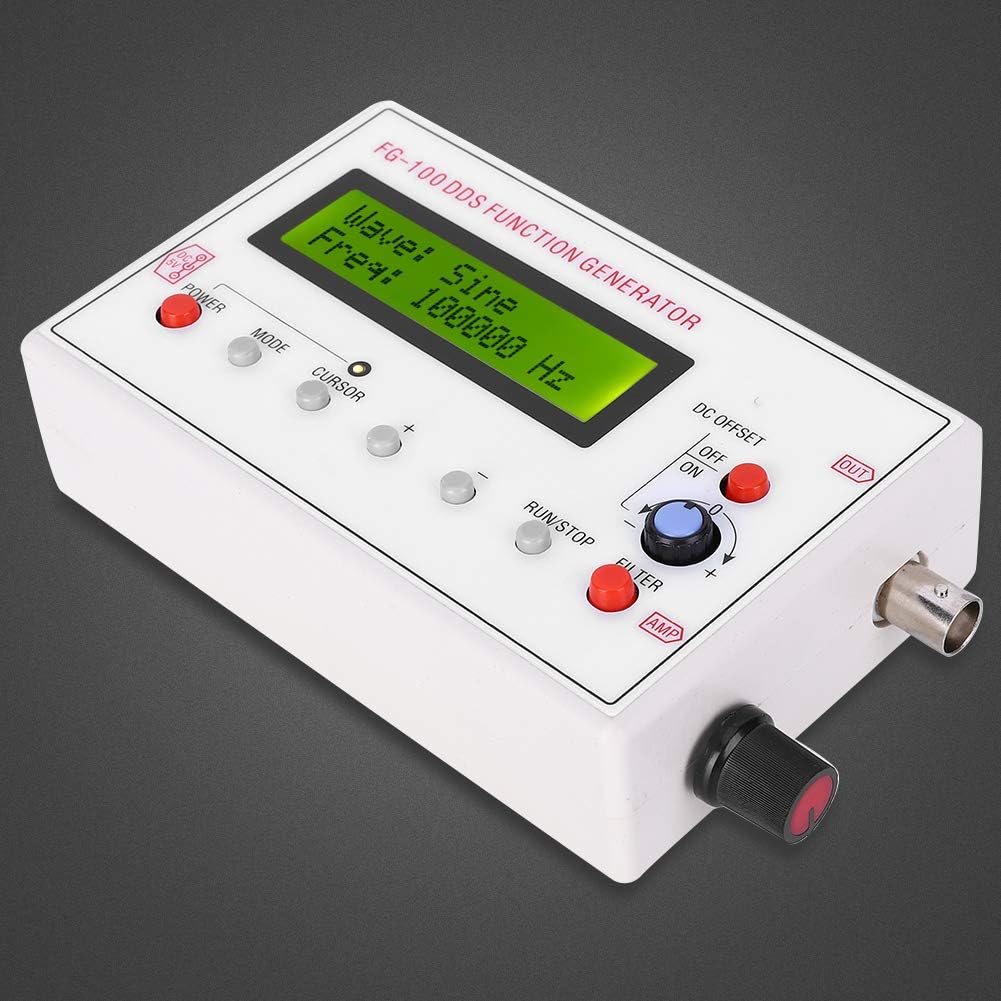
Figuur 5.1: Gedetailleerd view of the control panel, showing buttons for mode, cursor, frequency adjustment, run/stop, and knobs for DC offset and amplitude.
6. Onderhoud
- Skoonmaak: Gebruik 'n sagte, droë lap om die buitekant van die toestel skoon te maak. Moenie skuurmiddels of oplosmiddels gebruik nie.
- Berging: Store the generator in a cool, dry place, away from direct sunlight and extreme temperatures.
- Inspeksie: Periodically check cables and connectors for any signs of damage.
7. Probleemoplossing
| Probleem | Moontlike oorsaak | Oplossing |
|---|---|---|
| Geen krag/Skerm af | Power cable not connected; Power supply faulty; Power button off. | Check power cable connection; Verify power supply functionality; Press the POWER button. |
| Geen seinuitvoer nie | "RUN/STOP" button in STOP mode; Output cable faulty; Frequency set to 0. | Press "RUN/STOP" to RUN; Check/replace output cable; Adjust frequency to a non-zero value. |
| Verwronge golfvorm | Incorrect filter setting; Overloaded output; Frequency too high for waveform type. | Adjust or toggle the FILTER; Ensure load impedance is appropriate; Verify frequency is within range for the selected waveform (e.g., <20KHz for square/triangle). |
Indien probleme voortduur nadat u hierdie oplossings probeer het, kontak asseblief kliëntediens.
8. Spesifikasies
- Modelnommer: FTVOGUEg9wbxgh4zr
- Handelsmerk: FTVOGUE
- Output Waveforms: Sinus, Vierkant, Driehoek, Ramp
- Sine Wave Frequency Range: 1Hz - 500KHz
- Square/Triangle/Ramp Wave Frequency Range: 1Hz - 20KHz
- Frekwensie resolusie: 1Hz
- Maksimum uitset Amplitude: ±10 Vpp (no load)
- Uitsetimpedansie: 50 Ω ± 10%
- DC Bias: ±10 V (no load)
- Kragtoevoer: DC 3.5-10V
- Vertoon: LCD1602
- Materiaal: Metaal, plastiek
- Spesiale kenmerk: Draagbaar
9. Waarborg en Ondersteuning
For warranty information or technical support, please refer to the documentation provided at the time of purchase or contact your retailer. You may also visit the official FTVOGUE store or webwebwerf vir verdere hulp.
FTVOGUE Store: FTVOGUE Amazon Store